


As app developers, our primary focus is building great user experiences, designing APIs, and shipping features quickly. What we don’t want is database friction—wasting hours configuring local DB instances, writing verbose migration scripts by hand, or worrying about unexpected cloud bills while prototyping.
Today, we are making database development fast, intelligent, and completely free. By combining the Azure SQL Database container for local offline development, AI Agent Skills to automate your ORM and data layer, and the Azure SQL Database Free Tier, you can build locally and ship to production in minutes for $0.
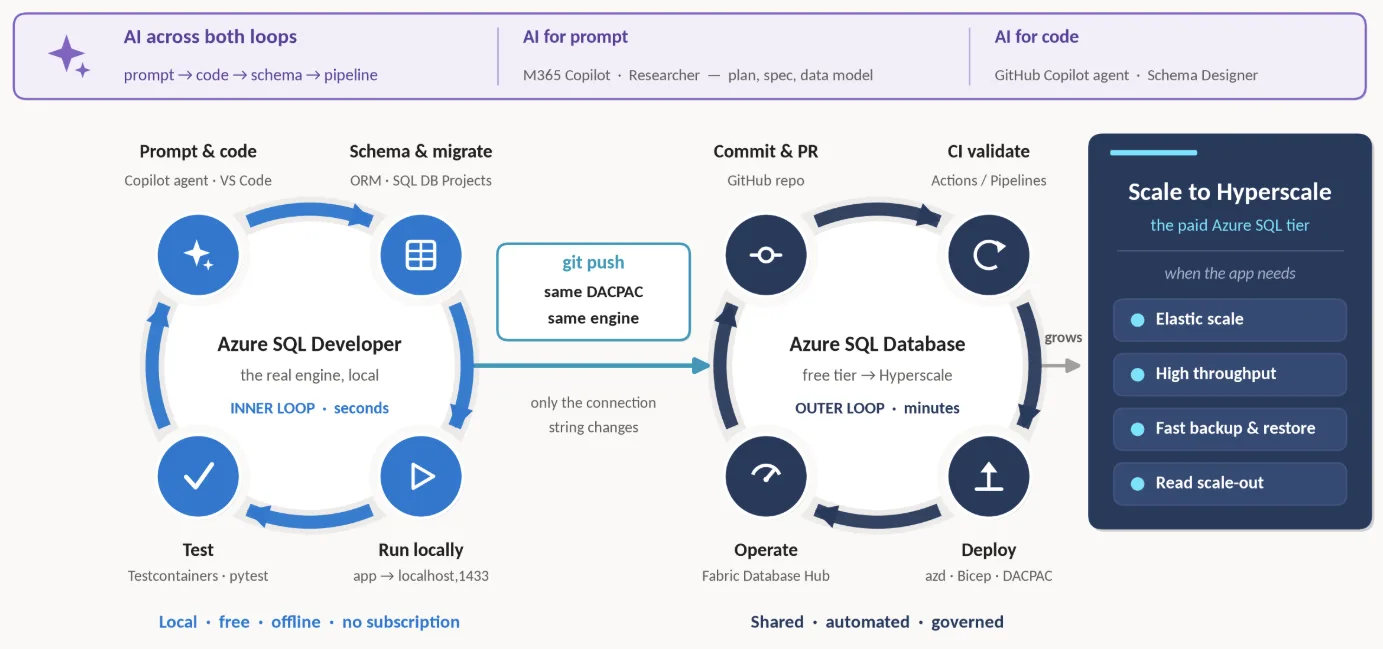
Here is how to get started in three simple steps.
Step 1: Build Locally with the Azure SQL Database container (Private preview)
Before provisioning cloud resources, you can build and test completely offline on your local machine using the containerized Azure SQL engine. This isn’t an emulation layer – it is the actual Azure SQL Database engine in a container.
- Sign Up for the Preview: Request access to the container registry at https://aka.ms/azuresqldb-container-signup
- Equip Your AI Coding Agent: Add the official Azure SQL Agent Skills to your preferred AI coding assistant (GitHub Copilot, Cursor, Claude Code, or Codex):
npx skills add microsoft/azure-sql-database-container - Automate Container Setup: Command your AI agent to spin up your local environment directly inside your IDE:
Spin up the Azure SQL Database container locally on port 1433, verify the connection, and initialize a local database named AppDevLocal
Step 2: Automate Your ORM & Data Layer with AI Prompts
You don’t need to be a T-SQL expert or manually write database migrations. Using natural language prompts, you can bridge your application code directly to Azure SQL using popular ORMs like Prisma, Entity Framework Core (EF Core), or Drizzle.
- JSON-to-Schema & ORM Mapping
Paste a TypeScript interface, C# record, or JSON payload into your editor and ask AI to generate your ORM schema and apply database migrations:
Prompt (Node.js / Prisma):
Here is the TypeScript interface for my app's user profile and orders payload. Generate a schema.prisma file configured for SQL Server / Azure SQL, and run npx prisma migrate dev against my local Azure SQL database container.Prompt (.NET / EF Core):
Create EF Core entity classes and a DbContext mapping for a multi-tenant project management API. Apply the initial migration directly to my local Azure SQL Database container.
- Instant Mock Data Generation for API Testing
Testing API endpoints requires realistic seed data. Instead of hand-crafting JSON or database seed scripts:
Prompt:
Generate a seeding script using my ORM that populates my local Azure SQL database with 50 realistic project records and mock user profiles so I can test my /api/projects endpoint.Because your AI agent leverages Azure SQL skills, it executes the schema creation and data seeding locally with zero context switching and zero cloud overhead.
Step 3: Ship to Azure SQL Database free tier for $0
When your API routes and local tests are green, moving to production doesn’t require rewriting code, changing database drivers, or modifying ORM schemas—it’s just a connection string update.
Deploy your database to the cloud using the Azure SQL Database Free Tier:
- 100,000 vCore seconds of serverless compute every month (auto-pauses when limit is exhausted, or continue using for additional charges).
- 32 GB of database storage.
- 32 GB of automated backup storage.
Deployment in 3 quick steps:
- Go to the Azure Portal (or visit aka.ms/azuresqlhub).
- Select Start Free under the Azure SQL Database creation pane.
- Swap your app’s local connection string (localhost,1433) with your cloud instance string (yourserver.database.windows.net).
Resources & Links
Ready to build against the exact same enterprise-grade database engine that powers global applications—at zero cost?
- 📝 Sign up for the Azure SQL Database container Preview: https://aka.ms/azuresqldb-container-signup
- 📖 Explore the Azure SQL Database Free Tier Docs: Deploy Azure SQL Database for Free
- 📖 FAQs on Free tier: Free offer frequently asked questions (FAQ) – Azure SQL | Microsoft Learn
- 💡 Learn more about the Azure SQL Database container: Build locally, ship to Azure: Meet Azure SQL Database container


0 comments