

In plain T-SQL, we can rename a table or column without having to copy or move the data through the sp_rename and modify the schema of an object with ALTER SCHEMA ... TRANSFER. In this post we’ll walk through an example of using SQL projects in VS Code to automatically generate these steps as part of the deployment plan. As a result, we’ll be able to seamlessly handle significant refactors of our database across multiple environments and continue to capture ongoing development in source control.
The SQL Database Projects extension for Visual Studio Code supports refactoring database objects while preserving the intent of the change through deployment. When you rename an object or move it between schemas, SQL projects update the source files and record the operation in a refactor log so deployments can use sp_rename or ALTER SCHEMA ... TRANSFER rather than recreating the object.
[ProductCatalog]- move product description to ProductCatalog
Create a SQL project
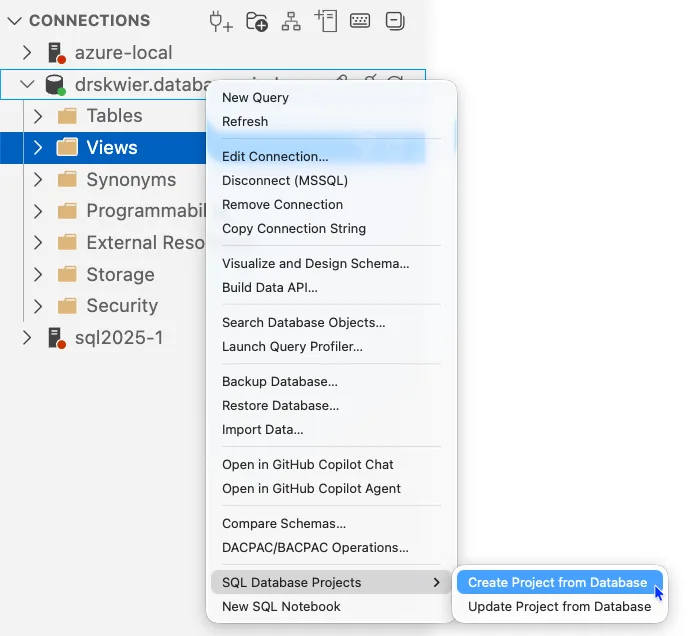
If you don’t already have an SQL project representing your database, you’ll want to create one now. You can create an SQL project from a database using either the SqlPackage CLI or one of the IDEs (VS Code, SQL Server Management Studio, Visual Studio). In VS Code, the object explorer database context menu has convenient entries for creating and updating projects from a database.
Creating a new schema in a SQL project is fundamentally adding a new.sql file with the create schema statement in it. Using VS Code, the database projects view includes a menu option for adding an item where several templates are available.
Selecting Add item…
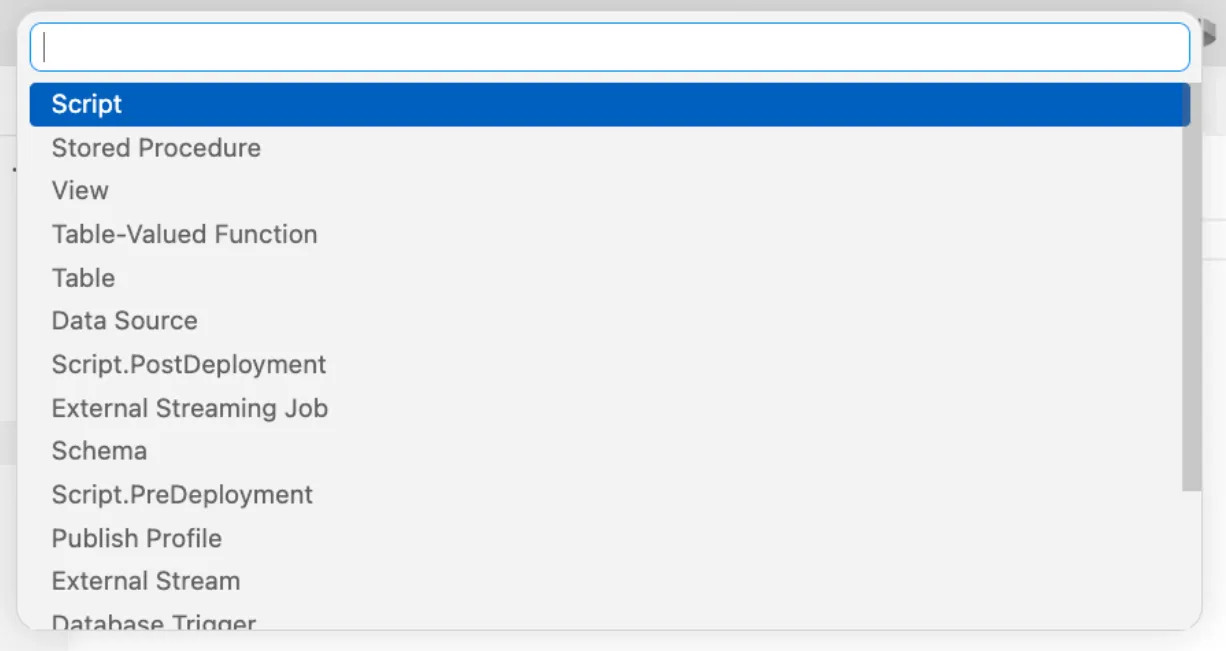
Using the option for “Schema”, we enter the name “ProductCatalog” to generate the templated CREATE SCHEMA statement immediately in our project.
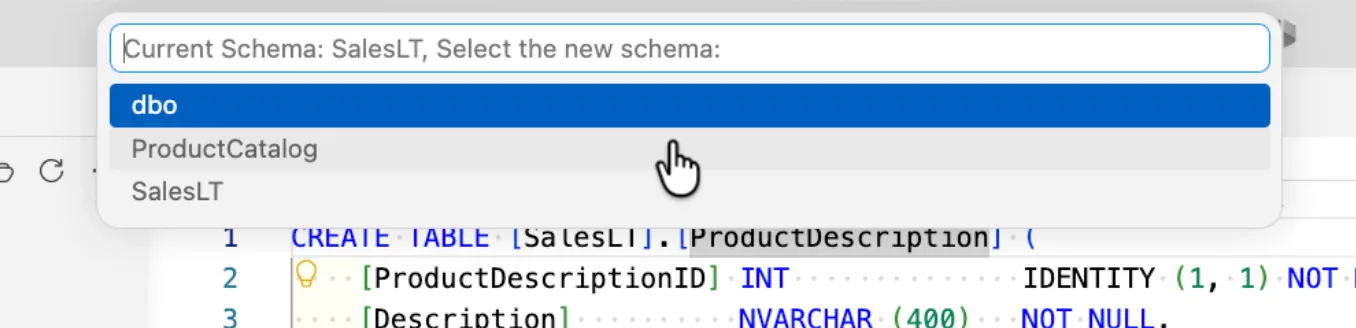
[ProductCatalog], we’re ready to move the SalesLT.ProductDescription table to our new schema. Open the ProductDescription.sql file in the folder SalesLT/Tables and right-click on the table name in the text editor to open the context menu. Select Refactor from the menu and Move to Schema
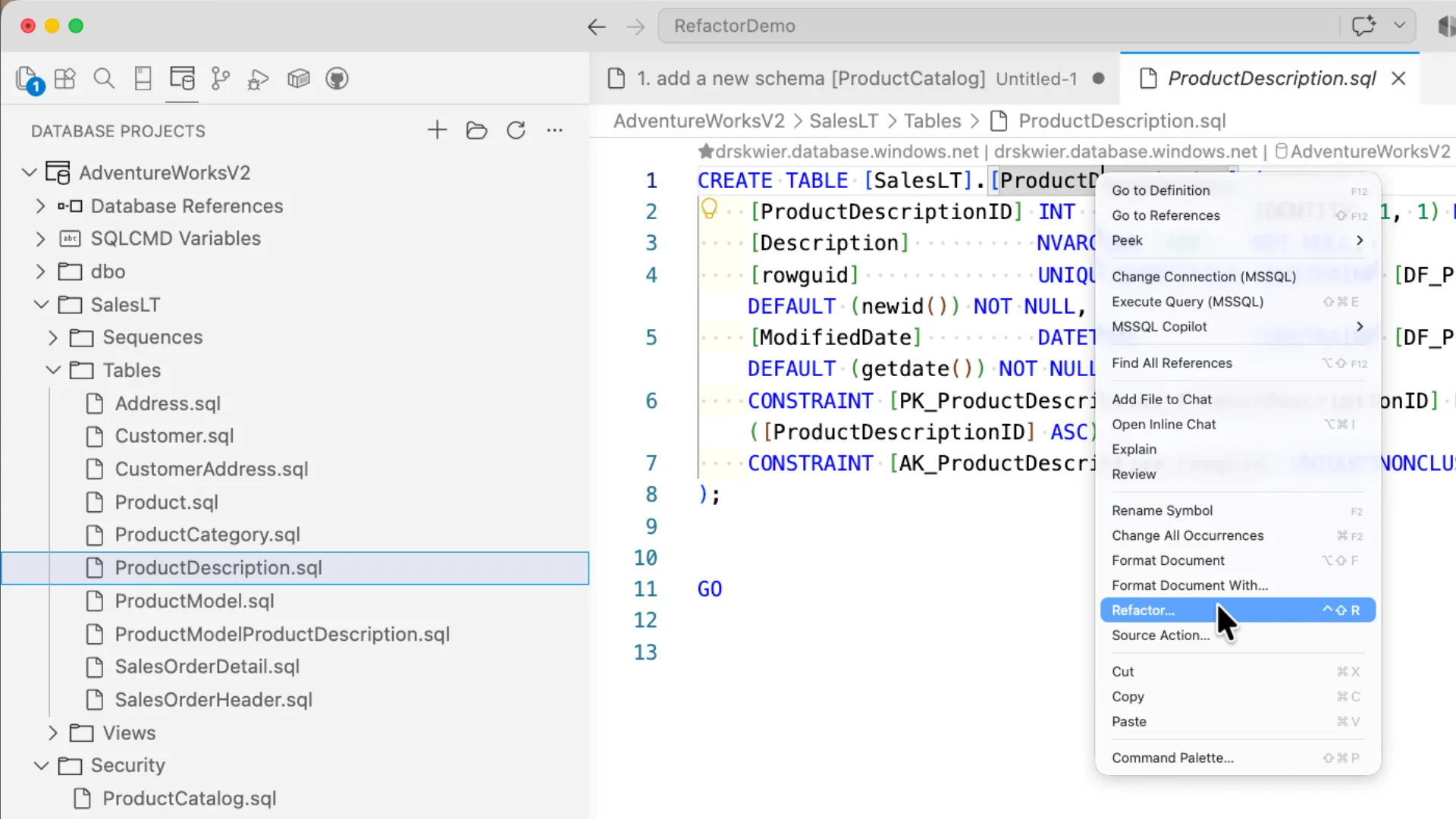
All the user schemas in the SQL project will be presented as a list for selection and the updates to the project will be presented for review.
The review of the changes includes modifying the table definition, any references in additional objects, and the creation/modification of a refactorlog file.
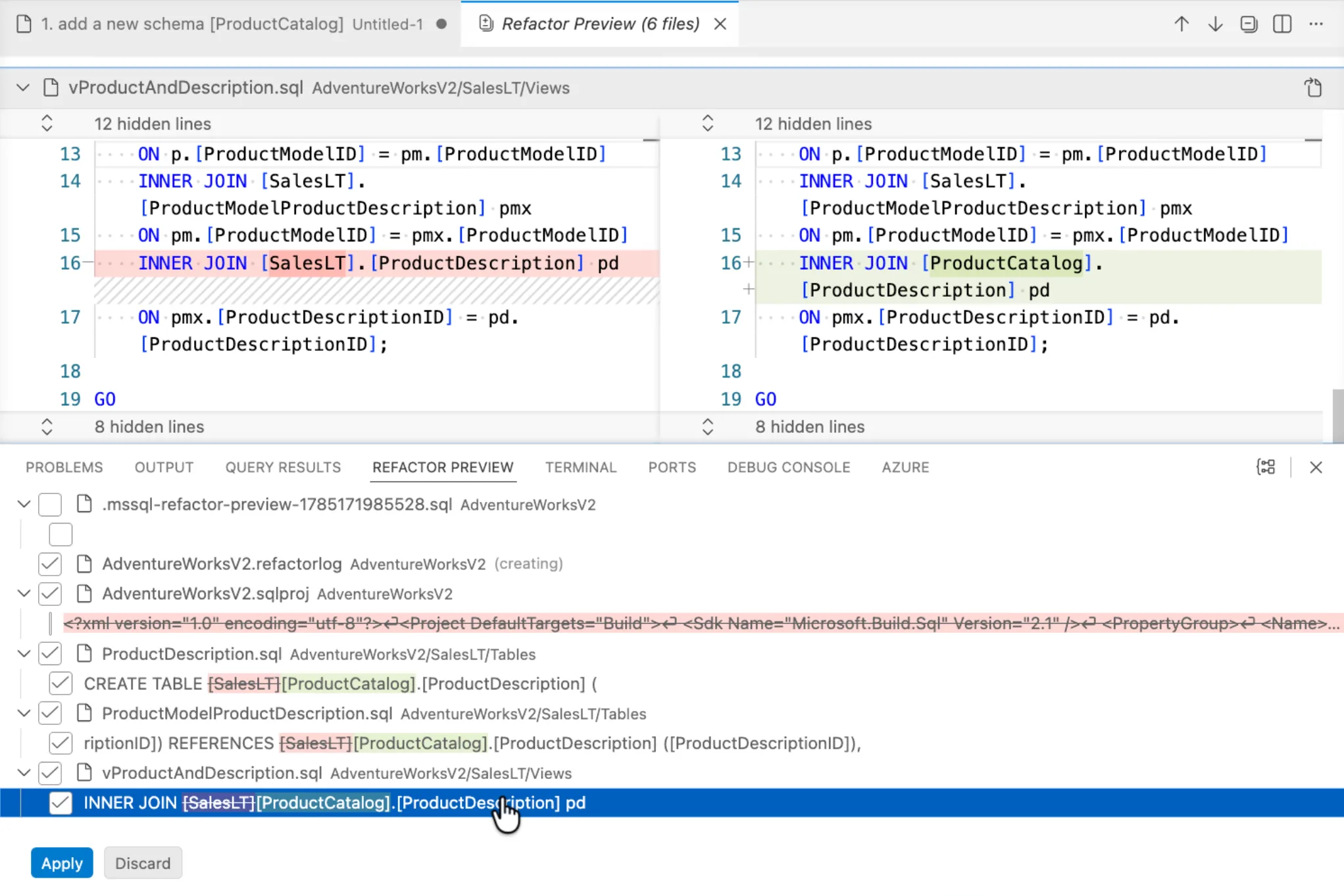
Apply or discard and cancel the changes. The refactorlog file included in the changes will keep track of changes where the name or schema of an object is changed, ensuring that each deployment is able to track if the movement has been applied. When you commit your project to source control, you should include the ProjectName.refactorlog file.
Rename a table
Another operation that the SQL projects refactoring capability handles well is renaming objects, including tables and columns. Using the refactorlog for table and column renames means that the deployment will be completed without requiring data movement.
To rename the SalesOrderDetail table to SalesOrderLine, we access the Rename Symbol
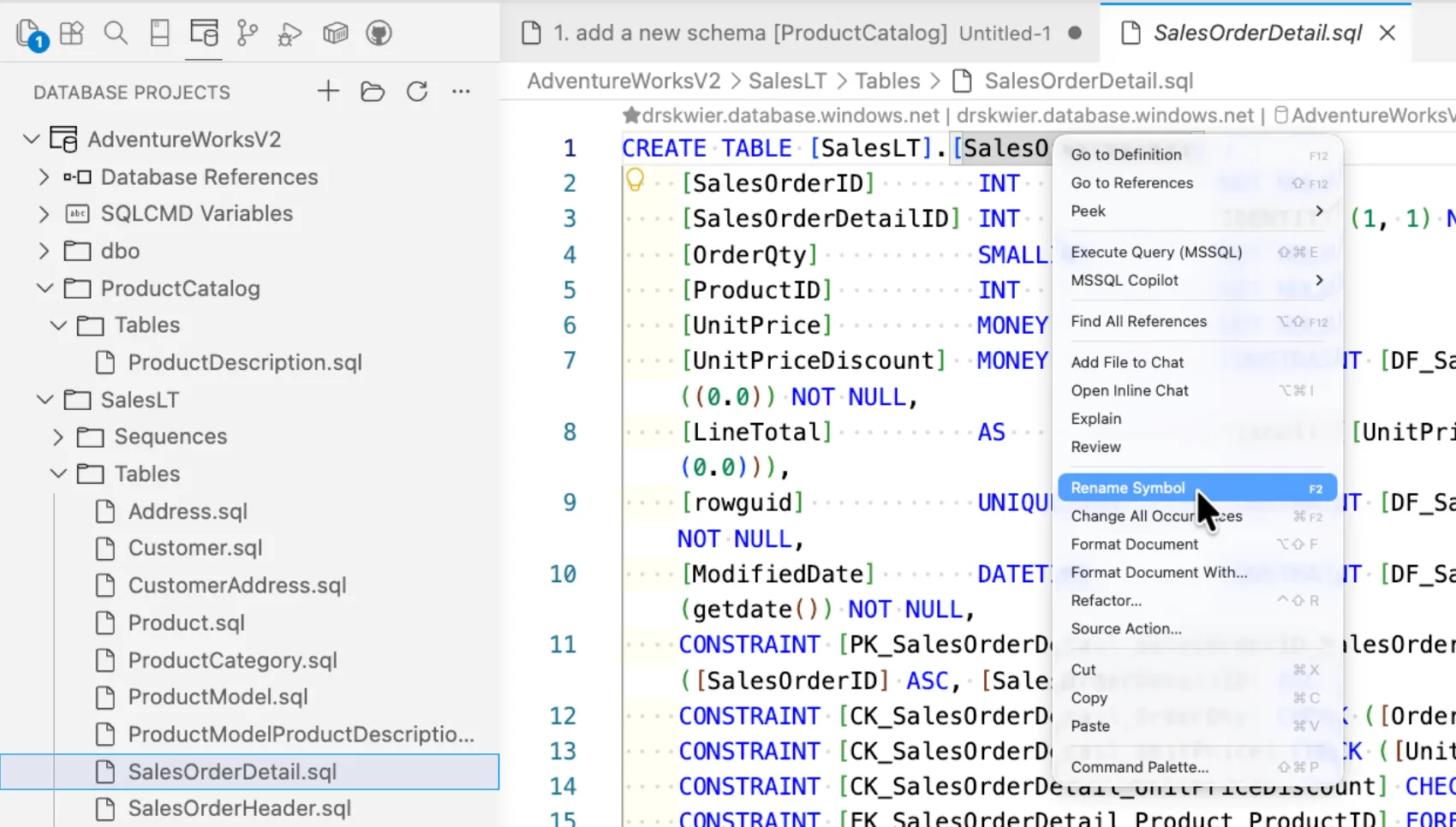
ProjectName.refactorlog file. After the move schema and rename operations we’re applied to the SQL project, our refactorlog contents are:
<Operations Version="1.0" xmlns="http://schemas.microsoft.com/sqlserver/dac/Serialization/2012/02">
<Operation Name="Move Schema" Key="8f599e45-64ea-4636-a369-139cde876a84" ChangeDateTime="07/27/2026 17:06:25">
<Property Name="ElementName" Value="[SalesLT].[ProductDescription]" />
<Property Name="ElementType" Value="SqlTable" />
<Property Name="NewSchema" Value="ProductCatalog" />
<Property Name="IsNewSchemaExternal" Value="False" />
</Operation>
<Operation Name="Rename Refactor" Key="4f955015-b69e-4c8e-b527-761612505adb" ChangeDateTime="07/27/2026 17:10:38">
<Property Name="ElementName" Value="[SalesLT].[SalesOrderDetail]" />
<Property Name="ElementType" Value="SqlTable" />
<Property Name="ParentElementName" Value="[SalesLT]" />
<Property Name="ParentElementType" Value="SqlSchema" />
<Property Name="NewName" Value="SalesOrderLine" />
</Operation>
</Operations>
Deploying our changes
The refactorlog itself is integrated into the .dacpac file on project build, and as a result it will be included as part of the deployment whether we’re working in VS Code, another IDE, or an automated CI/CD environment.
From VS Code, we can use the Generate Script option to examine the syntax that would be run to apply our changes. The use of refactorlog includes a deployment-managed table dbo.__RefactorLog, which will be created by the deployment if it does not already exist. This minimal table tracks the operation keys from the refactorlog when they are applied and enables deployments across multiple iterations of a SQL project to operate seamlessly even when refactoring is involved.
IF OBJECT_ID(N'dbo.__RefactorLog') IS NULL
BEGIN
    CREATE TABLE [dbo].[__RefactorLog] (OperationKey UNIQUEIDENTIFIER NOT NULL PRIMARY KEY)
    EXEC sp_addextendedproperty N'microsoft_database_tools_support', N'refactoring log', N'schema', N'dbo', N'table', N'__RefactorLog'
END
If you look through the generated deployment script, you’ll also notice the use of sp_rename and ALTER SCHEMA ... TRANSFER for the refactor operations that need to be applied in that environment. A section of the deployment script is show below, including the print statements that reference specific refactorlog keys.
...
CREATE SCHEMA [ProductCatalog];
GO
PRINT N'The following operation was generated from a refactoring log file 8f599e45-64ea-4636-a369-139cde876a84';
PRINT N'Move object [SalesLT].[ProductDescription] to different schema [ProductCatalog]';
GO
ALTER SCHEMA [ProductCatalog] TRANSFER [SalesLT].[ProductDescription];
GO
PRINT N'The following operation was generated from a refactoring log file 4f955015-b69e-4c8e-b527-761612505adb';
PRINT N'Rename [SalesLT].[SalesOrderDetail] to SalesOrderLine';
GO
EXECUTE sp_rename @objname = N'[SalesLT].[SalesOrderDetail]', @newname = N'SalesOrderLine', @objtype = N'OBJECT';
...These same statements are used if the deployment is run as a direct Publish operation. Because the refactorlog is packaged into the .dacpac
Once the deployment is completed, our original database is updated to match the renamed table “SalesOrderLine” and the table “ProductDescription” has been moved to the “ProductCatalog” schema.

Get to know the SQL Database Projects extension in VS Code through the overall SQL projects documentation (https://aka.ms/sqlprojects) and the SQL Database Projects extension .
Learn more about refactoring in SQL projects from the SQL projects


Who in the right mind uses renames in db? If you have a comfort to turn of traffic during deployment, then sure, but in case you dont, this will break your app, after db deploy your existing app will crash, because your schema is no longer backward compatible. I would request a fearure to turn this rename refactorings off.
What an interesting question. To start with, the benefit of rename over a much slower process like creating new and copying the data over is that the change to the database is very quick. You're not stressing over a data migration timeframe as part of the deployment.
However, there's a couple ways to approach application and database design such that ongoing traffic is reliably handled. Three come to mind right away and I'm sure other folks would have good suggestions:
The first one is to leverage stored procedures instead of direct app to table access, creating an access contract separate from...