


There are many scenarios where Copilot Chat can feel limited by the built-in model training data. Maybe you want guidance on the latest web framework, documentation, or project-specific resources—but Copilot’s responses just aren’t specific enough. For developers who rely on up-to-date or esoteric answers, this gap can be a real frustration.
URL Context: Bringing the web into Copilot Chat
With the new URL context feature, Copilot Chat can now access and use information directly from web pages you specify. By pasting a URL into your Copilot Chat prompt, you empower Copilot to pull real-time, relevant information from the source. This means more tailored responses.
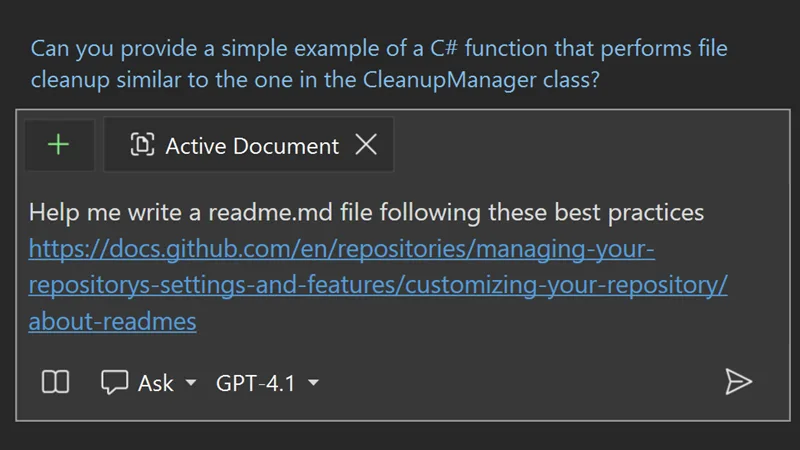
How to use reference URLs in Copilot Chat
Getting started is easy. When you need Copilot to answer using a specific web resource, simply paste the desired URL into your chat prompt. Copilot will then process the contents of that page, giving you context-aware answers that go beyond its original training. This opens the door to more personalized support.
Limitations to keep in mind
While the URL context feature is powerful, there are a few things to remember. Copilot’s ability to extract and understand content depends on the accessibility of the web page and the clarity of its information. Some sites might have authentication restrictions or have dynamic content that limit Copilot’s ability to read the web page’s content. Always review responses for accuracy and completeness, especially when referencing complex or highly technical sources.
Check out the new Visual Studio Hub
Stay connected with everything Visual Studio in one place! Visit the Visual Studio Hub for the latest release notes, YouTube videos, social updates, and community discussions.
Appreciation for your feedback
Your feedback helps us improve Visual Studio, making it an even more powerful tool for developers. We are immensely grateful for your contributions and look forward to your continued support. By sharing your thoughts, ideas, and any issues you encounter through Developer Community, you help us improve and shape the future of Visual Studio.


Good thing! Does this also help with .NET 10 and the newest C# and Blazor? Cause I’m worried about using all current models because they all seem to have been release before .NET 10 went RTM. I think GPT5 was trying to tell me that .NET 10 isn’t even in planning yet. 😉 (That’s why I use the Anthropic Claude models for coding, GPT is good for generic questions, but isn’t all that good for coding.)
Hey Ben, thanks for the question!
This url support only helps in scenarios where you explicitly include a url in the prompt to augment the data. However, we now have an MS Learn MCP Server that is built-in to VS. When you ask it things it isn’t aware of due to training dates, it can utilize the Learn docs to get up to date information about those concepts. Learn more from Wendy’s blog – https://devblogs.microsoft.com/dotnet/microsoft-learn-mcp-server-elevates-development/
Excellent info, thank you!