

A project fails to compile, but the solution build keeps going. You already have an error to fix, while other projects continue using build time to tell you the solution still doesn’t build.
Visual Studio 2026 version 18.11 adds an opt-in way to stop a solution build after the first project failure. If your next step is to fix that failure and try again, you can make the build stop there too.
Choose when the build should stop
Open Tools > Options > Projects and Solutions > Build and Run and enable Stop solution build after first failure.
When a project fails, Visual Studio stops starting queued projects and safely stops projects already building. It still reports the build as failed, not canceled. You don’t have to watch for the first error and manually cancel the remaining work.
This stops the solution build, not only the projects that depend on the failed project. That’s an important choice: you get back to the first problem sooner, but you don’t collect the results of every remaining project in that build.
If you prefer to see those results before you start fixing errors, leave the setting disabled. That preserves the existing behavior. You can also turn it off again on the same settings page.
Measure the wait after a failure
In four test builds, post-failure completion time averaged 26 seconds with the setting disabled and 1.5 seconds with it enabled. That’s about a 94% reduction in the wait after a failure, not a claim that successful builds run 94% faster.
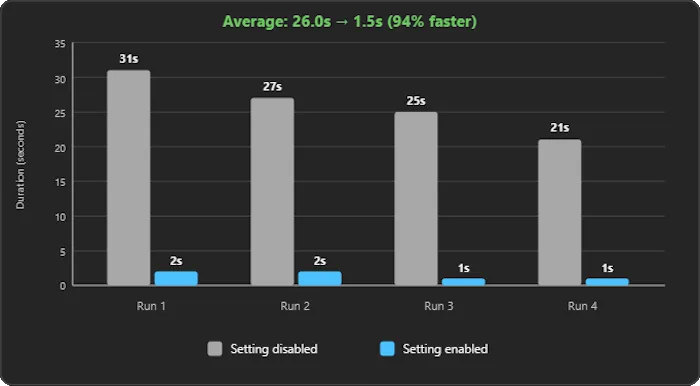
Your results depend on the solution and where a failure occurs. A solution with a long dependency chain or substantial parallel work can have more remaining work to stop than a small solution that finishes almost immediately anyway.
The Developer Community request describes a concrete version of this problem: a packaging project kept trying to build even after a dependency failed. The new option gives you a solution-wide stopping policy rather than requiring you to interrupt the build yourself.
Keep the two decisions separate
This setting answers when should a failed build stop? It doesn’t decide which projects you build in the first place. Existing Build and Run options cover choices such as building only startup projects and dependencies when you run or debug.
Try stop-on-failure on a solution where you normally cancel the build after seeing an error. Compare that post-failure wait, then keep the policy that fits how you troubleshoot.


This sounds great! I’ve been using the StopOnFirstBuildError extension to do something similar for a while so having it built in is nice.
Me too. So happy this is now built in