


Are you wasting time reviewing code for nits on code standards, project preferences, or important contribution guidelines? We know the pain. It’s all too easy for best practices and those tiny but critical team details to slip through the cracks, resulting in inconsistencies, confusion, and wasted time. But now, there’s a smarter way to ensure everyone’s always on the same page!
How Copilot memories make teamwork effortless
Introducing Copilot memories, a new feature that empowers every developer and team to capture, remember, and share their coding preferences and important project guidelines, automatically!
Intelligent detection just for you and your team
Copilot memories continuously learns how you and your team likes to work. It intelligently detects unique preferences within your projects as you prompt. No more manual reminders or digging through old messages. Copilot keeps track of what matters most, so you don’t have to.
Confirmation nudges you can trust
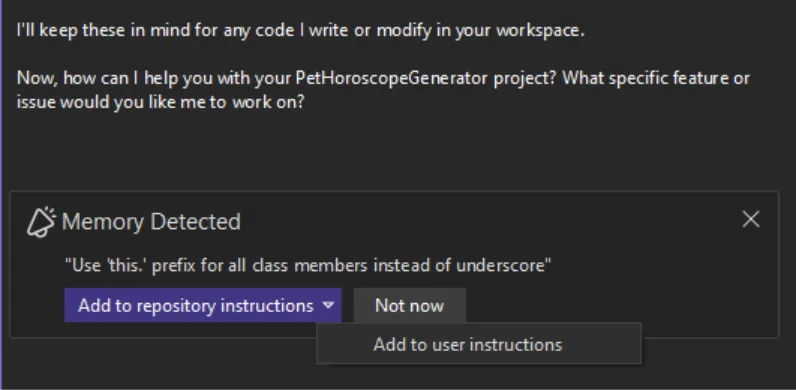
Worried about Copilot making changes without you knowing? Don’t be! Whenever Copilot is ready to save a new memory or update an existing one, you’ll receive a clear confirmation nudge. You’re always in control. Simply review, accept, or adjust as needed before preferences are updated.
Smart categorization, right where you need it
Copilot memories doesn’t just remember information. It also helps you organize it exactly where you expect to find it. Each memory gives you the option to save preferences in your personal user preference file %USERPROFILE%/copilot-instructions.md or in the version-controlled repo-level instructions in the /.github/copilot-instructions.md. Copilot intelligently merges the results into your existing files or creates new ones.
Benefits for every developer and team
With Copilot memories, your projects automatically become more consistent and easier to onboard to. New team members can instantly see “how we do things here,” and seasoned pros save time by letting Copilot handle the details. It’s project-aware and makes documentation part of your natural workflow.
Check out the new Visual Studio Hub
Stay connected with everything Visual Studio in one place! Visit the Visual Studio Hub for the latest release notes, YouTube videos, social updates, and community discussions.
Appreciation for your feedback
Your feedback helps us improve Visual Studio, making it an even more powerful tool for developers. We are immensely grateful for your contributions and look forward to your continued support. By sharing your thoughts, ideas, and any issues you encounter through Developer Community, you help us improve and shape the future of Visual Studio.


Who’s **** do I have to **** to get this in VS Code?
You don’t have to do any such thing, just create a .github folder in the root of the folder you have open, and in that folder you create a copilot-instructions.md file and type in a rule or two or more in markdown format. Save the file, restart VSCode to make sure it reads it.
To add more rules to it just tell copilot “Add to your instructions file something about blah-blah” and it will add it.
I've been using this lately, and when it works, it works well. But other times it just seems to ignore them. Like telling it to remember we're running on Windows, so use Powershell syntax and do not attempt to use bash commands like tail or grep. Next thing you know, it's using bash syntax again.
Also, no matter how I set the settings, it doesn't seem to read its instructions file at the beginning of a chat session - i have gotten into the habit of telling it to read its instructions file as the first step in a new chat...
Yes. I am so tired of it giving me or automatically using bash commands when I have specifically told it to use PowerShell.
Any plans for enabling them for azure devops?
It’s a Copilot feature, not a GitHub feature. It should work with any source control system.
> Copilot memories doesn’t just remember information. It also helps you organize it exactly where you expect to find it. Each memory gives you the option to save preferences in your personal user preference file %USERPROFILE%/copilot-instructions.md or in the version-controlled repo-level instructions in the /.github/copilot-instructions.md. Copilot intelligently merges the results into your existing files or creates new ones.
What if few developers work with repo?
This sounds great! Could you explain how it works in practice? Is this a feature that needs to be enabled manually, or is it available by default? Also, which versions of Visual Studio currently support this functionality?
This feature was released for Visual Studio 18.2.0. It's only available in Visual Studio 2026 and not part of the Copilot Agent Memory that Michael linked to.
In practice, there is a tool that detects potential memories in your prompt. This may be where you've issued a correction to Copilot or where you've explicitly mentioned you or your team has a preference to work in a specific way. If the tool detects a memory, you will see a nudge dialog (pictured in the blog) at the end of your Copilot result asking where you want to save this item. You have...
This may be helpful – https://docs.github.com/en/copilot/how-tos/use-copilot-agents/copilot-memory