


Managing cloud resources often means juggling multiple tools, writing custom scripts, and switching contexts between your IDE and cloud management portals. These extra steps slow development and make it harder to build intelligent, secure applications efficiently.
We’re excited to announce that Azure MCP Server (Model Context Protocol) tools are now generally available out-of-the-box in Visual Studio 2026, bringing agentic cloud automation directly into your trusted IDE. This integration empowers developers to build intelligent, secure applications faster, with less complexity and more confidence.
Why It Matters
Azure MCP Server is a standards-based Model Context Protocol server that enables AI agents to securely access and manage Azure resources through natural language—helping teams streamline cloud operations and boost developer productivity without custom integrations.
Visual Studio 2026 is designed as an AI-native IDE, and Azure MCP Server is the perfect complement. With these MCP tools available out-of-the-box, developers can:
- Generate Azure-related code and infrastructure as code using natural language.
- Query and manage resources such as Azure Kubernetes Service, Azure Container Apps, Cosmos DB, AI Foundry, and more.
- Apply Azure best practices for enterprise-grade security.
- Diagnose and troubleshoot easily with direct access to logs, diagnostics, and telemetry.
This means less context-switching, fewer manual steps, and more time building great software.
For more details on Azure MCP, visit Azure MCP Overview.
Additional Azure Development Tools
In addition to the core Azure MCP Server tools, Visual Studio 2026 introduces an expanded suite of Azure Development tools designed to streamline and enhance common workflows:
- Automated CI/CD Setup Generate Azure DevOps or GitHub Actions workflows for ASP.NET, Blazor, or Azure Functions projects—complete with YAML files and securely managed credentials.
- Effortless Publishing Create and verify publish profiles, select the appropriate Azure Web App, and deploy—all via natural language prompts.
- Azure CLI Command Generation Need an Azure CLI command? Just ask. Copilot translates intent into precise az commands.
Get Started
- Download Visual Studio 2026 or Visual Studio 2026 Insiders and install using the Visual Studio Installer.
- If Visual Studio 2026 is already installed, open the Installer and select Modify to view available workloads.
- On the Workloads tab, select Azure and AI development and enable GitHub Copilot.
- Click Install while downloading to complete the installation.
- Launch Visual Studio 2026 and create or load a project.
- Open GitHub Copilot Chat.
- In the chat area, select the Select tools button (two wrenches icon) to display a list of available tools. Enable all Azure tools by checking the top nodes for Azure and Azure MCP Server.
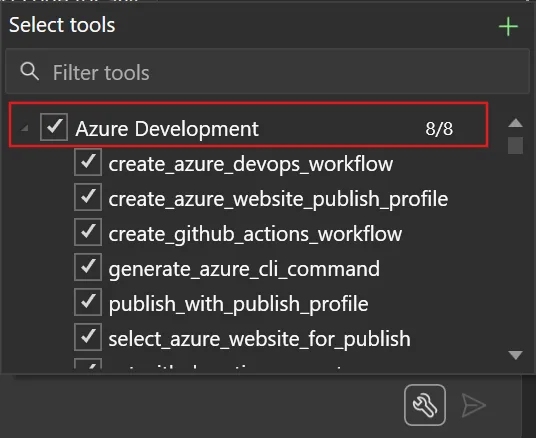
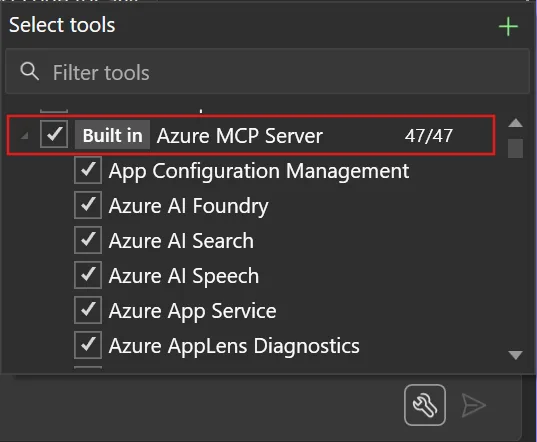
For more information, visit Get started with GitHub Copilot for Azure – GitHub Copilot for Azure | Microsoft Learn.
Closing Thoughts
The integration of Azure MCP into Visual Studio 2026 marks a significant step toward agentic workflows—where AI-driven automation meets developer creativity. By reducing friction and enabling natural language interactions with Azure, we’re helping developers focus on what matters most: building innovative, secure, and scalable applications.


Not much help when you don’t have rights to the Azure resources. Many enterprise admins don’t give us access to any deployed services nor allow us to create any. Good idea anyway.
Thank you for your feedback. If you don’t have rights to the Azure resources, you might still find value in Azure MCP Server for tasks like generating Azure-related code or creating deployment templates with Bicep or Terraform. We’re also actively exploring ways to make Azure MCP Server more useful in restricted environments, so input like yours is incredibly helpful in shaping those improvements.
I love Visual Studio 2026 Insiders! Thanks to the dev team for upgrading the UX/UI. I love the new look and think it is polished and beautiful looking. I always look forward to working with the app.
Thank you for sharing your feedback! We’re thrilled to hear you’re enjoying Visual Studio 2026 Insiders and the upgraded UX/UI.
Is there a similar way for us to query Azure logs—such as App Insights, Grafana, and others—directly? It would make things much easier. For example, we could ask: “Hey, can you validate what’s wrong with task 8893? I want to see the flow or understand why it’s behaving differently.”
Thank you for your question! Yes, you can query Azure logs—including App Insights—using natural language through Azure Monitor tools in Azure MCP. These tools allow you to interact with telemetry data without writing complex KQL queries. For more details, visit https://learn.microsoft.com/en-us/azure/developer/azure-mcp-server/tools/azure-monitor.
Woohoo! Awesome job!