


Our accessibility journey in Visual Studio has taught us that developers love to customize their experiences to help them be productive. Some developers have been telling us that they want to use sound to help them understand what’s happening in their code. A short, simple sound when the caret arrives on a line with an error can quickly help some developers understand where their attention needs to be. Visual Studio Code introduced a handful of these audio cues, and many developers love them. We’re happy to bring them to Visual Studio.
Get Started
With Visual Studio 17.3 preview 2, Visual Studio has added a few new audio cues. This feature is in preview and is in Tools\Options under Preview Features. When you check “Enable Audio Cues for the Editor”, Visual Studio will register the audio cues the next time the editor is created. (This normally happens when you first launch Visual Studio or open a new solution/folder).
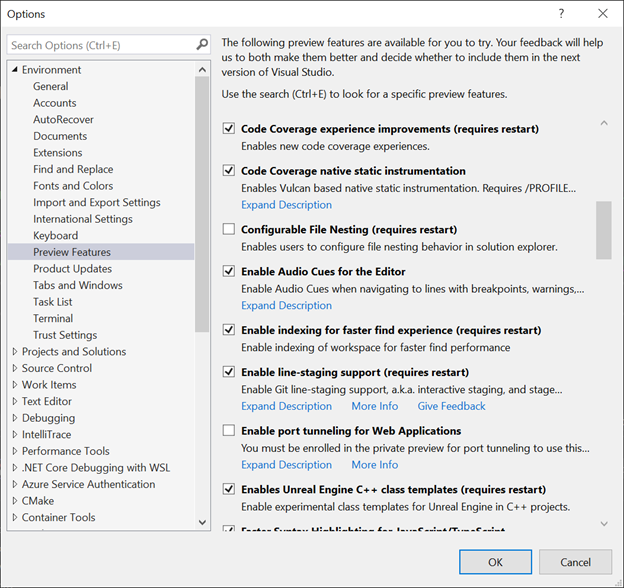
By default, Visual Studio now has three new sounds. You’ll hear a sound when the caret arrives on a line with a breakpoint, error, or warning. We intentionally don’t play sounds unless you’re navigating around. When we first tested the audio cues, we felt that playing the sounds as soon as an error was introduced during typing was rather annoying. We chose the same sounds as Visual Studio Code, so folks coming to Visual Studio should already be familiar with these sounds.
If you arrive on a line with more than one of these, you’ll only hear the sound with the highest priority. Errors are the highest priority, followed by warnings and finally breakpoints.
Customize your experience
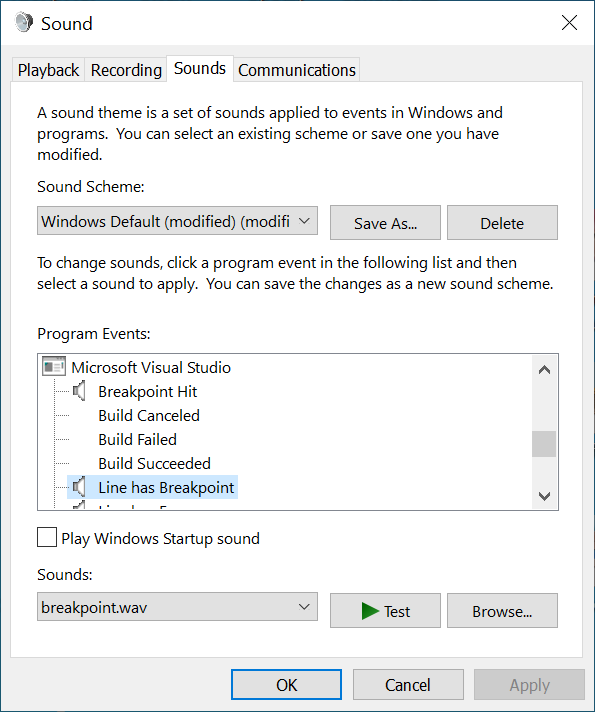
If you’d like to customize these sounds, you can search in Windows 10 or 11 for “Change System Sounds”. Windows will display the Sound control panel. You can scroll down in the Program Events box for the “Microsoft Visual Studio” events. The new events are “Line has Breakpoint”, “Line has Error”, and “Line has Warning”. The Sound control panel lets you customize each of these sounds to any .wav file you like or disable a specific sound by setting the Sounds field to (None).
Tell us what you think
We’re excited to hear how this is changing folks and their workflows. We’re also looking for other places where more audio cues would be useful. If you’ve got suggestions, we invite you to join the conversation on Developer Community.


Interesting possibility! Try it out soon and set some cool sounds…
My organisation enforces a code style rule which forbids multiple consecutive new lines. Some refactoring tools have an annoying habit of introducing extra blank lines, which I miss and don’t find out about until I try and build the project. It would be useful if these feature used an auto prompt to inform me that this has happened.
The insulting comments here are unprofessional.
It’s sometimes impossible to say whether a feature is useful until it has been developed and widely deployed, especially when the audience that might benefit the most is a small portion of the user space.
Whether or not the typical user will ultimately use this feature, kudos to the VS team for experimenting new accessibility features.
I may try the new feature out of interest but even if it’s not my cup of tea i still appreciate the VS team keeping us informed. We use VS/c#/.net/MS SQL server, as a senior dev having been thru many coding/db tools i rekon these MS tools are highly productive & have matured well. i don’t understand the vitriol that comes from some people’s posts, they could perhaps put themselves in the shoes of the other person before throwing stones.
I can easily explain my "vitriol": I pay a yearly subscription for VS, since I write commercial applications with it. I'm not using a gift by the gods, neither the result of the efforts of a bunch of people working "gratis et amore" (Italian translation: per grazia e per amore di Dio). I would never pour that "vitriol", for instance, with people working in .NET Core. It's true that's the basis of mostly all else sold thanks to VS, but I understand that there are guys and gurls spending their precious time in that product. For Visual Studio, however,...
hi, it may surprise you but i see your point and agree that I’d rather fewer features that work efficiently & reliably. MS always had a tendency to bloat and complicate rather than say “enough already, lets consolidate and streamline”. Having said that, tis not easy, we have bloated our own product too over the years 😉