


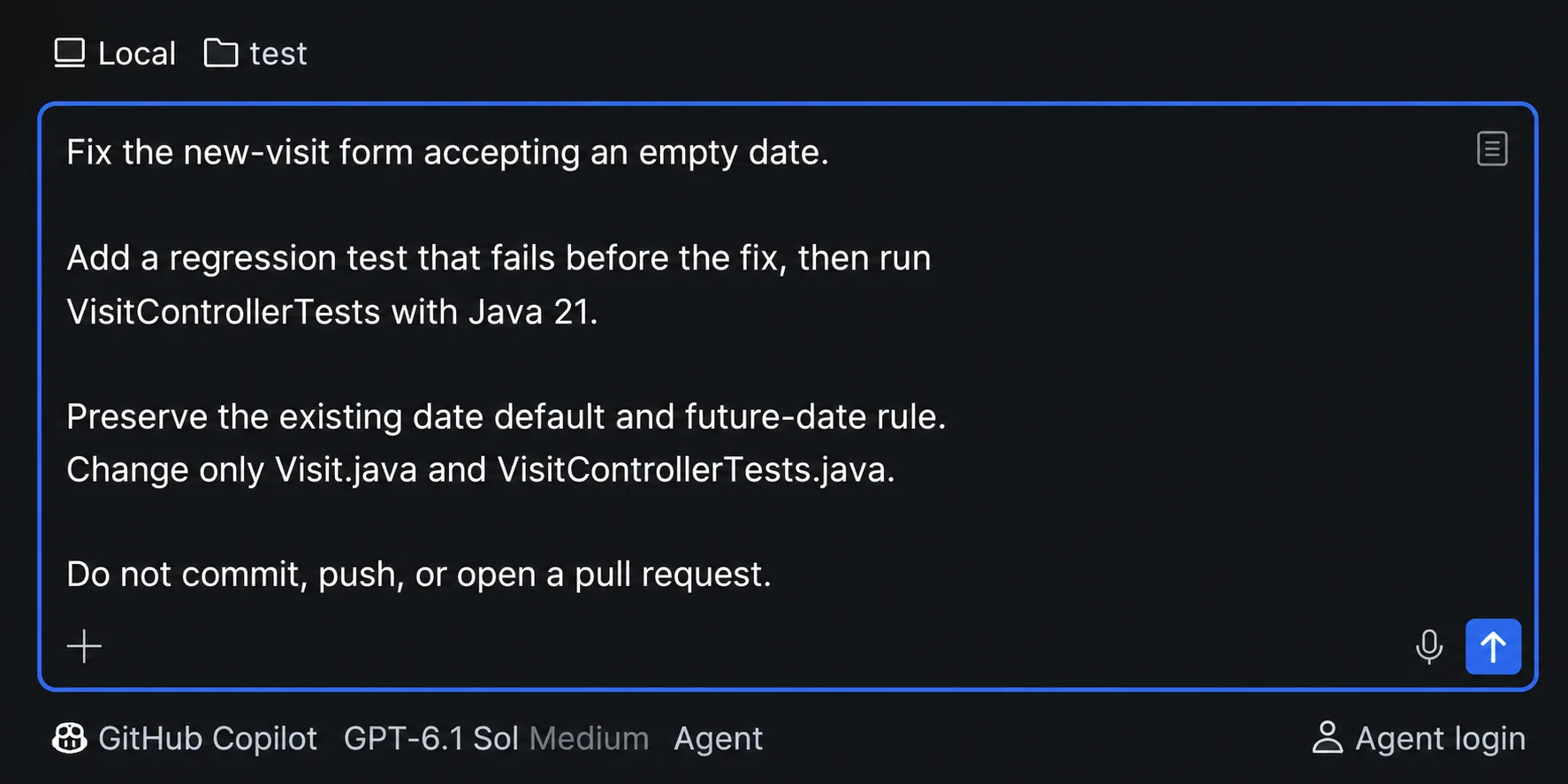
GitHub Copilot is now available in the JetBrains Air as a default agent. Select GitHub Copilot as your agent, delegate coding tasks, and work through results without leaving your IDE. All you need to get started is a GitHub Copilot subscription:
Built in collaboration with JetBrains and powered by Agent Client Protocol (ACP), this integration brings GitHub Copilot into Air’s native agent experience. Developers can select GitHub Copilot from the agent picker, sign in with their existing GitHub Copilot subscriptions, and start delegating coding tasks, managing parallel agent sessions, and reviewing changes without leaving their IDE.
Starting November 3, GitHub Copilot will also be available through Air’s Cloud Run experience, expanding beyond the existing Local Run integration. This gives developers greater flexibility to delegate coding tasks through Copilot, whether working locally or in the cloud.
Getting started is simple: Open Air → Select GitHub Copilot from the default agent picker → (Sign-in will be prompted if user is not logged in) → Send a prompt
What's new at a glance
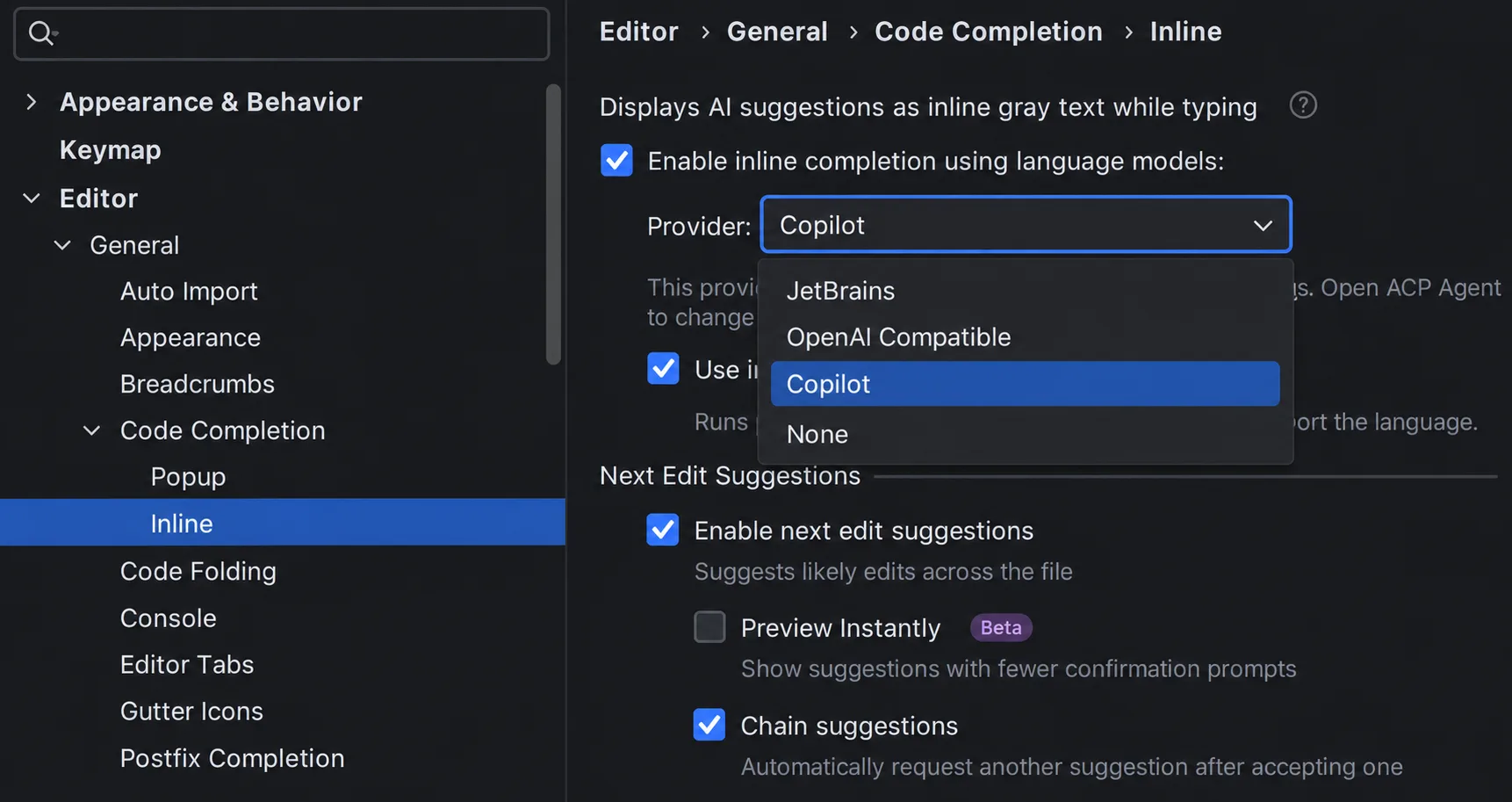
Open the Air in your JetBrains IDE → Select GitHub Copilot in the agent picker → Delegate a coding task, follow progress, and review the changes in context.Additionally, starting with JetBrains IDEs version 2026.2.4, GitHub Copilot can be selected as a provider for the natively integrated Next Edit Suggestions (NES) feature. To enable NES, navigate to Settings → Editor → General → Code Completion → Inline, select Copilot as the provider, and enable Next Edit Suggestions.
Two ways to use GitHub Copilot in JetBrains IDE
With this integration, developers now have two ways to use GitHub Copilot in JetBrains IDEs, depending on their workflows and needs. Both experiences share core Copilot capabilities, including agentic coding, parallel agent sessions, IDE tools and project context, and model selection, while offering different levels of integration and workflows.
GitHub Copilot agent in JetBrains Air: Quick access to GitHub Copilot
Built in collaboration with JetBrains and powered by Agent Client Protocol (ACP), GitHub Copilot in Air offers a lightweight, native way to access GitHub Copilot’s agentic capabilities.
- Built-in access: Select GitHub Copilot directly from Air’s agent picker, with no separate Copilot plugin installation or maintenance required.
- Air-native workflows: Delegate coding tasks, track progress, and review changes through Air’s integrated agent workspace.
- Next Edit Suggestions: Choose “GitHub Copilot” as one of the native NES providers from JetBrains IDEs.
GitHub Copilot plugin: The complete GitHub Copilot experience
For developers seeking deeper IDE integration, advanced capabilities, and GitHub Copilot specific enterprise capabilities and features, the GitHub Copilot plugin for JetBrains IDEs remains our recommended experience.
- Deeper IDE integration: Completion/Next Edit Suggestions, Inline Chat, built-in Copilot Code Review, and commit message generation.
- Advanced agentic capabilities and features: Agent customization (skills, hooks, instructions), Agent Debug panel, and Local Sandbox for secure agent execution.
- GitHub Copilot enterprise controls: Enterprise Managed Settings (EMS) for centrally managing Copilot configurations, permissions, and policies, with Enterprise Policy Diagnostics to debug enterprise settings.
| Capability | GitHub Copilot Plugin | GitHub Copilot in Air |
|---|---|---|
| Best for | Complete GitHub Copilot experience | Streamlined built-in GitHub Copilot access |
| Entry point | Chat panel, inline chat, code completion and code review | Built-in agent picker (via ACP) and completion |
| Next Edit Suggestion (NES) | Yes | JetBrains IDE version 2026.2.4 or later |
| Agentic coding (model selection, parallel sessions, etc) | Yes | Yes |
| Advanced agentic user experience (Customizations, Agent Debug Logs, etc) | Yes | Not included |
| Running tasks in cloud | GitHub Copilot Coding Agent | Cloud Run (part of JetBrains Teams) |
| Inline Agentic Chat | Yes | Not included |
| GitHub enterprise controls (Managed Settings, Enterprise Policy diagnostics) | Yes | Not included |
| Local Sandbox | Yes | Not included |
| IDE Tools | Yes (via JetBrains MCP server) | Yes |
| Copilot Code Review and Git Commit Message Generation | Yes | Not included |
| Subscription | GitHub Copilot | GitHub Copilot |
References
- Air plugin for JetBrains IDEs
- GitHub Copilot plugin for JetBrains IDEs
- Agent Client Protocol in JetBrains
Share your feedback
Your feedback helps shape the future of GitHub Copilot. Share your thoughts through the GitHub Copilot for JetBrains feedback repository or our quick survey.


0 comments
Be the first to start the discussion.