


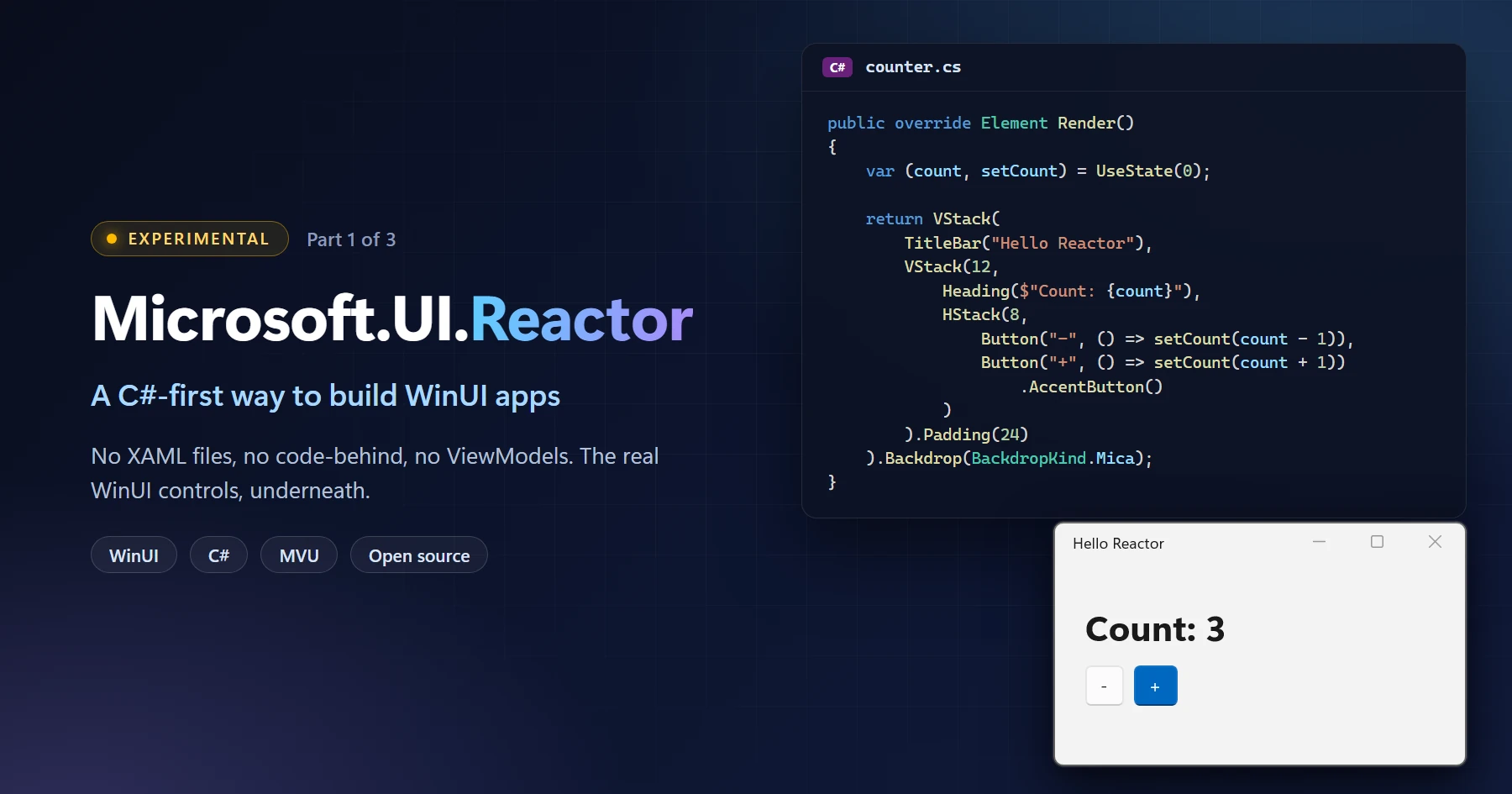
If you caught our session at Microsoft Build 2026 or you’ve been watching the repo, you’ve seen this one taking shape in public for a while now, and a lot has changed since Build. Here’s the longer tour: Microsoft.UI.Reactor, an experimental C# framework that brings the MVU (Model-View-Update) pattern to WinUI desktop apps. No XAML files, no code-behind, no ViewModels.
Two things before the fun part. Reactor is experimental: no support policy, no API guarantees, published this early on purpose because we’d rather hear we got the design wrong now than once people have shipped on it. And it is not a replacement for XAML or MVVM, which we’ll come back to.
Now the fun part.
What is Reactor?
Reactor is not a new UI platform. There is no new renderer and no fork of anything. Reactor renders WinUI controls and primitives: write Button, TextBox, NavigationView, or TreeView and you get the real WinUI control, laid out by the same panels, themed by the same resources, inspected by the same tools. A few pieces are ours, like the flex layout panel, but those are built on the same primitives your XAML app uses. What you ship is as close to the platform as it gets.
What changes is how you describe them, and the pattern you use to do it.
XAML apps are usually built with MVVM (Model-View-ViewModel): state lives on a view model, it announces changes, and bindings pull the new values into controls. Reactor uses MVU (Model-View-Update): state lives in one place, an update function returns the next state, and the view is a plain function of that state. Elm popularized it; React, SwiftUI, and Jetpack Compose are all variations on it.
Neither is a newer version of the other. They’re two established patterns with different trade-offs, and WinUI can now run both.
So instead of writing markup that gets compiled into a control tree, you write a C# function that returns an immutable description of what the UI should look like right now. Reactor diffs that description against the previous one and patches only what actually changed on the real controls underneath.
Why are we doing this? To find out how far MVU can go on WinUI, and whether it makes WinUI feel familiar to developers who already think that way. If you’ve built UI with React, React Native, SwiftUI, or Jetpack Compose, the usual WinUI path starts with learning a markup language and a binding engine, and we want to find out whether Reactor can remove that step. UI written as plain C# also turned out to be easy for coding agents to read, write, and check, so we now design for agents as well as people. And Reactor gives WinUI a place to experiment: new controls and patterns get tried here first, and the ones that prove themselves are candidates to land in WinUI itself, where they’ll work for XAML apps too. None of this is about replacing anyone: not XAML, and not you.
Here is an entire Reactor application. Not a piece of one, but the whole thing, including its package reference and build settings:
#:package Microsoft.UI.Reactor@0.1.0-preview.16
#:property OutputType=WinExe
#:property TargetFramework=net10.0-windows10.0.22621.0
#:property UseWinUI=true

using Microsoft.UI.Reactor;
using Microsoft.UI.Reactor.Core;
using static Microsoft.UI.Reactor.Factories;

ReactorApp.Run<MyApp>("Hello Reactor", width: 340, height: 200);

class MyApp : Component
{
    public override Element Render()
    {
        var (count, setCount) = UseState(0);

        return VStack(
            TitleBar("Hello Reactor"),
            VStack(12,
                Heading($"Count: {count}"),
                HStack(8,
                    Button("-", () => setCount(count - 1)),
                    Button("+", () => setCount(count + 1))
                        .AccentButton()
                )
            ).Padding(24)
        ).Backdrop(BackdropKind.Mica);
    }
}
Save that as counter.cs and run it:
winapp run counter.cs
A real WinUI window opens, with a real TitleBar, a TextBlock and two Buttons, and the counter works.

Those #: lines at the top are .NET 10’s file-based apps: package references and build properties live in the same file as the code, which makes for a quick way to try things. A more complex app uses a normal project, and there’s a template for that; see Try it below. The Reactor code doesn’t change either way.
If that snippet made you feel something (either “oh, finally” or “absolutely not”), hold onto that reaction. Both answers are useful to us, and there’s a comment box waiting at the end of the post. First impressions are data we can’t get any other way, and there’s plenty more below to react to.
By the way, what’s winapp?
Quick aside, since it’s the first command in this post. winapp is Microsoft’s CLI for Windows app development: scaffolding, package identity, MSIX packaging and signing. It works with any framework targeting Windows, not just Reactor. v0.7.0 just shipped, and it’s what lets you run a .cs file directly like we did above. We use it for every sample in this series because it handles the boilerplate. Prefer dotnet? Everything here works there too, with a flag or two more: dotnet run counter.cs -a x64 -p:WindowsAppSDKSelfContained=true. That runs it as a plain unpackaged app, though. Package identity and MSIX packaging are what winapp adds.
The same app, side by side
Let’s be fair about this comparison, because unfair comparisons are how frameworks get a reputation they don’t deserve. We’ll write the XAML version the way a good XAML developer would actually write it in 2026: x:Bind, and the MVVM Toolkit‘s source generators doing the heavy lifting.
The XAML version. Five files and a project, at minimum: the window’s markup, its code-behind, a view model, App.xaml and App.xaml.cs to bootstrap it, and a .csproj to build it. You don’t need to read the code to follow along, but here are the three files that hold the counter:
Show MainWindow.xaml, MainWindow.xaml.cs, and CounterViewModel.cs
<!-- MainWindow.xaml -->
<Window x:Class="CounterApp.MainWindow"
        xmlns="http://schemas.microsoft.com/winfx/2006/xaml/presentation"
        xmlns:x="http://schemas.microsoft.com/winfx/2006/xaml"
        Title="Hello XAML">
    <Window.SystemBackdrop>
        <MicaBackdrop />
    </Window.SystemBackdrop>
    <StackPanel>
        <TitleBar x:Name="AppTitleBar" Title="Hello XAML" />
        <StackPanel Spacing="12" Padding="24">
            <TextBlock Text="{x:Bind ViewModel.CountText, Mode=OneWay}"
                       Style="{StaticResource TitleTextBlockStyle}" />
            <StackPanel Orientation="Horizontal" Spacing="8">
                <Button Content="-" Command="{x:Bind ViewModel.DecrementCommand}" />
                <Button Content="+" Command="{x:Bind ViewModel.IncrementCommand}"
                        Style="{StaticResource AccentButtonStyle}" />
            </StackPanel>
        </StackPanel>
    </StackPanel>
</Window>
// MainWindow.xaml.cs
public sealed partial class MainWindow : Window
{
    public CounterViewModel ViewModel { get; } = new();

    public MainWindow()
    {
        InitializeComponent();
        ExtendsContentIntoTitleBar = true;
        SetTitleBar(AppTitleBar);
    }
}
// CounterViewModel.cs
public partial class CounterViewModel : ObservableObject
{
    [ObservableProperty]
    [NotifyPropertyChangedFor(nameof(CountText))]
    public partial int Count { get; set; }

    public string CountText => $"Count: {Count}";

    [RelayCommand] private void Increment() => Count++;
    [RelayCommand] private void Decrement() => Count--;
}
The Reactor version. The MyApp class from earlier. A more complex app has a .csproj too, but the counter itself is one class, in one language.
Now: that XAML is good XAML. The source generators erase most of the boilerplate that made MVVM famous. But look at what’s still true:
- The value flows across three files and two languages before it reaches a pixel.
{x:Bind ViewModel.CountText}is a string that the XAML compiler has to be taught to understand. RenameCountTextfrom C# and you’d better hope your tooling follows.- The state lives in a class whose entire reason to exist is being observed.
- “What does this screen look like when
Countis 5?” is a question you answer by reading three files and mentally running a binding engine.
In Reactor, that last question has a very boring answer: read Render(). It’s a function. Give it a count, it gives you a UI. That’s the whole idea, and most of what Reactor is good at follows from it.
One question before we move on: does this style look like it would suit something you’re working on, or does it look like more trouble than the XAML version? Both are useful answers. “I’d stay with XAML for this screen” is a perfectly good one: we’re trying to learn which kinds of screens each model fits, not which one wins. Comments are open.
So what do you actually get?
Beyond “fewer files,” which is nice but not a strategy: everything is compile-time. No binding failures in the output window at runtime, and renaming a property updates every usage, because every usage is C#. State lives next to the UI that uses it, so there’s no ViewModel class and no PropertyChanged plumbing. And a good deal comes in the box: flexbox layout via a faithful C# port of Meta’s Yoga engine, commanding, navigation, theming tokens, localization, a DataGrid, and a docking system.
The one worth calling out is tooling. Because your UI is ordinary C#, the entire Roslyn toolchain points at it, and we’ve shipped 60+ Reactor-specific analyzers covering hooks, accessibility, theming, commanding, and performance. They catch the things that are mechanically detectable but invisible in markup: a list item missing a key, a hook called inside an if, a hard-coded brush that won’t survive dark mode, an icon-only button a screen reader would announce as “button”. You find out three seconds after you type it, not three weeks before ship.
Where XAML fits
WinUI is the foundation. XAML is a first-class way to use it, it isn’t being deprecated, and it’s still getting active investment. The XAML + MVVM model fits a large part of the WinUI user base, and the tooling, designer, templating, guidance, and third-party control ecosystem built around it aren’t going anywhere. WinUI development is moving into the open on GitHub, and platform tools like the winapp CLI are built for any framework targeting Windows, not for Reactor. Reactor sits on top of all of it.
So the two models coexist on purpose. If you’re shipping XAML/MVVM, keep shipping it. If you want MVU with no XAML, Reactor gets you there on the same runtime and the same controls. And if you want both, they interoperate in both directions, in the same process and the same visual tree, so nobody has to pick a side.
Missing a control? Any other WinUI control, third-party or your own, can be wrapped as a Reactor element and used like the built-in ones.
It’s open source. All of it.
Everything is on GitHub under the MIT license: microsoft/microsoft-ui-reactor. Framework code, design specs, sample apps, the full test suite, the CLI, the analyzers, and the VS Code extension. Clone it, build it, break it, tell us about it.
This isn’t a one-off. It’s the same direction WinUI itself is heading: it has been moving its day-to-day development into the open on microsoft/microsoft-ui-xaml, so the community can see the roadmap, follow the work, and contribute to the platform directly. Reactor was born in that world rather than being retrofitted into it: it has been public from its first commit, and there is no internal branch where the “real” work happens.
Same team. Same repo culture. Same belief that the Windows developer platform gets better faster when you can see it being built.
Reactor isn’t just running in our own samples. OpenClaw’s Windows companion app uses it in production for its chat, on by default. That app is open source too, so you can read exactly how a shipping app puts Reactor to work.
Try it
You’ll want the .NET 10 SDK and the winapp CLI (v0.7 or later, which is where running a .cs file directly arrived):
winget install Microsoft.WinAppCli
The fastest path is the one you already read. Save the counter from the top of this post as counter.cs and run it:
winapp run counter.cs
That builds the file, generates a package manifest from the #:property directives at the top of it, and launches the app with real package identity, not a loose .exe.
Prefer to stay in dotnet? dotnet run counter.cs -a x64 -p:WindowsAppSDKSelfContained=true builds and runs the same file, unpackaged. Add a #:package Microsoft.Windows.SDK.BuildTools.WinApp@* line and dotnet run gives you the packaged launch too, which is exactly what winapp is doing under the hood.
When you want a real project rather than a scratch file:
winapp new -t reactor -n MyApp
cd MyApp
winapp run
That scaffolds a packaged app (Package.appxmanifest, assets, publish profiles, the lot) and installs the WinUI template pack for you if you don’t have it. Debug builds also pull in the Reactor devtools. Four templates are available, all experimental: reactor (blank), reactor-mvu (state, actions, and a reducer wired up), reactor-navview, and reactor-tabview. Run winapp new --list to see the rest, including the XAML ones: the same CLI scaffolds both.
Prefer Rust?
The idea isn’t tied to C#. Over in windows-rs, the Rust for Windows project, we’re running the same experiment in Rust: windows-reactor is a declarative WinUI library where components own their state, controls send typed messages back, and only the WinUI controls that changed get updated.
It’s early days there too, and it’s already on crates.io. Different language, same native controls underneath.
What we’d like to know
“Let us know what you think” is the emptiest sentence in developer relations, so here are the actual questions keeping us up at night. Answer any one of them in the comments and you’ve moved this project forward:
- Does the DSL read well at scale? Twelve lines look great. Does a 400-line screen? We’re actively working with the C# language team, and the syntax can still change, but only while the experimental label is on.
- Where does it break down? Which control, which layout, which scenario made you reach for XAML instead? That’s the single most valuable thing you can tell us.
- Is interop good enough? If you can’t adopt this incrementally inside an existing app, it doesn’t matter how nice the greenfield story is.
- Is this a bad idea? If you think WinUI doesn’t need this, we want that comment too. A well-argued “no” from a working Windows developer is worth more to us right now than a dozen stars.
The experimental label stays on for the next few months while we iterate in public. Every line of code is fair game: the DSL syntax may shift, controls may come and go, the layering may get reorganized. This is the window where feedback changes the design instead of getting filed under “breaking change, too late.”
Wherever you’re most comfortable, in rough order of how little effort it costs you:
- The comments below: lowest friction, no account needed, and we read every one
- Discussions & issues: github.com/microsoft/microsoft-ui-reactor/issues
- Repo: microsoft/microsoft-ui-reactor
- Guide: microsoft.github.io/microsoft-ui-reactor
Next month
No counters. We’ll tour the twenty-odd real apps living in the repo: a registry editor, a chat client, an IDE with tear-off docking panes, then build a full minesweeper board from an empty folder. And once you’ve watched it hold up under 256 interactive controls, we’ll answer the question we already know you’re going to ask: where does the state actually live when there’s no ViewModel to put it in.
Until then: clone it, build something small, and tell us where it hurts. That’s the whole ask.
Happy coding!


Yes, finally indeed! I’ve been doing this approach for a while now in my MAUI apps, by implementing my own custom extensions. Super happy to see official embrace of this pattern. I’ve never seen the benefit of XAML to be honest… in theory it allows the designer to do design and the developer to do development, but in practice the developer always writes the XAML as well, so it needs to learn, handle and manage this layer along with the C# codebase… huge effort with zero benefit. So yeah, super happy to see this happening!
Thanks, Dan, glad it resonates! Since you’ve already built your own take on this for MAUI, I’d love to hear how Reactor’s API compares to what you landed on.
WinApps
I started this venture about 15 years ago, utilizing WPF to access SQL Servers when Microsoft first came out with the Express Edition of SQL. The real game changer for me was Template 10. Jerry Nixon and friends hosted videos regarding MVVM, and there is where my passion began. I did this for the better part of 8 to 10 years.Now, having experience with the cloud and many JavaScript frameworks like React, I have successfully published multiple websites. Although my passion was for Windows, and yes, I have a couple of apps in the Store, Web Dive Browser is MVVM...
Thanks for sharing your story, John! Going from Template 10 and MVVM to React and now Reactor is quite the journey, and two FOSS apps already is awesome! Glad Reactor felt like a breath of fresh air!
Thanks for your contribution to this blog. Please keep up the good work. I’ll always check back.
For something small where you need a quick UX then I think it is doable. But even with this approach I don't see VMs going away unless every visual aspect of a model ends up in a separate component. For example my Model has a first and last name but everywhere I show things in the UX I want to format that name in a very specific manner. Do I put that in a component, an extension method on the model where I now have UI and business mingling?
Another area of concern is complexity as it gets larger. A simple...
Great questions, Michael, and the state ones are exactly what part 2 covers next month, to some extent. The short version: formatting can be a plain C# function or a small component in your UI code, so the model stays clean. You don't need INotifyPropertyChanged: changing state re-renders the component that owns it. For your tree and details example, the selection lives in their nearest common parent and flows down to both. And DI is what Context is for: provide services near the root and any component below can read them, so a parent doesn't need to know what its...
Until Visual Studio does it, it’s another worthless dart at the wall and more cacophony in the UI space. You haven’t seen the *real* WPF forks yet that put all these sad UI framework attempts to shame. WinUI isn’t even relevant, it was DOA when Windows 8 was released and there won’t be rest until it is destroyed.
So where does this leave C++ developers?
After replacing C++/CX with C++/WinRT, to this day with a very poor developer experience, never delivering on the roadmap vision shown at CppCon 2017, it has been radio silence on Visual Studio tooling for WinUI C++ applications.
Thanks for the thoughtful question, Paulo. Reactor is an experiment focused on C#, so it doesn’t change anything for C++ developers, and C++ remains a supported way to build WinUI apps. We appreciate the candid feedback on the C++ experience. With WinUI development moving into the open on GitHub, https://github.com/microsoft/microsoft-ui-xaml is a great place to keep that conversation going.
I'm very interested in this approach to programming. As they say, less code that's more readable goes a long way toward maintaining large projects over time. I'm used to working with XAML, but the idea of being able to use this C#-first approach—or even combining XAML with Reactor—seems excellent to me.
I’d also like to know if there’s already a way to hot-reload so I can see changes to the UI in real time. I feel like these kinds of experiments can inspire the C# team to create new syntax for the language and improve the entire ecosystem: XAML, Reactor, and...
Thanks, Alex, and thanks to Tushar for answering! To add to that: run under dotnet watch or winapp run –watch and Reactor keeps your app’s state across most edits. Mixing works too: Reactor and XAML interoperate in both directions in the same app, so you can bring it into an existing project gradually. We’ll dig into that later in the series. And you’re spot on about syntax: we’re already working with the C# language team 🙂
Reactor supports hot reloading from day one, although there are some rough edges due to the framework being experimental. In fact, MVU is more hot-reload friendly model than MVVM because the states are easily preserved (without any exceptions).
This looks cool! I used Jetpack Compose for a bit a few years ago, and I loved how everything was checked at at compile time, rather than having to deal with runtime errors because I made a simple mistake. Will there be a preview pane like XAML has currently? And can this idea be applied to other UI frameworks, so it can be used on other operating systems?
Thanks, Ed! Compile-time checking is a big part of it, and the analyzers catch even more as you type. For previews, run under dotnet watch and Reactor hot-reloads your edits while keeping the app's state. There's also an early Visual Studio extension that previews the component you're editing next to the code: https://microsoft.github.io/microsoft-ui-reactor/latest/vs-extension/. We're also adding Reactor support to the winapp CLI's dev tools.
As for other operating systems: Reactor is built on WinUI, so today it runs on Windows, but there's an open PR over in Uno Platform's repo that adds Uno support, running Reactor on desktop, WebAssembly, Android...
Honestly I like having less files and get rid of bindings, but I’m a bit concerned of “not seeing” the UI (at least a skeleton of it), I would really miss a designer here…
Totally fair, Luca, and thanks to Tushar for jumping in. Besides hot reload, there’s an early Visual Studio extension that shows a live preview of the component you’re editing, docked next to the code (for now you build it from the repo): https://microsoft.github.io/microsoft-ui-reactor/latest/vs-extension/. It’s still very rough, but it’s the direction we’re exploring for exactly this, and we’re also adding Reactor support to the winapp CLI’s dev tools.
For previews, you can use the hot reloading feature. You can just run the app and see the new UI as you’re making changes.