

TL;DR
- Trace-based evaluation for external and hosted agents: Grade real production traces from Foundry, GCP, AWS, or any framework — no hand-curated datasets required.
- Grok 4.3: xAI’s latest model lands in Foundry for advanced agentic and domain-specific workloads.
- DeepSeek V4: DeepSeek’s newest model family expands open-model choice in the catalog.
- Fireworks AI — May update: DeepSeek V4 Pro and Kimi 2.6 arrive via Fireworks for high-performance open-model inference.
- GPT-5 Reinforcement Fine-Tuning (Gated GA): RFT graduates to gated GA with enterprise-ready compliance and SLA coverage.
- MagenticBrain, Fara1.5-9B, MagenticLite: Microsoft Research ships three on-device agent projects for agentic reasoning, screen-based UI automation, and local browser/file-system workflows — with examples in Foundry Labs.
- SocialReasoning-Bench + STATE-Bench: Two open-source benchmarks for evaluating agent negotiation, coordination, and memory quality.
- Managed VNET (GA): Microsoft-managed network isolation reaches general availability.
- Project-level cost attribution: See LLM costs by project for budget tracking and governance.
- Content Understanding improvements (GA): Read and layout analyzers reach GA alongside a Logic App connector and Foundry NextGen integration.
- Evaluation tooling updates: Skill evaluation, workflow evaluation UX improvements, and evaluation alignment across VS Code and the portal.
- Foundry Local 1.1 + 1.2: Live audio transcription, text embeddings, Qwen 3.5 Vision, multilingual ASR, cancellable downloads, Linux ARM64, and ONNX Runtime 1.26 across Python, JavaScript, C#, and Rust.
- Foundry Agent Service:
azure-ai-projects2.2.0 adds preview skills and toolboxes; the sample below registers a design skill, exposes it through a toolbox MCP endpoint, and invokes a GPT-5.4 prompt agent with image input. - SDK updates:
azure-ai-projectsships 2.2.0 across Python, JS/TS, and .NET with external agent definitions, skills, toolboxes, model weight registry, routines, and optimization jobs. - Microsoft Build: Register for Microsoft Build and save Microsoft Foundry sessions to watch online.
Looking for Microsoft Foundry sessions to watch online? Start with these Microsoft Build breakout sessions. Times are shown in Pacific time; check the session page for the latest schedule.
| Session | Date/time | Speaker(s) | Description |
|---|---|---|---|
| Confident model selection and integration with Microsoft Foundry (BRK230) | June 2, 12:30-1:15 PM PT | Yina Arenas, Naomi Moneypenny | Choose, integrate, and validate AI models in Microsoft Foundry, including benchmarking and integrated developer workflows. |
| Govern open-source AI agents, any framework, any scale (BRK250) | June 2, 2:30-3:15 PM PT | Sarah Bird, Mehrnoosh Sameki | Learn governance patterns for Microsoft Agent Framework and open-source agent stacks, including evaluations and risk controls. |
| From prototype to production: build and run agents at scale (BRK241) | June 2, 3:45-4:30 PM PT | Tina Schuchman, Jeff Hollan | Walk through the lifecycle for production-grade agents with Foundry Agent Service and Microsoft Agent Framework. |
| From observability to ROI for AI agents on any framework (BRK252) | June 2, 3:45-4:30 PM PT | Sebastian Kohlmeier, Filisha Shah | Cover cross-framework tracing, evaluations, production observability, and ROI measurement for AI agents. |
| Orchestrate special agents with Nemotron models on Microsoft AI Foundry (BRKSP94) | June 2, 3:45-4:30 PM PT | Stephen McCullough | Route tasks across frontier models, NVIDIA Nemotron, and local models for tiered agentic AI architectures. |
| Deploy. Observe. Learn. Reinforcement learning for production agents (BRK231) | June 2, 5:00-5:45 PM PT | Alicia Frame, Omkar More | Use fine-tuning and reinforcement learning on Microsoft Foundry to improve production agents with real usage signals. |
| Build context-aware agents at scale with Microsoft IQ (BRK240) | June 2, 5:00-5:45 PM PT | Marco Casalaina | Learn how Foundry IQ, Fabric IQ, and Work IQ provide an enterprise intelligence layer for AI agents. |
| Context engineering for agents: connect agents with enterprise knowledge (BRK246) | June 3, 9:00-9:45 AM PT | Pablo Castro Castro | Explore Foundry IQ, Azure AI Search, knowledge sources, agentic retrieval-augmented generation (RAG), and enterprise security. |
| Local models, developer control, and the future of AI runtimes (BRK235) | June 3, 10:15-11:00 AM PT | Parth Sareen | Learn how local and hybrid model execution can reshape developer workflows, privacy, and experimentation. |
| Claw and agent harness in Microsoft Foundry (BRK243) | June 3, 11:30 AM-12:15 PM PT | Glenn Condron, Amanda Foster, Shawn Henry | Go deep on multi-agent systems, Claw agent patterns, hosted agents architecture, triggers, state management, and file access. |
| Build secure and enterprise-ready agents with Agent 365 (BRK251) | June 3, 11:30 AM-12:15 PM PT | Neta Haiby | Build enterprise-ready agents with runtime visibility, identity-aware access, data protection, and policy-based governance. |
| Build distributed agentic apps from edge to cloud (BRKSP92) | June 3, 11:30 AM-12:15 PM PT | Colin Helms, Eddy Rodriguez | Design and run multi-agent applications across client, edge, and Azure environments. |
| Train and deploy custom OSS reasoning models with Foundry (BRK232) | June 3, 2:45-3:30 PM PT | Vijay Aski, Manoj Bableshwar, Chris Lauren | Train and tune open-source reasoning models in Microsoft Foundry with code-first workflows and curated reinforcement learning environments. |
| Turn your agents into action: connect tools, APIs, and data (BRK242) | June 3, 4:00-4:45 PM PT | Ronak Chokshi, Joe Filcik, Maria Naggaga | See how to connect agents with toolsets, application programming interfaces (APIs), and data without overloading context windows. |
Want the full online breakout catalogs? Browse Agents & apps, Responsible AI, and Working with models.
Join the community
Connect with 50,000+ developers on Discord, ask questions in GitHub Discussions, or subscribe via RSS to get this digest monthly.
Models
Grok 4.3
Grok 4.3 from xAI is available in the Microsoft Foundry model catalog. This is a step up from the Grok 4.2 GA that shipped in March — focused on advanced agentic workloads and domain-specific scenarios where you need a high-capability external model with Foundry’s production controls, safety tooling, and enterprise compliance.
If you’re already using Grok models in Foundry, 4.3 is a direct upgrade path through the same deployment flow.
One practical note before you move traffic: review the model card and run your own evaluations for your target use case. The catalog calls out additional responsible AI considerations for Grok 4.3, including higher safety and jailbreak risk than some other Azure Direct models. Treat that as a deployment checklist item, not a footnote.
Grok 4.3 uses the Chat Completions API path, so call the deployment directly. Set FOUNDRY_ENDPOINT to your deployment endpoint ending in /openai/v1/chat/completions, then trim that suffix for the OpenAI client base URL:
import os
from openai import OpenAI

endpoint = os.environ["FOUNDRY_ENDPOINT"]

client = OpenAI(
    api_key=os.environ["FOUNDRY_API_KEY"],
    base_url=endpoint.removesuffix("/chat/completions"),
)

response = client.chat.completions.create(
    model="grok-4.3",
    messages=[
        {"role": "system", "content": "You are Grok, a highly intelligent, helpful AI assistant."},
        {
            "role": "user",
            "content": "In one sentence, explain why developers should evaluate agent tool calls before production.",
        },
    ],
    temperature=0.2,
    max_tokens=80,
)

print(response.choices[0].message.content)
Sample output:
Developers should evaluate agent tool calls before production to catch incorrect parameters, unsafe actions, or unintended side effects that autonomous agents can generate in real environments.Action: Deploy Grok 4.3 from the model catalog and compare against your current Grok 4.2 workloads.
DeepSeek V4
DeepSeek V4 variants are now available in Microsoft Foundry. DeepSeek has been building momentum in the open-model space, and V4 reinforces the breadth of choice in the Foundry catalog — particularly for teams that want competitive reasoning and coding performance from open-weight models with full Foundry deployment and monitoring.
Action: Browse the DeepSeek V4 models in the catalog and test against your existing model mix.
Fireworks AI on Foundry — May Update
The Fireworks AI integration continues to expand. Two new models arrived in May:
| Model | What it does | Best for |
|---|---|---|
| DeepSeek V4 Pro | High-precision open-model reasoning via Fireworks | Complex reasoning, coding, agent workflows |
| Kimi 2.6 | Long-horizon reasoning and agentic workflows via Fireworks | Extended reasoning chains, coding, multi-step agents |
Both run on Fireworks’ high-throughput inference infrastructure with Azure enterprise security and compliance. The broader narrative here is model choice without compromise: open-model breadth, production scalability, and customer control over deployment, all within Foundry’s operational envelope.
Action: Deploy DeepSeek V4 Pro or Kimi 2.6 via Fireworks from the model catalog for high-throughput open-model inference.
GPT-5 Reinforcement Fine-Tuning (Gated GA)
GPT-5 Reinforcement Fine-Tuning (RFT) moves from preview to gated GA. This means enterprise-ready access with stronger compliance guarantees and SLA coverage — the kind of stability teams need before committing production fine-tuning pipelines to a service.
RFT lets you train GPT-5 on domain-specific tasks using reinforcement learning from human feedback, without managing training infrastructure. The gated GA status means access requires approval, but once in, you get production-grade support and commitments.
Action: If you have RFT workloads in preview, start planning the move to the GA tier. If you’re new to RFT, request access through the model catalog.
Microsoft Research Agent Models — MagenticBrain, Fara1.5-9B, MagenticLite
Three related Foundry Labs from Microsoft Research released this month: MagenticLite, the local agentic app; MagenticBrain, the planner/coder/orchestrator; and Fara1.5, the computer-use model family for browser work. The Microsoft Research developed this as one co-designed system: MagenticLite is the app and harness, MagenticBrain handles reasoning/delegation/terminal use, and Fara1.5 handles browser-based tasks. Each component is useful on its own, but they work best together.
Start with the MagenticLite GitHub repo when you want to run it locally; the Foundry Labs page is a good overview of the research artifact. The app expects OpenAI-compatible /v1 endpoints for the two recommended model roles. MagenticLite on GitHub, MagenticBrain on Microsoft Foundry, and Fara1.5 on Microsoft Foundry are available for you to get started. Setup Foundry Managed Compute: deploy Fara1.5-9B for browser use and MagenticBrain-14B for orchestration, then paste each deployment’s /v1 endpoint, model ID, and primary key into MagenticLite.
Here is a MagenticLite expense-form demo from the project:
You can also browse the full demo set.
Action: Try MagenticLite locally if you’re exploring browser-plus-filesystem agents, then connect MagenticBrain and Fara1.5 endpoints through the Foundry Managed Compute guide.
Evaluations & Benchmarks
May was a strong month for evaluation infrastructure. The headline: you can now grade real production traces from agents running anywhere — not just Foundry-hosted agents, and not just from synthetic test sets.
Trace-Based Evaluation
Two capabilities shipped back-to-back:
Trace-based evaluation for external agents (May 4) lets you grade production traces from agents running on Foundry, GCP, AWS, or any other platform. Instead of hand-curating evaluation datasets, you point evaluators at real traces and get quality scores on live agent behavior.
Trace-based evaluation for hosted agents (May 6) brings the same approach to Foundry-hosted agents. Assess agent quality using live interactions rather than relying exclusively on synthetic test sets.
This is a meaningful shift. Evaluation is moving from “test before you ship” to “measure what’s actually happening in production” — and it works across clouds and frameworks.
Action: Connect your agent traces to Foundry evaluations. If you’re running agents on external platforms, use trace-based evaluation to get quality signals without migrating workloads.
Evaluation Tooling Updates
Three evaluation improvements shipped at mid-month:
- Evaluation alignment with AI Toolkit and VS Code: Consistent evaluation workflow across portal and IDE surfaces. Run the same evaluators from VS Code that you use in the portal — less friction switching between environments.
- Skill evaluation: Skills become a first-class concept in Foundry evaluations. This is foundational platform work for structured skill evaluation — expect more here in coming months.
- Workflow evaluation UX: Improved UX for workflow evaluations with new workflow evaluators. If you’ve found the workflow evaluation experience rough, this is the update to revisit.
Action: Update your Foundry Toolkit extension and try running evaluations from VS Code alongside the portal.
SocialReasoning-Bench and STATE-Bench
Two open-source benchmarks shipped for teams building agents that need to work with other agents or remember things across sessions:
SocialReasoning-Bench tests whether agents negotiate and coordinate competently. It measures both outcome quality (did the agent get a good deal?) and process quality (did it negotiate reasonably?) in adversarial, realistic scenarios. Useful if you’re building multi-agent systems where agents interact with external parties.
STATE-Bench measures whether agent memory actually improves performance on realistic enterprise tasks. If you’re investing in memory architectures for your agents, this gives you a reproducible way to evaluate whether that memory is helping or just adding complexity.
Action: Use SocialReasoning-Bench and STATE-Bench to test your agents’ coordination and memory capabilities against reproducible baselines.
Platform
Managed VNET (GA)
Managed VNET is now generally available for Microsoft Foundry projects. This is one of those platform updates that sounds like plumbing until your security review is staring at you from across the table.
Instead of asking every app team to own virtual network design, subnet sizing, endpoint approval, and firewall details up front, Foundry can now provision a Microsoft-managed network boundary for agent outbound traffic. You still choose the isolation posture:
| Mode | Use it when |
|---|---|
| Allow internet outbound | You need managed isolation, but broad outbound access is acceptable. |
| Allow only approved outbound | You need curated egress through service tags, private endpoints, or fully qualified domain name (FQDN) rules. |
The developer payoff is simple: hosted and prompt agents can reach approved resources like Azure Storage, Azure Cosmos DB, Azure Key Vault, and Azure AI Search through managed private endpoints, while the networking primitives stay mostly out of your application code. Evaluations also plug into the same story, with required outbound rules for evaluation catalogs and Application Insights result reporting.
Two gotchas are worth calling out before you flip the switch. First, the isolation mode is a creation-time architecture decision — you can’t disable Managed VNET later or convert a custom VNET deployment in place. Second, FQDN outbound rules create a managed Azure Firewall, which means firewall charges can appear even though the Managed VNET feature itself is free. Platform plumbing: still plumbing, just with a price tag if you ask for fancy valves.
Action: Use Managed VNET for new regulated agent projects, and decide early whether you need
allow_internet_outboundorallow_only_approved_outbound.
Quota GA for Global and Data Zone
Quota management for Global Standard and Data Zone Standard deployments is now generally available. This matters if your production model deployments already span regions, or if you’re trying to move from “why did I get a 429?” archaeology to deliberate capacity planning.
Quota is scoped per subscription, region, model, and deployment type. Foundry now gives you a cleaner operating model for that capacity:
| Question | Where to look |
|---|---|
| How much quota have I consumed? | The Foundry portal quota page or the Usages API. |
| Where can I deploy this model right now? | The Model Capacities API. |
| Why am I seeing 429s below my token usage chart? | Response headers such as x-ratelimit-limit-tokens, x-ratelimit-remaining-*, and retry-after-ms. |
The subtle but important change: quota is not the same thing as billed tokens. Rate limiting estimates the request’s maximum processed tokens at request time, including max_tokens, and RPM enforcement looks at short windows inside the minute. If your app bursts traffic or sets max_tokens to “just in case,” you can throttle yourself even when Azure Monitor usage looks calm.
Action: Add quota checks to your deployment automation and log rate-limit headers in production clients before you request more quota.
Project-Level Cost Attribution
Project-level cost attribution gives teams a more useful answer to the classic AI bill question: “which project did this?”
That sounds small, but it changes how you run shared Foundry environments. If one workspace supports a chatbot prototype, an evaluation harness, a fine-tuning experiment, and a production agent, subscription-level cost graphs are too blunt. Project-level attribution gives platform teams a better unit for budgets, chargeback, anomaly review, and “please stop load-testing the expensive model at 5 PM” conversations.
Use it alongside Azure Cost Management rather than instead of it. Foundry project attribution helps explain model and project usage; Azure Cost Management still gives the full bill across supporting resources such as Azure AI Search, Storage, Key Vault, Application Insights, Private Link, virtual machines, and Marketplace model offers.
Action: Review project-level spend after each evaluation or model-routing experiment, then set Azure budgets at the subscription or resource-group scope for the infrastructure around it.
Data-Zone Support for OSS Models (Public Preview)
Data-zone deployment support for open-source models is now in public preview. This is useful when the model choice is no longer the hard part — the hard part is where the inference runs.
Global deployments are great when you want Azure to route traffic for availability. Data-zone deployments are the middle ground for teams that want Azure-managed routing inside a Microsoft-defined geography, with more control over data residency than a global deployment and less operational burden than stitching together regional deployments yourself.
For developers building with open models, this gives you a cleaner path to test model quality, latency, and residency constraints together. Don’t treat preview as a free pass to production, though. Validate model availability, quota, content filters, and your fallback strategy before you put a user-facing workload behind it.
Action: Use data-zone deployments for OSS model experiments that need geography-aware routing, then compare latency and quality against Global Standard and regional options.
In-App Pay-As-You-Go Subscription
You can now create a pay-as-you-go subscription directly inside Foundry instead of detouring through the Azure portal. This is not the flashiest update in the post, but it removes one of the most annoying first-run speed bumps: “I came here to try a model, why am I three tabs deep in billing setup?”
The signed-out experience also got a refresh, which helps new developers understand what Foundry does before they authenticate. That matters for internal enablement. If you’re sending teammates, customers, or workshop attendees into Foundry for the first time, fewer onboarding redirects means more time spent deploying models and fewer “which portal am I in?” messages in chat.
Action: Update your workshop and onboarding links to point directly at the Foundry portal, especially for developers who do not already have an Azure subscription ready.
Private Connectivity for Azure AI Search
Private connectivity between Azure AI Search and Foundry is the update to look at if your agent architecture includes retrieval-augmented generation (RAG) over enterprise data.
In a network-isolated Foundry setup, Azure AI Search can be reached through a private endpoint rather than public networking. That means the retrieval leg of your agent flow — query, top-k results, grounding chunks, metadata — can stay inside the approved network boundary. This is especially important when your search index contains sensitive internal documents, customer records, or regulated data that should not ride over public endpoints.
The implementation detail developers need to remember: private Search with a private Foundry agent tool is supported in the new Foundry portal path, and your architecture should use bring-your-own resources for Storage, Azure AI Search, and Azure Cosmos DB when you need end-to-end network isolation. Also check tool support. MCP tools, Azure AI Search, OpenAPI, Azure Functions, and Agent-to-Agent (A2A) can run through the VNET path; some tools still use public endpoints or are not yet supported in isolated environments.
Action: If your RAG agent uses Azure AI Search, move the Search connection into your network isolation design instead of treating it as an app-layer detail.
Speech & Content Understanding
Speech Updates
Four speech capabilities shipped in May:
| Feature | What it does |
|---|---|
| Local live transcription | Local live transcription capability for speech scenarios in Foundry |
| Custom speech for Fast Transcription | Custom speech model support extended to fast transcription |
| Fast Transcribe API customization | Customization support for Fast Transcribe API (private preview) |
| Stereo support for realtime STT | Multi-channel audio fidelity for real-time speech-to-text |
The custom speech and Fast Transcribe items are particularly relevant if you’re running domain-specific transcription — medical, legal, or technical vocabularies that benefit from custom models. Stereo support matters for call-center and meeting scenarios where you need to distinguish speakers across channels.
Action: If you’re using custom speech models, test them with Fast Transcription for faster turnaround on domain-specific audio.
Content Understanding Improvements (GA)
Content Understanding had a strong May. The read and layout analyzers reached GA — these are the document extraction primitives that power RAG pipelines, form processing, and document intelligence workflows.
Alongside the GA:
- Logic App connector: Plug Content Understanding extraction workflows into broader automation pipelines via Logic Apps. If you’re building document processing that feeds into business workflows, this is the integration point.
- Content Understanding in Foundry: Part of the broader UX modernization inside Foundry — Content Understanding capabilities are surfaced in the new portal experience.
- NER playground for TA4H: Next-generation playground for named entity recognition (NER) in Text Analytics for Health workflows.
Action: If you’re using Content Understanding in preview, your read and layout analyzers are now GA. Test the Logic App connector for end-to-end document automation pipelines.
Foundry Local
Foundry Local 1.1
Foundry Local 1.1 shipped in May with four headline features for on-device AI:
- Live audio transcription — real-time speech-to-text streaming using the Nemotron ASR model (
nemotron-speech-streaming-en-0.6b), with an OpenAI Realtime-compatible API surface. Available across Python, JavaScript, C#, and Rust SDKs. - Text embeddings — on-device embedding generation via a new embedding client. Ships with
qwen3-0.6b-embedding. - Qwen 3.5 Vision — multimodal vision-language model running fully on-device.
- WebGPU execution provider — delivered as a separate downloadable plugin to keep the default install lean (~20 MB base).
The JavaScript SDK also dropped its koffi FFI dependency in favor of a prebuilt N-API addon — faster installs and a leaner node_modules. The C# SDK now dual-targets netstandard2.0 and net8.0, enabling .NET Framework 4.6.1+ and Unity support.
Qwen 3.5 Vision turns Foundry Local from “local chat model” into “local model that can inspect the same screenshots, diagrams, whiteboards, and product photos your app already handles.” No upload step, no cloud round trip, no awkward “please ignore the sensitive customer data in this screenshot” moment.
Use a small local image like this one:
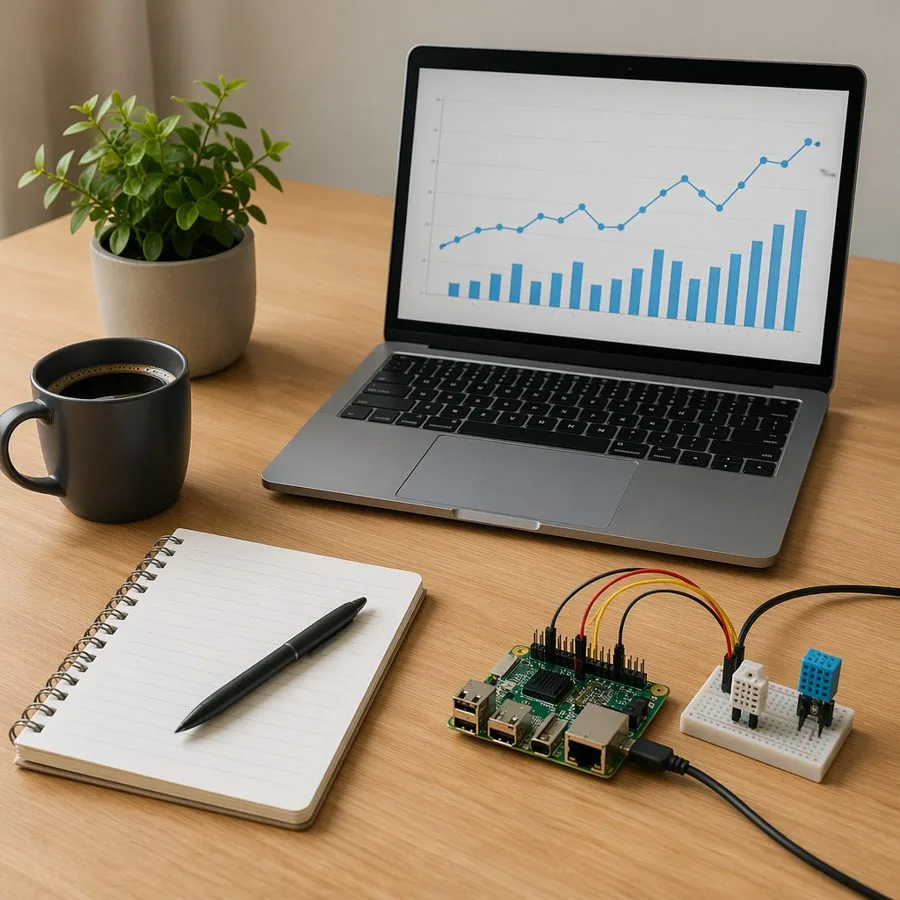
Then pass the image to the local Responses API:
import base64
import io

from openai import OpenAI
from PIL import Image

from foundry_local_sdk import Configuration, FoundryLocalManager

config = Configuration(app_name="foundry_local_vision_demo")
FoundryLocalManager.initialize(config)
manager = FoundryLocalManager.instance

model = manager.catalog.get_model("qwen3-vl-2b-instruct")
if not model.is_cached:
    model.download()

client = None
service_started = False
model.load()
try:
    manager.start_web_service()
    service_started = True
    client = OpenAI(base_url=manager.urls[0].rstrip("/") + "/v1", api_key="notneeded")

    image = Image.open("images/foundry-local-qwen-vision-sample.jpg")
    image.thumbnail((512, 512))

    buffer = io.BytesIO()
    image.save(buffer, format="JPEG")
    image_b64 = base64.b64encode(buffer.getvalue()).decode()

    vision_input = [
        {
            "type": "message",
            "role": "user",
            "content": [
                {
                    "type": "input_text",
                    "text": "Describe the scene and identify anything useful for a developer demo.",
                },
                {
                    "type": "input_image",
                    "image_data": image_b64,
                    "media_type": "image/jpeg",
                },
            ],
        }
    ]

    stream = client.responses.create(
        model=model.id,
        input="placeholder",
        extra_body={"input": vision_input},
        stream=True,
    )

    for event in stream:
        if getattr(event, "type", None) == "response.output_text.delta":
            print(getattr(event, "delta", ""), end="", flush=True)
finally:
    if client is not None:
        client.close()
    if service_started:
        manager.stop_web_service()
    model.unload()
Sample output:
This image depicts a typical developer's workspace, likely for a data scientist or software developer working on a project involving data analysis and development.

The scene is a wooden desk with a modern, functional setup, suggesting a focused and creative work environment.

- Laptop: A silver laptop is the central focus. Its screen displays a digital graph, which is a bar chart with blue bars and an accompanying line graph, indicating some form of data analysis or progress tracking.
- Development Tools: A small, green circuit board with USB ports and other connections is connected via cables to a breadboard-style adapter.
- Notebook and Pen: A spiral-bound notebook and a pen are placed on the desk, indicating that the developer is taking notes and documenting their work.
Use Foundry Local to load the model, start the local web service, then call it through the same OpenAI-style Responses API shape you would use elsewhere. If your app already has screenshot capture, document preview, or image upload flows, this is a very low-friction way to add local visual reasoning.
Action: Upgrade to
foundry-local-sdk1.1+ and try Qwen 3.5 Vision with one of your app’s real screenshots or diagrams.
Foundry Local 1.2
Foundry Local 1.2 followed in May with operational improvements:
- Cancellable downloads — model and execution provider downloads can be canceled using each platform’s native idiom (
CancellationTokenin C#,AbortControllerin JS,threading.Eventin Python). - Multilingual ASR — speech recognition extended beyond English-only.
- Linux ARM64 — new platform target for aarch64 deployments.
- WinML 2.0 upgrade — no longer requires the WinAppSDK Runtime bootstrapper, extends support to Windows 10.0.18362.0+, and adds WebGPU EP and plug-in auto-update.
- ONNX Runtime 1.26.0 + GenAI 0.14.0 — runtime upgrades with region-based downloads and no more 5-minute timeout cap on large models.
For Python apps, the upgrade path stays simple:
pip install --upgrade foundry-local-sdkAction: Upgrade to
foundry-local-sdk1.2 for multilingual speech, ARM64 support, and cancellable downloads.
Foundry Agent Service
May’s most interesting agent developer update is the new prerelease surface in azure-ai-projects: skills and toolboxes. This is the vanilla Foundry Agent Service path — no Microsoft Agent Framework required.
The useful shape is: register reusable guidance as a project skill, bundle it into a toolbox, expose that toolbox as a Model Context Protocol (MCP) endpoint, and attach the MCP endpoint to a prompt agent. I tested this with a scenario where Zava Studio’s agent reviews rough product screenshots and turns them into design guidance.
Here is the rough input the agent received:
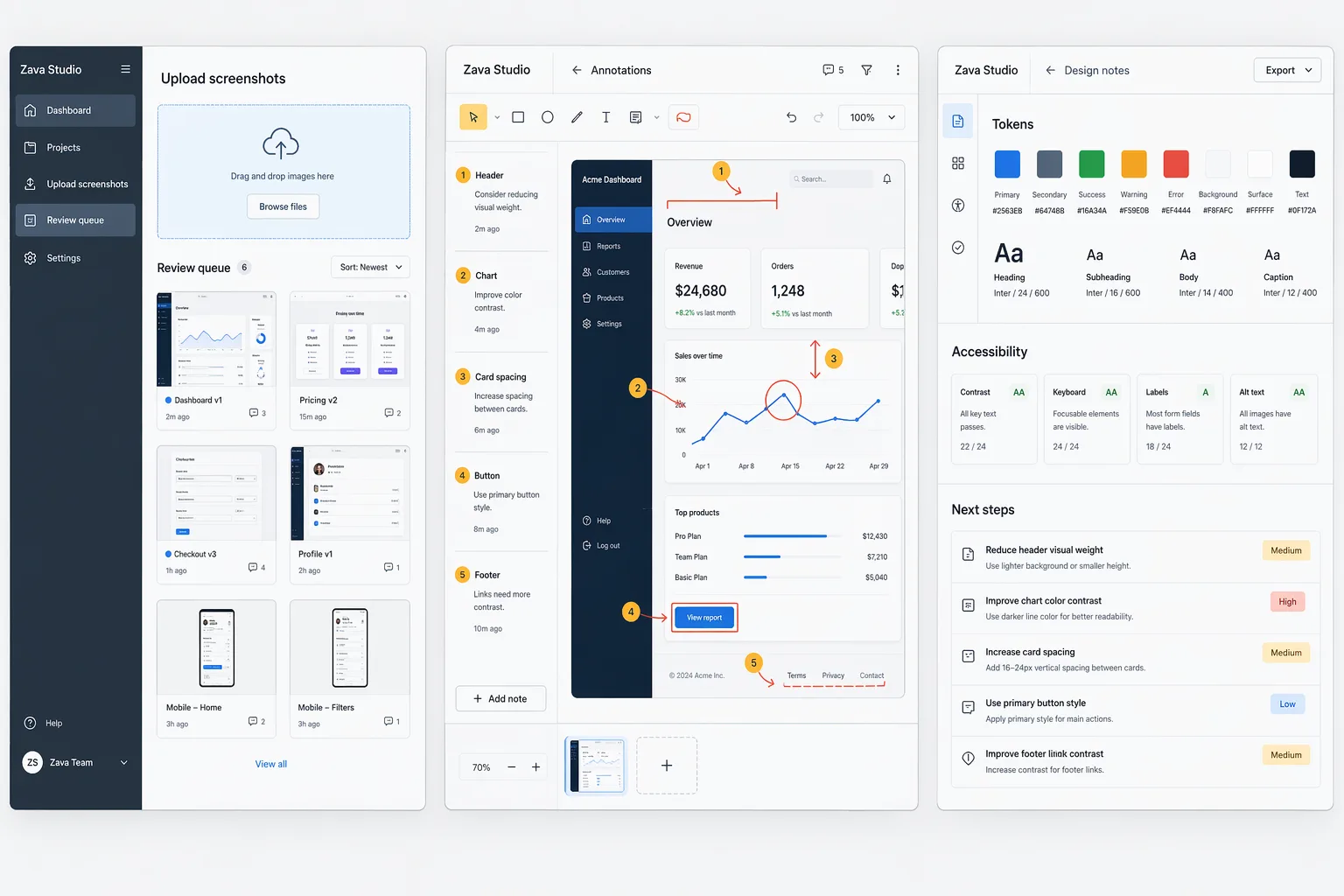
The agent used gpt-5.4 with reasoning.effort="high", plus a frontend-design skill registered through the project skill APIs.
import base64
import os
from pathlib import Path

from azure.ai.projects import AIProjectClient, models
from azure.identity import DefaultAzureCredential

endpoint = os.environ["FOUNDRY_PROJECT_ENDPOINT"]
model = "gpt-5.4"

credential = DefaultAzureCredential()

with AIProjectClient(
    endpoint=endpoint,
    credential=credential,
    allow_preview=True,
) as project_client, project_client.get_openai_client() as openai_client:
    # 1. Register reusable design guidance as a project skill.
    skill = project_client.beta.skills.create(
        "zava-frontend-design",
        inline_content=models.SkillInlineContent(
            description=(
                "Zava Studio frontend-design skill: distinctive UI review "
                "guidance for product screenshot workflows."
            ),
            instructions=Path("skills/frontend-design/SKILL.md").read_text(),
            metadata={"scenario": "Zava Studio"},
        ),
        default=True,
    )

    # 2. Put the skill in a toolbox with tool search enabled.
    toolbox = project_client.beta.toolboxes.create_version(
        "zava-design-toolbox",
        description=(
            "Zava Studio design-review toolbox: frontend-design skill plus "
            "a named web search tool for current UI guidance."
        ),
        tools=[
            models.WebSearchTool(
                type="web_search",
                name="zava_frontend_research",
                description=(
                    "Find frontend design guidance, product UI references, "
                    "accessibility guidance, and verification ideas for Zava Studio."
                ),
                search_context_size="low",
            ),
            models.ToolboxSearchPreviewTool(
                type="toolbox_search_preview",
                name="zava_tool_search",
            ),
        ],
        skills=[
            models.ToolboxSkillReference(
                type="skill_reference",
                name=skill.name,
                version=skill.version,
            )
        ],
    )

    # 3. Attach the toolbox to a prompt agent through its MCP endpoint.
    token = credential.get_token("https://ai.azure.com/.default").token
    toolbox_mcp_url = (
        f"{endpoint.rstrip('/')}/toolboxes/zava-design-toolbox/"
        f"versions/{toolbox.version}/mcp?api-version=v1"
    )

    toolbox_mcp_tool = models.MCPTool(
        server_label="zava_design_toolbox",
        server_url=toolbox_mcp_url,
        authorization=token,
        headers={"Foundry-Features": "Toolboxes=V1Preview"},
        require_approval="never",
    )

    agent = project_client.agents.create_version(
        "zava-design-agent",
        definition=models.PromptAgentDefinition(
            kind="prompt",
            model=model,
            instructions=(
                "You are Zava Studio's frontend design agent. Use the attached "
                "rough screenshots as visual context. First use tool_search, "
                "then call_tool when useful. Return exactly three bullets: "
                "aesthetic direction, concrete UI change, anti-pattern to avoid."
            ),
            reasoning=models.Reasoning(effort="high"),
            tools=[toolbox_mcp_tool],
        ),
    )

    # 4. Invoke the agent with rough product screenshots as image input.
    image_b64 = base64.b64encode(
        Path("images/zava-rough-product-screenshots.png").read_bytes()
    ).decode("ascii")

    response = openai_client.responses.create(
        input=[
            {
                "role": "user",
                "content": [
                    {
                        "type": "input_text",
                        "text": (
                            "Review these Zava Studio rough product screenshots. "
                            "The product turns messy product screenshots into "
                            "clear design-review notes."
                        ),
                    },
                    {
                        "type": "input_image",
                        "image_url": f"data:image/png;base64,{image_b64}",
                    },
                ],
            }
        ],
        extra_body={
            "agent_reference": {
                "name": agent.name,
                "type": "agent_reference",
            }
        },
    )

    print(response.output_text)
Sample output from the live run:
- Aesthetic direction: Treat Zava as a calm review workbench for turning raw screenshots into decisions: neutral surfaces (canvas #F6F7F9, panel #FFFFFF, border #D9DEE7, text #0F172A / #475569), one blue action accent (#2563EB), semantic colors only for severity, 12px radius, 8/16/24 spacing, and very light elevation so the screenshot and annotations — not the app chrome — stay primary.

- Concrete UI change: Recompose the first viewport into one desktop-first tri-pane flow — left 280px intake/review queue, center flexible annotation canvas, right 360px generated notes — with the right pane opening on Actionable notes and moving Tokens / Accessibility into tabs or accordions below; that makes the product promise visible in one glance: "messy screenshot in → clear review notes out." Verify on a 1440px desktop that all three panes fit without horizontal scroll, tab order moves left → center → right, spacing stays on an 8px grid, and text/controls meet at least 4.5:1 contrast.

- Anti-pattern to avoid: Don't turn this into three disconnected admin screens or a mini-Figma clone with dense toolbars, loud gradients, and multicolor cards everywhere; that overbuilds the UI, increases cognitive load, and hides the core before/after value of the product.
Action: Try
azure-ai-projects==2.2.0with a small project skill and toolbox. Start with the CRUD samples forbeta.skills, then use the toolbox-search MCP pattern when you want agents to discover tools dynamically.
SDK & Language Changelog (May 2026)
May’s SDK story is about expanding the preview surface — external agents, model weight management, routines, optimization jobs, and memory stores all landed as beta operations. The pattern is the same as April: stable GA core, fast-moving .beta namespace.
Python
azure-ai-projects 2.2.0
The biggest addition is the .beta.models sub-client for AI model weight registry — create, list, update, delete, and retrieve credentials for model versions. This opens up programmatic model management workflows that previously required the portal.
Other highlights:
- External agent integration (preview) — new
ExternalAgentDefinitionfor third-party agent integration. - New agent tools —
FabricIQPreviewToolandToolboxSearchPreviewTool. - Optimization jobs — create, monitor, and promote optimization candidates for hosted agents.
- Routines — triggered automation CRUD via
.beta.routines. - Data generation jobs — synthetic data generation via
.beta.datasets. - Memory store item CRUD — individual memory management in
.beta.memory_stores. - Skills versioned management — create, list, download, delete skill versions.
Breaking changes are confined to the .beta namespace: isolation_key removed from session operations, several class renames (AgentEndpoint → AgentEndpointConfig, SkillObject → SkillDetails, Target → EvaluationTarget), and signature changes in skills and evaluation taxonomy methods.
pip install --upgrade azure-ai-projects==2.2.0Action: Upgrade to
azure-ai-projects==2.2.0. Breaking changes only affect.betasurface — stable operations are unchanged.
JavaScript / TypeScript
@azure/ai-projects 2.1.1 + 2.2.0
The 2.1.1 patch fixes agent list operations that only returned the first page of results due to missing cursor-based pagination — upgrade if you have more than one page of agents.
2.2.0 mirrors the Python release: external agent definitions, model weight registry, routines, optimization jobs, memory store CRUD, FabricIQPreviewTool, WorkIQPreviewTool, and ToolboxSearchPreviewTool. Same beta-scoped breaking changes as Python.
npm install @azure/ai-projects@2.2.0Action: Take
2.1.1immediately for the pagination fix. Move to2.2.0when you’re ready for the new beta surface.
.NET
Azure.AI.Projects 2.1.0-beta.2 + 2.1.0-beta.3
2.1.0-beta.2 adds the DataGenerationJobs client for synthetic data generation — useful for creating evaluation datasets programmatically. New samples cover evaluation cluster insights, AI-assisted evaluators, and image grading.
2.1.0-beta.3 adds the AIProjectModels client for model weight management and memory store item CRUD.
Action: Upgrade to
Azure.AI.Projects2.1.0-beta.3 for the latest preview surface. GA operations remain on the stable 2.0.x line.
Java
azure-ai-projects 2.1.0-beta.1
Java adds the SkillsClient and SkillsAsyncClient for end-to-end skill management (create, download, list, update, delete). A new buildAgentScopedOpenAIClient(agentName) method on AIProjectClientBuilder returns an OpenAI client scoped to a specific agent endpoint — useful when you need per-agent routing.
Also adds threshold to EvaluatorMetric and new properties on CodeBasedEvaluatorDefinition for code-based evaluator workflows.
Action: Upgrade to
com.azure:azure-ai-projects:2.1.0-beta.1for skills management and agent-scoped clients.
Resources & Community
Register for Microsoft Build
Microsoft Build runs June 2-3, 2026, in San Francisco and online. Register now, sign in, and save Microsoft Foundry sessions to your schedule so you can watch them online. Register for Microsoft Build- Foundry docs: Start with the Microsoft Foundry documentation
- Discord: Join 50,000+ developers building with Foundry
- GitHub Discussions: Ask questions in the forum
- RSS: Subscribe to get this digest monthly
- Foundry Labs: Explore research projects, model experiments, and runnable examples in Foundry Labs
- Microsoft Build recap: Catch up on Microsoft Build sessions if you missed them live


0 comments