

TL;DR
- Foundry Local (generally available, GA): Local model inference is production-ready on Windows, macOS on Apple Silicon, and Linux x64.
- GPT-5.5: The latest GPT-5 family model is available in Microsoft Foundry, with default quota for Tier 5 and Tier 6 subscriptions.
- Microsoft Agent Framework tracing (Preview): Agent Framework agents can emit OpenTelemetry traces into Foundry for debugging and production observability.
- Hosted-agent tracing (Preview): Hosted-agent sessions, tool calls, and run steps can now surface in Foundry traces.
- CodeAct with Hyperlight (alpha): Agent Framework adds sandboxed Python code execution in Hyperlight micro-virtual machines for low-risk tool chains.
- Continuous evaluation custom evaluators (Preview): Bring code-based or prompt-based evaluators into continuous evaluation.
- Agent Monitoring Dashboard (Preview): Track operational metrics and evaluation results together, including token usage, latency, run success rate, and evaluator scores.
- Agent inventory in Foundry Control Plane: Find supported agents across a subscription from the Operate view, including Foundry agents, Azure Site Reliability Engineering (SRE) Agent, Logic Apps agent loops, and registered custom agents.
- GPT-image-2 (Preview): OpenAI’s latest image generation model arrives in Microsoft Foundry with 4K resolution, editing, and up to 10 images per request.
- Microsoft first-party AI models (Preview): MAI-Image-2 and MAI-Image-2-Efficient for image generation, MAI-Voice-1 for expressive text-to-speech, and MAI-Transcribe-1 for speech recognition.
- Gemma 4: Google DeepMind’s open-weight models join the Foundry catalog with native multimodal input and up to 256K context.
- Claude Opus 4.7: Anthropic’s most capable GA model is available in Foundry with stronger instruction following and improved vision.
- Microsoft Agent Framework 1.0 (GA): The unified multi-agent orchestration SDK for .NET and Python reaches general availability.
- Microsoft Foundry Toolkit for VS Code (GA): Formerly AI Toolkit, the extension is generally available with a model playground, agent builder, and one-click deploy.
- Batch evaluations for third-party agents (Preview): Run cloud-based batch evaluations against agents built on any framework.
- Audio and image input in score model grader (Preview): Evaluation graders now accept audio and image content alongside text.
- Notification center (GA): Tenant-level notifications with email delivery for critical alerts move from preview to general availability.
- SDK & language updates: Python and JavaScript/TypeScript add beta agents, skills, and toolboxes routes; .NET reaches the 2.0 GA line; Java fixes streaming behavior.
- Microsoft Build: Register for Microsoft Build and save Microsoft Foundry sessions to watch online.
Looking for Microsoft Foundry sessions to watch online? Start with these Microsoft Build breakout sessions. Times are shown in Pacific time; check the session page for the latest schedule.
| Session | Date/time | Speaker(s) | Description |
|---|---|---|---|
| Confident model selection and integration with Microsoft Foundry (BRK230) | June 2, 12:30-1:15 PM PT | Yina Arenas, Naomi Moneypenny | Choose, integrate, and validate AI models in Microsoft Foundry, including benchmarking and integrated developer workflows. |
| Govern open-source AI agents, any framework, any scale (BRK250) | June 2, 2:30-3:15 PM PT | Sarah Bird, Mehrnoosh Sameki | Learn governance patterns for Microsoft Agent Framework and open-source agent stacks, including evaluations and risk controls. |
| From prototype to production: build and run agents at scale (BRK241) | June 2, 3:45-4:30 PM PT | Tina Schuchman, Jeff Hollan | Walk through the lifecycle for production-grade agents with Foundry Agent Service and Microsoft Agent Framework. |
| From observability to ROI for AI agents on any framework (BRK252) | June 2, 3:45-4:30 PM PT | Sebastian Kohlmeier, Filisha Shah | Cover cross-framework tracing, evaluations, production observability, and ROI measurement for AI agents. |
| Orchestrate special agents with Nemotron models on Microsoft AI Foundry (BRKSP94) | June 2, 3:45-4:30 PM PT | Stephen McCullough | Route tasks across frontier models, NVIDIA Nemotron, and local models for tiered agentic AI architectures. |
| Deploy. Observe. Learn. Reinforcement learning for production agents (BRK231) | June 2, 5:00-5:45 PM PT | Alicia Frame, Omkar More | Use fine-tuning and reinforcement learning on Microsoft Foundry to improve production agents with real usage signals. |
| Build context-aware agents at scale with Microsoft IQ (BRK240) | June 2, 5:00-5:45 PM PT | Marco Casalaina | Learn how Foundry IQ, Fabric IQ, and Work IQ provide an enterprise intelligence layer for AI agents. |
| Context engineering for agents: connect agents with enterprise knowledge (BRK246) | June 3, 9:00-9:45 AM PT | Pablo Castro Castro | Explore Foundry IQ, Azure AI Search, knowledge sources, agentic retrieval-augmented generation (RAG), and enterprise security. |
| Local models, developer control, and the future of AI runtimes (BRK235) | June 3, 10:15-11:00 AM PT | Parth Sareen | Learn how local and hybrid model execution can reshape developer workflows, privacy, and experimentation. |
| Claw and agent harness in Microsoft Foundry (BRK243) | June 3, 11:30 AM-12:15 PM PT | Glenn Condron, Amanda Foster, Shawn Henry | Go deep on multi-agent systems, Claw agent patterns, hosted agents architecture, triggers, state management, and file access. |
| Build secure and enterprise-ready agents with Agent 365 (BRK251) | June 3, 11:30 AM-12:15 PM PT | Neta Haiby | Build enterprise-ready agents with runtime visibility, identity-aware access, data protection, and policy-based governance. |
| Build distributed agentic apps from edge to cloud (BRKSP92) | June 3, 11:30 AM-12:15 PM PT | Colin Helms, Eddy Rodriguez | Design and run multi-agent applications across client, edge, and Azure environments. |
| Train and deploy custom OSS reasoning models with Foundry (BRK232) | June 3, 2:45-3:30 PM PT | Vijay Aski, Manoj Bableshwar, Chris Lauren | Train and tune open-source reasoning models in Microsoft Foundry with code-first workflows and curated reinforcement learning environments. |
| Turn your agents into action: connect tools, APIs, and data (BRK242) | June 3, 4:00-4:45 PM PT | Ronak Chokshi, Joe Filcik, Maria Naggaga | See how to connect agents with toolsets, application programming interfaces (APIs), and data without overloading context windows. |
Want the full online breakout catalogs? Browse Agents & apps, Responsible AI, and Working with models.
Join the community
Connect with 50,000+ developers on Discord, ask questions in GitHub Discussions, or subscribe via RSS to get this digest monthly.
Models
GPT-5.5
GPT-5.5 is now part of the Microsoft Foundry model lineup, but it is not broadly available by default. It has default quota only for Tier 5 and Tier 6 subscriptions. Tiers 1 through 4 currently show 0 requests per minute (RPM) and 0 tokens per minute (TPM) for GPT-5.5, so teams below Tier 5 should request quota before planning a deployment.
We know that can be frustrating if you are ready to test today. We plan to make GPT-5.5 available to more tiers as soon as demand and capacity allow. Thanks for being patient with us while we expand access responsibly.
Regional availability includes Global Standard deployments in East US 2, Sweden Central, South Central US, and Poland Central. Data Zone Standard deployments are available in those same regions.
| Quota tier | GPT-5.5 Data Zone Standard | GPT-5.5 Global Standard |
|---|---|---|
| Tier 5 | 3,000 RPM / 3,000,000 TPM | 10,000 RPM / 10,000,000 TPM |
| Tier 6 | 4,000 RPM / 4,000,000 TPM | 15,000 RPM / 15,000,000 TPM |
To check your subscription tier, use the Microsoft Cognitive Services quota tiers control plane API and look for properties.currentTierName in the response. If you’re signed in with the Azure CLI, this command returns the current tier for a subscription:
az rest --method get --url "https://management.azure.com/subscriptions/<your-subscription-id>/providers/Microsoft.CognitiveServices/quotaTiers?api-version=2025-10-01-preview" --query "value[0].properties.currentTierName" --output tsvExample output:
Tier 2In this example, the subscription is below Tier 5, so GPT-5.5 would need a quota request before deployment.
Developers can use GPT-5.5 through the Responses API or Chat Completions API, with support for structured outputs, text and image inputs, functions, tools, parallel tool calling, computer use, and reasoning.
Action: Check your subscription tier, region, and quota before you move traffic to GPT-5.5. If your subscription is below Tier 5, submit a quota request first.
GPT-image-2 (Preview)
GPT-image-2 is available in public preview in Microsoft Foundry. It is OpenAI’s most capable image generation model, supporting arbitrary resolutions up to 4K (3,840 px long edge), editing with inpainting and variations, face preservation, and up to 10 images per request.
GPT-image-2 accepts text and image inputs and returns images in base64 format. Quality options include low, medium, and high, with low optimized for latency-sensitive use cases. Deploy the model in any supported region and call it through the Images API.
Here is the same prompt run through gpt-image-1.5 and gpt-image-2 in Microsoft Foundry so you can see the generational jump for yourself:

Action: Deploy GPT-image-2 from the Foundry model catalog and use the Images API to generate, edit, or create variations of images.
Microsoft AI (MAI) models (Preview)
Four new first-party Microsoft AI models launched in public preview in April, covering image generation, text-to-speech, and speech recognition.
MAI-Image-2 is a text-to-image generation model that uses a diffusion-based approach to create high-quality, visually rich images from natural language prompts. It supports photorealistic image synthesis with consistent visual structure, and is well suited for concept visualization, creative content, and design workflows. MAI-Image-2e delivers the same image quality up to 22% faster and four times more efficiently, making it the better choice for high-volume, fast-turnaround scenarios like product imagery at scale, marketing variations, and branded assets.
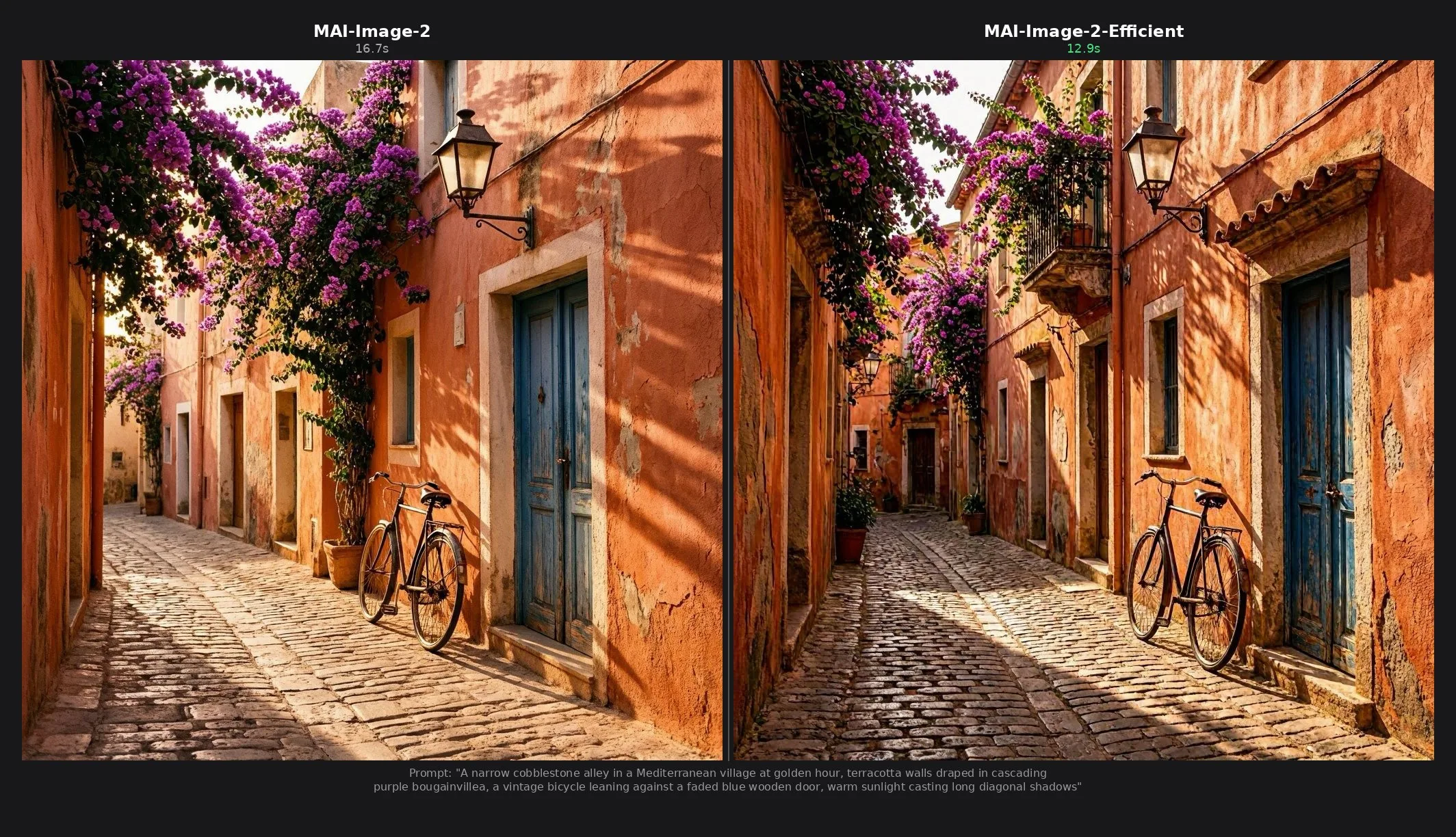
Both models accept text prompts up to 32,000 tokens and output a single PNG image. Resolution must be at least 768×768 pixels, with a maximum total pixel count of 1,048,576 (equivalent to 1024×1024). Either dimension can exceed 1024 as long as the total stays within the limit. Generate an image with MAI-Image-2e:
curl -s -X POST "https://<your-resource>.services.ai.azure.com/mai/v1/images/generations" \
  -H "Content-Type: application/json" \
  -H "api-key: <your-api-key>" \
  -d '{
    "model": "MAI-Image-2e",
    "prompt": "A narrow cobblestone alley in a Mediterranean village at golden hour",
    "width": 1024,
    "height": 1024
  }' | python3 -c "import json,base64,sys; \
    open('output.png','wb').write(base64.b64decode(json.load(sys.stdin)['data'][0]['b64_json']))"
MAI-Voice-1 is a neural text-to-speech model available through Azure Speech in Foundry. It ships with six prebuilt English (US) voices that produce emotionally rich, conversational speech and adapt tone automatically without manual Speech Synthesis Markup Language (SSML) tuning. It is also available as a base model for Personal Voice.
MAI-Transcribe-1 is a speech recognition model from the Microsoft AI Superintelligence team. It focuses on high accuracy and high efficiency through the LLM Speech API, supports WAV, MP3, and FLAC input up to 300 MB, and has SDKs for Python, C#, Java, JavaScript, and REST.
Action: Try MAI-Image-2 or MAI-Image-2-Efficient for image generation, and explore MAI-Voice-1 and MAI-Transcribe-1 through Azure Speech in your Foundry project.
Gemma 4
Gemma 4, Google DeepMind’s newest open-weight model family, is available in the Foundry model catalog through the Hugging Face collection. Released under an Apache 2.0 license, the family spans multiple sizes with native multimodal input (text, image, video), enhanced reasoning and coding capabilities, 140+ pretrained languages, and context windows up to 256K tokens.
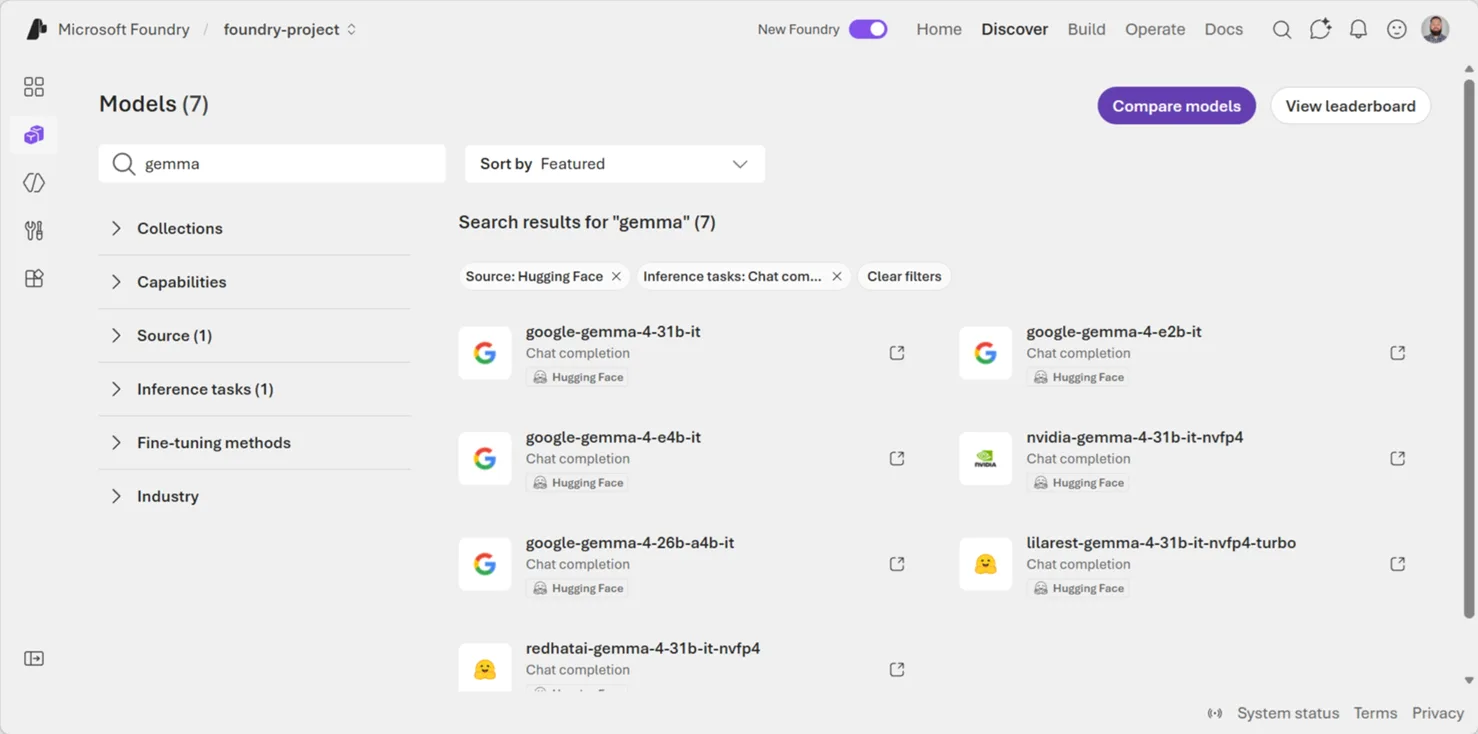
Action: Try Gemma 4 models from the Foundry catalog for document intelligence, multilingual applications, or long-context analytics.
Claude Opus 4.7
Claude Opus 4.7, Anthropic’s most capable generally available model, is available in the Microsoft Foundry model catalog. It brings stronger instruction following, improved vision and document outputs, and better memory for complex multi-step workflows compared to Opus 4.6.
Teams already running Opus 4.6 on Foundry get a direct upgrade path with no infrastructure changes. Claude Code is also available via the Foundry endpoint with a single configuration change. Anthropic provides a migration guide for teams moving from 4.6.
The example below uses Claude’s Skills API to generate a PowerPoint presentation while grounding answers with the Microsoft Learn MCP server — all through a Foundry endpoint:
import os
from anthropic import AnthropicFoundry

client = AnthropicFoundry(
    api_key="ANTHROPIC_FOUNDRY_API_KEY",
    resource="resource-name",
)

messages = [{"role": "user", "content": "Create a 4 slide presentation on Foundry Agent Service"}]
kwargs = dict(
    model="claude-opus-4-7",
    max_tokens=8192,
    betas=["code-execution-2025-08-25", "skills-2025-10-02", "mcp-client-2025-04-04"],
    container={"skills": [{"type": "anthropic", "skill_id": "pptx", "version": "latest"}]},
    mcp_servers=[{"type": "url", "url": "https://learn.microsoft.com/api/mcp", "name": "microsoft_learn"}],
    tools=[{"type": "code_execution_20250825", "name": "code_execution"}],
)

response = client.beta.messages.create(messages=messages, **kwargs)
while response.stop_reason == "pause_turn":
    messages.append({"role": "assistant", "content": response.content})
    kwargs["container"]["id"] = response.container.id
    response = client.beta.messages.create(messages=messages, **kwargs)

for block in response.content:
    if block.type == "text":
        print(block.text)
    elif block.type == "bash_code_execution_tool_result":
        for f in block.content.content:
            meta = client.beta.files.retrieve_metadata(file_id=f.file_id)
            client.beta.files.download(file_id=f.file_id).write_to_file(meta.filename)
            print(f"Saved: {meta.filename}")
Action: Upgrade from Claude Opus 4.6 to 4.7 in the Foundry model catalog, or deploy Opus 4.7 for the first time through the standard provisioning flow.
Agents
Foundry Local (GA)
Foundry Local is generally available for building AI features that run on-device, without a cloud dependency in the request path. It supports Windows, macOS on Apple Silicon, and Linux x64, with software development kits (SDKs) for Python, JavaScript, C#, and Rust.
For agent builders, the value is simple: prototype locally, keep latency low, and ship offline-capable experiences where user data stays on the device.
After installing foundry-local-sdk (foundry-local-sdk-winml on Windows for Windows ML acceleration), you can run a local chat completion with a small catalog model:
from foundry_local_sdk import Configuration, FoundryLocalManager

config = Configuration(app_name="foundry_local_quickstart")
FoundryLocalManager.initialize(config)
manager = FoundryLocalManager.instance

model = manager.catalog.get_model("qwen2.5-0.5b")
model.download()
model.load()

try:
    client = model.get_chat_client()
    response = client.complete_chat(
        [{"role": "user", "content": "Write one sentence about local AI."}]
    )
    print(response.choices[0].message.content)
finally:
    model.unload()
Example output:
Local AI refers to machine learning models and algorithms that can run on devices within the same physical location as they were trained.Action: Try Foundry Local if your agent needs offline execution, local data handling, or a fast local development loop before moving workloads to Microsoft Foundry in the cloud.
Microsoft Agent Framework 1.0 (GA)
Microsoft Agent Framework reached general availability for both .NET and Python. The 1.0 release unifies Semantic Kernel and AutoGen into a single open-source SDK for building multi-agent applications, with a standard agent abstraction, tool integration, session management, and orchestration patterns for composing agents into collaborative workflows.
The framework is designed to work with Microsoft Foundry for model hosting, tracing, and deployment, but runs with any OpenAI-compatible endpoint.
Action: Start building multi-agent applications with Agent Framework 1.0 in .NET or Python. Deploy to Foundry Agent Service for production hosting, tracing, and monitoring.
Microsoft Agent Framework tracing (Preview)
Microsoft Agent Framework tracing is now available in preview for Python agents. It emits OpenTelemetry (OTel) spans for the agent run, model calls, tool execution, token usage, latency, and input/output payloads when you explicitly enable sensitive data for a safe development environment.
This gives developers a practical debugging loop for agent apps: run a scenario, copy the trace ID, and inspect which model answered, which tool ran, how long each step took, how many tokens were used, and what payload moved through the run.
Install the Agent Framework Foundry package and Azure Monitor OpenTelemetry support:
pip install agent-framework-foundry azure-identity azure-monitor-opentelemetry aiohttp pydanticThen run a minimal weather agent. Set the tracing flags before importing Agent Framework, connect to your Foundry project, and let FoundryChatClient.configure_azure_monitor() send telemetry to the Application Insights resource connected to that project:
import asyncio
import os
from typing import Annotated

# Enable GenAI semantic tracing while the capability is experimental.
os.environ.setdefault("AZURE_EXPERIMENTAL_ENABLE_GENAI_TRACING", "true")
os.environ.setdefault("ENABLE_INSTRUMENTATION", "true")
os.environ.setdefault("ENABLE_SENSITIVE_DATA", "true")
os.environ.setdefault("OTEL_SERVICE_NAME", "weather-agent-demo")

from agent_framework import Agent, tool
from agent_framework.foundry import FoundryChatClient
from agent_framework.observability import get_tracer
from azure.identity import AzureCliCredential
from opentelemetry.trace import SpanKind
from opentelemetry.trace.span import format_trace_id
from pydantic import Field

@tool(approval_mode="never_require")
async def get_weather(
    location: Annotated[str, Field(description="The city or region to get weather for.")],
) -> str:
    """Get the current weather for a location."""
    await asyncio.sleep(0.2)
    return f"The weather in {location} is sunny with a high of 22C."

async def main():
    client = FoundryChatClient(
        project_endpoint=os.environ["FOUNDRY_PROJECT_ENDPOINT"],
        model=os.environ["FOUNDRY_MODEL"],
        credential=AzureCliCredential(),
    )
    try:
        await client.configure_azure_monitor(enable_sensitive_data=True)

        agent = Agent(
            client=client,
            tools=[get_weather],
            name="WeatherAgent",
            id="weather-agent",
            default_options={
                "tool_choice": "required",
                "reasoning": {"effort": "low", "summary": "auto"},
            },
            instructions=(
                "You are a weather assistant. For every weather question, call the "
                "get_weather tool before answering. Do not guess or use memorized weather."
            ),
        )

        with get_tracer().start_as_current_span("Weather Agent Chat", kind=SpanKind.CLIENT) as span:
            print(f"Trace ID: {format_trace_id(span.get_span_context().trace_id)}")
            session = agent.create_session()
            result = await agent.run("What's the weather in Amsterdam?", session=session)
            print(result)
    finally:
        await client.project_client.close()
        await client.client.close()

if __name__ == "__main__":
    asyncio.run(main())
A run like this emits the expected Agent Framework span tree: invoke_agent, chat, and execute_tool, with token counts, durations, tool arguments, tool output, and final assistant response. Keep enable_sensitive_data=False for routine observability, and turn it on only for temporary debugging with non-sensitive inputs.
In the Foundry portal, the trace view makes it easy to scan the agent invocation, tool execution, model call, user input, and assistant output in one place.
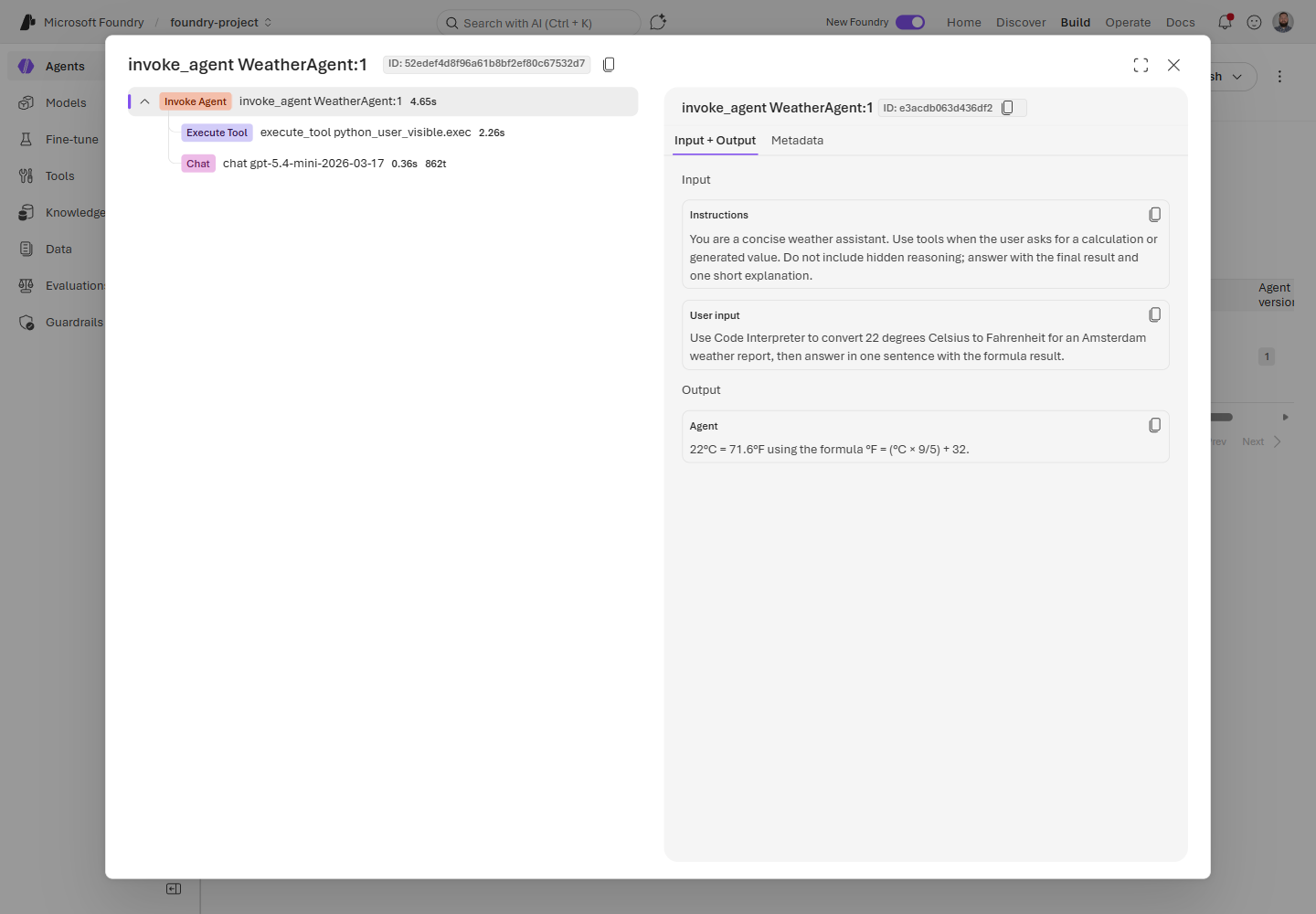
Action: Connect Application Insights to your Foundry project, enable Agent Framework observability, and use the trace ID to debug model calls, tool calls, tokens, latency, and failures.
Hosted-agent tracing (Preview)
Hosted-agent tracing brings server-side trace visibility to hosted agents when tracing is connected to your project. You can inspect recent runs, review conversation details, and see the ordered actions, run steps, and tool calls behind a response.
Tracing is generally available for prompt agents; workflow, hosted, and custom agents are in preview. Treat trace data like production telemetry: redact sensitive content before it reaches spans, prompts, tool arguments, or logs.
Action: Connect Application Insights to your Foundry project, generate hosted-agent traffic, and use the Traces view to debug tool behavior and latency.
CodeAct with Hyperlight (alpha)
CodeAct with Hyperlight is available as an alpha package for Microsoft Agent Framework. It lets an agent collapse multi-step tool plans into a single sandboxed Python code block, then run that generated code in an isolated Hyperlight micro-virtual machine.
The best fit is read-heavy, chainable work: data lookups, light computation, report assembly, and tasks where several small tool calls can be composed safely. Keep side-effecting tools, such as sending email or writing to production systems, approval-gated as direct tools.
Action: Use CodeAct for low-risk tool chains where reducing model round trips matters, and keep human approval around tools with side effects.
Agent inventory in Foundry Control Plane
Foundry Control Plane gives teams a subscription-level inventory for supported agents across projects and platforms. The Operate > Assets > Agents view helps you find agents, check status, review versions, inspect runs and error rates when observability is configured, and perform supported lifecycle operations.
Supported discovery includes Foundry agents, Azure Site Reliability Engineering (SRE) Agent, Azure Logic Apps agent loops, and registered custom agents. Logic Apps agent loops appear in the inventory, but observability features such as traces and metrics are not supported for those loops.
Action: Use the Agents inventory to find agent assets across a subscription before you troubleshoot, stop, block, or register agents.
Evaluations & Observability
Continuous evaluation custom evaluators (Preview)
Continuous evaluation now supports custom evaluators, so production quality checks can match the way your application actually works. Add code-based evaluators for deterministic checks like format validation, or prompt-based evaluators for subjective checks like tone, helpfulness, and domain-specific answer quality.
Action: Move one team-specific acceptance criterion into a custom evaluator, then add it to continuous evaluation from the agent monitoring settings.
Agent Monitoring Dashboard (Preview)
Agent Monitoring Dashboard brings operational metrics and evaluation results into one view: token usage, latency, run success rate, evaluator scores, and red-teaming results when enabled. This makes quality drift easier to spot alongside the runtime signals your team already watches.
Action: Connect Application Insights to your Foundry project, open your agent’s monitoring view, and review evaluation scores next to latency and success-rate trends.
Monitoring custom agents (Preview)
Custom agent monitoring lets Foundry centralize observability for agents that do not run directly on the platform. Register a custom agent through Foundry Control Plane, route it through AI Gateway, and send OTel traces to the same Application Insights resource used by your Foundry project. From there, you can monitor metrics like error rate and configure continuous evaluations for production traffic.
Action: If you have a LangGraph, Agent-to-Agent (A2A), or HTTP-based agent running outside Foundry, register it as a custom agent and instrument it with OTel semantic conventions.
Batch evaluations for third-party agents (Preview)
Batch evaluations now support third-party agents through the azure_ai_target_completions data source. Teams building agents with LangGraph, the Agent-to-Agent (A2A) protocol, or any HTTP-based framework can run cloud-based evaluations using built-in evaluators for safety, fluency, and task adherence without switching platforms.
Define test data inline or from a dataset file, target your agent by name and version, and retrieve pass/fail results with scores and reasoning for each test case.
Action: Point a batch evaluation run at your non-Foundry agent using
azure_ai_target_completionsand built-in evaluators to measure safety and quality.
Audio and image input in score model grader (Preview)
Score model grader now accepts audio and image content alongside text when evaluating model outputs. This extends the evaluation surface to multimodal scenarios where agent responses include or depend on non-text content.
Action: Use the score model grader with multimodal inputs when your evaluation criteria depend on audio or visual content.
Tools & Developer Experience
Microsoft Foundry Toolkit for VS Code (GA)
Microsoft Foundry Toolkit for VS Code, formerly AI Toolkit, is now generally available. The rebrand reflects a unified developer experience for building AI apps and agents on the Microsoft Foundry platform.
The GA release includes a curated model playground with 100+ models from Foundry, GitHub, OpenAI, Anthropic, and Ollama; a no-code agent builder for experimenting with agent ideas; GitHub Copilot–powered agent development using the Microsoft Agent Framework; an agent inspector for real-time workflow visualization and debugging; Phi model fine-tuning for edge targets; and one-click deployment to Foundry Agent Service with continuous evaluations via pytest.
Action: Install Foundry Toolkit from the VS Code Marketplace and follow the getting started tutorial to build your first agent.
Notification center (GA)
Notification center is now generally available after previewing in March. It delivers tenant-level notifications with email delivery for critical evaluation, safety, and deployment alerts, so teams can catch issues without watching dashboards.
Action: Check your notification preferences in the Foundry portal to make sure your team receives alerts for the events that matter.
SDK & Language Changelog (April 2026)
After March’s GA wave, April was about rounding out the day-to-day developer experience. The SDKs are starting to expose more of the hosted-agent lifecycle directly from code: sessions, session files, skills, toolboxes, typed evaluation inputs, and safer streaming behavior.
Python
azure-ai-projects 2.1.0 (Apr 20)
If you’re building hosted agents in Python, this is the release to look at. The azure-ai-projects 2.1.0 package adds more of the hosted-agent management surface under the preview .beta namespace, so you can script the same workflows you test in the portal.
The most useful change is that get_openai_client(agent_name=...) can now return an OpenAI client scoped to an agent endpoint when your AIProjectClient is created with allow_preview=True. That makes it easier to keep application code on the familiar OpenAI client shape while routing requests through a specific agent.
The release also adds project_client.beta.agents operations for hosted-agent sessions and session files, plus patch_agent_details() for updating agent metadata. New project_client.beta.skills and project_client.beta.toolboxes clients bring CRUD-style operations for packaged skills and toolboxes, and evaluation authors get TypedDict helpers for .evals.create() and .evals.runs.create().
One tracing change to note: trace context propagation is now enabled by default when tracing is enabled.
Action: Upgrade to
azure-ai-projects==2.1.0if you are using hosted-agent sessions, skills, toolboxes, or typed evaluation inputs. Keepallow_preview=Truefor agent endpoint preview flows.
JavaScript / TypeScript
@azure/ai-projects 2.0.2 (Apr 6) + 2.1.0 (Apr 17)
JavaScript and TypeScript followed the same direction as Python. Version 2.1.0 adds preview routes for the pieces you need when an agent becomes more than a prompt: beta agent operations, skills, and toolboxes.
Use project.beta.agents for beta agent operations such as managed agent identity blueprints, sessions, and session files. Use project.beta.skills and project.beta.toolboxes when you want to manage skills and toolbox features from your build or deployment tooling instead of doing everything manually.
There is also an important safety fix in 2.0.2: unconditional console.debug calls were replaced with Azure SDK logging, which helps avoid exposing sensitive values such as SAS URIs in console output.
Breaking changes in 2.1.0 are small but worth checking: container_protocol_versions and code_type changed from required to optional in hosted-agent output types, and Schedule.id was renamed to schedule_id.
Action: Upgrade to
@azure/ai-projects@2.1.0for the new beta routes. If you are pinned to2.0.0or2.0.1, take the2.0.2logging fix at minimum.
.NET
Azure.AI.Projects 2.0.0 (Apr 1) + 2.0.1 (Apr 22)
For .NET developers, April marks the move to the Azure.AI.Projects 2.0 GA line on the v1 REST surface. If you held off during the beta cycle, this is the stable package to start from.
The migration from beta includes several naming cleanups. Insights became ProjectInsights, Evaluators became ProjectEvaluators, AIProjectClient.OpenAI became AIProjectClient.ProjectOpenAIClient, and AIProjectClient.Agents became AIProjectClient.AgentAdministrationClient. Evaluation and memory operations also moved into Azure.AI.Projects.Evaluation and Azure.AI.Projects.Memory namespaces.
2.0.1 adopts Azure.Core 1.53.0, which type-forwards the Azure.Identity namespace, so the explicit Azure.Identity dependency is no longer required.
Preview note: 2.1.0-beta.1 added a Toolboxes sample for teams trying the preview toolbox surface.
Action: Upgrade to
Azure.AI.Projects2.0.1 for the stable .NET package, and review the rename list if you are moving from the beta line.
Java
azure-ai-projects 2.0.1 (Apr 16)
Java’s April update is smaller, but important if you stream responses. Version 2.0.1 fixes streaming APIs so they stream response data instead of eagerly buffering the full response body in memory. Async completions also moved off I/O threads to avoid blocking.
Action: Upgrade to
com.azure:azure-ai-projects:2.0.1if your Java app uses streaming responses or long-running streamed output.
Resources & Community
Register for Microsoft Build
Microsoft Build runs June 2-3, 2026, in San Francisco and online. Register now, sign in, and save Microsoft Foundry sessions to your schedule so you can watch them online. Register for Microsoft Build- Foundry docs: Start with the Microsoft Foundry documentation
- Microsoft Build: Register for Microsoft Build and sign in to save Microsoft Foundry sessions to your online schedule
- Discord: Join the Foundry Discord
- GitHub Discussions: Ask questions in the forum
- RSS: Subscribe to get this digest monthly
- Model catalog: Browse models in Microsoft Foundry


0 comments