


Available in Public Preview Today
Toolbox is a new way to curate, configure, and reuse tools across all of your AI agents without rewiring them every time from Foundry.
Today, teams build agents across different frameworks and runtimes. Each agent often wires tools directly, with its own authentication, credentials, and integration code. As organizations scale agent usage, this leads to duplicated work, inconsistent behavior, and fragile production deployments.
Toolbox fixes this by letting you define a curated set of tools once, manage them centrally in Foundry, and expose them through a unified endpoint that any agent can consume.
Why are tools messy today
Consider this scenario: developer onboarding. You’re building an agent that provisions an environment for a new engineer. It creates an Entra ID account, adds access to GitHub repos, spins up cloud resources, creates onboarding tasks in Azure DevOps, and sends a welcome message in Teams. Sounds straightforward, until you look closer.
That single agent depends on five tools. Five different tool types (APIs, MCP servers, skills, connectors, flows). Five different authentication models. Five different owning teams; each with their own expectations for how their tools should be called. Now multiply that across every agent your organization is building. Teams re‑implement the same tools. Credentials are duplicated. Governance is inconsistent or missing entirely. There’s little visibility into what tools exist, who is using them, or whether they’re governed at all. Developers stall, not because the models aren’t capable, but because tool integration has become the bottleneck. The infrastructure already exists. Enterprises have gateways, credential vaults, policies, and observability. What’s missing is a developer experience that packages this infrastructure into something reusable, discoverable, and governed by default.
That’s what Foundry Toolbox is designed to provide.
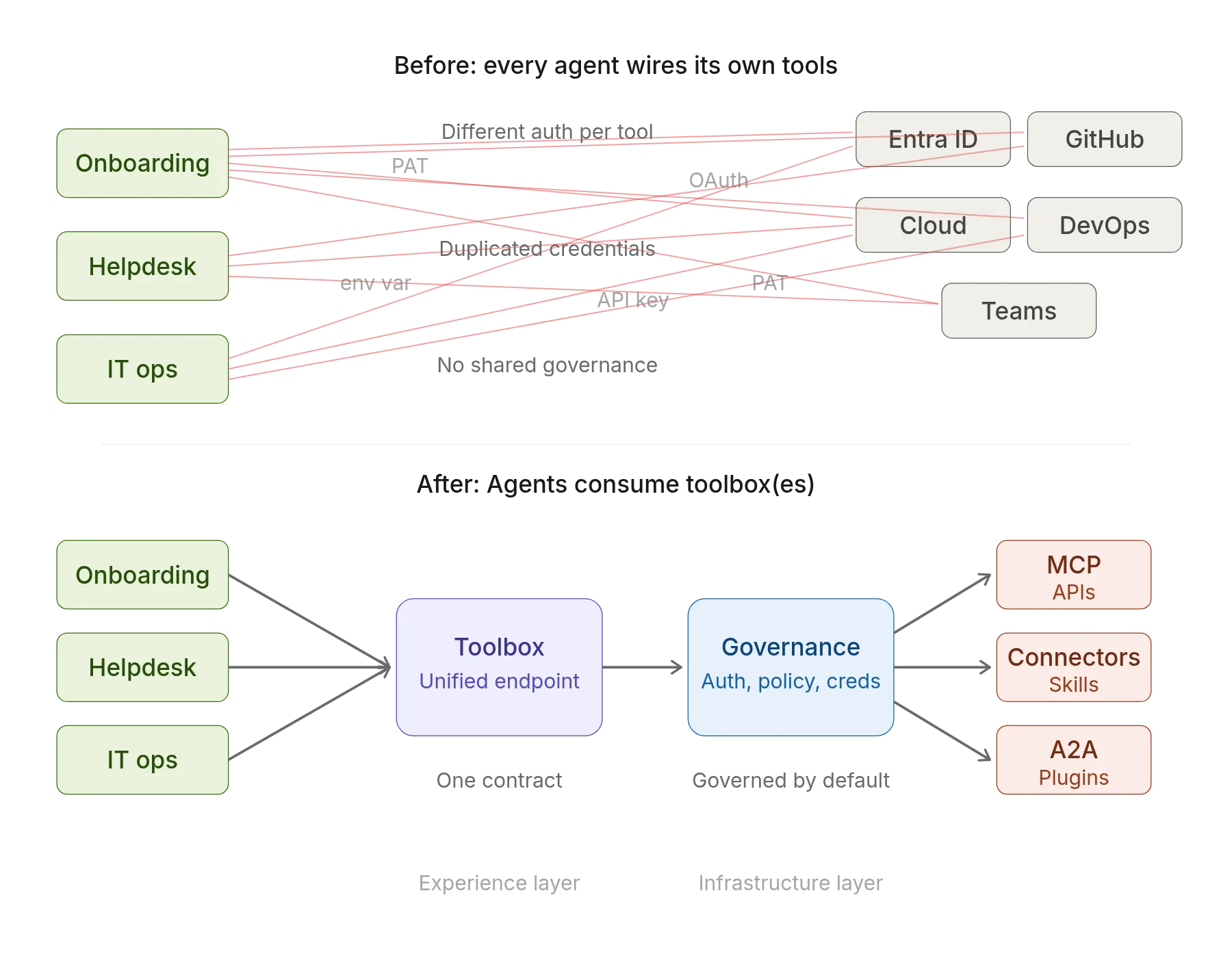
Stop wiring every agent to every tool.
Toolbox Overview
Discover. Build. Consume. Govern.
What is a Toolbox: A toolbox is a reusable bundle of tools, managed in Foundry, that agents consume through a single, consistent interface.
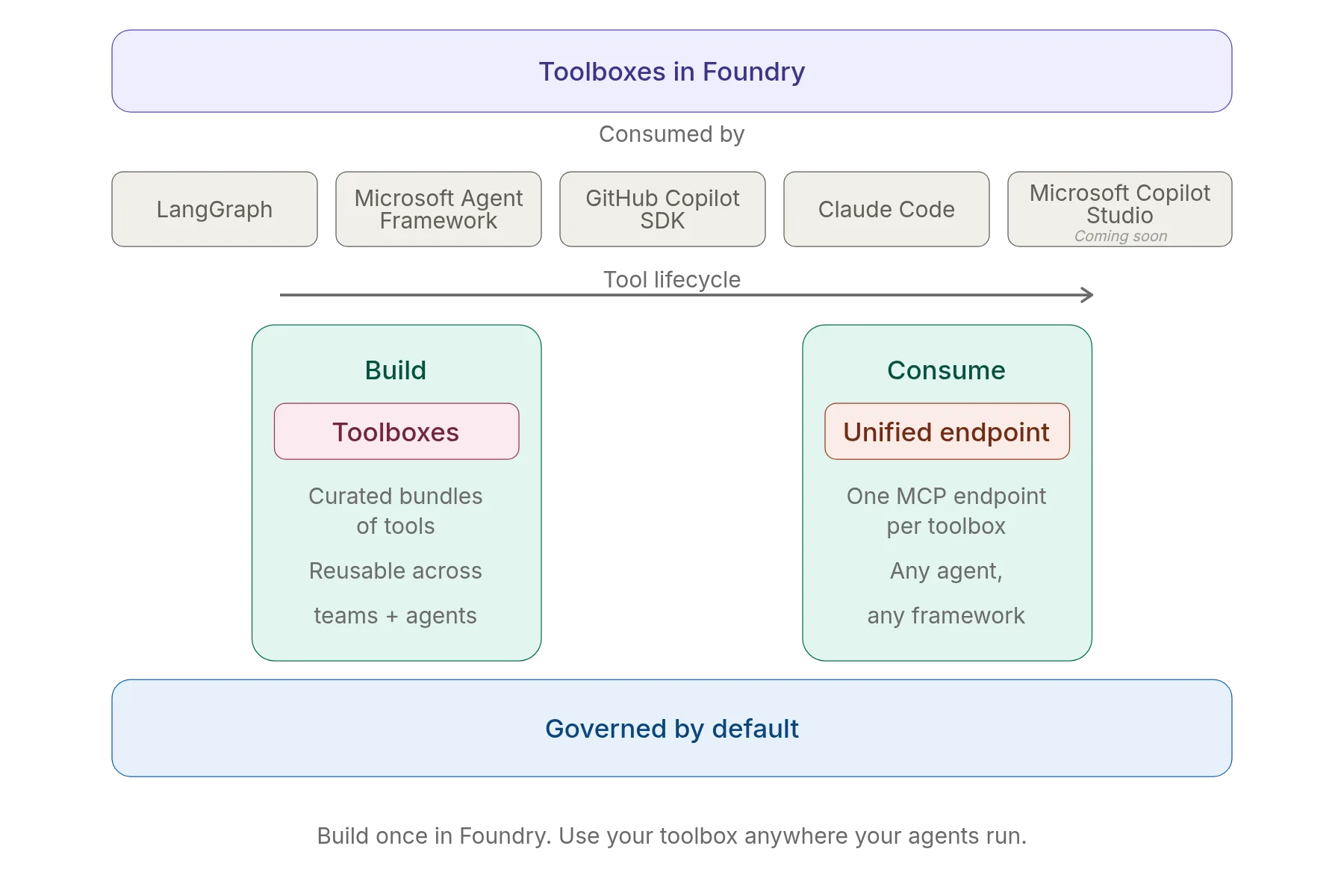
Toolboxes cover the full tool lifecycle through four pillars: Find the right tools. Build a toolbox. Consume a toolbox from any agent. Govern everything that flows through it. In public preview today, the focus is on Build and Consume; the two steps that remove friction immediately.
| Pillar | What it is | What it enables |
| Discover (coming soon) | The ability to find the right tools without manually browsing long catalogs or knowing where tools live. | Developers and agents can discover existing, approved tools instead of rebuilding them, reducing duplication and improving consistency. |
| Build (Today) | The ability to select tools into a toolbox — a named, reusable bundle of tools managed in Foundry. | Teams define tools once, configure authentication and access centrally, and publish a reusable toolbox that others can consume. |
| Consume (Today) | A single, MCP‑compatible endpoint that exposes all tools in a toolbox to any agent runtime. | Agents connect once and dynamically discover and invoke all tools in the toolbox, without per‑tool wiring or custom SDKs. |
| Govern
(coming soon) |
Centralized authentication and observability applied to all tool calls flowing through a toolbox. | Security and platform teams get consistent controls and visibility, while developers avoid stitching governance into every agent. |
Build – Curate Tools into Reusable Toolboxes
A toolbox is a named, reusable bundle of tools managed in Foundry. You select tools, configure authentication, and publish the toolbox as a shared asset.
Tools you can include today:
- Built-in tools: Web Search, Code Interpreter, File Search, Azure AI Search
- Protocols: Model Context Protocol (MCP), Agent-to-Agent (A2A), OpenAPI
Authentication is handled centrally using options like OAuth identity passthrough and Microsoft Entra managed identity so, individual agents don’t manage credentials themselves. And any agent team can consume it without re-wiring the individual tools.
Consume – One Endpoint, Any Agent
When you build a toolbox, Foundry gives you a unified MCP-compatible endpoint for the entire bundle.
https://zava.services.ai.azure.com/api/projects/<project>/toolbox/<toolbox-name>/mcp?api-version=v1
With one endpoint, an agent can:
- Discover and invoke all tools in the toolbox dynamically
- Span multiple protocols and auth models transparently
- Use a production-ready version while the toolbox continues to evolve
Agents connect once; no per-tool wiring, no custom SDKs.
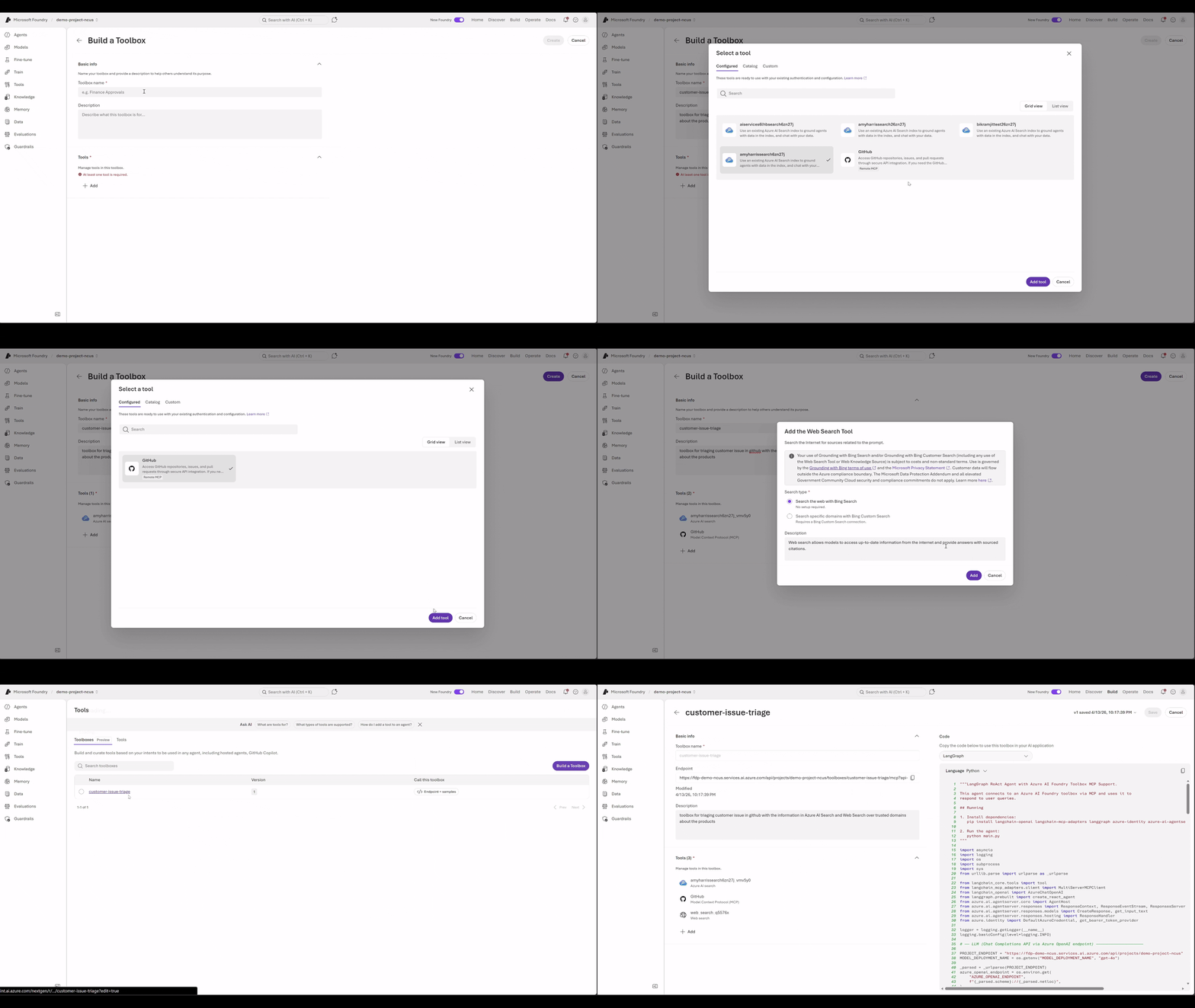
Toolboxes are Foundry Homed, not Foundry-Bound
Build once consume anywhere.
A common question we hear is: “Are we locked into Foundry Agents?”
No, and that’s a deliberate design choice.
Toolboxes are created and governed in Foundry, where teams configure tools and credentials. But the consumption surface is open. Any agent runtime that can consume an MCP endpoint can use a toolbox.
This includes:
- Custom agents: Built with Microsoft Agent Framework, LangGraph, or your own code
- Coding agents: GitHub Copilot, Claude Code, and MCP-enabled IDEs
You can reuse tool investments across runtimes without duplicating configuration or governance.
Getting started with Toolbox in Foundry
You can be up and running with Toolbox in just a few steps.
Step 1: Set up your Foundry project client
A Toolbox lives inside a Foundry project. Create an AIProjectClient using your project endpoint and Azure credentials.
from azure.identity import DefaultAzureCredential
from azure.ai.projects import AIProjectClient
import os
client = AIProjectClient(
    endpoint=os.environ["FOUNDRY_PROJECT_ENDPOINT"],
    credential=DefaultAzureCredential()
)
This sets up a connection to your Foundry project and handles authentication for local development, managed identity, or CI automatically.
Step 2: Build a toolbox
Next, create a toolbox and add the tools your agents need. In this example, the toolbox combines:
- Web search over approved domains
- Azure AI Search over internal documentation
- A GitHub MCP server for taking action
toolbox_version = client.beta.toolboxes.create_toolbox_version(
toolbox_version = client.beta.toolboxes.create_toolbox_version(
    toolbox_name="customer-feedback-triaging-toolbox",
    description="Search public and internal documentation to triage customer feedback, then respond to issues or create tasks in GitHub. ",
    tools=[
        {
        "type": "web_search",
        "description": "Use this tool to retrieve public documentation in our official websites".
  "custom_search_configuration": {
          "project_connection_id": "<BING_CONNECTION_NAME>",
          "instance_name": "<BING_INSTANCE_NAME>"
        }
        },
        {
        "type": "azure_ai_search",
        "name": "product-manuals-ai-search",
        "description": "Search internal product documentation",
        "azure_ai_search": {
            "indexes": [
            {
                "index_name": "<INDEX_NAME>",
                "project_connection_id": "<CONNECTION_ID>"
           }
            ]
        }
        },
        {
        "type": "mcp",
        "server_label": "github",
        "server_url": "https://api.githubcopilot.com/mcp”,
        "project_connection_id":  "<CONNECTION_ID>"
        }
    ],
)
print(f"Created toolbox: {toolbox_version.name}, version: {toolbox_version.version}")
print(toolbox_version.mcp_endpoint)
What happened here
- A Toolbox and its first version were created
- Tools spanning web search, internal search, and MCP servers were registered
- Authentication for each tool is handled by Foundry (OAuth, Microsoft Entra, etc.)
Foundry gives you a unified endpoint to your toolbox to test with:
Step 3: Attach the toolbox to an agent
You can use Toolbox with any agent framework. Here’s an example using Microsoft Agent Framework with a Foundry‑hosted model.
import asyncio
import logging
import os
import pathlib
import re
from urllib.parse import urlparse as _urlparse

import httpx
from dotenv import load_dotenv

load_dotenv(override=False)

from azure.identity import DefaultAzureCredential, get_bearer_token_provider
from azure.ai.agentserver.responses import (
    ResponseContext,
    ResponseEventStream,
    ResponsesAgentServerHost,
    ResponsesServerOptions,
    get_input_expanded,
)
from azure.ai.agentserver.responses.models import CreateResponse
from agent_framework import MCPStreamableHTTPTool
from agent_framework.azure import AzureOpenAIChatClient
from agent_framework.observability import enable_instrumentation

enable_instrumentation(enable_sensitive_data=True)
What this sets up
- An agent backed by a Foundry‑hosted model
- Authentication handled through Microsoft Entra
- A Microsoft Agent Framework agent ready to use tools
- Tracing enabled by default
Step 4: Attach the Toolbox to your agent
Now, connect your Toolbox endpoint to the agent so it has access to all tools defined in the Toolbox.
AGENT_NAME = os.getenv("AGENT_NAME")
logger = logging.getLogger(AGENT_NAME)

TOOLBOX_ENDPOINT =os.getenv("FOUNDRY_TOOLBOX_ENDPOINT")

_TOOLBOX_FEATURES = "Toolboxes=V1Preview"

class _ToolboxAuth(httpx.Auth):
    """httpx Auth that injects a fresh bearer token on every request.

    Uses ``get_bearer_token_provider`` so the underlying credential handles
    caching and proactive token refresh automatically.
    """
    def __init__(self, token_provider):
        self._get_token = token_provider
    def auth_flow(self, request):
        request.headers["Authorization"] = f"Bearer {self._get_token()}"
        yield request

SYSTEM_PROMPT = """You are a helpful assistant with access to Microsoft Foundry toolbox tools. Use the available tools to help answer user questions accurately and concisely."""

def _create_agent():
    """Create and return the MAF agent with toolbox tools."""
    credential = DefaultAzureCredential()

    chat_client = AzureOpenAIChatClient(
        endpoint=azure_openai_endpoint,
        deployment_name=AZURE_AI_MODEL_DEPLOYMENT_NAME,
        credential=credential,
    )

    logger.info("Connecting to toolbox: %s", TOOLBOX_ENDPOINT)
    token_provider = get_bearer_token_provider(credential, "https://ai.azure.com/.default")
    extra_headers = {"Foundry-Features": _TOOLBOX_FEATURES} if _TOOLBOX_FEATURES else {}
    http_client = httpx.AsyncClient(
        auth=_ToolboxAuth(token_provider),
        headers=extra_headers,
        timeout=120.0,
    )

    mcp_tool = MCPStreamableHTTPTool(
        name="toolbox",
        url=TOOLBOX_ENDPOINT,
        http_client=http_client,
        load_prompts=False,
    )
    tools = [mcp_tool]

    agent = chat_client.as_agent(
        name=AGENT_NAME,
        instructions=SYSTEM_PROMPT,
        tools=tools,
    )

    logger.info(
        "[%s] starting up (model=%s, endpoint=%s)",
        AGENT_NAME, AZURE_AI_MODEL_DEPLOYMENT_NAME, PROJECT_ENDPOINT,
    )
    return agent
What this does
- Adds the Toolbox endpoint as a single tool
- Gives the agent access to every tool in the Toolbox
- Uses Microsoft Entra for secure, managed authentication
Step 5: Promote and share a production‑ready Toolbox
Once you are fully tested one version of toolbox, you can promote this version to be the default version of toolbox and share the toolbox endpoint broadly.
toolbox = client.beta.toolboxes.update(
    toolbox_name="my-toolbox",
    default_version="<version_id>",
)
print(f"Default version: {toolbox.default_version}")
After this you can share the toolbox endpoint with other people while you continue iterating this toolbox:
In future iterations, once you have another production-ready version, you can update the toolbox again pointing to the newer version and people using this toolbox won’t need to change their code and agent at all.
Start Building
- Documentation for toolbox in Foundry
- Start with AZD CLI
- Sample code for using toolbox with Hosted Agents in Foundry Agent Service
- Start with Foundry Portal (Build -> Tools) or Foundry Toolkit for VS Code Pre-release to start building Toolboxes


0 comments
Be the first to start the discussion.