


When we launched Microsoft Agent Framework last October, we made a promise: building production-grade AI agents should feel as natural and structured as building any other software.
Today, we’re delivering on that promise — with the v1.0 release of Microsoft Agent Framework and the general availability of Foundry Toolkit for Visual Studio Code (formerly AI Toolkit for VS Code), new capabilities in memory (preview) in Foundry Agent Service, Toolbox in Foundry (preview) to give your agents the right tools, a faster and more secure hosted agents experience in Foundry Agent Service (preview), and Observability in Foundry Control Plane reaching full GA on core capabilities including end-to-end tracing now in place.
Customers like Sitecore are already putting this stack to work. Their SitecoreAI platform powers Agentic Studio, a collaborative workspace where marketing teams and AI agents execute campaigns together. It’s built on Microsoft Agent Framework, with Foundry IQ ensuring each agent connects to the right brand knowledge at the right time with built-in governance.
Step 1: Build Locally with Microsoft Agent Framework + Foundry Toolkit for VS Code
Every agent starts on a developer’s machine. Microsoft Agent Framework has now reached its v1.0 release and is stable across Python and .NET. It’s the open-source SDK and runtime that unifies the enterprise-grade foundations of Semantic Kernel with the multi-agent orchestration innovation of AutoGen, so developers no longer have to choose between them. We’ve published detailed migration guides for existing Semantic Kernel and AutoGen users to make the transition straightforward.
v1.0 includes:
- Multi-model and agent platform support — Azure OpenAI, Anthropic, Google Gemini, Amazon Bedrock, Ollama, and more
- Workflows — programmatic and declarative multi-step agent pipelines, including visual export in DevUI
- Native Foundry integration — memory, hosted agents, Observability (Tracing, Monitoring, and Evaluations), and Foundry Tools as first-class building blocks
- Open standards — MCP, A2A, and OpenAPI out of the box
import asyncio
from agent_framework.azure import AzureOpenAIResponsesClient
from azure.identity import AzureCliCredential

async def main():
    agent = AzureOpenAIResponsesClient(
        credential=AzureCliCredential(),
    ).as_agent(
        name="SupportTriageBot",
        instructions="You are an expert support triage agent.",
    )

    response = await agent.run("Analyze this ticket and classify its priority.")
    print(response.text)

asyncio.run(main())
Foundry Toolkit for VS Code, now generally available, gives you a purpose-built VS Code experience alongside Microsoft Agent Framework: create agents from templates or with GitHub Copilot, test and debug runs locally with visualization and traces, and deploy to Foundry Agent Service directly — all without leaving the familiar VS Code environment. Read this blog to learn more about what’s new in Foundry Toolkit. Deploying to the newest hosted agents in Foundry Agent Service (public preview) is available via the Foundry Toolkit pre‑release.
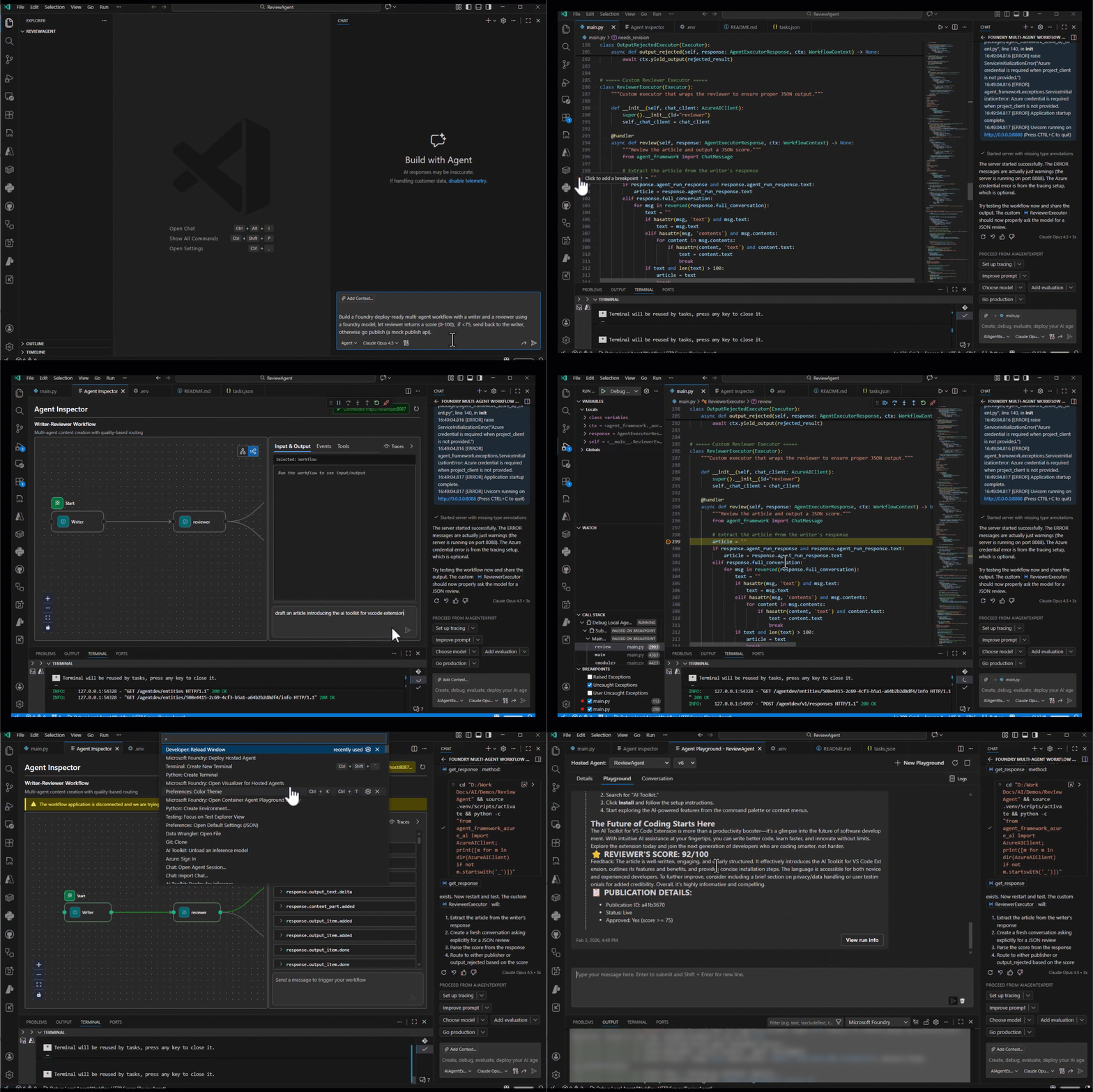
Step 2: Build Agents That Actually Do Things — Agent Harness & Multi-Agent Composition (Public Preview)
Microsoft Agent Framework handles multi-agent orchestration— but orchestrating agents is only half the picture. The other half is what happens when an individual agent needs to operate autonomously over extended periods: executing shell commands, reading and writing to the filesystem, and managing context across long-running sessions without losing coherence. Microsoft Agent Framework addresses this in two ways: a built-in Agent Harness (public preview) and integrations with coding agents (public preview).
Agent Harness
Three foundational patterns, available in Python and .NET:
1. Local Shell Harness with Approval Flows
Execute commands locally with explicit human-in-the-loop approval before anything runs:
@tool(approval_mode="always_require")
def run_bash(command: str) -> str:
    """Execute a shell command and return the result."""
    result = subprocess.run(command, shell=True, capture_output=True, text=True)
    return result.stdout

# Wire the local function to the agent via get_shell_tool
local_shell_tool = client.get_shell_tool(func=run_bash)
agent = Agent(
    client=client,
    instructions="You are a helpful assistant that can run shell commands.",
    tools=[local_shell_tool],
)
🔒 Always run local shell execution in an isolated environment with approval enabled.
2. Hosted Shell Harness
Move execution into the provider-managed sandbox environment that powers hosted agents in Foundry Agent Service, with a single-line change:
shell_tool = client.get_shell_tool()  # execution runs in provider-managed sandbox
agent = Agent(client=client, instructions="...", tools=shell_tool)
3. Context Compaction
Automatically manage conversation history for long-running sessions, keeping agents within their token budget without losing critical context:
from agent_framework import (
    Agent, InMemoryHistoryProvider,
    CompactionProvider, SlidingWindowStrategy,
)

agent = Agent(
    client=client,
    instructions="You are a helpful assistant.",
    tools=[get_weather],
    context_providers=[
        InMemoryHistoryProvider(),
        CompactionProvider(
            before_strategy=SlidingWindowStrategy(keep_last_groups=3)
        ),
    ],

)
Multi-Agent Composition with GitHub Copilot SDK
Microsoft Agent Framework provides multi-agent orchestration across multiple agents — sequential, concurrent, hand-off, and coding agent composition— with checkpointing, middleware pipelines, and human-in-the-loop control built into the execution layer.
With the new GitHub Copilot SDK integration, Microsoft Agent Framework serves as the orchestration backbone while calling the GitHub Copilot SDK for the agent harness layer. Any agent in the workflow can delegate to a Copilot SDK-powered agent — leveraging its native Model Context Protocol (MCP) support, skills integration, shell execution, and file operations — then pass results to the next agent in the pipeline.
Step 3: Make Agents Stateful with memory in Foundry Agent Service (Public Preview)
Production agents need to remember. Foundry’s memory (preview) is a managed long-term memory capability built directly into Foundry Agent Service and now integrates natively with Microsoft Agent Framework and LangGraph— no external databases to provision, scale, or secure.
from agent_framework import InMemoryHistoryProvider
from agent_framework.azure import AzureOpenAIResponsesClient, FoundryMemoryProvider
from azure.ai.projects import AIProjectClient
from azure.identity import AzureCliCredential
import os

project_client = AIProjectClient(
    endpoint=os.environ["AZURE_AI_PROJECT_ENDPOINT"],
    credential=AzureCliCredential(),

)


agent = AzureOpenAIResponsesClient(
    credential=AzureCliCredential(),
).as_agent(
    name="CustomerSuccessAgent",
    instructions="You are a proactive customer success agent.",
    context_providers=[
        InMemoryHistoryProvider(),
        FoundryMemoryProvider(
            project_client=project_client,
            memory_store_name=memory_store.name,
            scope="user_123",  # segments memory per user
        ),
    ],
)
What’s new:
- Microsoft Agent Framework & LangGraph integration — memory in Foundry Agent Service (preview) is now natively integrated with Microsoft Agent Framework and LangGraph, so developers using any of these frameworks get persistent, managed memory without additional wiring or custom middleware
- Memory item CRUD API — inspect, edit, or delete specific facts and preferences the agent has stored programmatically, giving developers full transparency and control over what the agent remembers. Users can request that stored memories be corrected or removed at any time
- Custom user scope header — as part of memory, developers can now pass a custom userId header to define memory scope based on their own identity and user management systems, rather than being tied to Entra ID. This gives teams the flexibility to segment memory per user in any IAM setup they already use
Step 4: Give Your Agents the Right Tools – Toolbox in Foundry (Public Preview)
Building a capable agent isn’t just about choosing the right model or framework — it’s about connecting that agent to the real-world tools it needs to get work done. The tools agents need in production go far beyond a single MCP server or API. They span web search, code interpreter, file search, SaaS connectors, internal services, and more — each with its own auth model, protocol, and owning team. Without a shared layer, every agent team re-implements the same integrations, duplicates credentials, and operates without governance.
Toolbox in Foundry solves this with a single, unified way to configure and use a curated, intent‑driven set of tools, with consistent capabilities, secure access, and enterprise‑grade guarantees built in. No matter which agent framework you use—Microsoft Agent Framework, LangGraph, or others—you can integrate tools cleanly, without custom glue code.
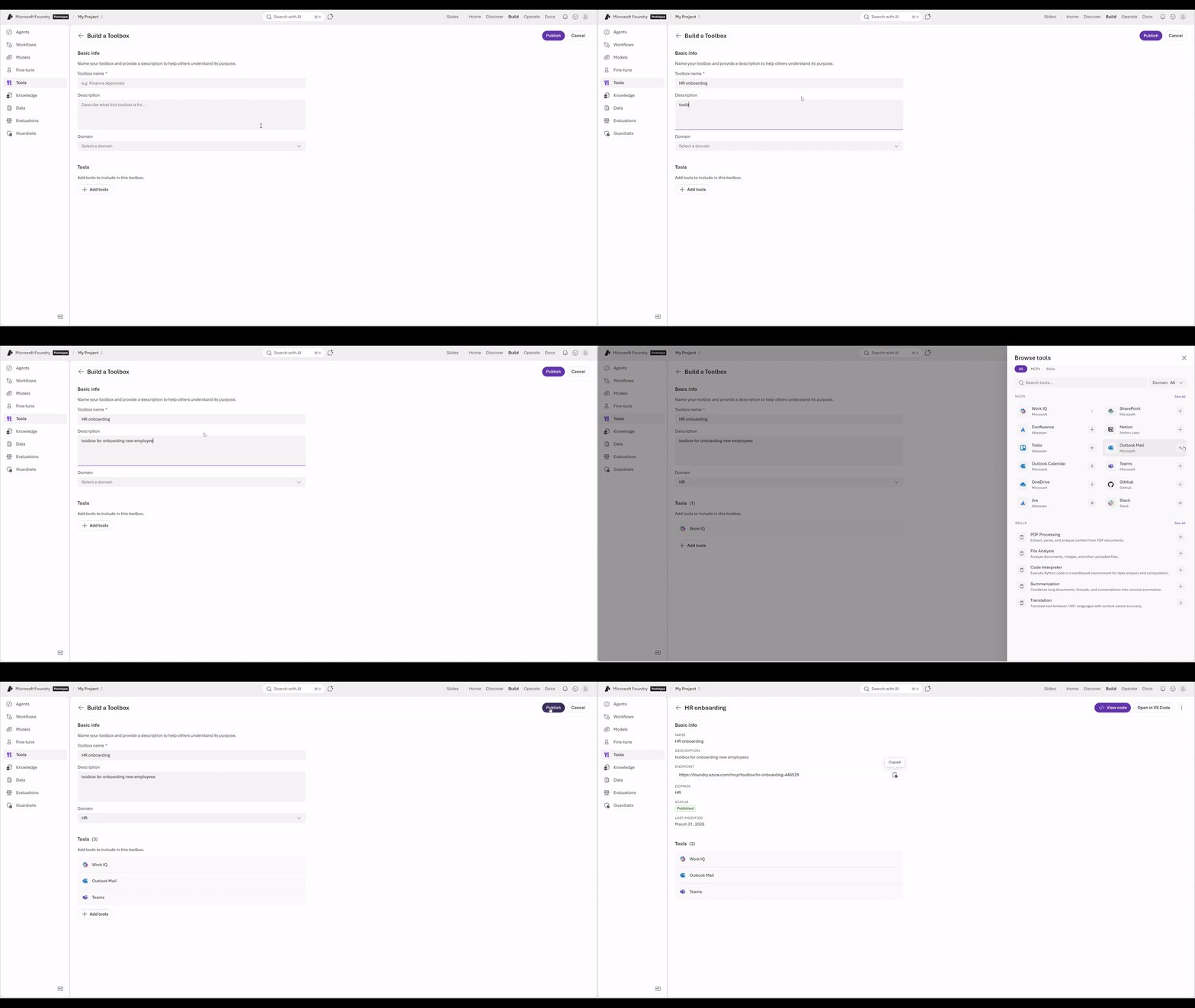
With toolbox, you get:
- Build once in Foundry, consume anywhere: create a toolbox, store your configuration in Foundry, and connect any MCP client to the same endpoint — no re-wiring required
- Tools in Foundry accessible via one endpoint: built-in tools such as web search, file search, code interpreter, and Azure AI Search, alongside protocols including MCP, OpenAPI, and Agent-to-Agent (A2A), all exposed through a single unified endpoint
- Enterprise requirements handled for you: built-in auth handling including OAuth identity passthrough and Microsoft Entra Agent Identity, plus built-in tracing and observability for all tool calls in Hosted Agents
Step 5: Host and Manage Agents at Scale — Hosted Agents in Foundry Agent Service (Public Preview)
Once your agent is ready, hosted agents in Foundry Agent Service provides a fully managed runtime to deploy and operate it at enterprise scale — with security, isolation, and performance that production workloads demand.
At the core of hosted agents is an isolated execution sandbox that runs each agent session in its own dedicated, secure runtime. Every session starts clean — no shared state between sessions, no cross-session data leakage, and strong compute boundaries between tenants. Read this blog to learn more about the new hosted agents.
What hosted agents gives you:
- Session isolation — each agent run executes in its own isolated sandbox, providing compute isolation and a clean execution environment per session
- VNET support — run hosted agents within your own virtual network for private connectivity to data sources, APIs, and internal services without exposing traffic to the public internet
- Faster startup — agent sessions start near-instantly in under 100ms, eliminating cold-start latency without the cost of keeping instances warm
- Zero idle cost — agents are suspended between conversation turns; you pay only for active execution
- Framework agnostic — bring any SDK or framework; hosted agents in Foundry Agent Service is not limited to any specific invocation pattern
- Built-in skills, memory, and observability — native integration with Foundry Tools, memory (preview), and Observability in Foundry Control Plane with no additional wiring
- One-command deployment via Azure Developer CLI (AZD) with autoscaling, managed identity, and CI/CD promotion gates included
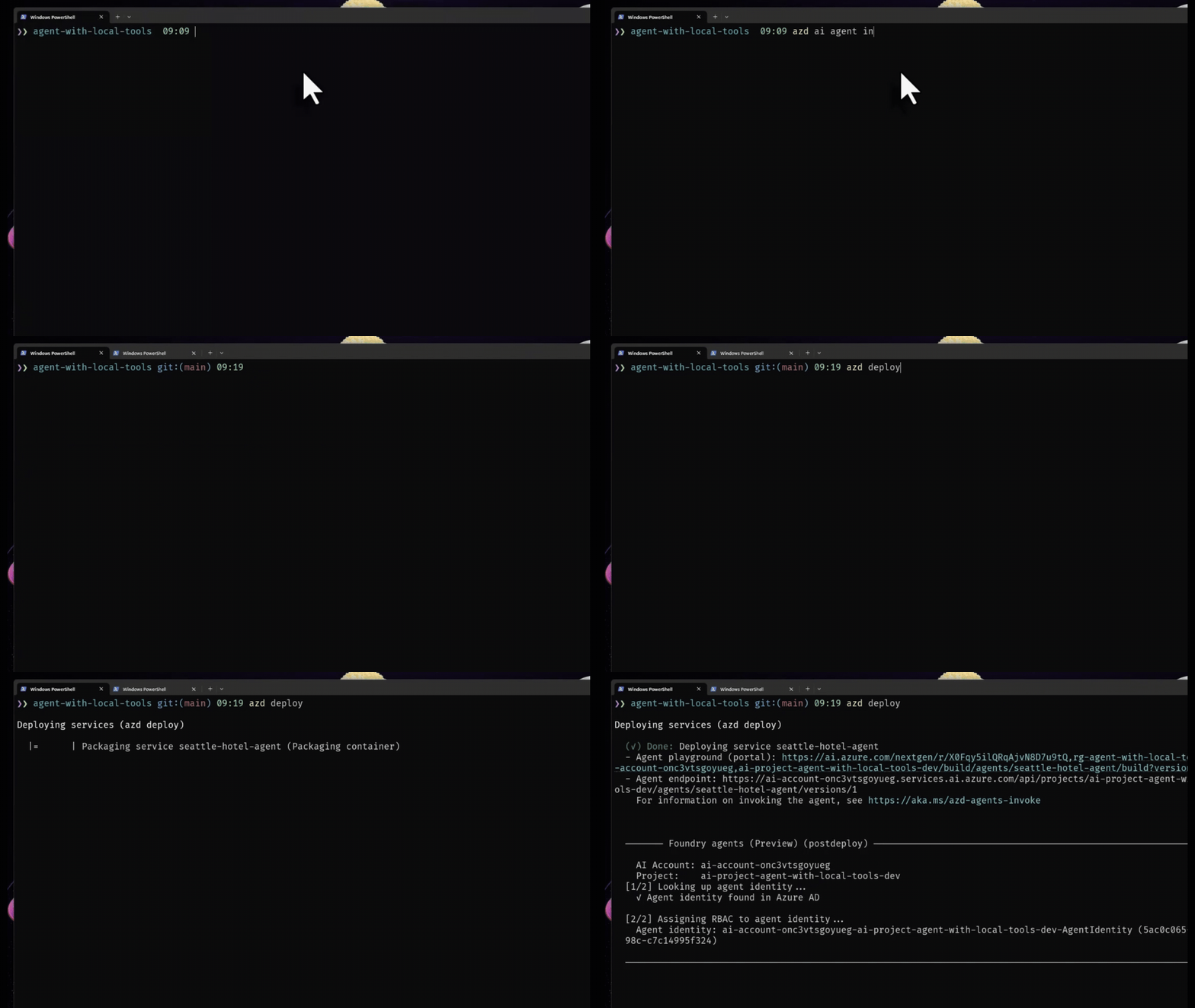
# Deploy your agent to Hosted agents in Foundry Agent Service in one command
azd deployStep 6: Know What Your Agents Are Doing — Observability in Foundry Control Plane
Getting to production is an achievement. Staying there — reliably, safely, efficiently — is the real engineering challenge. Observability in Foundry Control Plane is now fully GA. Tracing and AI Red Teaming Agent complete a stack that includes built-in evaluators (coherence, relevance, groundedness, and safety) and continuous production traffic monitoring through Azure Monitor — all GA. Custom evaluators, both code-based and LLM-as-a-judge, are available in public preview, letting teams define domain-specific quality metrics beyond the built-in catalog. The full development lifecycle is now covered: from local debugging to production alerts.
Tracing — From “Something Went Wrong” to “Here’s Exactly Where”
Tracing in Foundry is built on OpenTelemetry and provides automatic, end‑to‑end visibility into agent execution. The tracing foundation is generally available, with hosted agent tracing rolling out in public preview.
from azure.ai.projects import AIProjectClient
from azure.identity import AzureCliCredential
from azure.monitor.opentelemetry import configure_azure_monitor

project_client = AIProjectClient(
    endpoint=os.environ["FOUNDRY_PROJECT_ENDPOINT"],
    credential=DefaultAzureCredential(),
)

# Connect Application Insights — configure once per application
configure_azure_monitor(
    connection_string="<your-application-insights-connection-string>"
)
# All downstream agent calls, tool invocations, and model requests are now traced.
This captures the full execution path — model calls, tool invocations, retrieval steps, and cross-agent handoffs — with evaluation-to-trace linkage that takes you directly from a low-quality score to the exact trace that produced it.
AI Red Teaming Agent – Know how your agents behave under attack
AI Red Teaming Agent is now generally available — giving every organization building generative AI agentic applications on Foundry access to Microsoft’s automated adversarial testing capabilities. The AI Red Teaming Agent automates adversarial probing of your models and hosted agents, running systematic attack simulations and scoring results so you get a clear picture of your system’s risk posture before it ships. It builds on Python Risk Identification Tool, Microsoft’s open-source red teaming framework, and integrates natively with the Foundry Evaluation SDK.
- Automated scanning — simulate adversarial attacks across content safety categories and agentic-specific risks including prohibited actions, sensitive data leakage, task adherence, and indirect prompt injection (XPIA)
- No-code UI — launch red teaming runs directly from the Foundry portal without writing code
- CI/CD integration — run red teaming via the Foundry SDK and APIs as part of your development and deployment pipelines
- Continuous risk tracking — findings are logged, monitored, and tracked over time directly in Foundry, so your risk posture improves alongside your agent as it evolves
Red teaming is designed to run throughout the development lifecycle — pick the safest foundation model, test during development, gate pre-deployment, and run continuous scans in production.
From developer observability to IT governance
Foundry Control Plane gives developers deep visibility into every agent run. But as agent fleets grow, IT and security teams need organizational-level oversight too — not just per-agent traces, but a complete picture of every agent operating across the tenant.
Every agent created in Foundry Agent Service is automatically visible in Microsoft Agent 365 (A365) — giving IT admins a single, unified control plane to observe, secure, and govern all agents across the organization, regardless of where they were built.
Through Agent 365, admins can:
- See every agent in the tenant — a complete registry of Foundry-managed agents alongside Copilot Studio and other sources
- Govern agent access and lifecycle — enforce least-privilege access, automate lifecycle policies, and maintain audit readiness with built-in logging
- Monitor agent behavior — track activity, performance, usage patterns, and risk signals in real time
- Extend your existing security posture to agents — assign Entra agent identities, defend with Microsoft Defender, prevent data leaks with Microsoft Purview
Together, Foundry Control Plane and Agent 365 give you developer-level observability and enterprise-level governance — built on infrastructure you already use.
Step 7: Put Agents in the Hands of Users – Publishing to Microsoft 365 (Public Preview)
Once your agent is built, stateful, deployed, observable, and governed, the final step is putting it in the hands of users — wherever they work. From the Foundry Agent Service portal today, agents can be published directly to Microsoft Teams and Microsoft 365 Copilot (preview) with a single click, appearing as a first-class participant in the tools your organization already uses.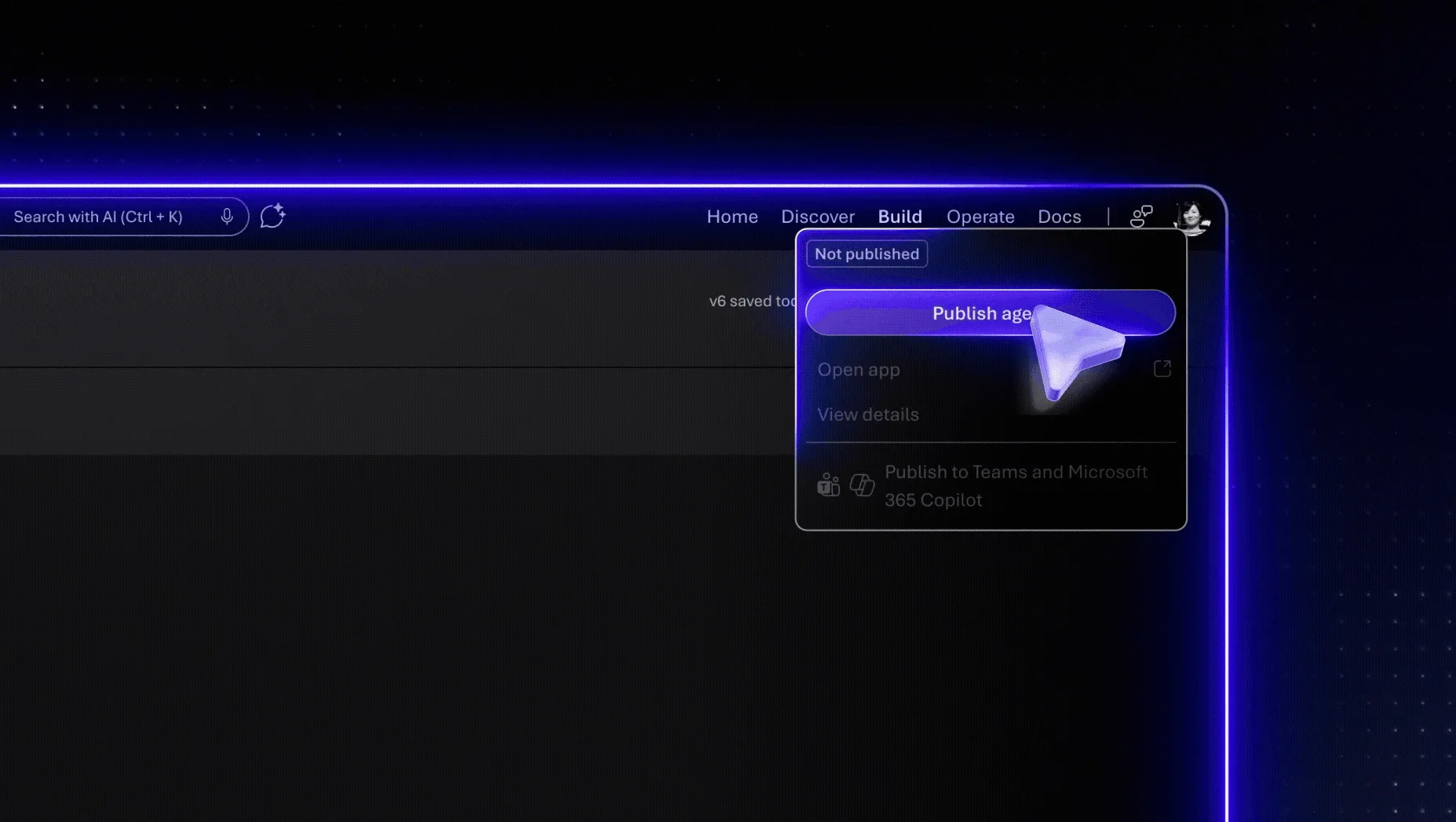
Developers can choose between two distribution scopes. Shared scope makes the agent available to individual users under “Your agents” in the Agent Store in Microsoft 365 Copilot and Microsoft Teams — no admin approval required. Organization scope is designed for broad distribution across the tenant: when published with organization scope, the agent is submitted for admin approval in the Microsoft 365 admin center, where admins can review the agent’s description, connected data sources, and capabilities before approving it. Once approved, the agent appears under “Built by your org” in the Agent Store and is available to users across the organization in Microsoft 365 Copilot and Microsoft Teams.
Get Started
- Start building your own intelligent agents today with Foundry Agent Service and Microsoft Agent Framework
- See the end-to-end demo in action in the Microsoft Mechanics episode
- Watch the Open at Microsoft episodes:
- Join our live “Host your agents on Foundry” series to learn how to deploy production-ready AI agents using Microsoft Agent Framework or LangGraph and hosted agents.
- To continue your learning journey, visit Microsoft Learn and explore resources including the AI Agents for Beginners and course materials that help you build and operate agents responsibly
- Dive deeper with the AI Builder’s Guide to Agent Development and Management whitepaper
- Keep the conversation going in GitHub and Discord!


0 comments