

Announcing Foundry Managed Compute: Run open models in Microsoft Foundry
Today we’re announcing Managed Compute in Microsoft Foundry, a new managed platform for customizing and serving open-source AI models on elastic GPU capacity without the operational burden of running virtual machines, Kubernetes clusters, or model runtimes. Managed Compute pulls together three things into one experience: the Foundry Model Catalog, the runtimes and frameworks that serve those models well, and the GPU capacity underneath. It’s open by design. You get access to thousands of open-source models through our Hugging Face partnership, you can customize them with supervised fine-tuning or reinforcement learning, and you can securely deploy model weights you trained somewhere else.
Together with pay-per-token for the lowest-friction starting point, and provisioned throughput for predictable production load on frontier models, Managed Compute rounds out Microsoft Foundry as a single platform for serving AI models at scale: frontier, open-source, and custom, through one endpoint, one set of SDKs, and one bill.
Where Managed Compute fits in Foundry
Foundry has three deployment types. Managed Compute is the one built for open-source and custom models on dedicated GPU capacity.
| Deployment type | What it serves | Billing | Best for |
|---|---|---|---|
| Pay-per-token | First-party (Azure Direct) models, including Azure OpenAI | Per input and output token | Lowest-friction starting point; bursty traffic on hosted models with no capacity planning. |
| Provisioned throughput units (PTU) | First-party (Azure Direct) models | Reserved throughput units | Predictable, sustained load on first-party models with consistent latency. |
| Managed compute | Open-source and community models from the Foundry catalog | Hourly per accelerator family | Hosting open-source models on dedicated GPUs with Foundry-managed runtimes, private networking, and the same SDKs as the other deployment types. |
Why open models, why now
Open-source AI has matured fast. The best open models now match frontier models on reasoning, coding, and instruction-following benchmarks. A newer generation of specialized small models is hitting state-of-the-art quality on focused tasks (document understanding, re-ranking, code completion, domain-specific chat) at a fraction of the cost and latency of general-purpose large models. The pattern across enterprises is consistent: teams reach for managed APIs to move fast on frontier intelligence, then bring in open and custom models for the routes where they want more control over behavior, customization, data residency, and cost.
What’s been missing is an easy way to run those open models in production. Today that usually means assembling a stack from scratch: procuring GPU VMs, standing up and operating Kubernetes, wiring networking and authentication, choosing and operating an inference runtime, hardening containers, patching CVEs, and building observability and billing attribution from the ground up. Even when a team can do all of that, the result often underutilizes expensive GPUs, lacks advanced serving patterns like disaggregated prefill and decode, and locks workloads to specific SKUs and regions that are slow and expensive to migrate. Managed Compute is built to lift that work off your team so the model, not the infrastructure, is what you spend your time on.
Models, not machines: Foundry’s GPU platform-as-a-service
With Managed Compute, the unit of deployment is the model, not the machine. Here’s what that means in practice.
No more GPU VM sizing pain
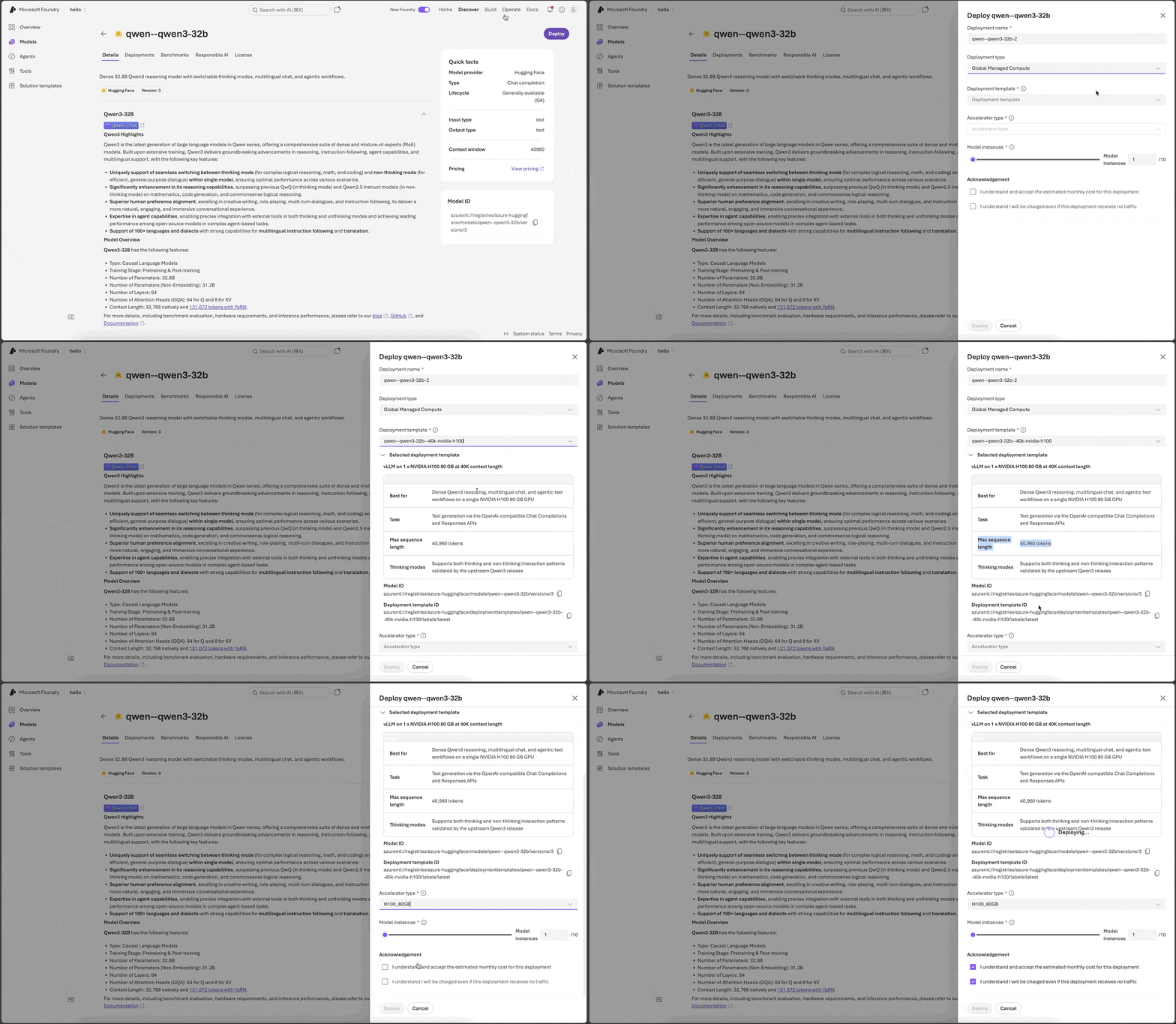
Getting an open model onto raw GPU infrastructure is real work. You reason about model architecture (dense vs. mixture-of-experts), parameter count, KV-cache memory, tensor vs. data parallelism, and quantization, then map all of that to a VM SKU with the right number and class of GPUs. Azure ND-family VMs ship with a fixed count of eight GPUs per node, so you either pack multiple models onto one node or leave accelerators idle. Managed Compute removes that work. You pick three things: a model, a deployment template, and an accelerator family (A100, H100, MI300X). Foundry provisions the right number of GPUs underneath. The template encodes the runtime, GPU count, context length, quantization, and the latency-vs-throughput tuning the model needs to serve well, so you don’t have to work any of that out yourself.
Quota is tracked per accelerator family (H100_80GB, A100_80GB, MI_300_192GB) in the Foundry resource, alongside pay-per-token (Standard) and Provisioned quota. It’s separate from your Azure VM quota.
Scale out with cache-aware routing: higher throughput, lower latency
Add more model instances to increase the token capacity of your deployment. All instances sit behind one endpoint URL, and Foundry routes across them with three pieces of intelligence built in:
- Concurrency-aware load balancing. Incoming requests are distributed across model instances based on the number of in-flight requests on each instance, so load stays evenly spread even as instances scale out.
- Prompt-prefix affinity for cache hits. Foundry hashes the prefix of each request at the edge and routes requests with the same prefix (shared system prompts, tool definitions, RAG context) to the same instance, so the KV cache stays hot and time-to-first-token stays low.
- Multi-turn session affinity. Convey a session identifier with each request and Foundry sticks a user’s turns to the same instance, compounding cache wins over the life of a session.
All three are gated by soft affinity with load bounds. When sticking to a “preferred” instance would push it past its load bound, the request spills over to other instances instead. You get cache locality and even load without writing the load balancer.
Container patching and runtime upgrades, in place
Open-model serving stacks move fast. New runtime versions ship every few weeks; CVEs in the model server, base image, and CUDA layers land continuously. On DIY hosting, every patch is your problem: rebuild the container, retest, redeploy, drain traffic, retry. Managed Compute applies container and runtime upgrades to live deployments in the background on supported runtimes, so security patches, CVE fixes, and runtime improvements show up under your deployment without you redeploying.
One Foundry resource, three deployment types
Managed Compute lives alongside pay-per-token and provisioned throughput in the same Foundry resource, which streamlines admin, developer, and observability experiences:
- Admin experience. One Foundry resource to set up and govern across every model-hosting need: frontier, open-source, and custom. RBAC, private networking, identity, cost management, and audit are configured once on the resource and apply to every deployment under it. The smaller infrastructure footprint translates directly into lower operational cost and a better TCO.
- Developer experience. One API surface for inference. The same SDKs, the same authentication, the same endpoint URL. Switching from a frontier model to an open one means changing the
modelparameter to the new deployment name; the client code, auth, and observability path stay the same. Open-source deployments plug into Foundry Agents and the Responses API the same way frontier models do. - Observability experience. One Azure Monitor surface for every deployment. Request rates, latency percentiles (TTFT, TBT), token usage, and per-deployment billing tags flow into the same Azure Monitor Metrics, Log Analytics workspace, and Grafana dashboards, whether the deployment is frontier, open-source, or custom. One set of alerts, one cost-attribution model, one place to look when something goes wrong.
This works because Managed Compute runs on the same hyperscale Kubernetes platform that powers pay-per-token and provisioned throughput on Foundry. The routing, scaling, multi-tenancy, and operational fabric that serve frontier models is the same fabric serving your open and custom models. Unless you’re running a deeply customized model architecture with your own runtime, the TCO and DIY-tax savings are substantial, especially given Foundry GPUs are priced at parity with the equivalent Azure VM GPUs.
Deploying and scoring an open weight model
The Hugging Face Collection in the Foundry Model Catalog is where you start: a curated set of open-weight models with mirrored model cards, preserved license metadata, and a one-click path from a Hugging Face model page into a Managed Compute deployment. What you deploy is the same open-weight model the community publishes, so evaluations and behavior carry over. What changes is the operational layer: a curated, hardened container on a vetted runtime, with CVE patching, isolation, and Azure identity, networking, and governance applied by default.
From there, deployment is five steps:
- Browse the catalog and pick a model. The deploy wizard also surfaces the model id, deployment template id, and acceleratorType you’ll need if you’re scripting the deploy via SDK or REST.
- Choose a deployment template (latency- vs throughput-optimized, accelerator family, context length, quantization).
- Configure instance count to scale throughput by adding model instances.
- Deploy from the portal, CLI, SDK, or REST.
- Score via the unified Foundry endpoint with the SDK you already use.
Deployment templates
A deployment template is the unit of choice in step 2: a named, versioned asset that pins the runtime, the accelerator family and count, the context length, and the runtime-specific tuning needed to serve the model well. Picking a template is the only knob you turn for “how do I want this model to run.”
qwen3-32b, for example, ships with four templates the deploy wizard exposes side by side:
| Template | Runtime | Accelerator | Context |
|---|---|---|---|
| qwen–qwen3-32b–40k-nvidia-a100 | vLLM | 1 × A100 80 GB | 40K |
| qwen–qwen3-32b–40k-nvidia-h100 | vLLM | 1 × H100 80 GB | 40K |
| qwen–qwen3-32b–128k-nvidia-2xa100 | vLLM | 2 × A100 80 GB | 128K |
| qwen–qwen3-32b–128k-nvidia-2xh100 | vLLM | 2 × H100 80 GB | 128K |
Each template arrives pre-tuned for the model. Runtime settings, tool-call and reasoning parsers, scoring path, health probes, request concurrency, and any model-specific context-extension settings are all set by Microsoft, with any trade-offs called out inline in the template description. When you script the deploy, you reference the template and Foundry handles the rest.
SDK
from azure.identity import DefaultAzureCredential
from azure.mgmt.cognitiveservices import CognitiveServicesManagementClient

client = CognitiveServicesManagementClient(DefaultAzureCredential(), SUBSCRIPTION_ID)

deployment = client.managed_compute_deployments.begin_create_or_update(
    resource_group_name=RESOURCE_GROUP,
    account_name=ACCOUNT_NAME,
    deployment_name="qwen3-32b",
    resource={
        "sku": {"name": "GlobalManagedCompute", "capacity": 1},
        "properties": {
            "model": "azureml://registries/azure-huggingface/models/qwen--qwen3-32b/versions/1",
            "deploymentTemplate": "azureml://registries/azure-huggingface/deploymenttemplates/qwen--qwen3-32b--40k-nvidia-h100/labels/latest",
            "acceleratorType": "H100_80GB",
        },
    },
).result()
The three properties map to the three choices you make: model is what you’re serving, deploymentTemplate pins the runtime and GPU count, and acceleratorType picks the accelerator family (A100, H100, MI300X) the template runs on. That’s an accelerator family, not a VM SKU. Foundry sizes the node underneath.
Score
Fetch the endpoint and API key from the deployment’s details page in the Foundry portal, or pull them programmatically with the same management client:
api_key = client.accounts.list_keys(RESOURCE_GROUP, ACCOUNT_NAME).key1
endpoint = f"https://{ACCOUNT_NAME}.services.ai.azure.com/openai/v1"
Then call it with the OpenAI SDK. The model field takes the deployment name you set in the begin_create_or_update call above:
from openai import OpenAI

openai_client = OpenAI(base_url=endpoint, api_key=api_key)

completion = openai_client.chat.completions.create(
    model=deployment.name,  # the deployment you created above
    messages=[{"role": "user", "content": "What is the capital of France?"}],
)

print(completion.choices[0].message)
Same auth, networking, and managed-identity story as every other Foundry deployment. If you’re already calling frontier models through a Foundry endpoint, Managed Compute deployments appear behind the same URL with the same credentials.
Use Managed Compute deployments with Foundry Agents and the Responses API
A chat-completions Managed Compute deployment slots into Foundry Agents today by adding it as an admin-connected model, either via the Add to agent button on the deployment details page, or by following the API Management gateway pattern documented at learn.microsoft.com/azure/foundry/agents/how-to/ai-gateway. Native Foundry Agents integration that removes this extra step is coming soon.
Once the deployment is wired to an agent, you call it through the Foundry Responses API with an agent_reference. Same OpenAI SDK, no separate agents SDK to learn:
from azure.identity import DefaultAzureCredential
from azure.ai.projects import AIProjectClient

project_client = AIProjectClient(
    endpoint="https://<your-resource>.services.ai.azure.com/api/projects/<your-project>",
    credential=DefaultAzureCredential(),
)
openai_client = project_client.get_openai_client()

agent_ref = {"name": "my-agent", "version": "1", "type": "agent_reference"}

r1 = openai_client.responses.create(
    input=[{"role": "user", "content": "My favorite color is teal and my dog's name is Mochi."}],
    extra_body={"agent_reference": agent_ref},
)
print(r1.output_text)
Conversation memory is server-side. You don’t have to manage history on the client. Chain turns by passing the previous response id:
r2 = openai_client.responses.create(
    input=[{"role": "user", "content": "What is my favorite color and my dog's name?"}],
    extra_body={"agent_reference": agent_ref},
    previous_response_id=r1.id,   # agent remembers turn 1
)
print(r2.output_text)
# -> "Your favorite color is teal, and your dog's name is Mochi."
Drop previous_response_id and the agent starts a fresh conversation. Same agent, same deployment, same endpoint; memory is just a thread id you carry forward.
Observability and performance
Every Managed Compute deployment automatically emits Azure Monitor metrics with no agent, no client instrumentation, and no SDK changes. They cover the three things you care about in production: are my requests succeeding, how fast am I serving them, and how much am I serving.
| Family | What it covers |
|---|---|
| HTTP requests | Request volume and availability: how many calls hit the deployment and what fraction succeeded |
| Latency | End-to-end response time, time-to-first-token, and inter-token decode time: the numbers your users actually feel |
| Usage | Input, output, and total token counts: what’s driving spend and capacity |
These plug straight into the Azure monitoring stack you already use: Azure portal Metrics blade, Log Analytics (KQL), Grafana dashboards, or any other Azure Monitor consumer.
Pricing, Billing, Accelerator SKUs, and Data Residency
Unlike VM-based infrastructure where you rent whole GPU servers and pay for every GPU on the box whether your model uses it or not, Managed Compute charges for model instances. Foundry right-sizes each model to the GPUs it actually needs (one, two, four, or eight), so you’re not paying for idle accelerators sitting next to your workload. Billing is hourly per accelerator, and the cost of a deployment is just Accelerators per model instance × model instances × hours running × hourly rate.
Global vs. Data Zone: pick a scope at deployment time
Every Managed Compute deployment runs in one of two scopes, selected via the deployment SKU:
- Global Managed Compute (
GlobalManagedCompute): the broadest capacity and the lowest hourly rate. The default choice for most workloads. Available at launch. - Data Zone Managed Compute (
DataZoneManagedCompute): the same managed platform, with traffic and processing kept inside a defined data zone for residency and sovereignty requirements. Coming soon, at a small premium over Global.
Scope is the only thing that changes between the two. The model catalog, deployment templates, SDKs, endpoint shape, and observability surface are identical. Same code, same workflow.
| Meter | Global Managed Compute ($/hr/GPU) |
|---|---|
| A100 80GB | $3.95 |
| H100 80GB | $7.91 |
| MI300X 192GB (coming soon) | $7.91 |
Spend rolls up in Azure Cost Management alongside the rest of your Foundry usage.
Enterprise-ready security, identity, and networking
Managed Compute is part of your Foundry project and your Azure subscription. The same controls you already apply to other Azure resources apply to Managed Compute deployments.
- Microsoft Entra ID authentication for both the control plane (deployment management) and the data plane (inference calls). Managed identities are supported for service-to-service calls, so no static keys are required.
- Azure RBAC for who can create, modify, scale, or invoke deployments. Foundry project-level roles map onto deployment scope.
- Private networking via Azure Private Link and private endpoints, with customer-managed VNet integration for outbound traffic.
- Azure Policy for guardrails (allow-listing models or accelerator families, mandatory tagging, region restrictions), with Activity Log and diagnostic settings for audit trails.
Conclusion and call to action
Watch Managed Compute in action at this demo session at Microsoft Build: Hugging Face open‑source models to production on Microsoft Foundry
Available now in preview: deploy any base model from the Foundry Model Catalog onto A100 or H100 accelerators in the Global scope, behind a unified Foundry endpoint, with Playground support, Azure Monitor metrics, per-deployment billing tags, and curated runtime upgrades and CVE patching. Sign up for the preview at forms.cloud.microsoft/r/8Jnx1LALLA.
On the roadmap: Data Zone scope and MI300X accelerators for broader residency and hardware choice; Bring Your Own Weights for full weights and LoRA adapters, deployed with the same templates and governance as catalog models; and IP-protected marketplace models with an optional publisher surcharge.
With Managed Compute, frontier, proprietary, and open-source models all live behind a single Foundry endpoint, a single SDK surface, and a single bill. The operational complexity that used to make open models the harder choice is gone.


0 comments
Be the first to start the discussion.