

The past year was about building agents. The next year is about putting them to work.
Organizations have moved quickly from experimenting with AI agents to building ones that perform complex business processes and execute long-running tasks. But the bottleneck has shifted. The challenge is no longer building agents — it’s getting them into the hands of employees in the tools they already use and governing them at scale.
Today we’re announcing three things that close that last mile:
- Publishing to Microsoft 365 Copilot and Teams (generally available next month)
- Autopilot agents (public preview)
- Agent to Agent (A2A) (public preview)
Publish to Microsoft 365 Copilot and Teams
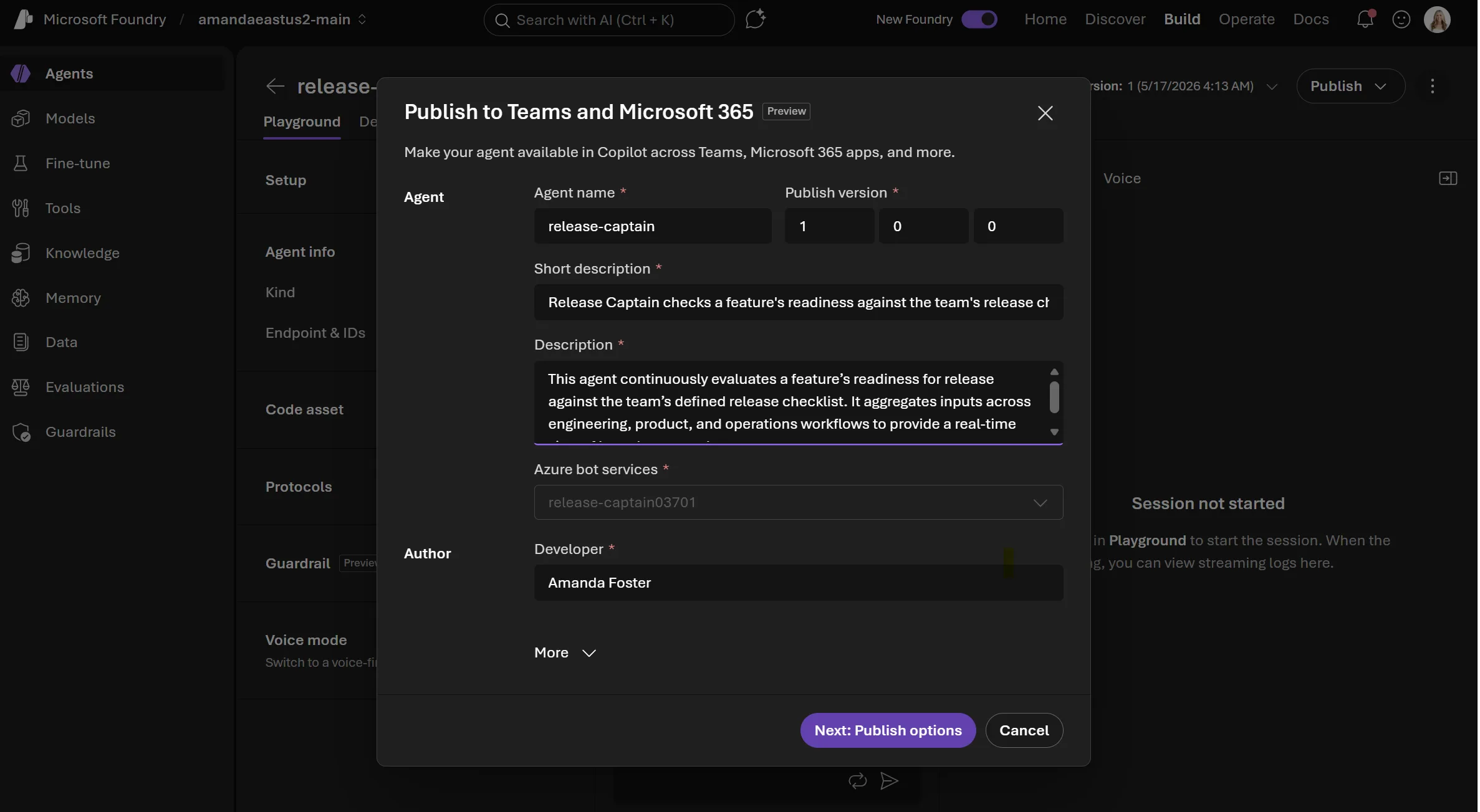
In Foundry Agent Service, you can publish any agent — prompt, workflow, or hosted — directly into Microsoft 365 Copilot and Teams in just a few clicks, without rebuilding for each surface. Agents keep the same capabilities they had in development and move through a consistent, governed publishing pipeline on the way to becoming available org wide.
This matters because agentic experiences need to feel obviously relevant to employees’ day-to-day work, be easy to learn without adding friction, and show up at the right moments inside the tools people already use. Instead of sharing endpoints, standalone apps, or bespoke web surfaces, agents now appear naturally where work already happens.
A new interaction model: delegation, not just chat
Publishing Foundry agents to Microsoft 365 Copilot and Teams isn’t limited to chatbot-style experiences. The interaction model leans into delegation.
Traditional AI looks like this:
Prompt → Response
Foundry agents in Microsoft 365 Copilot and Teams enable something richer:
Goal → Ongoing execution → Checkpoints → Collaboration
Think “assign this agent a goal” rather than “ask this agent a question.” Whether user-triggered or fully autonomous, agents surface progress, request approvals, and escalate to humans when needed — natively, through the Teams and Microsoft 365 channels employees already use.
Publish as autopilot agents
We’re also introducing a new category of agents called autopilot agents (public preview). Autopilot agents operate autonomously using their own identity and have user accounts with a productivity license granting them their own email, calendar, OneDrive, Microsoft Teams access, and place in the org chart.
Autopilot agents are built to work with teams, not just individuals. They can participate in shared spaces like Teams group chats, take on ongoing responsibilities, and help coordinate work across people, channels, and meetings.
Unlock human-agent collaboration
Agents working one-on-one with a single user is great for individual tasks. But most enterprise work isn’t done by one person working independently. It happens across teams, meetings, documents, channels, SharePoint sites, and group chats. Shipping a feature, launching a campaign, closing a deal, managing a customer account, or leading a workstream all require people to coordinate across roles, context, and decisions.
That’s where the story shifts from personal productivity to organizational productivity. When agents operate in shared spaces, their value compounds. If one person improves the workflow, the whole team benefits. If the agent learns from repeated use, every member benefits. If the agent has shared context, it can coordinate across people. If the agent is embedded in a common process, it can drive consistency and better execution. The value isn’t the output of one interaction — it’s the improvement of a shared operating system for work.
Meet the Workstream Manager Autopilot Agent
To bring this to life, we’re starting with a practical, high-impact use case with Foundry: a workstream manager agent designed to live in Teams group chats. We’ve created an out-of-the-box code sample you can easily customize and connect to your own enterprise data and workflows.
The Workstream Manager is an autopilot agent developers can build with Foundry Agent Service, grounded in dynamic knowledge drawn from the channel’s conversation history — every message, file, link, GitHub PR, and meeting recap or transcript shared in chat — as well as documents and context from the any other sources your choose such as team SharePoint site, product specs, and public documentation.
In a group chat, it can track tasks and deadlines, summarize conversations into action items, follow up on overdue work, surface risks and blockers, and coordinate updates across stakeholders.
Out of the box, the sample ships with a few capabilities you can extend:
- Manager onboarding flow — On first DM, the agent introduces itself and walks the manager through setup: granting access, how it tracks work items, and pulling summaries. Run /onboarding anytime to change preferences.
- Manager-controlled access — By default only the manager can talk to it; they extend access with /access add, /access remove, and /access list <upn>. In group chats, every participant must be approved.
- Tracks open items — Captures every commitment that needs follow-up — the small, easily-forgotten ones like “Amanda will file a bug for that.” It marks the logged message with 📌, and owner, description, status, and ETA persist across sessions, so you can ask later who’s on what.
- On-demand workstream summary — Run /workstreamsummary run for a digest of open items grouped by owner — a natural starting point for a recurring daily or weekly digest.
- Workstream Q&A — Answers questions about the workstream from conversation history plus any sources you grant it: SharePoint, specs, Azure DevOps.
- Built-in Work IQ tools — Pre-wired with Microsoft 365 tools — Word, Excel, Outlook mail, calendar, OneDrive/SharePoint. Ask it to draft an email, summarize a spec, or pull last week’s notes and it goes straight to the source.
- Knows when to chime in — In a 1:1 DM, every message is for the agent. In group chats it replies only when addressed — an @mention or a clear follow-on like “thanks, can you also…” — and leaves human side conversations alone.
- Reacts to messages — Messages it will reply to get a 👍; messages it logs as work items get a 📌, so you can scan the chat and see what’s tracked at a glance.
This agent is designed to handle the manual, repetitive work that pulls teams away from what they were hired to do. A single Workstream Manager agent keeps track of what everyone is working on, so anyone on the team can stay current on progress without having to interrupt others for routine questions — they can just DM the autopilot.
Agent2Agent (A2A)
Distribution isn’t only about getting agents to people — it’s also about getting agents to each other. A lot of real work spans more than one agent’s expertise, and those agents increasingly run on different platforms and frameworks. Foundry Agent Service have been able to call remote A2A agents as a tool since the A2A tool launched.
At Build, we’re adding the other direction: incoming A2A (public preview). Developers can now expose any Foundry agent as an A2A endpoint, and other agents discover it through its agent card and invoke it via the open A2A protocol, regardless of framework or cloud.
With both directions in place, an agent can hand off part of a task to another agent in the same way it would call any other tool — and be called the same way in return. This matters because agents shouldn’t have to be rebuilt or hard-wired together to work as a system. Built on an open standard, A2A lets agents interoperate across vendors and frameworks while still moving through the same governed pipeline as everything else in Foundry — every call authenticated with Microsoft Entra ID, no anonymous access.
Enterprise-ready by design
These capabilities are built for enterprise use from day one.
Every Foundry agent is issued its own Entra agent identity — governed with the same controls applied to users, apps, and devices. The moment an agent is created, it’s automatically registered in Microsoft Agent 365, giving IT a single place to see, approve, and manage every agent across the organization.
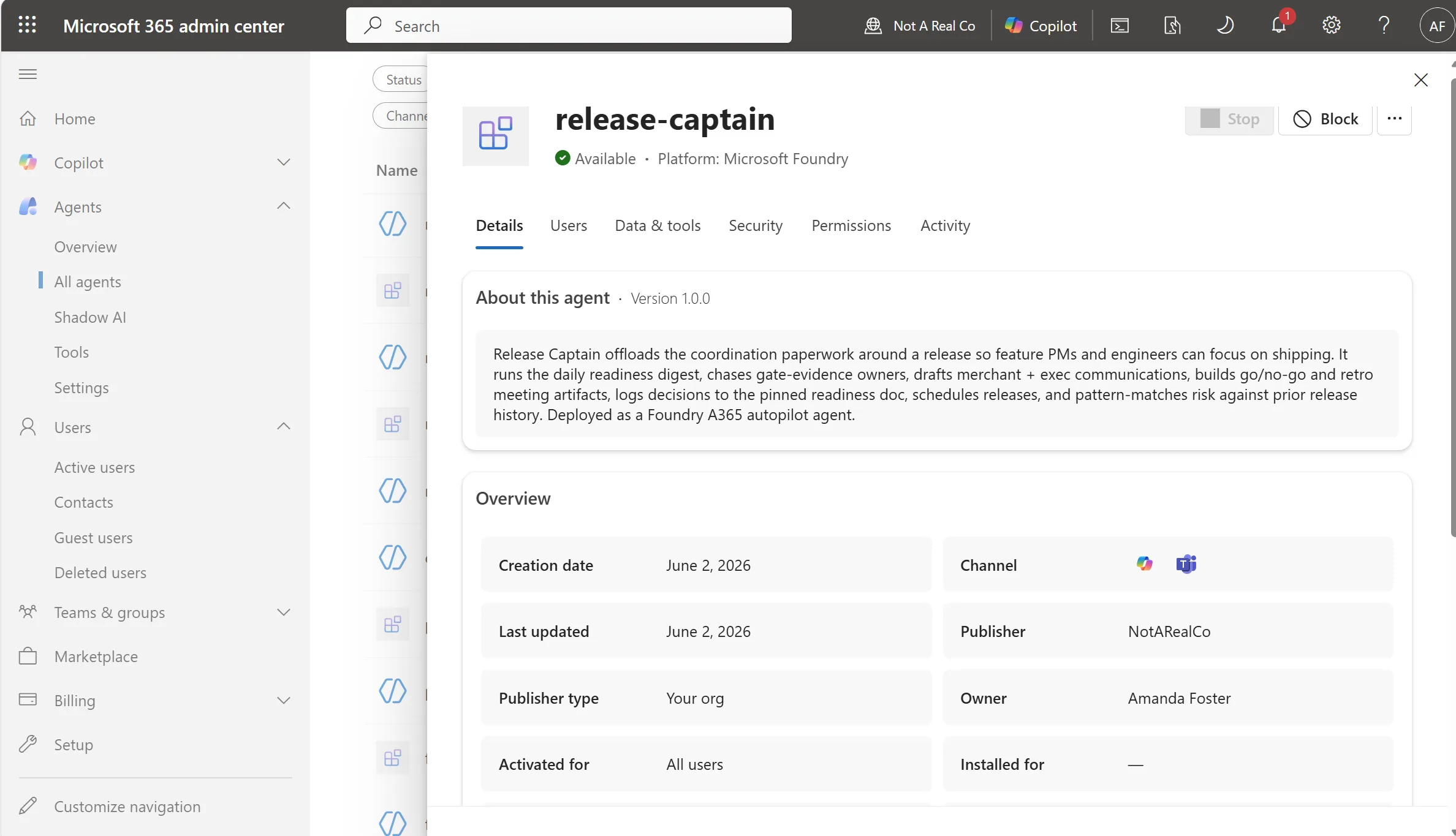
Governance begins in development, not at deployment. By the time an agent is ready to publish, admins can review and approve access, control who can discover and use it, and manage it alongside every other agent in Agent 365. Every published agent — whether a standard Foundry agent or an autopilot agent— flows through the same consistent, governed pipeline before going org-wide.
Identity, admin approval, scoping, secure publishing, and org-wide visibility aren’t bolted on. They’re the foundation.
Put your Foundry agents to work
Our goal is simple: make AI agents not just something you build — but something your entire organization works with.
With Microsoft Foundry, developers can build agents their way, publish them where employees already work, and govern them with the enterprise controls organizations require.
The future of work isn’t just AI-assisted. It’s AI-collaborative.
Get started today
- Learn how to publish your agents to Microsoft 365 and Teams.
- Learn how to enable incoming A2A on your Foundry agent.
- Create your first Foundry autopilot agent from one of our code samples.
📺 Watch: Foundry Agent Service + Microsoft Agent Framework Explained — Jeff Hollan walks through how to operationalize AI agents from deployment to real-world impact.
If you’re attending Microsoft Build 2026, or watching on-demand content later, be sure to check out these sessions:
- BRK241 — From prototype to production: build and run agents at scale | Session repo
- BRK242 — Turn your agents into action: Connect tools, APIs, and documents | session repo
- BRK243 — Claw and agent harness in Microsoft Foundry | session repo
- DEM333— How Foundry integrates with open-source frameworks and tools | session repo


0 comments
Be the first to start the discussion.