

When Anthropic released their Agent Skills framework, they published a blueprint for how enterprise organizations should structure AI agent capabilities. The pattern is straightforward: package procedural knowledge into composable skills that AI agents can discover and apply contextually. Microsoft, OpenAI, Cursor, and others have already adopted the standard, making skills portable across the AI ecosystem.
But here’s the challenge for .NET shops: most implementations assume Python or TypeScript. If your organization runs on the Microsoft stack, you need an implementation that speaks C#.
This article walks through building a proof-of-concept AI Skills Executor in .NET that combines Azure AI Foundry for LLM capabilities with the official MCP C# SDK for tool execution. I want to be upfront about something: what I’m showing here is a starting point, not a production-ready framework. The goal is to demonstrate the pattern and the key integration points so you can evaluate whether this approach makes sense for your organization, and then build something more robust on top of it.
The complete working code is available on GitHub if you want to follow along.
The Scenario: Why You’d Build This
Before we get into any code, I want to ground this in a real problem. Otherwise, every pattern looks like a solution searching for a question.
Imagine you’re the engineering lead at a mid-size financial services firm. Your team manages about forty .NET microservices across Azure. You’ve got a mature CI/CD pipeline, established coding standards, and a healthy backlog of technical debt that nobody has time to address. Sound familiar?
Your developers are already using AI assistants like GitHub Copilot and Claude to write code faster. That’s great. But you keep running into the same frustrations. A junior developer asks the AI to set up a new microservice, and it generates a project structure that doesn’t match your organization’s conventions. A senior developer crafts a detailed prompt for your specific deployment pipeline, shares it in a Slack thread, and within a month there are fifteen variations floating around with no way to standardize or improve any of them. Your architecture review board has patterns they want enforced, but those patterns live in a Confluence wiki that no AI assistant knows about.
This is the problem skills solve. Instead of every developer independently teaching their AI assistant how your organization works, you encode that knowledge once into a skill. A “New Service Scaffolding” skill that knows your project structure, your required NuGet packages, your logging conventions, and your deployment configuration. A “Code Review” skill that checks against your actual standards, not generic best practices. A “Tech Debt Assessment” skill that can scan a repo and produce a prioritized report using your team’s severity criteria.
The Skills Executor is the engine that makes these skills operational. It loads the right skill, connects it to an LLM via Azure AI Foundry, gives the LLM access to tools through MCP servers, and runs the agentic loop until the job is done. Keep this financial services scenario in mind as we walk through the architecture. Every component maps back to making this kind of organizational knowledge usable.
Where Azure AI Foundry Fits
If you’ve been tracking Microsoft’s AI platform evolution, you know that Azure AI Foundry (recently rebranded as Microsoft Foundry) has become the unified control plane for enterprise AI. The reason it matters for a skills executor is that it gives you a single endpoint for model access, agent management, evaluation, and observability, all under one roof with enterprise-grade security.
For this project, Foundry provides two things we need. First, it’s the gateway to Azure OpenAI models with function calling support, which is what drives the agentic loop at the core of the executor. You deploy a model like GPT-4.1 to your Foundry project, and the executor calls it through the Azure OpenAI SDK using your Foundry endpoint. Second, as you mature beyond this proof of concept, Foundry gives you built-in evaluation, red teaming, and monitoring capabilities that you’d otherwise have to build from scratch. That path from prototype to production is a lot shorter when your orchestration layer already speaks Foundry’s language.
The Azure AI Foundry .NET SDK (currently at version 1.2.0-beta.1) provides the Azure.AI.Projects client library for connecting to a Foundry project endpoint. In our executor, we use the Azure.AI.OpenAI package to interact with models deployed through Foundry, which means the integration is mostly about pointing your OpenAI client at your Foundry-provisioned endpoint instead of a standalone Azure OpenAI resource.
Understanding the Architecture
The Skills Executor has four cooperating components. The Skill Loader discovers and parses SKILL.md files from a configured directory, pulling metadata from YAML frontmatter and instructions from the markdown body. The Azure OpenAI Service handles all LLM interactions through your Foundry-provisioned endpoint, including chat completions with function calling. The MCP Client Service connects to one or more MCP servers, discovers their available tools, and routes execution requests. And the Skill Executor itself orchestrates the agentic loop: taking user input, managing the conversation with the LLM, executing tool calls when requested, and returning final responses.
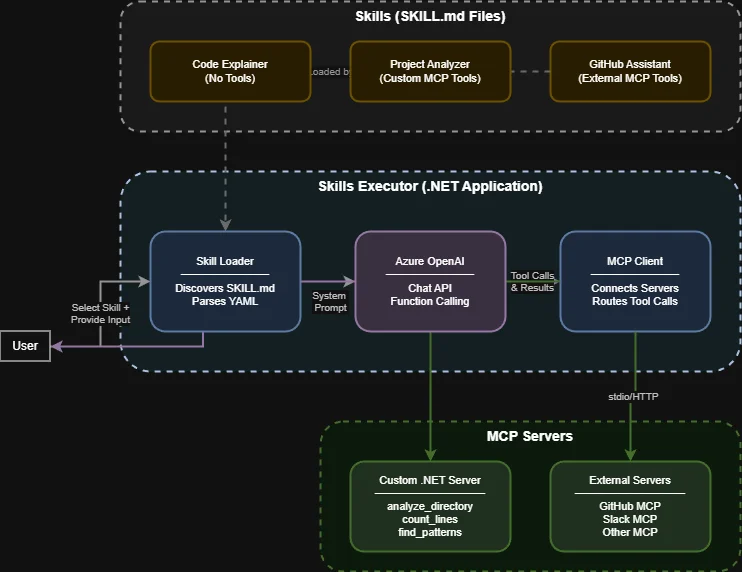 Figure: The Skills Executor architecture showing how skills, Azure OpenAI (via Foundry), and MCP servers work together.
The important design decision here is that the orchestrator contains zero business logic about when to use specific tools. It provides the LLM with available tools, executes whatever the LLM requests, feeds results back, and repeats until the LLM produces a final response. All the intelligence comes from the skill’s instructions guiding the LLM’s decisions. This is what makes the pattern composable. Swap the skill, and the same executor does completely different work.
Setting Up the Project
The solution uses three projects:
dotnet new sln -n SkillsQuickstart
dotnet new classlib -n SkillsCore -f net10.0
dotnet new console -n SkillsQuickstart -f net10.0
dotnet new console -n SkillsMcpServer -f net10.0

dotnet sln add SkillsCore
dotnet sln add SkillsQuickstart
dotnet sln add SkillsMcpServer
The key NuGet packages for the orchestrator are Azure.AI.OpenAI for LLM interactions through your Foundry endpoint and ModelContextProtocol --prerelease for MCP client/server capabilities. The MCP C# SDK is maintained by Microsoft in partnership with Anthropic and is currently working toward its 1.0 stable release, so the prerelease flag is still needed. For the MCP server project, you just need the ModelContextProtocol and Microsoft.Extensions.Hosting packages.
Skills as Markdown Files
A skill is a folder containing a SKILL.md file with YAML frontmatter for metadata and markdown body for instructions. Think back to our financial services scenario. Here’s what a tech debt assessment skill might look like:
---
name: Tech Debt Assessor
description: Scans codebases and produces prioritized tech debt reports.
version: 1.0.0
author: Platform Engineering
category: quality
tags:
  - tech-debt
  - analysis
  - reporting
---

# Tech Debt Assessor

You are a technical debt analyst for a .NET microservices environment.
Your job is to scan a codebase and produce a prioritized assessment.

## Severity Framework

- **Critical**: Security vulnerabilities, deprecated APIs with known exploits
- **High**: Missing test coverage on business-critical paths, outdated packages
  with available patches
- **Medium**: Code style violations, TODO/FIXME accumulation, copy-paste patterns
- **Low**: Documentation gaps, naming convention inconsistencies

## Workflow

1. Use analyze_directory to understand the project structure
2. Use count_lines to gauge project scale by language
3. Use find_patterns to locate TODO, FIXME, HACK, and BUG markers
4. Synthesize findings into a report organized by severity

**ALWAYS use tools to gather real data. Do not guess about the codebase.**
Notice how the skill encodes your organization’s specific severity framework. A generic AI assistant would apply some default notion of tech debt priority. This skill applies yours. And because it’s just a markdown file in a git repo, your architecture review board can review changes to it the same way they review code.
The Skill Loader parses these files by splitting the YAML frontmatter from the markdown body. The implementation uses YamlDotNet for deserialization and a simple string-splitting approach for frontmatter extraction. I won’t paste the full loader code here since it’s fairly standard file I/O and YAML parsing. You can see the complete implementation in the GitHub repository, but the core idea is that each SKILL.md file becomes a SkillDefinition object with metadata properties (name, description, tags) and an Instructions property containing the full markdown body.
Connecting to MCP Servers
The MCP Client Service manages connections to MCP servers, discovers their tools, and routes execution requests. The core flow is: connect to each configured server using StdioClientTransport, call ListToolsAsync() to discover available tools, and maintain a lookup dictionary mapping tool names to the client that owns them.
When the executor needs to call a tool, it looks up the tool name in the dictionary and routes the call to the right MCP server via CallToolAsync(). This means you can have multiple MCP servers, each with different tools. A custom server with your internal tools, a GitHub MCP server for repository operations, a filesystem server for file access. The executor doesn’t care where a tool lives.
Server configuration lives in appsettings.json:
{
  "McpServers": {
    "Servers": [
      {
        "Name": "skills-mcp-server",
        "Command": "dotnet",
        "Arguments": ["run", "--project", "../SkillsMcpServer"],
        "Enabled": true
      },
      {
        "Name": "github-mcp-server",
        "Command": "npx",
        "Arguments": ["-y", "@modelcontextprotocol/server-github"],
        "Environment": {
          "GITHUB_PERSONAL_ACCESS_TOKEN": ""
        },
        "Enabled": true
      }
    ]
  }
}
The empty GITHUB_PERSONAL_ACCESS_TOKEN is intentional. The service resolves empty environment values from .NET User Secrets at runtime, keeping sensitive tokens out of source control.
The Agentic Loop
This is the core of the executor, and it’s where the pattern earns its keep. The agentic loop is the conversation cycle between the user, the LLM, and the available tools. Here’s the essential logic, stripped of error handling and logging:
public async Task<SkillResult> ExecuteAsync(SkillDefinition skill, string userInput)
{
    var messages = new List<ChatMessage>
    {
        new SystemChatMessage(skill.Instructions ?? "You are a helpful assistant."),
        new UserChatMessage(userInput)
    };

    var tools = BuildToolDefinitions(_mcpClient.GetAllTools());
    var iterations = 0;

    while (iterations++ < MaxIterations)
    {
        var response = await _openAI.GetCompletionAsync(messages, tools);
        messages.Add(new AssistantChatMessage(response));

        var toolCalls = response.ToolCalls;
        if (toolCalls == null || toolCalls.Count == 0)
        {
            // No tool calls means the LLM has produced its final answer
            return new SkillResult
            {
                Response = response.Content.FirstOrDefault()?.Text ?? "",
                ToolCallCount = iterations - 1
            };
        }

        // Execute each requested tool and feed results back
        foreach (var toolCall in toolCalls)
        {
            var args = JsonSerializer.Deserialize<Dictionary<string, object?>>(
                toolCall.FunctionArguments);
            var result = await _mcpClient.ExecuteToolAsync(toolCall.FunctionName, args);
            messages.Add(new ToolChatMessage(toolCall.Id, result));
        }
    }

    throw new InvalidOperationException("Max iterations exceeded");
}
The loop keeps going until the LLM responds without requesting any tool calls (meaning it’s done) or until a safety limit on iterations is reached. Each tool result gets added to the conversation history, so the LLM has full context of what it’s discovered.
Let’s trace through our financial services scenario. A developer selects the Tech Debt Assessor skill and asks “Assess the tech debt in our OrderService at C:\repos\order-service.” The executor loads the skill’s instructions as the system prompt, sends the request to Azure OpenAI through Foundry with the available MCP tools, and the LLM (guided by the skill’s workflow) starts calling tools. First analyze_directory to understand the project structure, then count_lines for scale metrics, then find_patterns to locate debt markers. After each tool call, the results come back into the conversation, and the LLM decides what to do next. Eventually, it synthesizes everything into a severity-prioritized report using your organization’s framework.
The BuildToolDefinitions method bridges MCP and Azure OpenAI by converting MCP tool schemas into ChatTool function definitions. It’s a one-liner per tool using ChatTool.CreateFunctionTool(), mapping the tool’s name, description, and JSON schema.
Building Custom MCP Tools
The MCP C# SDK makes exposing custom tools simple. You create a class with methods decorated with the [McpServerTool] attribute, and the SDK handles discovery and protocol communication:
[McpServerToolType]
public static class ProjectAnalysisTools
{
    [McpServerTool, Description("Analyzes a directory structure and returns a tree view")]
    public static string AnalyzeDirectory(
        [Description("Path to the directory to analyze")] string path,
        [Description("Maximum depth to traverse")] int maxDepth = 3)
    {
        // Walk the directory tree, return a formatted string representation
        // Full implementation in the GitHub repo
    }

    [McpServerTool, Description("Counts lines of code by file extension")]
    public static string CountLines(
        [Description("Path to the directory to analyze")] string path,
        [Description("File extensions to include (e.g., .cs,.js)")] string? extensions = null)
    {
        // Enumerate files, count lines per extension, return summary
    }

    [McpServerTool, Description("Finds TODO, FIXME, and HACK comments in code")]
    public static string FindPatterns(
        [Description("Path to the directory to search")] string path)
    {
        // Scan files for debt markers, return locations and context
    }
}
The server’s Program.cs is minimal. Five lines to register the MCP server with stdio transport and auto-discover tools from the assembly:
var builder = Host.CreateApplicationBuilder(args);

builder.Services
    .AddMcpServer()
    .WithStdioServerTransport()
    .WithToolsFromAssembly();

await builder.Build().RunAsync();
When the Skills Executor starts your MCP server, the SDK automatically discovers all [McpServerTool] methods and exposes them through the protocol. Any MCP-compatible client can use these tools, not just your executor. That’s the portability of the standard at work.
Three Skills, Three Patterns
The architecture supports different tool-usage patterns depending on what the skill needs. Back to our financial services firm:
A Code Explainer skill uses no tools at all. A developer pastes in a complex LINQ query from the legacy monolith, and the skill relies entirely on the LLM’s reasoning to explain what it does. No tool calls needed. The skill instructions just tell the LLM to start with a high-level summary, walk through step by step, and flag any design decisions worth discussing.
The Tech Debt Assessor from our earlier example uses custom MCP tools. It can’t just reason about a codebase in the abstract. It needs to actually inspect the file structure, count lines, and find patterns. The skill instructions lay out a specific workflow and explicitly tell the LLM to always use tools rather than guessing.
A GitHub Assistant skill uses the external GitHub MCP server. When a developer asks “What open issues are tagged as P0 in the order-service repo?”, the skill maps that to the GitHub MCP server’s list_issues tool. The skill instructions explain which tools are available and how to translate user requests into tool calls.
The key thing to notice: the executor code is identical across all three cases. The only thing that changes is the SKILL.md file. That’s the whole point. Swap the skill, swap the behavior.
What This Architecture Gives You
I keep coming back to the question of “why.” Why build a custom executor when you could just use Claude or Copilot directly? Three reasons stand out for enterprise teams.
Standardization without rigidity. Skills let you standardize how AI performs common tasks without hardcoding business logic into application code. When your code review standards change, you update the SKILL.md file, not the orchestrator. Domain experts can write skills without understanding the execution infrastructure. Platform teams can enhance the executor without touching individual skills.
Tool reusability across contexts. MCP servers expose tools that any skill can use. The project analysis tools work whether invoked by a tech debt assessor, a documentation generator, or a migration planner. You build the tools once and compose them differently through skills.
Ecosystem portability. Because skills follow Anthropic’s open standard, they work in VS Code, GitHub Copilot, Claude, and any other tool that supports the format. Skills you create for this executor also work in those environments. Your investment compounds across your development toolchain rather than getting locked into one vendor.
What This Doesn’t Give You (Yet)
I want to be honest about the gaps, because shipping something like this to production would require more work.
There’s no authentication or authorization layer. In a real deployment, you’d want to control which users can access which skills and which tools. There’s no retry logic or circuit-breaking on MCP server connections. The error handling is minimal. There’s no telemetry or observability beyond basic console output, though Azure AI Foundry’s built-in monitoring would help close that gap as you mature the solution. There’s no skill chaining (one skill invoking another), no versioning strategy for skill updates, and no caching of skill metadata.
Think of this as the architectural proof that the pattern works in .NET. The production hardening is a separate effort, and it’ll look different depending on your organization’s requirements.
Where to Go From Here
If the pattern resonates, here’s how I’d suggest approaching it. Start by identifying two or three repetitive tasks your team does that involve organizational knowledge an AI assistant wouldn’t have on its own. Write those as SKILL.md files. Get the executor running locally and test whether the skills actually produce useful output with your real codebases and workflows.
From there, the natural extension points are: skill chaining to allow complex multi-step workflows, a centralized skill registry so teams across your organization can share and discover skills, and observability hooks that feed into Azure AI Foundry’s evaluation and monitoring capabilities. If you’re running Foundry Agents, there’s also a path to wrapping the executor as a Foundry agent that can be managed through the Foundry portal.
The real value isn’t in the executor code itself. It’s in the skills your organization creates. Every procedure, standard, and piece of institutional knowledge that you encode into a skill is one less thing that lives only in someone’s head or a Slack thread.
Get the Code
The complete implementation is available on GitHub at github.com/MCKRUZ/DotNetSkills. Clone the repository to explore the full source, run the examples, or use it as a foundation for building your own skills executor. All the plumbing code I skipped in this article (the full Skill Loader, the MCP Client Service, the Azure OpenAI Service wrapper) is there and commented.
References
- Model Context Protocol Specification. modelcontextprotocol.io
- MCP C# SDK (Microsoft/Anthropic). github.com/modelcontextprotocol/csharp-sdk
- Azure AI Foundry Documentation. learn.microsoft.com
- Azure OpenAI Service Documentation. learn.microsoft.com
- Building MCP Servers in .NET. devblogs.microsoft.com
- Anthropic Agent Skills Framework. anthropic.com/news/skills
- DotNetSkills – Complete Example Implementation. github.com/MCKRUZ/DotNetSkills


This post clearly shows how AI capabilities are being embedded deeper into the .NET ecosystem. The practical examples make it easier to visualize real usage. I’ve seen similar execution-focused thinking explained under .net development services here: https://mobisoftinfotech.com/services/dotnet-development-consulting
— especially around integrating AI into enterprise applications. Great technical read.
starts to get rather complicated
do I need an agent? a sub agent? a skill? an mcp server?
do I need multiple agents?
so I can ran into situations where multi agent, runs a skill, which runs an agent, which calls an mcp, which triggers an agent, which calls a skill..