



Generative AI became the fastest‑growing consumer technology in history, surpassing Instagram and TikTok, reaching 100 million users in under two months. At the end of 2022, OpenAI released a free preview of GPT‑3.5, delivered as a conversational chat client: ChatGPT. The model was fine‑tuned using Reinforcement Learning from Human Feedback (RLHF), marking the moment generative AI hit mainstream awareness. In early 2023, Microsoft responded by launching the Azure OpenAI Service, allowing developers to securely provision and use OpenAI‑compatible models behind Azure‑managed endpoints.
Soon after, Microsoft introduced:
- Semantic Kernel (SK) → tools for orchestrating prompts, memories, and plugins using C# or Python
- Microsoft Extensions for AI (MEAI) → unified abstractions for interacting with models (e.g.,
IChatClient) - Microsoft Extensions for Vector Data → standard interfaces for vector databases used in RAG systems
This post takes a step back from rapid AI innovation and focuses on core concepts, providing a foundation for .NET/C# developers working with Microsoft Foundry, GitHub Models, AI Extensions, and local runtimes like Ollama.
Understanding AI Terms
AI has its own distinct set of terms with very specific meanings.
Artificial Intelligence (AI)
AI involves techniques that enable computers to perform tasks typically requiring human intelligence—reasoning, language, planning, or perception. AI is not new, but today most people use “AI” to refer to generative AI.
Generative AI (GenAI)
Generative AI refers to AI systems capable of producing text, images, audio, or other content.
For example: GPT stands for Generative Pre‑trained Transformer. To break that down, we get:
- Generative → it produces content;
- Pre‑trained → trained on huge datasets;
- Transformer → neural‑network architecture enabling high‑quality language modeling
Large Language Models (LLMs)
LLMs are trained on billions of tokens and can generate text, images, code, or reasoning steps. Their ability to operate across multiple languages comes from learning relationships between words—not simple one‑to‑one dictionary translations.
Why translation is hard
Words have many meanings:
- pass the car
- mountain pass
- pass on the opportunity
- your park pass on the dashboard
Traditional software struggled with such ambiguity; LLMs excel because they operate in semantic space.
Tokens and embeddings
Models don’t read text directly. They break it into tokens:
- Whole words
- Word fragments
- Characters
These tokens are converted into numeric vectors known as embeddings — mathematical representations of meaning.
Example Phrases:
- “the actor was a star”
- “they loved the stars”
The word star appears in both, but with different meanings.
Embeddings capture this difference.
Here is a simplified way to visualize this concept. In the graph, the semantic meaning of the word “star” can be plotted based on its proximity to the concept of “celestial body” (a star at night) and the concept of “actor” (star of the show).
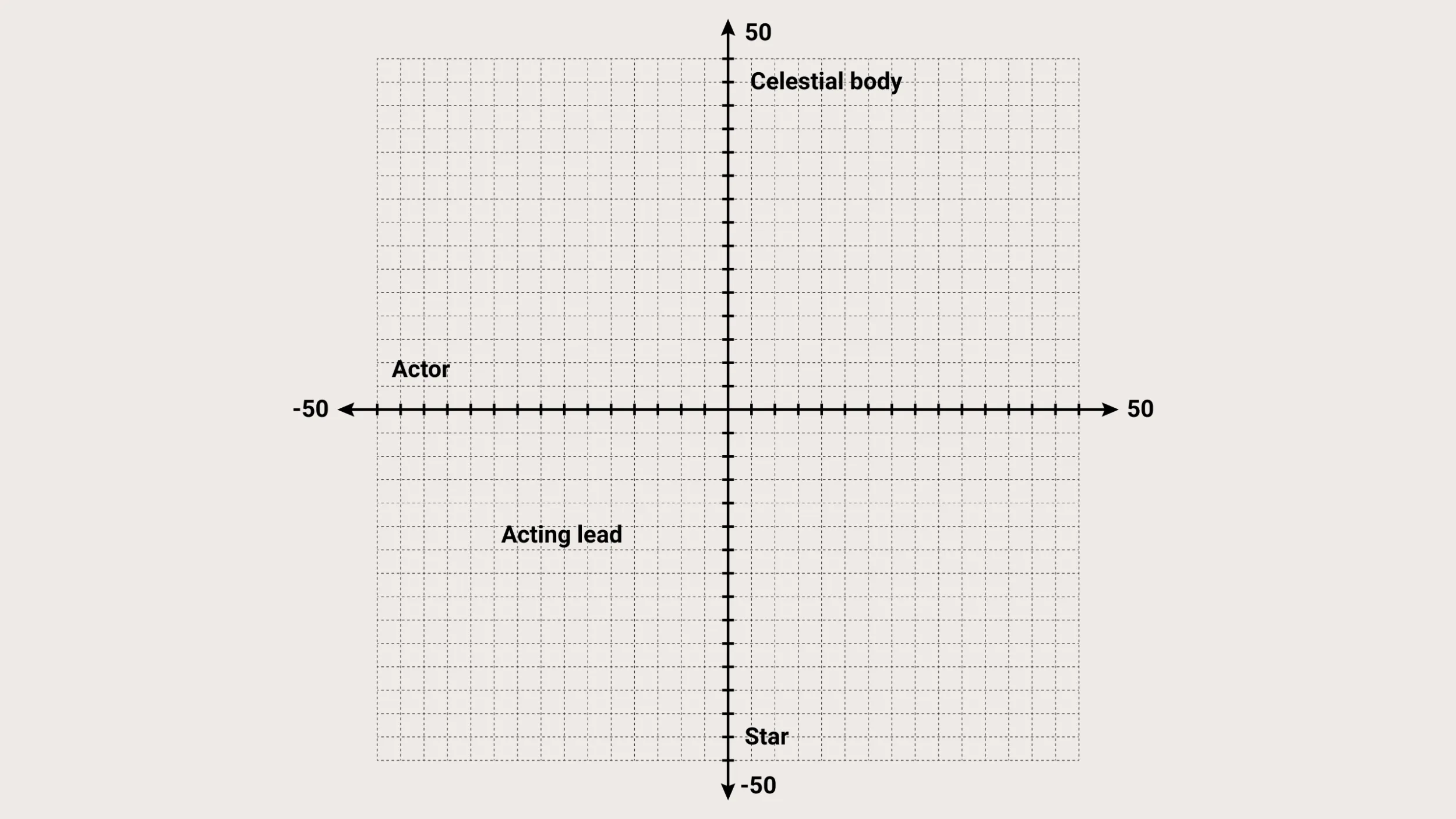
Now imagine billions of such points. Models generate text by navigating this space and predicting the next likely vector.
Examples of semantic distance:
- school ↔ schol (close distance → spelling correction)
- cat ↔ dog (close distance → similar animals)
- cat ↔ laptop (far apart)
Semantic search uses distance in embedding space, not string matching.
Parameters: model size
LLMs are often described by their parameter counts:
7B, 14B, 70B, 123B, etc.
Parameters are trained weights.
More parameters → deeper reasoning, richer knowledge, better nuance.
- GPT‑1 (2018) → 117M parameters
- Modern frontier models → 100B–400B+ parameters
Prompts, instructions, and tools
Previous sections covered information about the model. The terms in this section relate directly to input into and output out of the model.
Prompts
User input to the model. “What’s the best way to skin a mango.”
System Instructions
Hidden “blueprint” guiding model behavior. “You are a mango skinner and considered an expert in your area.”
Tools / Functions
LLMs are trained on historical data. Tools let them access current or authoritative information, e.g.:
- Weather API
- Database lookup
- Search engine
- Company knowledge index
This pattern is referred to as Retrieval‑Augmented Generation (RAG). Let’s look at two scenarios. First, imagine a concierge agent that’s provided with an API for local restaurants and an API for the weather. The user enters the prompt:
Can you book me a dinner this week at a restaurant with outdoor seating? The LLM first calls the weather API to determine which evenings are likely to be dry and warmer, then it calls the restaurant API to find what restaurants are open and have available seating. Finally, it returns a list of suggestions that are right on target.
Next, imagine a customer service agent for a retail store that has all of the product information uploaded. The user types,
"What kind of batteries does the traveling wonder cube take?"
The LLM is able to extract the product name, “traveling wonder cube”. It vectorizes the text of the query, then calls the product API with the product name and the vectors. Semantic search is invoked by using a function to find points in the product manual that are semantically closest to the query. This will return the relevant result of the required batteries if such a section exists.
Model Context Protocol (MCP)
Model context protocol, or MCP for short, is a set of standards for interoperability between agents and tools. It makes it easy for models to understand what tools are available and how to call them. This empowers you to build virtual toolboxes that any of your models or agents can call.
What about agents?
Wait, did I say agent? An agent is simply a way of providing a specialized solution that includes a model, tools, and context. A “concierge agent” might include a reasoning model with tools that provide information about weather, events, and local businesses combined with a specialized model capable of generating maps with turn-based instructions. I’ll look at agents more closely and cover C# based solutions in a later post.
I’ve covered all of the foundational concepts, so now it’s time to go hands-on. First, I want to briefly share the timeline between generative AI going mainstream and the tools that are available today.
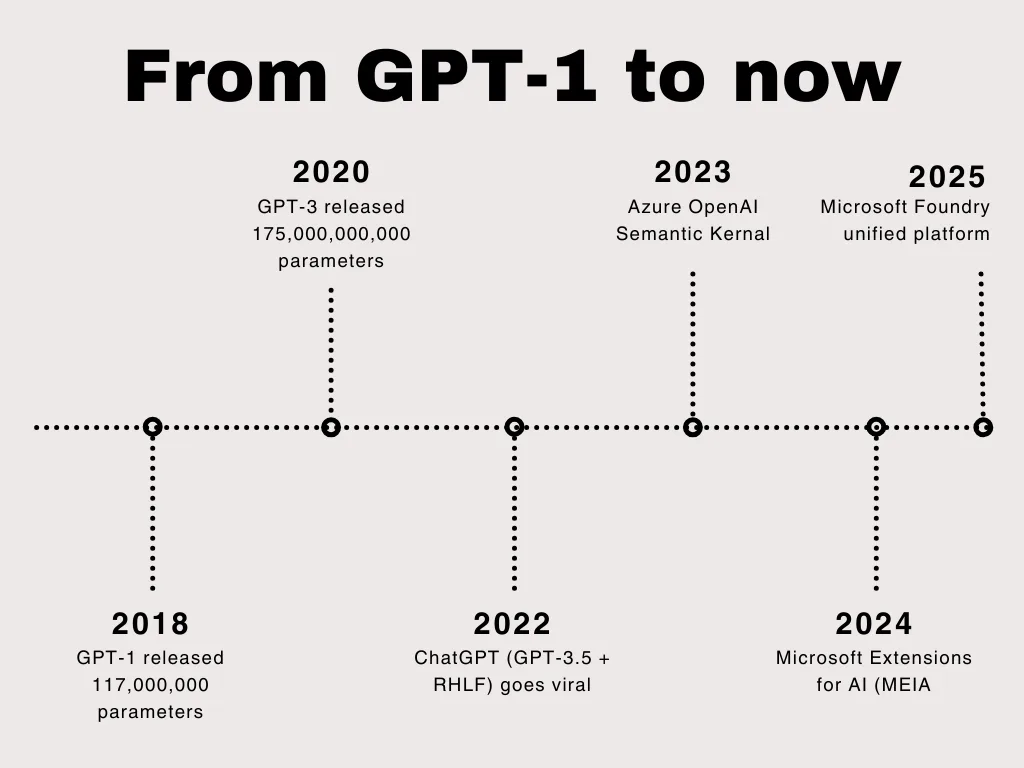
From GPT-1 to today
Here is a brief look at the evolution of AI in .NET over the past few years.
Model management in the .NET Ecosystem
Working with models is about more than identifying the right model and using it. Many companies choose to host their own models out of concerns related to trust, security, and cost. Other companies require fine-tuned models and the ability to perform their own training. Fortunately, working with models in .NET and C# is not only possible, but streamlined with the help of several products and services.
GitHub Models
GitHub Models provides a hosted catalog of open and frontier models through an OpenAI‑compatible API. It is a great way for developers to get started on their AI journey. A few reasons include:
- No infrastructure required
- Switch between models with minimal code changes
- Perfect for prototyping, evaluations, automation, extensions, and CI/CD pipelines
Get started with GitHub models.
Microsoft Foundry (Cloud)
Formerly Azure AI Studio, Microsoft Foundry is the enterprise platform for:
- Model catalogs (OpenAI, Meta, DeepSeek, Cohere, Mistral, etc.)
- Agentic workflows (Foundry Agent Service)
- Security, content safety, governance
- Monitoring, tracing, evaluations
- Fine‑tuning and customization
Foundry is where organizations take AI into production at scale.
Foundry Local
Foundry Local brings the Foundry developer experience offline:
- On‑premise, air‑gapped, or edge environments
- The same agents, tools, evaluations as cloud Foundry
- Supports hybrid “develop local → deploy cloud” lifecycle
This is a great option for testing new models, testing new code without blowing through budget, and building CI/CD pipelines with minimal overhead and that don’t require a third-party hosted account to succeed.
Ollama (Local Runtime)
Ollama is a popular open‑source engine for running lightweight and mid‑sized models locally.
Features:
- Runs models like Mistral, Llama 3, Phi‑3
- Simple CLI and server
- Excellent for privacy‑sensitive workflows
- Integrates cleanly with MEAI (
IChatClient) via OllamaSharp
Bringing It All Together: A Unified Abstraction
As a .NET Developer you shouldn’t have to choose a single provider or lock into a single solution. That’s why the .NET team invested in a set of extensions that provide consistent APIs for working with models that are universal yet flexible. It also enables scenarios such as middleware to ease the burden of logging, tracing, injecting behaviors and other custom processes you might use. Most of the major providers implement our extensions contracts so that you can, for example, use an IChatClient instance regardless of whether you’re talking to:
- GitHub Models
- Azure AI Foundry
- Open AI / Azure Open AI
- Foundry Local
- Ollama
- Custom provider
… and the code can stay the same.
We’ll dive deeper into these tools in future posts so stay tuned to the .NET blog, subscribe to our newsletter, and join an upcoming community standup on the .NET YouTube!


Is there any course or resources to build NLPs or LLMs using C#? And I’m open to contribute in NuGet for making libraries and packages.
Good article Jeremy, thank you!
Personally, I struggle with the term "AI Agent", and I believe many people struggle too. The words "agents" and "agentic" are confusing, because I imagine some kind of processes or services that run in the background and do some stuff (the stuff, I never asked them doing). We Developers need some level of predictability and determinism. When we hear Agents, we might get confused by the "agentic" side of the thing.
Do you think, the term "AI Agent" implies autonomy? Or is it more like a "AI Servant" that serves our requests in the best possible...
A class Master
mind defination
Since we’ve mentioned the Semantic Kernel, maybe better to mention the Microsoft Agent Framework also since that’s the successor of SK
Thanks! Yes, my next post will introduce that and get a little deeper. Appreciate the callout!
I appreciate you starting at the beginning, for those of us who have not yet started integrating AI into our code and (in many cases) haven’t even really used it as a consumer much.
I’m currently working on several ASP.NET Core projects and would like to implement AI-powered searching and filtering of records based on user or entity profiles (for example, semantic search rather than strict keyword matching).
Could you share recommended starting steps, architecture flow, or reference patterns for achieving this in .NET? Specifically:
1. How to model and generate embeddings for existing records
2. How to store and query them efficiently (e.g., vector databases or alternatives)
3. How this fits into a typical ASP.NET Core application flow (RAG, APIs, etc.)
Any guidance or links to sample implementations would be greatly appreciated.
Here are a few resources to get started. If this doesn't address what you are looking for or you find gaps or issues, please feel to reach out to me directly! My goal is to provide you with the right tools and docs for you to confidently implement the capabilities you described. Email is just my first name and last name with a dot in between at microsoft (dot) com.
https://devblogs.microsoft.com/dotnet/introducing-data-ingestion-building-blocks-preview/
https://devblogs.microsoft.com/dotnet/vector-data-qdrant-ai-search-dotnet/
Hi! Thanks for the article.
What should I use now for a greenfield project Semantic Kernel or Microsoft Extensions for AI (MEAI)?
My pleasure! I would always start with MEAI, then add other packages as needed/when they are identified. The primitives from Semantic Kernal have been migrated to MEAI, and the workflow capabilities are being address by the Microsoft Agent Framework.