


The Model Context Protocol (MCP) has made it much easier to connect tools and resources to AI applications. But once those tools are exposed to agents, you also need a reliable way to govern what gets registered, what gets executed, and what comes back from tool calls.
For a detailed look at the governance patterns and controls behind this
package, see Governing MCP tool calls in .NET with the Agent Governance
Toolkit. This post
announces Microsoft.AgentGovernance.Extensions.ModelContextProtocol, a
Public Preview companion package for the official MCP C# SDK that makes it
simple to apply those controls.
It adds one-call governance to IMcpServerBuilder so you can apply policy
enforcement, startup scanning, runtime tool-call governance, and response
sanitization to your MCP server without building that plumbing yourself.
If you’re already building MCP servers with .NET, this package is designed to fit directly into the builder pipeline you already use.
Why MCP servers need governance
MCP makes tool integration straightforward, but the same flexibility creates a new set of security and reliability questions:
- Should every registered tool be callable by every agent?
- What happens if a tool description includes prompt-injection-style instructions?
- How do you fail closed when a tool definition changes in a risky way?
- How do you keep unsafe tool output from flowing straight back into the model?
Those concerns usually show up as a mix of custom filters, ad hoc validation,
and application-specific guardrails.
Microsoft.AgentGovernance.Extensions.ModelContextProtocol packages those
concerns into a single extension method so the secure path is also the simple
path.
Getting started
Here’s how to add it to your MCP server. Start by installing the package:
dotnet add package Microsoft.AgentGovernance.Extensions.ModelContextProtocolThen add governance when configuring your MCP server:
using AgentGovernance.Extensions.ModelContextProtocol;

builder.Services
    .AddMcpServer()
    .WithGovernance(options =>
    {
        options.PolicyPaths.Add("policies/mcp.yaml");
        options.DefaultAgentId = "did:mcp:server";
        options.ServerName = "contoso-support";
    });
That single call registers startup and runtime governance controls in one place: tool-definition scanning before exposure, identity-aware policy enforcement on each call, response sanitization before model return, and audit plus metrics instrumentation.
What WithGovernance(...) adds
The package is intentionally small on surface area and opinionated in behavior.
How the governed flow works
The flow has two phases: startup gating and runtime tool-call governance. Startup scanning happens before tools are exposed, while runtime checks apply on each tool call.
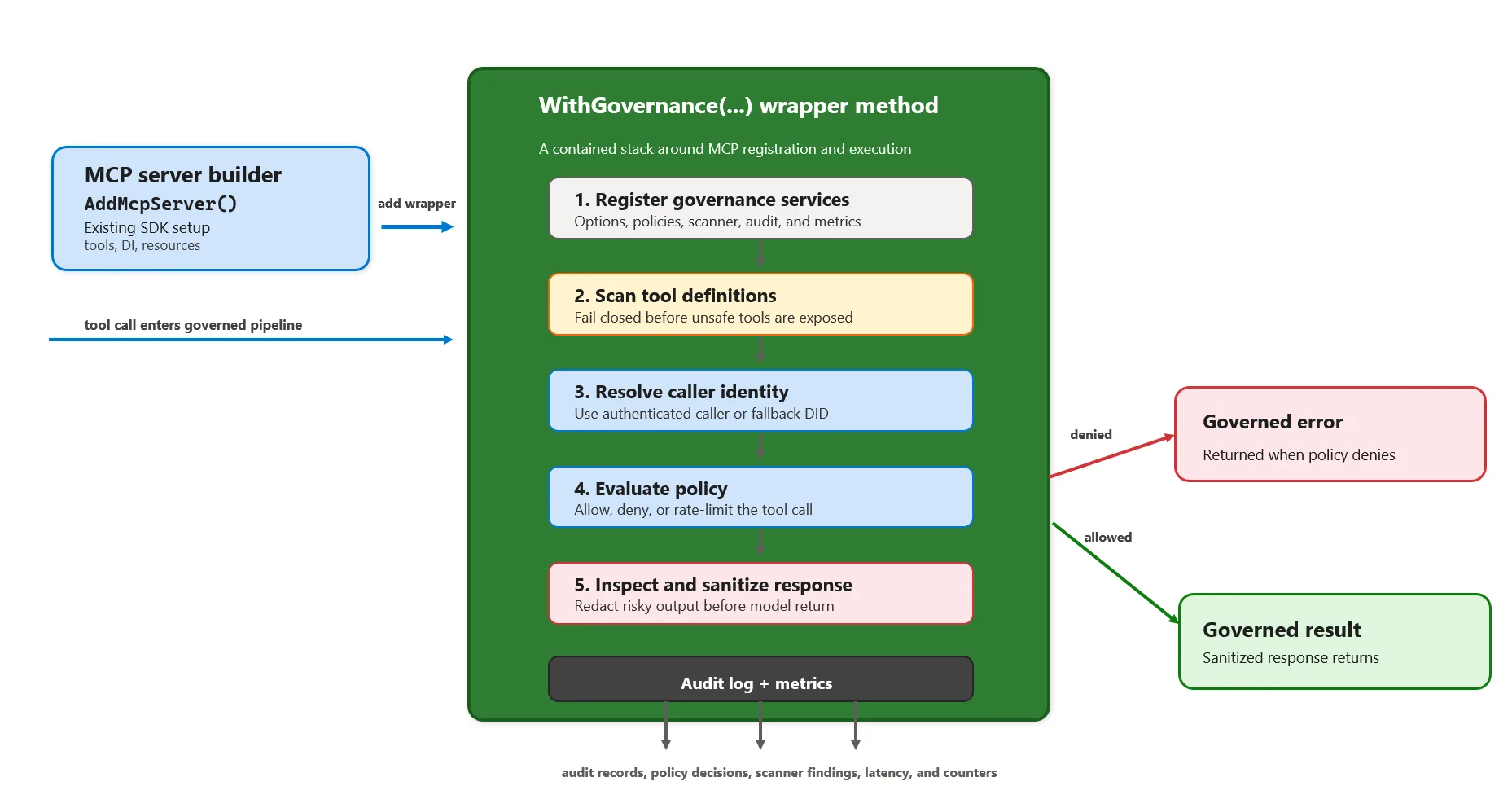
Startup scanning for unsafe tool definitions
When MCP server options are materialized, the package scans registered tools before they are exposed. By default, unsafe tools fail startup.
This is a startup gate, not a per-call runtime step, so unsafe tool metadata can fail closed before any tool is exposed to clients.
The built-in scanner detects threat categories including:
- tool poisoning
- typosquatting
- hidden instructions
- rug pulls
- schema abuse
- cross-server attacks
- description injection
This helps detect problems such as prompt-like control text in descriptions,
suspiciously similar tool names, hidden Unicode characters, or schema fields
that request sensitive values like token, password, or system_prompt.
Detection effectiveness depends on your threshold tuning and threat model—tune
the risk score threshold in your own environment based on your acceptable
false-positive rate.
Policy enforcement on tool execution
Governance decisions are applied when tools are invoked, using the same Agent Governance policy model as the base .NET package.
That means you can use YAML-backed policies to decide which tools are allowed, denied, or rate-limited, and you can keep those rules outside of application code.
For example:
apiVersion: governance.toolkit/v1
version: "1.0"
name: mcp-governance-policy
default_action: deny
rules:
  - name: allow-echo
    condition: "tool_name == 'echo'"
    action: allow
    priority: 10
If a tool call is denied, the package returns a governed error result instead of letting execution continue.
Authenticated identity support
When an authenticated identity is present, governance uses that agent identity
in evaluation. If one is not available, the package falls back to a
configurable default DID such as did:mcp:anonymous.
This makes it easier to write policies that distinguish between trusted callers and anonymous or low-trust execution contexts.
Response sanitization before content reaches the model
Tool output is another place where attacks can hide. By default, the package sanitizes text responses before they are returned to the client.
The sanitizer scans for:
- prompt-injection tags like
<system>...</system> - imperative override phrasing like “ignore previous instructions”
- credential leakage patterns
- exfiltration-oriented URLs
When it finds patterns matching these categories, it redacts the dangerous fragments while preserving as much useful result content as possible. Sanitizer effectiveness depends on pattern tuning and your environment’s threat baseline.
Designed to fail closed by default
One of the goals of this package is to make safe defaults the default defaults.
McpGovernanceOptions enables several protections out of the box:
ScanToolsOnStartup = trueFailOnUnsafeTools = trueSanitizeResponses = trueGovernFallbackHandlers = trueEnableAudit = trueEnableMetrics = true
That combination gives you a strong baseline without requiring a long checklist before your first deployment.
Works with the MCP builder model you already use
This package doesn’t require a forked SDK, a separate proxy process, or a
custom server abstraction. It extends the official C# SDK builder and wraps the
final ToolCollection, so governance applies to tools registered before or
after the extension is added.
That detail matters for real applications, because MCP server setup often grows across feature modules and DI registrations over time.
A practical fit for production MCP servers
Microsoft.AgentGovernance.Extensions.ModelContextProtocol is a good fit when
you want to:
- add policy control to an existing MCP server
- block unsafe tool definitions before startup completes
- enforce identity-aware tool execution
- sanitize tool output before it is fed back into agent workflows
- standardize governance across multiple MCP servers in the same organization
Because the package builds on the broader Microsoft.AgentGovernance stack, it
also lines up with features like auditability, metrics, execution rings,
prompt-injection detection, and circuit-breaker support already available in
the .NET package.
Try it today
Microsoft.AgentGovernance.Extensions.ModelContextProtocol is available now as
a Public Preview package for .NET 8+ applications using the official MCP C#
SDK.
To get started:
- Install
Microsoft.AgentGovernance.Extensions.ModelContextProtocol. - Add
WithGovernance(...)to yourIMcpServerBuilderpipeline. - Point the package at your governance policy files.
- Run your server with startup scanning and response sanitization enabled.
If you’re building MCP servers for internal copilots, enterprise tools, or agent platforms, this gives you a straightforward way to add governance support to your MCP servers without re-implementing the same controls in every service.
Compliance note
Agent Governance Toolkit provides technical controls that can help support security and privacy programs. It does not, by itself, guarantee legal or regulatory compliance. You are responsible for validating your end-to-end implementation, data handling, and operational controls against applicable requirements (for example, GDPR, SOC 2, or your internal policies).


Good to see the ecosystem maturing in the right direction.