

Modern applications often need to work in places where network connectivity is slow, intermittent, or unavailable. Field service, retail, logistics, healthcare, and mobile SaaS applications are common examples.
PowerSync recently introduced alpha support for Azure DocumentDB, giving developers a way to combine Azure DocumentDB as the cloud operational database with local SQLite databases on client devices. Applications can remain responsive and continue working offline while PowerSync synchronizes relevant data in the background.
Note: PowerSync support for Azure DocumentDB is currently an alpha release. Behavior and support may change as the integration evolves.
Why offline-first matters
Consider a field service application used by technicians maintaining equipment at customer sites. The application might need access to work orders, equipment information, service history, and configuration data.
A technician may lose network connectivity but still needs to inspect equipment, record findings, update work orders, and capture notes.
With an offline-first architecture, the application works against a local SQLite database. Reads and writes remain fast even without a network connection. When connectivity returns, changes can synchronize with the cloud system.
Azure DocumentDB and PowerSync
Azure DocumentDB is Microsoft’s managed, MongoDB-compatible document database service built on the open-source DocumentDB project. Developers can use familiar MongoDB drivers and tools while running their operational workloads on Azure.
PowerSync provides the synchronization layer between Azure DocumentDB and local SQLite databases.
A simplified architecture looks like this:
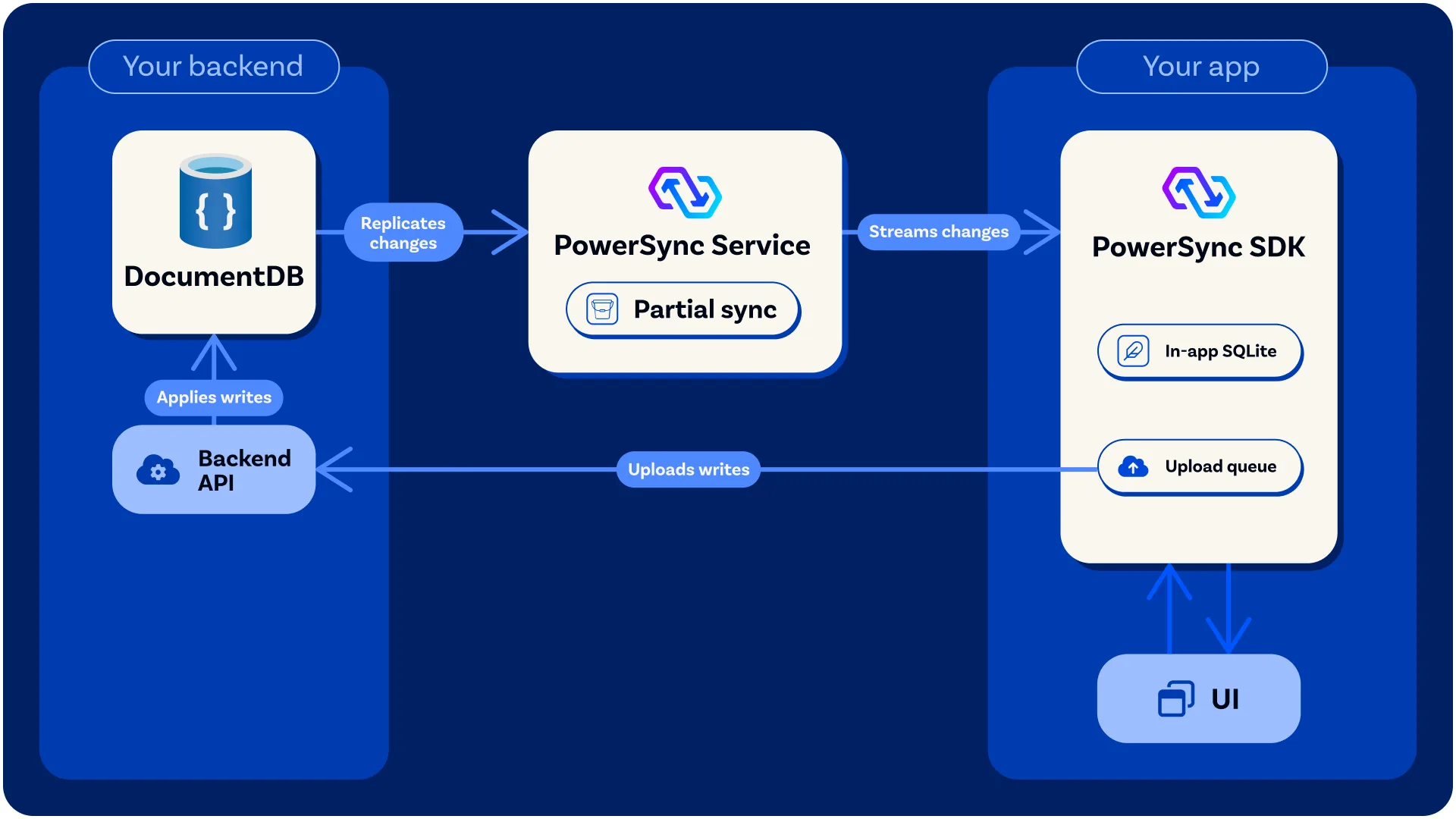
Azure DocumentDB → Change Streams → PowerSync Service → synchronized data → local SQLite
Client writes follow a separate path:
local SQLite → PowerSync upload queue → application backend → Azure DocumentDB
This means applications can read and write locally while Azure DocumentDB remains the authoritative operational database in the cloud.
Using Change Streams for synchronization
PowerSync uses Azure DocumentDB Change Streams to detect database changes and synchronize relevant updates to connected applications.
The integration builds on PowerSync’s existing MongoDB connector. PowerSync automatically detects Azure DocumentDB and includes specific handling for differences in Change Stream behavior.
Developers can then define which data should be synchronized to each user, device, tenant, or application context rather than copying the entire database to every client.
Where this pattern can help
Offline-first architectures can be useful across many application scenarios:
- Field service: Keep work orders, asset information, and service history available at remote sites.
- Retail: Give store associates access to product, inventory, and task information even when connectivity is unreliable.
- Logistics: Keep shipment, route, and warehouse data available to drivers and operational teams.
- Healthcare: Support applications that need reliable local access to approved operational data.
- SaaS: Add offline-capable mobile or desktop experiences to applications backed by Azure DocumentDB.
The common requirement is simple: the application needs cloud-based operational data, but users should not depend on a constant network connection to get their work done.
Current alpha considerations
Because the integration is an alpha release, developers should test it against their specific workloads.
PowerSync currently supports managed Azure DocumentDB as a source database for this integration. There are also Azure DocumentDB-specific considerations around Change Streams, collection operations, document size, and replication behavior.
PowerSync maintains current implementation details and limitations in its documentation, and we recommend reviewing those before evaluating the integration for production scenarios.
Get started
PowerSync’s Azure DocumentDB support creates an interesting new option for developers building offline-first and local-first applications.
If your application needs a managed MongoDB-compatible operational database in Azure together with fast local data access, you can now explore how Azure DocumentDB, PowerSync, and SQLite work together.
Refer to the PowerSync documentation to get started.
We would like to hear what applications and synchronization patterns you are testing. Feedback from developers will help shape how the integration evolves.
About Azure DocumentDB
Azure DocumentDB is a fully managed document database service for building and modernizing MongoDB-compatible applications. Powered by the open-source DocumentDB engine, it combines familiar APIs, tools, and workflows with Azure’s security, scalability, and operational simplicity. Whether you’re developing new applications or migrating existing MongoDB workloads, Azure DocumentDB helps you get started quickly and scale with confidence.
0 comments
Be the first to start the discussion.