

Protecting sensitive data is a foundational requirement for modern applications. As organizations scale their use of Azure Cosmos DB across teams, environments, and workloads, controlling who can see sensitive information becomes increasingly important.
Today, we are excited to announce the general availability of Dynamic Data Masking (DDM) for Azure Cosmos DB for NoSQL. This capability helps protect sensitive data by automatically masking it for users who do not have permission to view the original values, without requiring changes to application code or data models.
Dynamic Data Masking helps teams reduce the risk of accidental data exposure while simplifying security and compliance across production workloads.
What is Dynamic Data Masking?
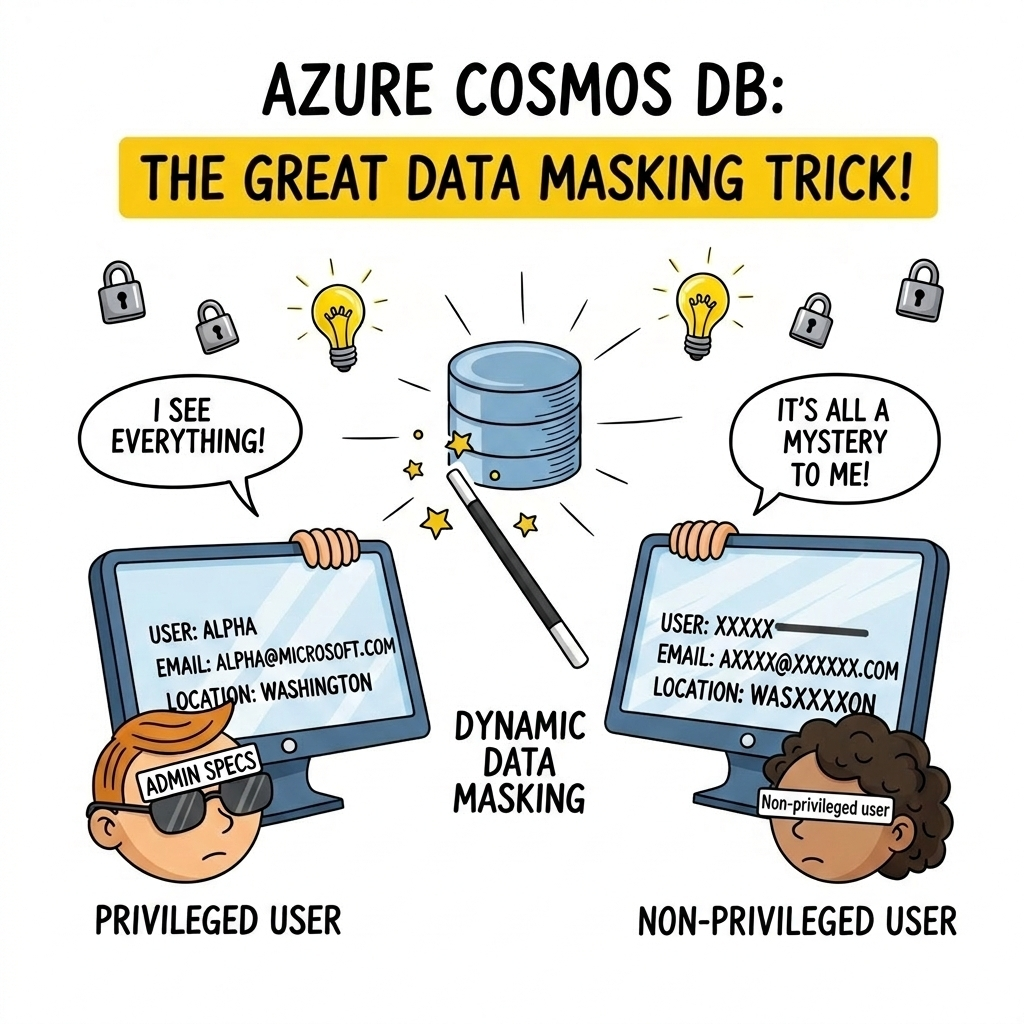
Dynamic Data Masking is a server-side, policy-based security feature that masks sensitive fields in query results for non-privileged users. Azure Cosmos DB applies masking dynamically at query execution time, while the underlying data stored in the database remains unchanged.
Authorized users continue to see full, unmasked values. All other users see masked values based on the configured policy. As a result, Azure Cosmos DB protects sensitive data by default, even as access patterns and team structures evolve.
In particular, Dynamic Data Masking is well-suited for protecting PII, PHI, and other confidential data that should only be visible to a limited set of users.
Why is This Important?
In many applications, read access must be granted broadly to developers, support engineers, analysts, or partner teams. Historically, protecting sensitive fields required implementing custom masking logic in every application or service accessing the data.
That approach is difficult to maintain, easy to misconfigure, and hard to audit at scale.
Instead, Dynamic Data Masking moves this responsibility into Azure Cosmos DB itself. Azure Cosmos DB enforces masking policies centrally and consistently for all queries, across all clients and SDKs, without requiring conditional logic in applications. As a result, teams reduce operational risk and find it easier to enforce least-privilege access in production environments.
Here is what you get immediately after enabling it:
- Safer read access in production – Non-privileged users see masked field values, while privileged users continue to see full values.
- No application changes – Azure Cosmos DB enforces masking server-side at query time, without changing stored data.
- Role-aware enforcement – Azure Cosmos DB evaluates masking based on the user’s role and privilege, so you can grant broad read access while controlling who can unmask.
- Easier compliance posture – DDM helps limit exposure of personal or protected data by ensuring non-privileged reads return masked values.
How Does It Work?
You can configure Dynamic Data Masking for your Azure Cosmos DB account through the Azure portal. Specifically, the process involves:
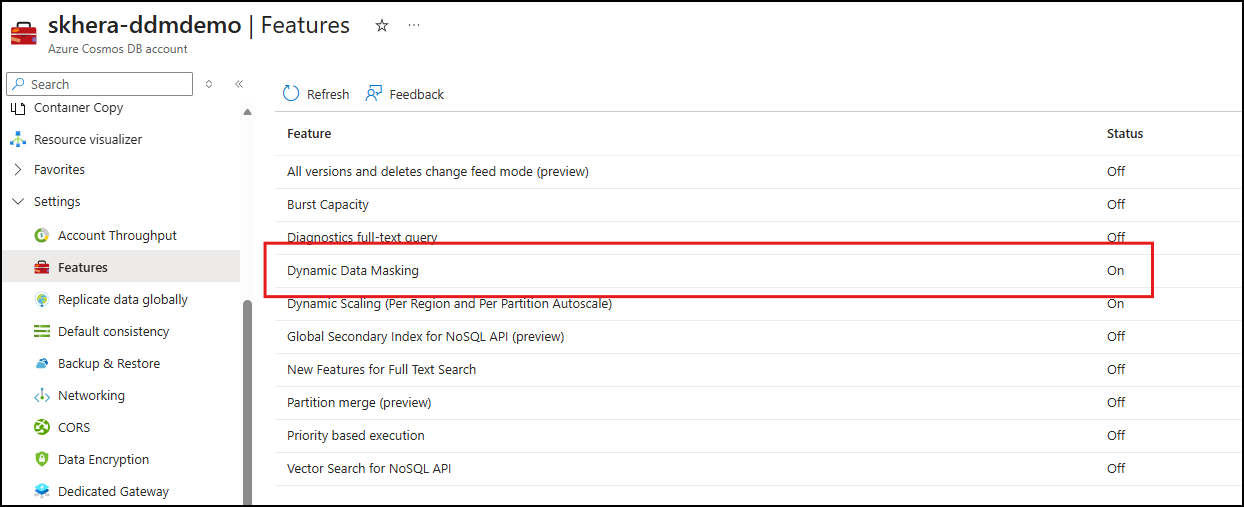
- First, enable Dynamic Data Masking in the Features tab under Settings.
- Next, define roles and permissions using Azure Cosmos DB’s data plane role-based access control (RBAC).
- Then, assign users to roles: privileged users get unmask permissions, while others receive standard roles.
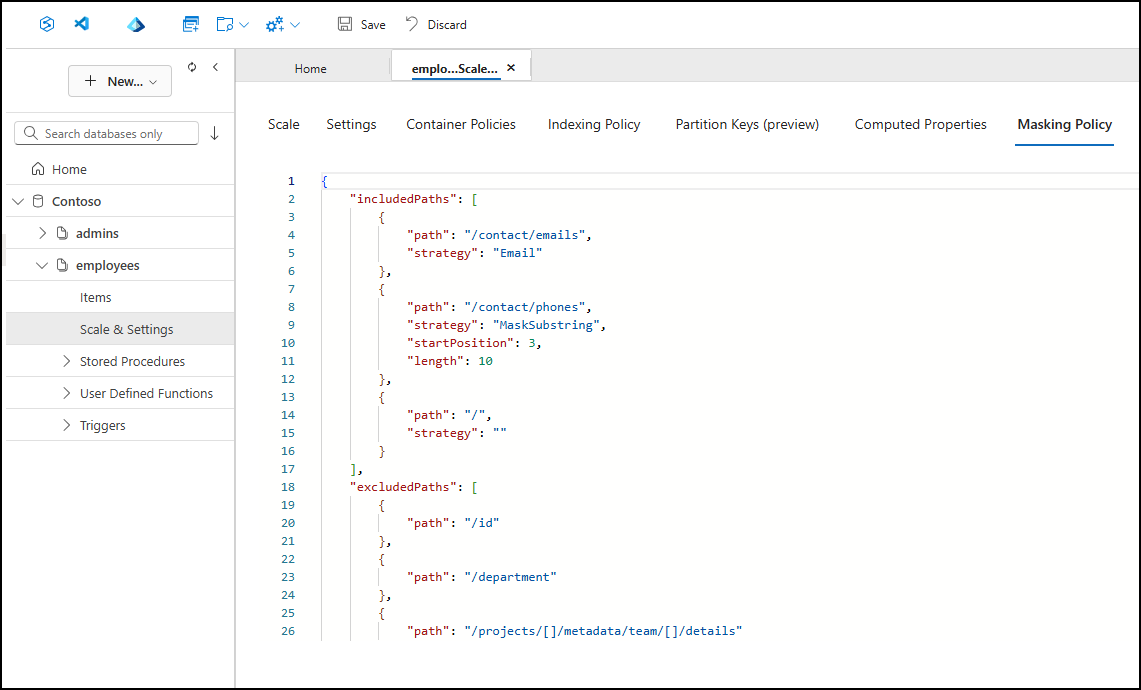
- Finally, apply a masking policy at the container level, specifying which fields to mask and which masking strategies to use.
Supported Masking Strategies
DDM supports multiple masking strategies to accommodate different data types and scenarios.
| Type | Description | Example |
|---|---|---|
| Default | String values are replaced with a fixed mask as XXXX
Numeric values are replaced with a default value of 0 Boolean values are always set to false |
Original: Redmond Masked: XXXXOriginal: 95 Masked: 0Original: true Masked: false |
| Custom String | A portion of the string is masked based on a defined starting index and length using MaskSubstring(Start, Length) | MaskSubstring(3,5)
Original: Washington Masked: WasXXXXXon |
| Only the first letter of the username and the domain ending (such as .com) remain visible. All other characters are replaced with Xs. | Original: alpha@microsoft.com
Masked: aXXXX@XXXXXXXXX.com |
Sample Masking Policy
Below is an example policy structure that uses included and excluded paths and turns the policy on for a container. This illustrates the shape of a masking policy so you can map it to your own document paths:
"dataMaskingPolicy":
{
  "includedPaths": [
    {
      "path": "/" // Mask all fields
    },
    {
      "path": "/profile/contact/email",
      "strategy": "Email" //Email strategy overrides the default mask
    },
    {
      "path": "/employment/history/[]/company",
      "strategy": "MaskSubstring", // MaskSubstring overrides the default mask
      "startPosition": 2,
      "length": 4
    }
  ],
  "excludedPaths": [
    {
      "path": "/projects/[]/projectId" //Exclude projectId from masking
    },
    {
      "path": "/id"
    },
    {
      "path": "/department"
    },
    {
      "path": "/employment/history/[]/duration"
    },
    {
      "path": "/projects/[]/details/technologies"
    }
  ]
}
What Dynamic Data Masking Doesn’t Protect Against
Since Dynamic Data Masking is applied at query time, there are a few considerations to keep in mind.
- Inference through queries: Users with query access may be able to infer masked values by applying filters or conditions on underlying fields. Cosmos DB evaluates real stored values when processing queries, even when results are returned masked.
- Administrative access: Users holding the administrator role can view unmasked data or modify masking policies directly. Cosmos DB account keys also bypass masking policies entirely, regardless of RBAC configuration.
-
Data movement: DDM is enforced at query time, not at the storage layer. Backups contain raw, unmasked values regardless of masking configuration.
Get Started
Dynamic Data Masking is now generally available for Azure Cosmos DB for NoSQL and ready for production workloads. Enable it in the Azure portal or see Dynamic Data Masking in Azure Cosmos DB to learn more.
About Azure Cosmos DB
Azure Cosmos DB is a fully managed and serverless NoSQL and vector database for modern app development, including AI applications. With its SLA-backed speed and availability as well as instant dynamic scalability, it is ideal for real-time NoSQL and MongoDB applications that require high performance and distributed computing over massive volumes of NoSQL and vector data.
To stay in the loop on Azure Cosmos DB updates, follow us on X, YouTube, and LinkedIn. Join the discussion with other developers on the #nosql channel on the Microsoft Open Source Discord.


0 comments