

The Problem Every Developer Knows Too Well
You’re building a feature. You know exactly what data you need all orders from the last week over $500, grouped by region. The logic is clear in your head. But between you and that data sits a query language, a documentation tab (or three), and fifteen minutes of trial and error before you get the syntax right.
Now multiply that across a team. New developers ramping up on Cosmos DB spend days learning query patterns. Senior developers’ context-switch between writing application logic and debugging queries. Product managers wait for data answers that a developer must manually extract.
This is the tax we’ve accepted as normal. It shouldn’t be.
Why Existing Approaches Fall Short
Today’s workflow for working with Azure Cosmos DB typically looks like this:
- Copy-paste from docs — You find a query example, modify it, run it, hit an error, go back to docs. Repeat.
- Memorize syntax — Experienced developers carry query patterns in their heads. New team members don’t have that luxury.
- Portal-only exploration — The Azure Portal works but switching between your editor and browser breaks flow.
- Generic AI tools — General-purpose code assistants can help, but they don’t understand your schema, your containers, or your partition strategy.
The gap is clear: developers need AI assistance that is deeply aware of their specific Cosmos DB environment not generic suggestions, but contextual, schema-aware intelligence embedded where they already work.
Introducing AI-Assisted Cosmos DB in VS Code
At //Build 2026, we’re announcing the public preview of AI-assisted productivity features in the Azure Cosmos DB VS Code Extension. This isn’t a bolt-on chatbot or a standalone tool. It’s intelligent assistance woven directly into your development environment understanding your connected databases, your document structures, and your intent.
Three core capabilities define this preview:
- Natural Language to Query — Describe what you want; get a working query
- Chat Experience Assistant — A conversational partner that knows your data
- Auto IntelliSense Query Experience — Schema-aware completions as you type
Let’s look at each one.
1. Natural Language to Query
What it does
Type a plain English description of the data you need. The extension generates the corresponding Cosmos DB query, ready to execute against your connected database.
Real-world example
A developer on an e-commerce team needs to investigate a spike in failed deliveries:
Input:
“Show me all orders from the last 7 days where delivery status is ‘failed’ and total is greater than $500, grouped by region”
Generated query:
    SELECT c.region, COUNT(1) as failedCount, SUM(c.total) as totalValue
    FROM c
    WHERE c.orderDate >= DateTimeAdd("day", -7, GetCurrentDateTime())
      AND c.deliveryStatus = "failed"
      AND c.total > 500
    GROUP BY c.region
No syntax lookup. No trial and error. The developer validates the output, runs it, and moves on.

Why these matters
- New team members become productive with Cosmos DB on day one
- Experienced developers skip the boilerplate and focus on logic
- Product managers can describe data needs in their own terms, reducing back-and-forth with engineering
2. Chat Experience Assistant
What it does
The @cosmosdb chat participant integrates directly into GitHub Copilot Chat in VS Code. With the agent kit built into the extension, anyone with GitHub Copilot can switch to chat mode and interact with Azure Cosmos DB using natural language — generating queries, explaining existing ones, or editing them through conversation.
Supported commands
| Command | What it does |
| /generateQuery | Generate a Cosmos DB NoSQL query from a natural language description |
| /explainQuery | Get a plain-English explanation of what a query does |
| /editQuery | Modify an existing query through conversational instructions |
| /question | Ask questions about Cosmos DB concepts, syntax, or best practices |
| /help | Get guidance on available commands and how to use the assistant |
How it works
The assistant leverages schema sampling and query history context to provide query-aware assistance. When you connect to a Cosmos DB NoSQL account, the extension samples your container schema to improve the quality of generated and explained queries.
Because the agent kit is integrated directly into the extension, there’s no separate setup — if you have GitHub Copilot enabled in VS Code, you can open chat mode and start interacting with @cosmosdb immediately.
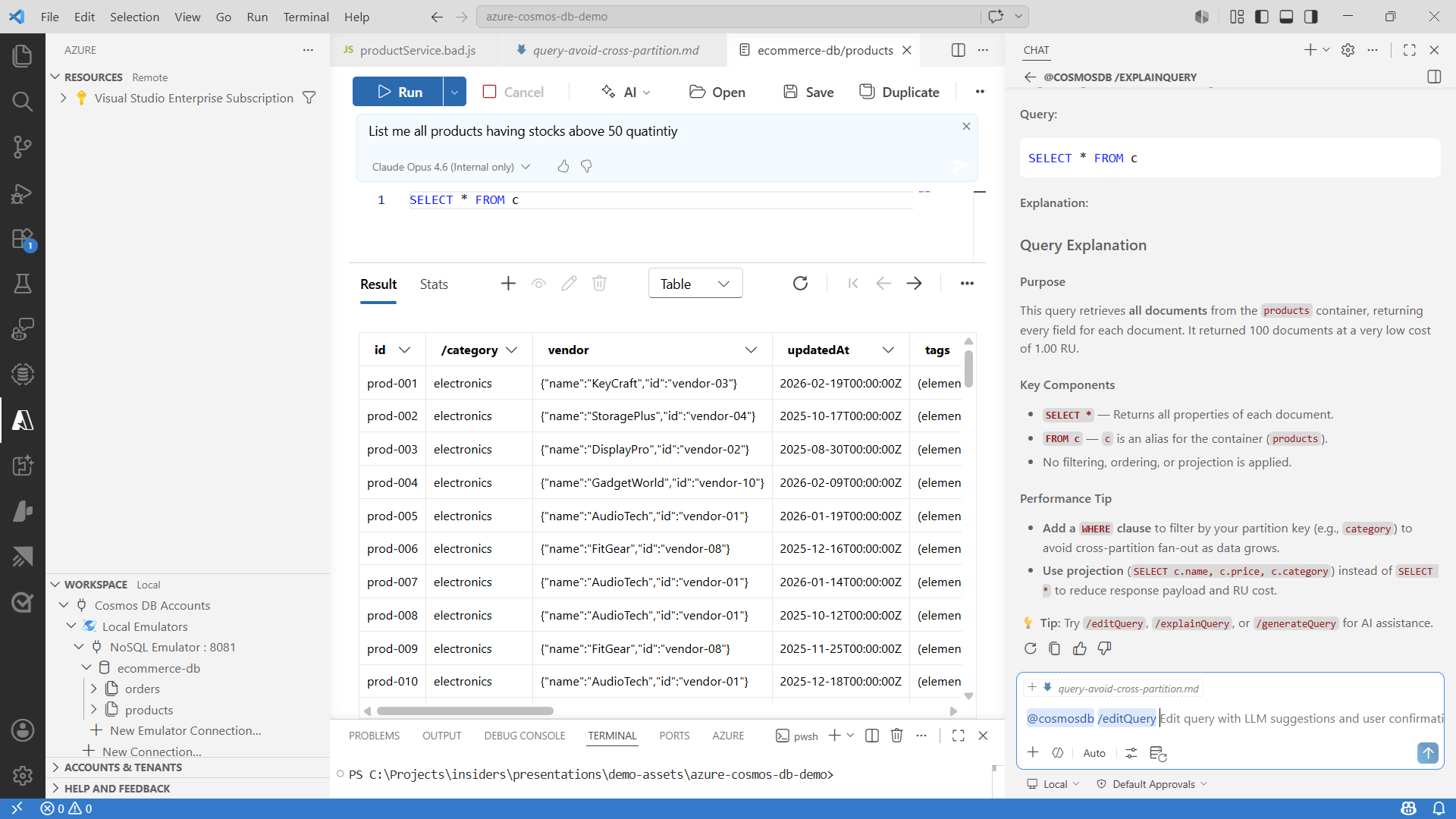
Example interaction:
You: @cosmosdb /generateQuery Find all customers who placed more than 3 orders in the last month
Assistant: Here’s the generated query based on your orders container schema…
You: @cosmosdb /explainQuery SELECT VALUE COUNT(1) FROM c WHERE c.status = “active” AND c.region IN (“us-east”, “eu-west”)
Assistant: This query counts the number of documents where the status is “active” and the region is either “us-east” or “eu-west”. It returns a single numeric value…
This is conversational database interaction — no context switching, no separate tooling, just ask and get answers where you already code.
3. Auto IntelliSense Query Experience
What it does
As you type a Cosmos DB query in the extension’s query editor, Auto IntelliSense provides real-time, AI-enhanced suggestions — going far beyond traditional autocomplete. It understands your schema, recognizes patterns, and proactively suggests completions, filters, and projections based on your data model.
Technical deep dive
Traditional IntelliSense works off static syntax definitions. The Auto IntelliSense Query Experience adds a layer of intelligence:
- Schema inference — Reads your container’s document structure and surfaces relevant field names, nested paths, and data types
- Pattern recognition — Learns from your query patterns and suggests likely next clauses
- Context-aware completions — Suggests WHERE filters relevant to the fields you’ve already selected, and recommends ORDER BY and GROUP BY clauses based on your data types
What this looks like in practice:
You start typing:
SELECT c.
Instead of a generic list, you see your actual fields: c.customerId, c.orderDate, c.deliveryStatus, c.items, c.total — with type annotations and nested path expansion for complex objects.
You add a WHERE clause:
SELECT c.customerId, c.total FROM c WHERE c. IntelliSense prioritizes fields commonly used in filters (indexed fields, partition keys) and suggests comparison operators appropriate for each field’s data type.
Why this matters
- Fewer typos and syntax errors
- Fewer round-trips to documentation
- Faster time from “I need this data” to “I have this data”
- Reduced RU waste from malformed queries that scan unnecessarily
The Foundation: Cosmos DB Shell with MCP Integration
Powering these AI-assisted experiences is the Cosmos DB Shell integrated with Model Context Protocol (MCP). MCP provides a standardized way for AI tools and agents to securely interact with your Cosmos DB resources — it’s the connective layer that enables natural language queries, intelligent suggestions, and chat-based interactions to work with live database context.
For teams building their own AI-powered tooling or integrating Cosmos DB into agent workflows, this MCP integration opens the door to custom automation that was previously difficult to achieve.
Migration Assistant Support
For teams evaluating Azure Cosmos DB, the extension now includes Migration Assistant capabilities — helping you assess source databases, identify compatibility considerations, and plan migrations directly from VS Code without switching tools.
Best Practices for Getting the Most Out of These Features
- Connect your actual database — The AI features work best with real schema context. Connect to your dev or staging environment to get relevant suggestions.
- Validate generated queries — Natural language to query is powerful but always review the output before running against production data. Check partition key alignment and index coverage.
- Use chat for learning — The Chat Assistant excels at explaining why something works, not just what to type. Use it to understand RU costs, indexing tradeoffs, and partition strategies.
- Iterate in the query editor — Combine Natural Language to Query for the initial draft, then refine with Auto IntelliSense. This workflow is faster than either approach alone.
- Leverage MCP for team workflows — If your team uses AI agents or automation, the MCP integration means those tools can interact with Cosmos DB using the same secure, context-aware foundation.
Who Benefits
| Role | Value |
| Developers | Write queries faster, learn Cosmos DB patterns through AI guidance, fewer context switches |
| Architects | Validate data modeling decisions through conversational exploration, assess partition strategies quickly |
| Product Managers | Describe data needs in plain language, reduce dependency on engineering for ad-hoc queries |
| Engineering Leaders | Faster onboarding for new team members, reduced time-to-insight across the team |
Get Started Today
The AI-assisted features are available now in preview:
- Install the Azure Cosmos DB extension for VS Code
- Connect to your Cosmos DB account
- Open the query editor and try Natural Language to Query
- Open Copilot Chat and ask about your database
Join the Community
Azure Cosmos DB VS Code extensions succeeds because of our community. We invite you to:
Star on GitHub – Show your support
Report Issues – Help us fix bugs
Share Your Story – Tell us how you’re using the shell
About Azure Cosmos DB
Azure Cosmos DB is a fully managed and serverless NoSQL and vector database for modern app development, including AI applications. With its SLA-backed speed and availability as well as instant dynamic scalability, it is ideal for real-time NoSQL and MongoDB applications that require high performance and distributed computing over massive volumes of NoSQL and vector data.
To stay in the loop on Azure Cosmos DB updates, follow us on X, YouTube, and LinkedIn. Join the discussion with other developers on the #nosql channel on the Microsoft Open Source Discord.


0 comments
Be the first to start the discussion.