

Back in January, we shipped the Azure Cosmos DB Agent kit in preview with 45 rules and a hypothesis: if we package Azure Cosmos DB expertise into a format that AI coding agents understand, developers will stop making the same expensive mistakes. That hypothesis held up. What surprised us was how much the rules themselves needed to evolve once we started systematically testing them.
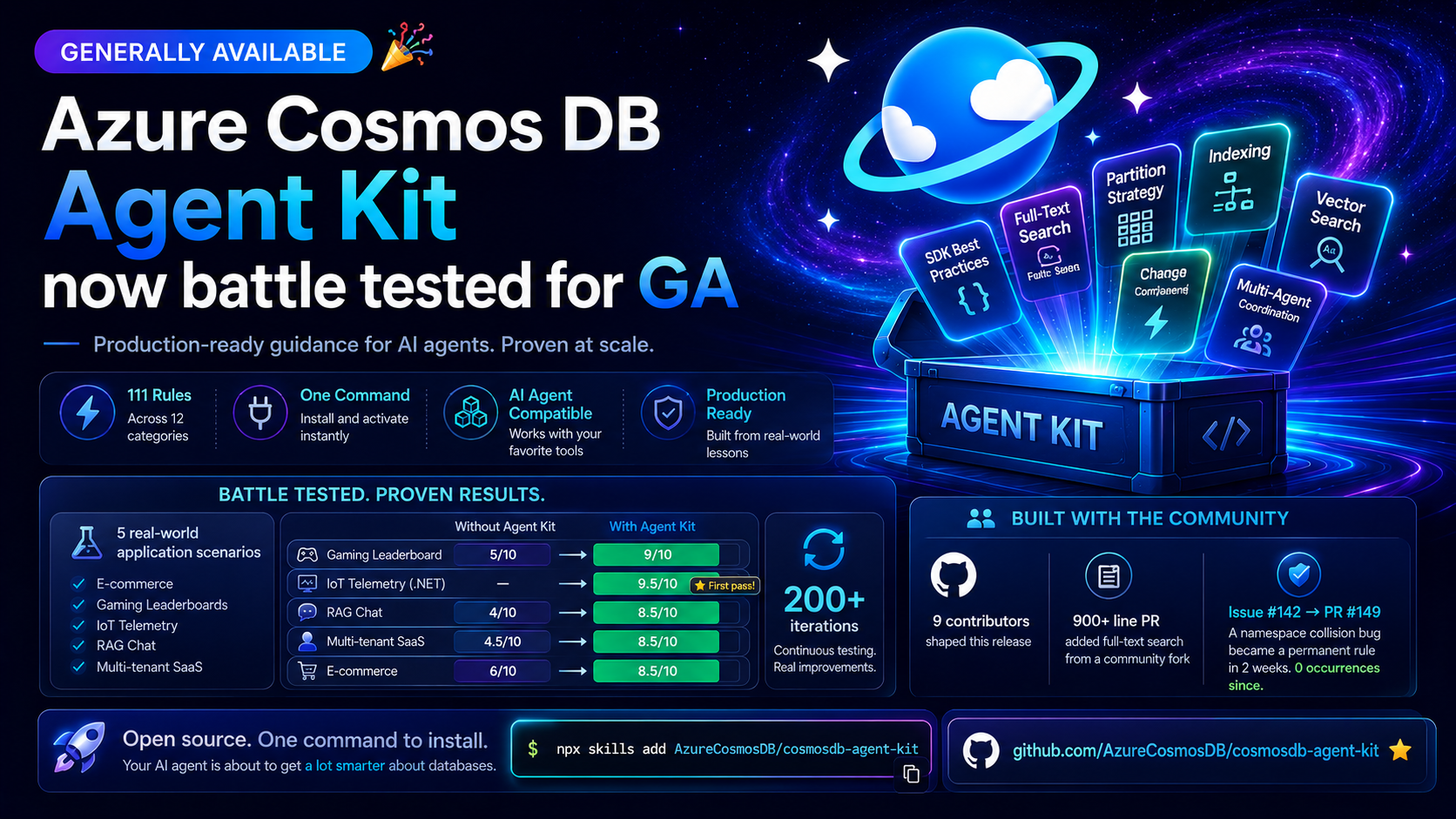
Today the Agent Kit is generally available . It now contains 120+ rules across 12 categories. But the number that matters more: we’ve run over 200 automated test iterations where AI agents build real applications from scratch using these rules, and we’ve fixed every gap those tests exposed.
Why We Spent Four Months on Testing Infrastructure
We could have just kept adding rules. That’s what most knowledge bases do — accumulate content and hope it’s correct. Instead, we built something we hadn’t seen anyone else do for agent skills: a closed-loop testing system that runs the rules through real code generation and checks the output.
The setup works like this. We have five application scenarios — an e-commerce order API, a gaming leaderboard, an IoT telemetry pipeline, a RAG chat app, and a multi-tenant SaaS platform. For each scenario, we define an API contract (what endpoints exist, what they return, what edge cases they handle). Then we let GitHub Copilot generate the entire application with our skill loaded, spin up the Azure Cosmos DB Emulator in CI, build the app, run it, and hit it with a full test suite covering API behavior, Cosmos infrastructure setup, and data integrity.
When tests fail, we examine the cause. In some cases, the rule itself is wrong. In others, the rule is technically correct but vague enough that agents interpret it differently. Sometimes the issue exposes a gap: an Azure Cosmos DB behavior that had not yet been documented. In every case, we update the rule and run the batch again.
We don’t run each scenario once. We run it 5+ times per language to get statistical confidence. One passing iteration might be luck. Five passing iterations means the rule is solid.
Some results that gave us confidence to ship GA:
- The IoT telemetry scenario in .NET scored 9.5/10 — the agent correctly applied 30+ rules including hierarchical partition keys, autoscale, TTL, composite indexes, and singleton client patterns, all in a single generation pass.
- The gaming leaderboard in Python went from 5/10 without the skill to 9/10 with it. The delta was entirely in Cosmos-specific gotchas that general-purpose agents don’t know about.
- The multi-tenant SaaS scenario in Java hit 100% test pass rate on API contract, Cosmos infrastructure, and data integrity tests across all iterations where the build succeeded. (The 40% build failure rate turned out to be a Netty/OpenSSL issue with the local emulator, not a skill gap.)
Rules We Discovered the Hard Way
The most useful rules in the kit didn’t come from documentation reviews. They came from watching AI agents repeatedly make the same mistake and figuring out how to teach them not to.
The enum serialization trap. In our e-commerce scenario, the .NET SDK was storing order status as integers (0, 1, 2) while the generated queries were filtering by string values (“Pending”, “Shipped”, “Delivered”). Every status query returned zero results. The app looked like it worked — no errors, no crashes — it just silently returned empty arrays. We added sdk-serialization-enums and the problem disappeared across all subsequent iterations.
The `TOP` parameter surprise. Every SQL developer knows you should parameterize values. So AI agents parameterize everything, including TOP. But Azure Cosmos DB requires TOP to be a literal integer — parameterize it and you get a 400 Bad Request. We watched this happen in three separate gaming-leaderboard iterations before adding query-top-literal. Agents were applying the “right” general practice that happens to be wrong for Cosmos DB specifically.
The missing `aiohttp` dependency. Python’s async Azure Cosmos DB client needs aiohttp, but it’s not listed as a hard dependency that pip resolves automatically. AI agents generate from azure.cosmos.aio import CosmosClient, the code passes linting, the import succeeds at module load… and then the first actual database call throws a confusing runtime error. Three lines in a requirements file, but agents never think to add them because nothing in the obvious documentation says to.
Composite index direction mismatches. Agents would create a composite index with ASC order, then write a query with ORDER BY c.score DESC, c.timestamp DESC. Works fine in testing with small datasets (Cosmos DB can scan), falls over in production. The rule now teaches agents to define both ASC and DESC variants upfront.
What’s New Since Preview
If you installed the preview back in January, a lot has changed beyond the rule count.
Four new categories. Vector Search (6 rules covering embedding policies, DiskANN vs QuantizedFlat, distance queries, normalization). Full-Text Search (6 rules for BM25, fullTextPolicy, hybrid queries). Design Patterns (change feed materialized views, efficient ranking, multi-agent coordination). Developer Tooling (emulator setup, local dev config, build validation).
Multi-agent patterns. If you’re building LangGraph applications backed by Cosmos DB, we added rules for wrapping sync database calls in asyncio.to_thread inside routing functions, attributing messages to specific agents, and preventing the infinite recursion loop that happens when agents check all messages instead of only new ones.
Java/Spring got serious attention. The preview rules were mostly .NET and Python. Now there’s deep coverage for Spring Data Cosmos — the @PostConstruct circular-dependency trap, Jackson config for Cosmos system metadata fields, JPA migration patterns, and the SSL certificate handling you need for the emulator in Java CI environments.
Cascade delete semantics. This one bit people in production. If you denormalize data across containers (which you should, for read performance), deleting the source document has to cascade to all derived copies. Updating a field that’s used as a partition key in a derived container means delete-and-recreate, not update-in-place. The rule now includes Python and C# examples for both patterns.
If You’re New Here
The Agent Kit is an open-source skill that plugs into your AI coding assistant — GitHub Copilot, Claude Code, Gemini CLI, Cursor, Windsurf, anything that supports the Agent Skills format. Once installed, it activates automatically when you’re working with Cosmos DB code.
npx skills add AzureCosmosDB/cosmosdb-agent-kit
Then just work normally. Ask your agent to review a data model, design a partition strategy, optimize a query, set up vector search — it now has 111 rules of Cosmos DB-specific knowledge to draw from instead of relying on generic database intuition.
The kinds of problems it catches:
- Creating a new CosmosClient per request instead of reusing a singleton (connection exhaustion under load)
- Running SELECT * when you only need three fields (unnecessary RU burn)
- Choosing /id as a partition key for a multi-tenant app (guaranteed hot partition)
- Missing retry configuration for 429 throttling responses (intermittent failures that only show up at scale)
- Using cross-partition queries where a materialized view would give you single-partition reads
These aren’t obscure edge cases. They’re the top five mistakes we see in production support cases, and AI agents make all of them by default because they’re optimizing for “code that compiles” rather than “code that scales.”
If you’re setting up your development environment for Azure Cosmos DB, watch this session Azure Cosmos DB Dev Environment with AI | at Azure Cosmos DB Conf 2026
We’ve received rules from 9 contributors so far, and the best submissions came from people who hit a real problem, spent hours debugging it, and realized “my AI agent should have known this.” Here are sample PRs and issues that directly shaped the GA release:
- PR #95 — @DavideDelVecchio contributed 4 new SDK best-practice rules and the entire Full-Text Search section (6 rules covering BM25 ranking,
FullTextContains, hybrid queries, andfullTextPolicyconfiguration). A 927-line addition from a community fork. - PR #19 — @sesmyrnov updated the Data Modeling, Partitioning, and Change Feed materialized-view rules early in the project’s life, strengthening the core knowledge base before automated testing even existed.
- Issue #144 — @sevoku caught a token-efficiency regression: after PR #95 landed,
SKILL.mdwas linking into the compiledAGENTS.mdinstead of individual rule files, blowing up token consumption for every agent that loaded the skill. Fixed within days in PR #145.
The Story Behind sdk-dotnet-namespace-collision
The most satisfying issue-to-rule pipeline we’ve seen started with @jaydestro filing Issue #142: “using Microsoft.Azure.Cosmos; collides with domain User model.”
Here’s what happened. During our automated gap-analysis tool runs against the e-commerce scenario, AI agents kept generating code that put using Microsoft.Azure.Cosmos; and using ECommerce.Core.Models; in the same file. Both namespaces contain a type called User — the SDK ships one as a control-plane type for Cosmos user/permission principals, while the app defines its own domain entity. The result: error CS0104: 'User' is an ambiguous reference — an immediate build failure.
The insidious part? Microsoft’s own quickstart documentation uses using Microsoft.Azure.Cosmos; without noting the collision. Models trained on those docs reproduce the pattern verbatim. Without the Agent Kit loaded, AI agents had zero signal that this was dangerous.
Jay’s issue included reproducers from two separate test profiles, the exact compiler diagnostic citing Microsoft.Azure.Cosmos.User, and a minimal 25-line repro that anyone could validate with dotnet build. He even validated the fix against SDK 3.59.0 — confirming that using Cosmos = Microsoft.Azure.Cosmos; as a namespace alias resolves the ambiguity cleanly.
Two weeks later, PR #149 landed: the new sdk-dotnet-namespace-collision rule. It warns agents that Microsoft.Azure.Cosmos ships top-level types including User, Database, Container, Conflict, Trigger, and Permission, and teaches them to alias the import or fully qualify SDK types when domain models use the same names. Since that rule shipped, the CS0104 error has appeared in zero subsequent test iterations.
That’s the loop: community member hits a real production problem → files an issue with evidence → rule gets written and validated → every AI agent using the kit now avoids that class of bug forever.
How to Contribute
The process: add a rule file to /skills/cosmosdb-best-practices/rules/, open a PR with the scenario that triggered it, and our CI pipeline will validate it against the testing framework. If it improves outcomes in batch evaluations, it ships.
The kit is GA and it works — 111+ rules, 200+ test iterations, real production coverage across .NET, Python, Java, and Node.js. But no knowledge base is ever complete. If you hit a Cosmos DB gotcha that your AI agent should have caught, we want to hear about it.
About Azure Cosmos DB
Azure Cosmos DB is a fully managed and serverless NoSQL and vector database for modern app development, including AI applications. With its SLA-backed speed and availability as well as instant dynamic scalability, it is ideal for real-time NoSQL and MongoDB applications that require high performance and distributed computing over massive volumes of NoSQL and vector data.
To stay in the loop on Azure Cosmos DB updates, follow us on X, YouTube, and LinkedIn. Join the discussion with other developers on the #nosql channel on the Microsoft Open Source Discord.


0 comments
Be the first to start the discussion.