


The MSSQL extension for VS Code v1.43 expands what’s possible inside Visual Studio Code with the General Availability of Schema Designer with GitHub Copilot, Data API builder, and SQL Notebooks. We’re also introducing the Public Preview of Azure SQL Database provisioning, giving developers a guided way to create Azure SQL databases directly from VS Code.
What’s new in MSSQL extension for VS Code v1.43
Here’s a summary of the key features in this release:
- Azure SQL database Provisioning (Preview): Create Azure SQL databases directly from VS Code through a guided provisioning experience, with support for both local container and free-tier options.
- Schema Designer with GitHub Copilot (GA): Design and evolve database schemas using natural language, visual change tracking, and migration-ready ORM script generation.
- SQL Notebooks (GA): Build interactive, Jupyter-based SQL notebooks with multi-kernel support, rich results, and Markdown documentation.
- Data API builder with GitHub Copilot (GA): Generate REST, GraphQL, and MCP endpoints from SQL databases with guided configuration, GitHub Copilot assistance, and column-level exposure controls.
Azure SQL database Provisioning (Preview)
The MSSQL extension for Visual Studio Code now introduces Azure SQL Database provisioning in public preview, starting with the free tier so you can create and connect to a fully managed cloud database directly from your editor at no cost.
With a guided wizard on the Deployments page, you authenticate with your Azure account, then configure your subscription, resource group, server, and database on a single page. Your connection is added automatically the moment provisioning completes. You never leave Visual Studio Code, and you don’t have to pay to get started. You choose what happens when the free monthly limit is reached: auto-pause until the next calendar month, or continue at standard serverless rates.
Whether you are prototyping a new application, validating a proof of concept, or experimenting with vector search and AI-ready workloads, you now have a fully managed Azure SQL Database ready to query in minutes. From there, you can continue into Schema Designer, where GitHub Copilot helps you design and evolve your data model visually. You can then go to data API builder, where GitHub Copilot generates back-end endpoints directly from your schema. Together, these experiences give you an end-to-end path from a provisioned database to a working back end, all inside Visual Studio Code.
Schema Designer with GitHub Copilot (GA)
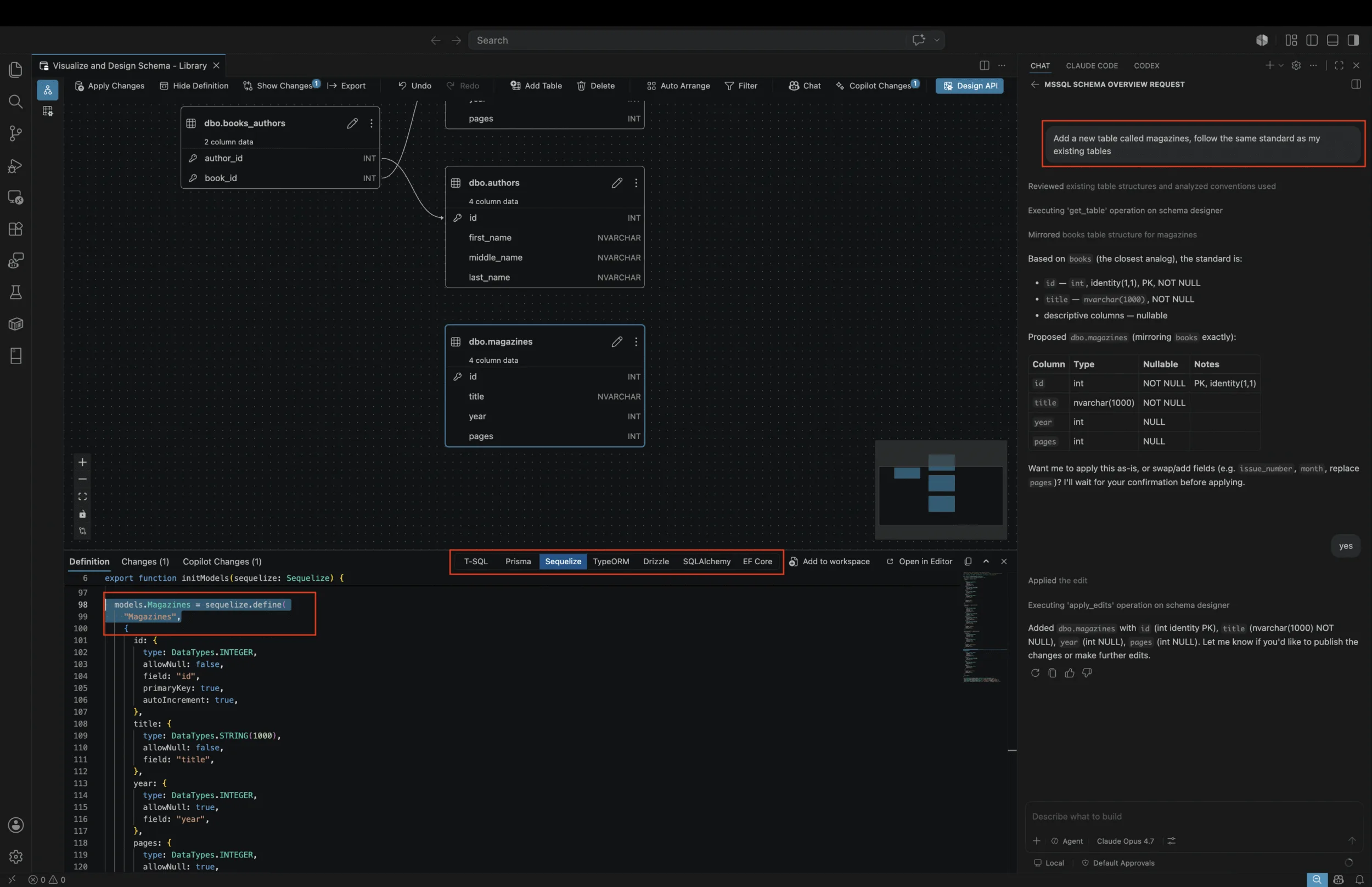
Schema Designer with GitHub Copilot integration is now generally available in the MSSQL extension for Visual Studio Code, bringing AI-assisted schema design, visual change tracking, and ORM script generation into one workflow. Describe the schema changes you want, review Copilot-generated updates in the Change Tracking panel, and generate migration-ready ORM scripts from your visual design.
Key highlights
- Natural language schema creation: Describe your schema in conversational prompts, and GitHub Copilot generates the tables, columns, data types, and relationships automatically, all reflected live in the visual diagram and T-SQL script.
- Schema evolution: Modify existing schemas by asking GitHub Copilot to add columns, rename tables, change data types, or create new relationships. Each change is presented individually with Accept/Undo controls so you stay in full control.
- ORM script generation: Generate migration-ready ORM scripts from visual schema changes, including Prisma, Sequelize, TypeORM, Drizzle, SQLAlchemy, and EF Core.
- Change review with diff view: Before applying changes to your database, review a consolidated diff showing all pending modifications. Schema-qualified names (schema.table, schema.column) make it easy to understand exactly what will change.
- Bootstrap from scratch: Start from an empty database and build a complete application schema using only natural language prompts, ideal for rapid prototyping and proof-of-concept work.
- Import external artifacts: Feed JSON files, documents, or even images into the Schema Designer and let GitHub Copilot generate matching schema elements, accelerating migrations and reverse engineering workflows.
- Validation and guardrails: GitHub Copilot flags potential issues like missing primary keys, invalid data types, and normalization concerns, helping you catch design problems early.
 For full documentation, see GitHub Copilot integration in Schema Designer.
SQL Notebooks (GA)
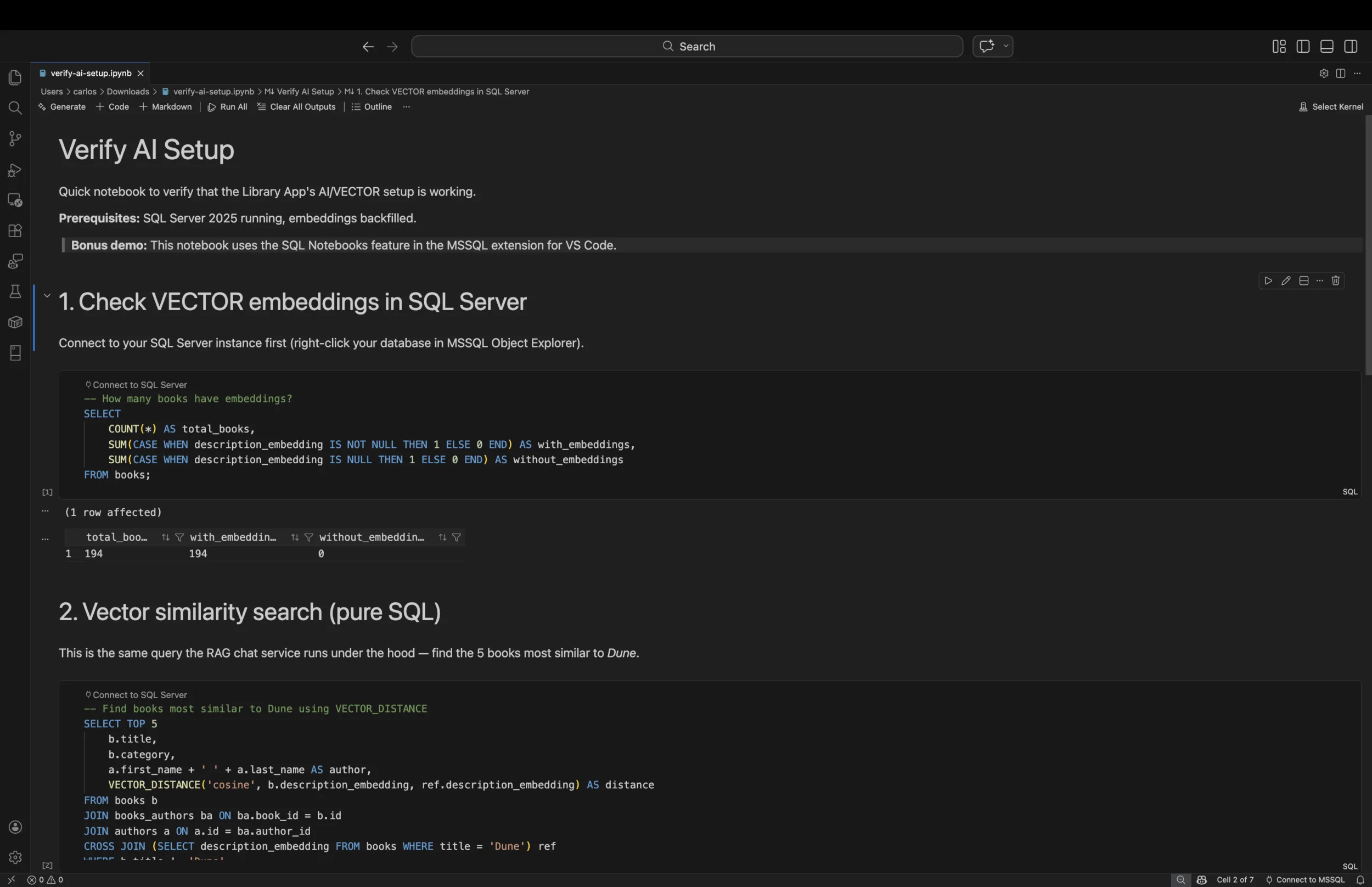
SQL Notebooks bring native Jupyter notebook support to the MSSQL extension for VS Code v1.41, combining interactive SQL query execution with Markdown documentation cells for reproducible analysis, runbook documentation, and educational content.
Key highlights
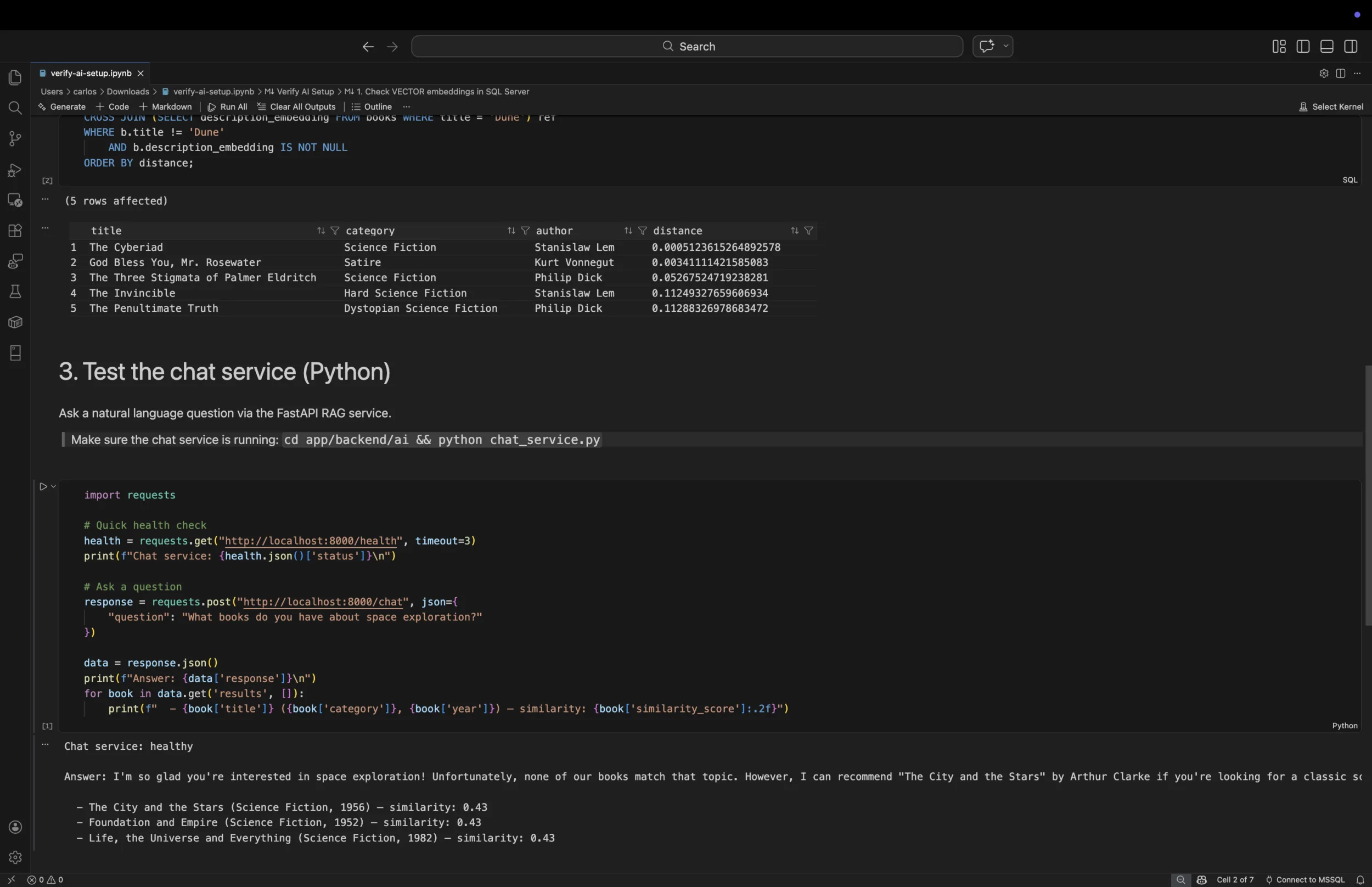
- Interactive SQL execution: Execute T-SQL queries cell by cell with inline results displayed in a rich data grid that supports sorting, filtering, null highlighting, and copy with headers.
- Native
.ipynbformat: Notebooks use the standard Jupyter.ipynbformat, making them portable and compatible with existing notebook tooling and version control workflows. - Markdown documentation: Combine SQL cells with Markdown cells to create self-documenting query collections, runbooks, and tutorials.
- IntelliSense support: Get table and column suggestions from your active database connection as you write SQL, bringing the same productivity features you expect from the query editor.
- Database context switching: Connect each notebook to a SQL Server instance and switch between databases on the same server without reconnecting.
- Multi-kernel support: Install complementary extensions like the Jupyter extension to unlock additional kernels such as Python, enabling you to combine SQL and Python cells in the same notebook for end-to-end data workflows.
For full documentation, see SQL Notebooks.
Data API builder with GitHub Copilot Integration (GA)
Data API builder with GitHub Copilot integration is now generally available in the MSSQL extension for Visual Studio Code, helping you generate REST, GraphQL, and MCP endpoints from your SQL database schema. This release adds column-level configuration, so you can choose exactly which columns are exposed in the generated API while using GitHub Copilot to help plan and update your configuration.
Key highlights
- Column-level configuration: Select tables or columns from your database, organized by schema, and configure CRUD permissions (Create, Read, Update, Delete) independently for each entity with granular role-based access control.
- Multiple API types: Choose REST, GraphQL, MCP, or any combination. Data API builder generates the appropriate endpoints and configuration automatically.
- Configuration preview: Review the generated Data API builder configuration file (JSON) in a read-only Definition panel before deploying, ensuring full transparency into what will be created.
- One-click Docker deployment: Deploy your API as a local Docker container with an automated prerequisite check wizard that validates Docker availability, pulls the Data API builder image, and starts the container.
- Built-in API testing: Once your API is running, open the Swagger UI (REST) or Nitro GraphQL playground endpoints directly in the VS Code Simple Browser, so you can validate your APIs without ever leaving the editor.
- GitHub Copilot chat integration: Use natural language in GitHub Copilot chat to configure entities, set permissions, and generate Data API builder configurations. Ask questions like “Add all HR tables with read-only access” and GitHub Copilot handles the rest.
For full documentation, see Data API builder
Conclusion
The MSSQL extension for VS Code v1.41 introduces Schema Designer with GitHub Copilot, Data API builder, SQL Notebooks, Edit Data (GA), Data-tier Application (GA), Fabric integration (GA), and SQL Database Projects static code analysis (GA): seven major updates that bring AI-powered schema design, instant API generation, interactive notebooks, and enterprise-grade tooling to your SQL development workflow. Together, these capabilities make the MSSQL extension more powerful, more integrated, and more developer-friendly than ever.
If there’s something you’d love to see in a future update, here’s how you can contribute:
- 💬 GitHub discussions – Share your ideas and suggestions to improve the extension
- ✨ New feature requests – Request missing capabilities and help shape future updates
- 🐞 Report bugs – Help us track down and fix issues to make the extension more reliable
Want to see these features in action?
Thanks for being part of the journey—happy coding! 🚀


Looks like the Conclusion needs to be updated (refers to a previuos version)