


Perhaps we missed it at first, but Copilot is more than comfortable with SQL. This goes beyond autocomplete. This is moving from nothing to a working database without leaving our tools. Have we really arrived? Yes, sort of. For database engineers and app engineers alike, we have crossed an important line.
Making us more productive is easy for Copilot. Modern developers already lean on these models. Making Copilot productive is the real unlock. From schema design to publishing in Azure, the question is not whether Copilot can help, but how we 10x Copilot. Walking through a common workflow, this article makes few technical assumptions while showing how to skill up Copilot to get it right the first time, and every time.
Working demo: https://github.com

Dear Copilot, let’s get started
Let’s say you own a flower shop and want to track plant inventory. Can Copilot take you from idea to a published SQL solution without turning you into a secret expert? Can it guide you toward solid SQL decisions along the way? Let’s see what happens when we combine simple questions with a bit of local Copilot guidance and let it lead.
Starting with a small amount of context, we give Copilot room to work. From a short description of a flower shop and its inventory, it proposes a schema, pauses for feedback, then adjusts as new requirements show up. Categories appear. Multiple shop locations follow. Each step builds on the last, turning a loose idea into something concrete and reviewable.
Learn more about Database Projects: https://aka.ms/sqlprojects
With the shape of the data coming into focus, Copilot shifts from design to execution. It sets up a local SQL Server using Docker, scaffolds a database project with create scripts and sample data, and brings everything online. With very little manual effort, the database is running locally and ready to build against.
Learn more about SQL Commander: https://github.com
Dear Copilot, add a REST API
With the database running locally, the next question is access. Instead of jumping straight to implementation, we ask Copilot why a REST API matters at all. That conversation quickly lands on isolation, keeping the database protected while still making data usable by apps and services. The key insight is simple. There is no code to write. Using Data API builder, the API is generated entirely from configuration.
Starting from the existing setup, Copilot adds a third container, updates Docker Compose, and refreshes the environment. Once everything comes back online, a Swagger endpoint appears, exposing each table as a REST endpoint. Calling the API confirms it is live, returning data directly from the database and ready to be consumed by an application.
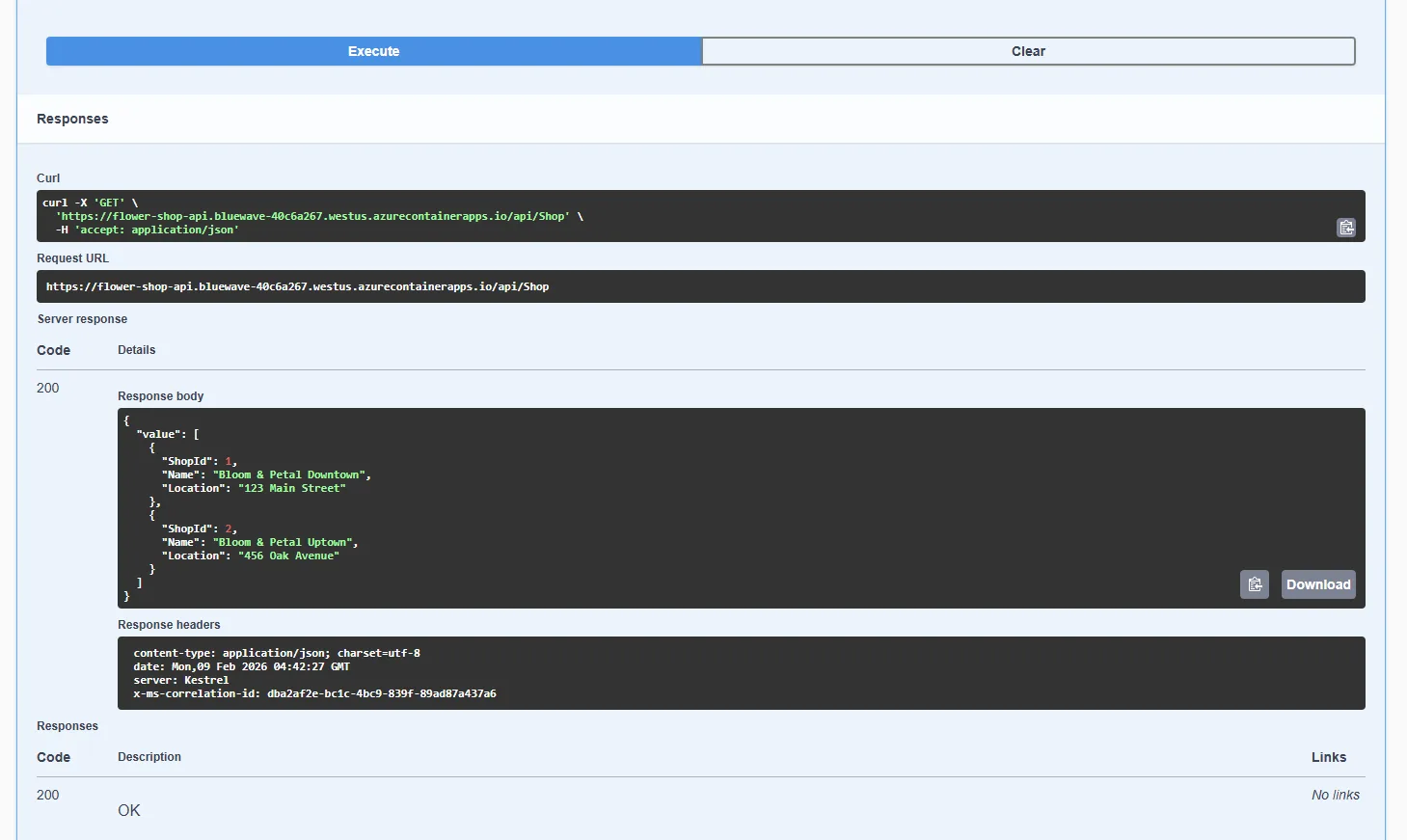
This image shows the custom Swagger UI. It is the result of Data API builder being set up correctly and deployed. Swagger is an easy way, though not the only way, to test REST endpoints.
Learn more about Data API builder: https://aka.ms/dab/docs
Dear Copilot, push to Azure
This is where most workflows fall apart. Moving from local to cloud usually means new tools, new scripts, and a pile of decisions you did not plan to make. We do not change the approach. We push harder. Using direct prompts, we let Copilot drive the move end to end. Azure CLI commands. Azure SQL. Schema. Data. Infrastructure. All of it.
Starting from nothing but the local setup, Copilot stands up the Azure Container Apps environment, wires up the container registry, and deploys a custom Data API builder image with configuration baked in. The result is a resource group that mirrors the local environment, REST API included, alongside tools like SQL Commander and MCP Inspector. At this point, the solution can run locally or flip entirely to Azure without changing shape.
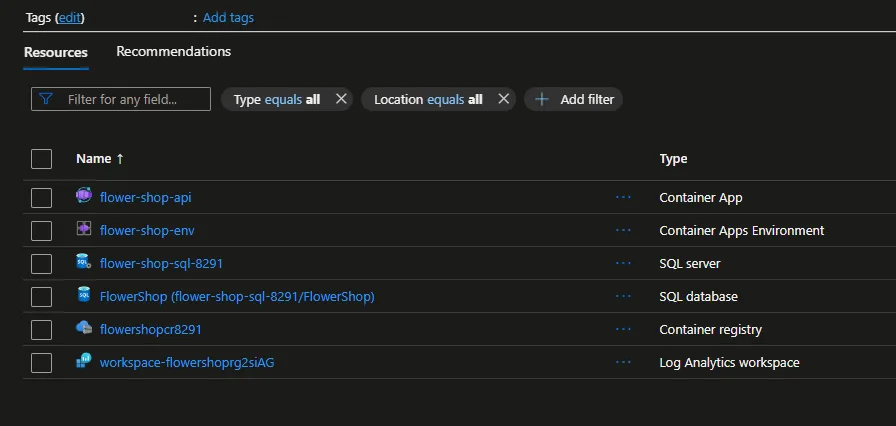
This image is the Azure Portal layout of the published solution. Resource Groups make it easy to keep your solution together and organized, as well as isolating billing costs if you have any. With the free edition of SQL and consumption plans in Azure Container Apps, this type of solution is amazingly approachable for developers.
Learn more about SQL MCP Server: https://aka.ms/sql/mcp
With infrastructure locked in, Copilot does not stop. It pushes into MCP, enabling agents to work against the same data. We turn it on locally first. Copilot creates and registers the MCP server in Visual Studio Code, then proves it works by inserting, querying, and deleting data. Because Data API builder exposes both REST and MCP endpoints, the same database now serves apps and agents. Validated locally, the exact configuration runs in Azure, clearing the path for real, enterprise-grade agentic applications.
Dear Copilot, want some skills?
So far, Copilot has been answering prompts, but it has not been guessing. The difference is context, and that context lives in the workspace.
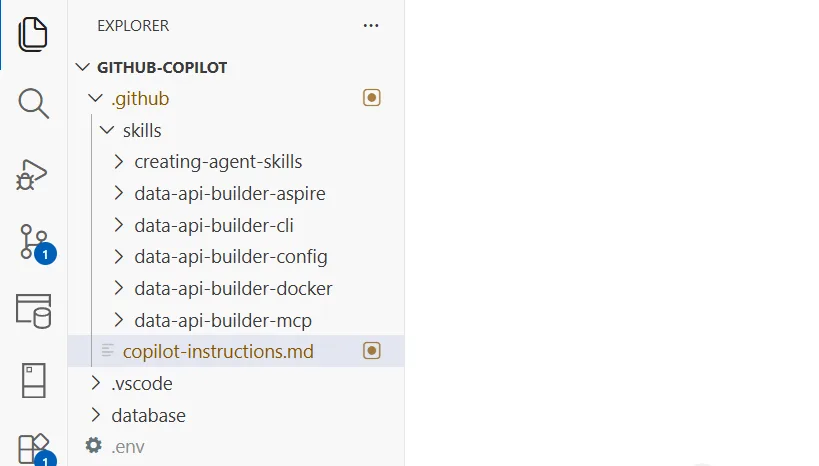
Using Copilot instructions, we tell it exactly how to think about the problem. Goals. Constraints. Expectations. This forces Copilot to reason inside the boundaries we care about instead of drifting through generic training knowledge or stale search results. The outcome is tighter, more predictable behavior.
Learn more about Copilot Instructions: https://code.visualstudio.com
In this demo, those instructions live next to the code. They are versioned, reviewable, and shareable. Clone the repo, copy them into your workspace, and Copilot starts with the same baseline on day one.
Demo repository: https://github.com
Copilot Skills
Instructions set the rules. Skills do the work.
Skills give Copilot explicit actions it can execute without hesitation. Provision infrastructure. Deploy containers. Validate database changes. Instead of hoping Copilot infers intent from a conversation, we make intent explicit and repeatable.
Learn more about Copilot Skills: https://code.visualstudio.com
Skills also fix a real problem. They cut down token usage and context bloat by loading only when needed. Long, always-on instructions become small, focused capabilities that introduce themselves at the right moment. One bloated instruction file often turns into a handful of sharp, purpose-built skills.
| Instructions | Skills |
|---|---|
| Always-on standards and guidelines | Task-specific actions loaded only when needed |
In this demo, SQL-focused skills live in the repository and are meant to be reused. They make Copilot behave the same way locally and in Azure, following the same patterns every time. Tune them to your own needs, but keep the idea. This is how Copilot stops being clever and starts being reliable, operating as a real collaborator inside your project instead of a chat window guessing at intent.
Demo repository: https://github.com
Dear Copilot, what’s the takeaway?
Copilot does not replace SQL expertise. That is the wrong framing. It multiplies it, but only when you stop treating it like a chatbot and start treating it like a system you control. Give it your schema. Your environment. Your deployment goals. Do that, and Copilot stops guessing and starts executing.
Grounded this way, Copilot becomes a force multiplier for real work. Designing databases. Exposing data safely. Moving SQL workloads to Azure without rewriting everything three times. The payoff is brutal and simple. Less time fighting setup. Less time context switching. More time making good data decisions, with SQL exactly where it belongs, at the center.

0 comments