

Why production AI retrieval depends on more than vector index performance.
It’s easy to think of AI retrieval as a vector search problem. For many developers, the first conversation starts with vector index benchmarks: How many queries per second can it handle? What’s the latency? What’s the recall? How well does it scale?
Those metrics are critical, but production AI retrieval rarely consists of vector similarity alone. Equally important is what happens when vector search becomes part of a real application workload, one that includes filters, joins, security policies, ranking logic, and live operational data.
Generating similar candidates at scale is only the first part of the problem. The harder challenge is helping the database find the right results after the rest of the SQL query is considered
The reality of production AI retrieval
Consider an enterprise support application where a support engineer investigates VPN failures after a password reset. The engineer searches for “VPN connection fails after password reset” to find similar incidents and known resolutions.
Finding semantically similar tickets is only part of the task. The engineer also needs results that are still open, belong to the relevant product area, include customer information from related tables, and are visible under existing security policies. Some of these conditions depend on values known only when the query executes, such as the selected product area, tenant, or current user context.
Conceptually, the query might look like this:
DECLARE @ProductArea NVARCHAR(50) = 'Networking';
DECLARE @TenantId UNIQUEIDENTIFIER = @CurrentTenantId;

SELECT TOP (10) WITH APPROXIMATE
    t.TicketId,
    t.Title,
    t.PriorityLevel,
    t.TicketStatus,
    c.CustomerName,
    p.ProductName,
    s.distance
FROM VECTOR_SEARCH(
    TABLE = dbo.SupportTicketEmbeddings,
    COLUMN = IssueEmbedding,
    SIMILAR_TO = @query_vector,
    METRIC = 'cosine'
) AS s
JOIN dbo.SupportTickets t
    ON s.TicketId = t.TicketId
JOIN dbo.Customers c
    ON t.CustomerId = c.CustomerId
JOIN dbo.Products p
    ON t.ProductId = p.ProductId
WHERE t.TicketStatus = 'Open'
  AND p.ProductName = @ProductArea
  AND c.TenantId = @TenantId
ORDER BY s.distance;
The application expresses a straightforward requirement. The database faces a more complex optimization problem: find semantically relevant records, apply relational predicates, and return the requested qualifying results while minimizing unnecessary vector exploration and distance calculations.
When vector retrieval lives outside the database
The challenge becomes more apparent, when vector retrieval happens in a separate vector database, applications commonly split the workflow into multiple steps.
- Send the query embedding to the external vector database.
- Retrieve a fixed set of candidate IDs, for example, the top 100 nearest matches.
- Send those candidate IDs to the relational database.
- Apply filters, joins, permissions, and business rules in SQL.
- Request more vector candidates and repeat the relational query if too few rows qualify.
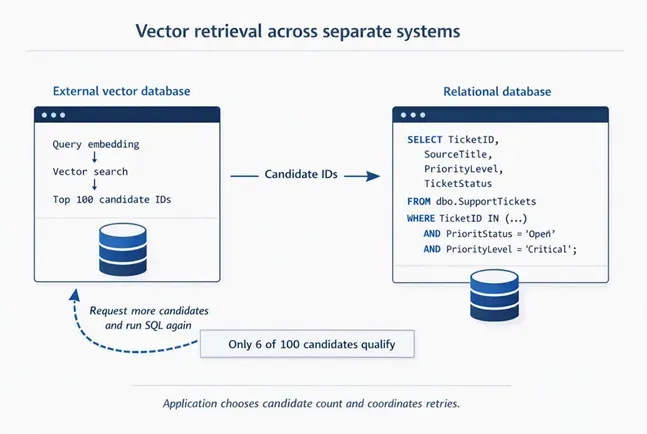
The vector database knows which embeddings are similar, but it may not have visibility into all the relational predicates, joins, security rules, and live business data evaluated by SQL. The relational database understands those constraints, but it receives only the candidate set selected by the external vector system. The two systems optimize different parts of the request independently. This increases application complexity and data movement, while placing the burden of choosing candidate counts, coordinating retries, and reconciling data and security boundaries on the developer.
Vector Retrieval as a Part of SQL Query Processing
The challenge is not simply where vectors are stored. The challenge is how vector retrieval participates in the execution of the complete query.
In Azure SQL, vectors are not stored as opaque blobs or managed through an external service bolted onto the database.
SQL query optimizers have benefited from decades of investment in cardinality estimation and cost-based plan selection.
Because vector search is fully composable with relational operators such as filters, joins, aggregates, and security predicates, the optimizer can cost it in the context of the complete query. It can then compare alternative execution strategies and choose an efficient plan for a query containing vector search, rather than optimizing vector retrieval as an isolated step. DiskANN provides efficient candidate generation over large vector collections, while the SQL optimizer integrates that retrieval with the rest of the query.

How Azure SQL evolved beyond post-filtering
Earlier DiskANN-based vector retrieval in Azure SQL followed a post-filtering model. The vector index first returned a candidate set, and relational predicates were applied afterward.
This works well when predicates are broad and most candidates qualify. As filters become more selective, however, many candidates may be discarded.
Azure SQL has moved beyond this model. The latest DiskANN Vector Index improvements introduced iterative filtering, where predicates are applied during vector search rather than only after a fixed candidate set is generated. T
Here’s a quick side-by-side comparison:
| Before (Post-Filtering) | New Version (Iterative Filtering) |
| The Problem: Filtering happened after retrieving vectors | The Solution: Filtering happens during the search |
| You had to over-fetch and hope enough matched | The search can continue until the requested number of qualifying results is found, when enough matching rows exist. |
|
SELECT TOP (20) t.id, t.title, s.distance FROM VECTOR_SEARCH( TABLE = wikipedia_articles, COLUMN = title_vector, SIMILAR_TO = @query_vector, METRIC = ‘cosine’, TOP_N = 20 /* Over-fetch */ ) AS s WHERE category = ‘Technology’ ORDER BY s.distance; |
SELECT TOP (10) WITH APPROXIMATE t.id, t.title, s.distance FROM VECTOR_SEARCH( TABLE = wikipedia_articles AS t, COLUMN = title_vector, SIMILAR_TO = @query_vector, METRIC = ‘cosine’ ) AS s WHERE t.category = ‘Technology’ ORDER BY s.distance; |
| Result: Maybe 10 results, maybe 3, maybe 0 | Result: Up to 10 qualifying Technology articles, when enough matching rows exist. |
| Had to guess how many to fetch (TOP_N = 20? 100?) | No longer need to select a fixed over-fetch value |
Candidate exploration and relational qualification now work together. The engine no longer has to commit to a single fixed candidate count before it knows how the rest of the query will behave.
One query, more intelligent choices
WITH APPROXIMATE tells Azure SQL that approximate nearest-neighbor results are acceptable while leaving the execution strategy to the engine.
At compile time, the optimizer evaluates available approaches using the complete query context and estimated execution cost. Approximate nearest-neighbour(ANN) search may work well for large vector collections when predicates are not highly selective. Queries containing highly selective filters may benefit from exact nearest-neighbor search instead of additional approximate nearest-neighbor (ANN) exploration. The exact choice is workload-dependent and may consider factors such as predicate selectivity, data distribution, available relational and vector indexes, and the requested result count. These examples are illustrative and not a guaranteed decision matrix.
At runtime, the execution engine can adapt to available resources and query conditions. When additional qualifying rows are needed to satisfy a filtered Top-K request, Azure SQL can switch between approximate nearest-neighbor (ANN) search and exact nearest-neighbor(KNN) search as appropriate. This helps return qualifying results without requiring the application to guess an over-fetch value.
The same T-SQL surface can therefore support different execution strategies based on the query and available resources. Developers do not need to choose between ANN search and exact nearest-neighbor search. They express the retrieval intent, and Azure SQL determines how best to execute the query.
Bringing the power of SQL to AI retrieval
Every database can add a vector index. The larger challenge is integrating vector retrieval into the optimizer, execution engine, security model, and query-processing infrastructure that production workloads already depend on.
By treating vectors as a first-class SQL data type, Azure SQL allows semantic retrieval to participate in decades of database innovation:
- Cost-based optimization
- Adaptive execution
- Security and governance
- Transactional consistency
- Relational processing at scale
The result is not simply vector search inside a database. It is vector search that behaves like SQL.
As AI applications increasingly operate over live operational data, that distinction becomes more important than the vector index alone.
Get started
Ready to modernize your retrieval stack? Explore first-class vector support and iterative filtering through one of these two paths.
Try it locally with Azure SQL Developer
Start without provisioning cloud resources. Azure SQL Developer brings the Azure SQL Database engine to your laptop in a container. It is free for local development and CI, requires no Azure subscription or credit card, and supports native vector capabilities for local prototyping.
Try it in Azure SQL Database for free
Want to try the complete cloud experience? The Azure SQL Database free offer provides 100,000 vCore seconds, 32 GB of data storage, and 32 GB of backup storage per database each month.
Quick start: Run the DiskANN improvements sample
Related reading


0 comments