


When you need to move an entire database or move the objects in a database, bacpac and dacpac files often come up because of all of the tooling options to interact with them. Bacpac and dacpac files share some core similarities as well as some major differences in how they’re used in SqlPackage and other SQL tools, but their flexibility can create a bit of confusion. In this post, we are going to discuss exactly what makes bacpac specifically important, as well as explore the options that a dacpac is capable of.
A bacpac is primarily a portable copy of schema and data whose model is limited to the Azure SQL Database surface area. A dacpac is primarily a deployment artifact, supports broader target-platform models, and can optionally include data.
Bacpacs: Portability for Azure SQL Database
Most people are familiar with bacpac files from working with the portability options of export and import, which enable moving database objects and their data across different versions of SQL, including downgrading versions (either from Azure to SQL Server or back to older versions of SQL Server). This is a big contrast from backup files (BAK files), which can only be restored to match or upgraded versions of SQL Server. Import and export functionality is available in SQL Server Management Studio (SSMS), VS Code, the Azure Portal, and the command line through SqlPackage.
Bacpacs are a file format for flexibly moving data around but there is a tradeoff of operation speed to get to that more portable file format. A bacpac export or import is generally slower than a native SQL Server backup or restore. Bacpac operations logically extract and recreate the database schema and table data, while native backup and restore copy database pages and log records in SQL Server’s optimized backup format. In Azure SQL Database, the file-level backups are managed as a part of the service, and in SQL Server, you or your DBA are responsible for managing the proper backup processes.
A bacpac file contains the definition of the database objects as well as a copy of all the data in the tables. If you change the file extension on a bacpac file to .zip and extract that to a folder, you can view the inside of a bacpac. The contents include a model.xml file that defines the object structures, as well as a data folder that contains BCP files. These BCP files were written during export, and on import, bulk insert will populate the database with that data.
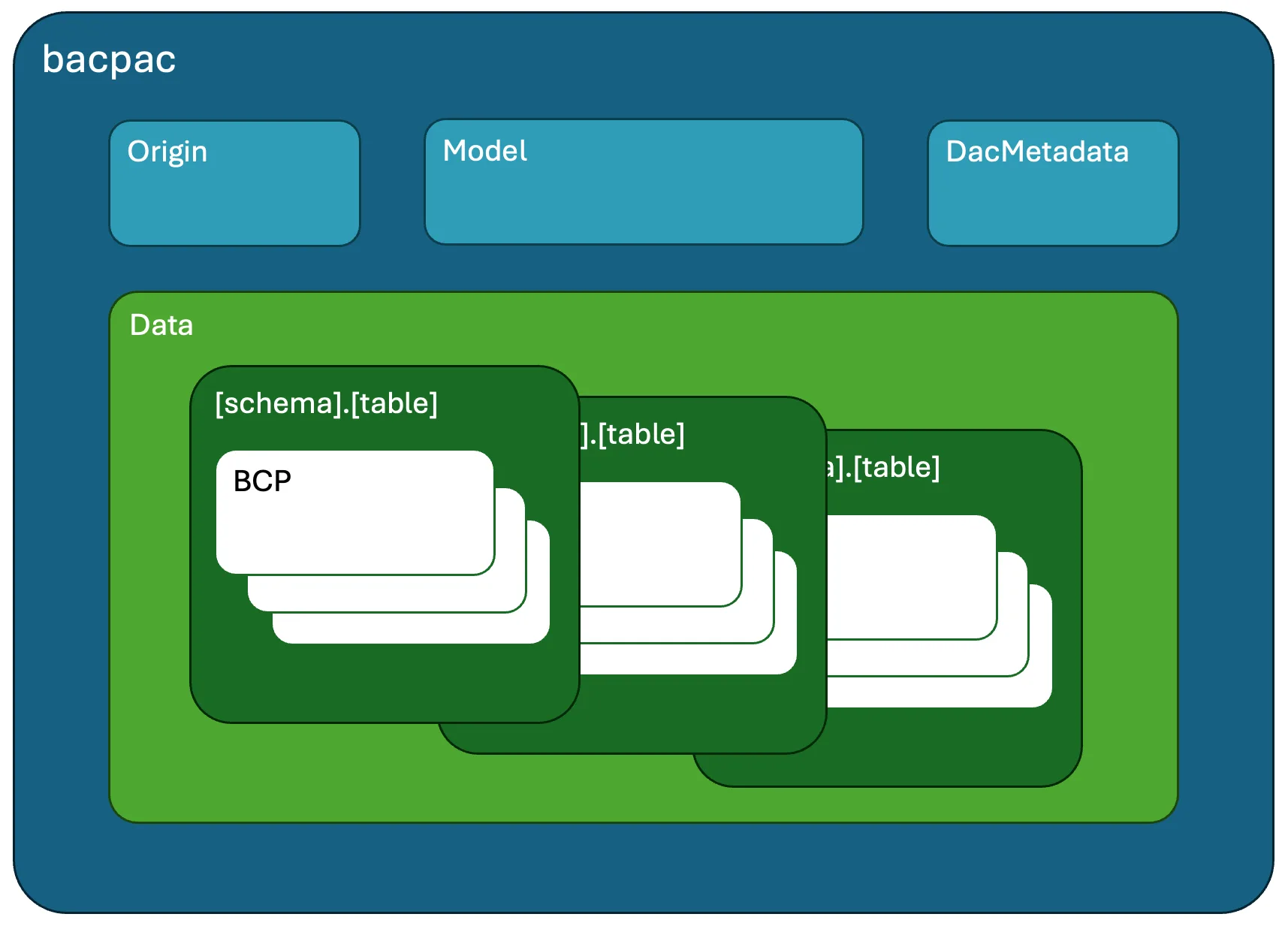
Data portability through bacpacs is focused on ensuring that a bacpac file can be imported to Azure SQL Database. As a result, bacpacs can only contain objects that are able to be used in Azure SQL Database. A bacpac can’t be created from a SQL Server database with objects that are not supported in Azure SQL Database, like Windows logins or file stream columns or even SQL CLR elements.
All is not lost if you run into a database that will not export to bacpac because of elements that aren’t supported in Azure SQL Database. One option is to create a copy of that database and remove the unsupported objects. However, if your intended destination is not Azure SQL Database, those object limitations may not be meaningful or desired. In this case, understanding all of the capabilities of a dacpac file creates another option.
Dacpacs: Anything and can be everything
Most people that are familiar with dacpac files know them for database deployments. When you build a SQL project the output/result is a dacpac file, but a dacpac can also be directly extracted from an existing database. A dacpac file contains the schema definition or database model of a database and dacpac tooling generates a deployment plan that can be output as T-SQL (script) or directly applied (publish). For a new database, the deployment plan is creating all of the objects from scratch. For an existing database, the deployment plan determines how to modify existing database objects such that they match the definition provided in the dacpac.
The publish and script operations have many available options that customize and analyze the deployment plan generated. An example of an option that customizes the deployment plan is “GenerateSmartDefaults”, which inserts default values when adding a non-nullable column to a table with existing rows. An example of an option that analyzes the deployment plan is “AllowTableRecreation”, which checks if the deployment plan will copy the data in a table to a new location before cancelling the deployment or allowing it to proceed. While dynamic deployments enable dacpac files to be used for numerous workflows from basic applications to multi-tenant SaaS with thousands of databases, the flexibility of the dacpac format extends its usefulness.
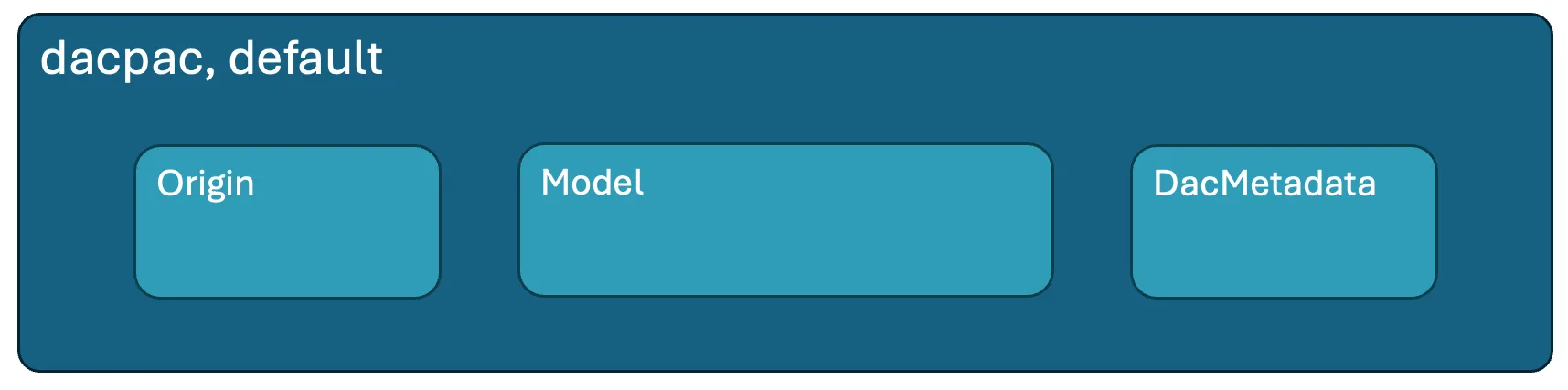
Creating a dacpac with an extract operation defaults to including all of the object definitions in the database, and these objects can be specific to any number of target platforms (SQL Server, Azure SQL Database, SQL database in Fabric, etc.). However, extract can be modified to:
- Exclude server-scoped elements from the dacpac
- Include data for the tables directly in the dacpac (similar to a bacpac)
- Extract the table data into Azure Blob Storage as parquet files
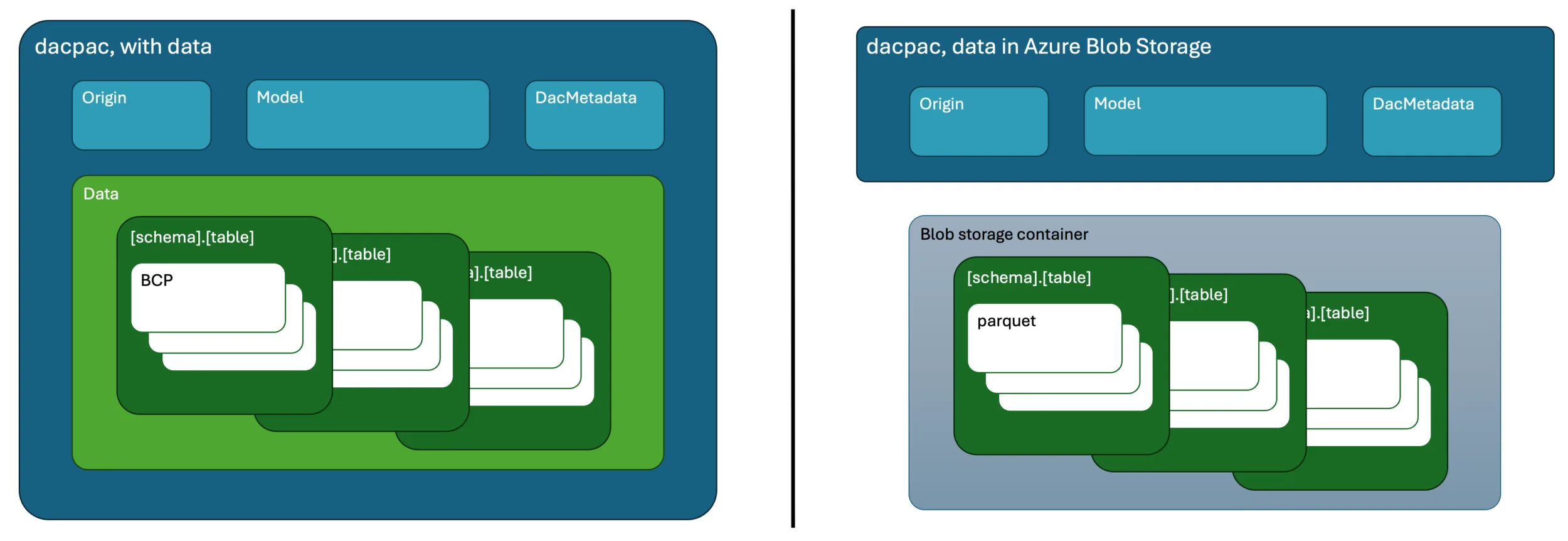
With the ability to include data in or with a dacpac file, you are able to accomplish portability in scenarios where the bacpac requirement of compatibility with Azure SQL Database becomes a challenge. While dacpac publish and extract is available in most tools, taking advantage of these more complex capabilities generally requires leveraging the SqlPackage CLI.
Portability with dacpacs
The following is a quick tactical overview of moving a copy of a database from one server to another through a dacpac file using the extract and publish commands in the SqlPackage CLI. As a reminder, this is similar to export and import with a bacpac file, but there’s no guarantee that the contents are ready for import to Azure SQL Database when the dacpac is created.
For the extract step, our process includes adding “/p:ExtractAllTableData=true” and optionally “/p:ExtractReferencedServerScopedElements=false” to create a dacpac with the data copy from the original database.
sqlpackage /action:extract /sourceconnectionstring:"<source connection string>" /targetfile:"C:\extracted.dacpac" /p:ExtractAllTableData=true /p:ExtractReferencedServerScopedElements=falseFor the publish step, the data contained in the dacpac is populated on the database by default. To modify from the standard publish process we may include additional properties like:
- “/p:AllowIncompatiblePlatform=true” when moving between different database types
- “/p:ExcludeObjectTypes=Logins;Users” to skip Windows logins that were present on SQL Server when moving to Azure SQL Database
sqlpackage /action:publish /sourcefile:"C:\extracted.dacpac" /targetconnectionstring:"<target connection string>" /p:AllowIncompatiblePlatform=true /p:ExcludeObjectTypes=Logins;UsersSqlPackage works with Integrated authentication, SQL authentication, and Microsoft Entra ID authentication methods. As a result, your connection string could include “Authentication=Active Directory Interactive” for browser-enabled authentication or “Authentication=Active Directory Default” to leverage terminal authentication with a preceding “az login” command.
Recap
The most common description of bacpacs and dacpacs is that a bacpac contains data and a dacpac doesn’t, but this is an incomplete statement. By default a bacpac contains data and the objects in the database must be compatible with Azure SQL Database, while the dacpac file format excels for database deployments and has an option to include a data copy.
Reflecting on the SqlPackage operations that create bacpac and dacpac files:
- Export: creates a bacpac containing the database schema/model and data. Used mainly for moving or archiving a database’s logical contents when interacting with Azure SQL Database.
- Extract: creates a dacpac containing the database schema/model (tables, views, procedures, etc.). Used for schema deployment, comparison, and versioning.
- Extract with Table Data option: creates a dacpac containing the database schema/model and data. Used for moving for moving or archiving a database’s logical contents.
Bacpac files are tightly integrated with Azure SQL Database, with import/export capabilities surfaced through the Azure Portal, az CLI, and Azure PowerShell cmdlets. Both file types, bacpacs and dacpacs, have support in SSMS, VS Code, and the SqlPackage CLI.


0 comments
Be the first to start the discussion.