


Modern distributed systems fail in partial, uneven ways. A downstream API slows down, a database starts timing out, or a burst of messages arrives faster than a dependency can absorb. If every Azure Function instance retries immediately and indefinitely, the system creates its own backpressure and turns a transient fault into a wider outage.
Two patterns are especially useful for controlling that failure mode:
- Exponential backoff increases the delay between retries so a dependency has time to recover.
- Circuit breaker stops repeated calls to an unhealthy dependency and fails fast until the dependency is likely to be healthy again.
Used together, these patterns reduce retry storms, protect downstream systems, and give your Functions app a controlled way to degrade under stress.
Reference architecture
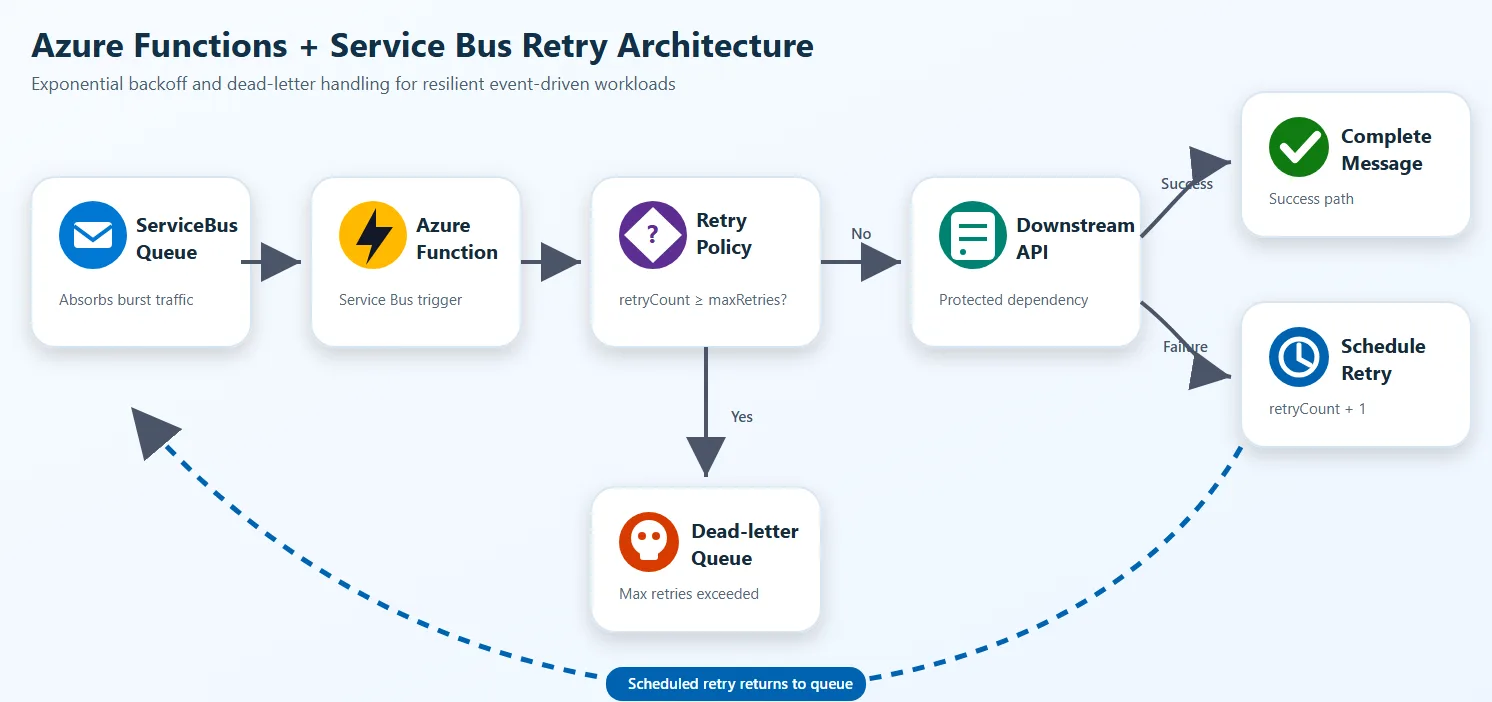
The queue absorbs burst traffic, the Functions app decides whether the dependency is safe to call, and failed work is either delayed or isolated instead of being retried immediately.
Why these patterns matter
Azure Functions can scale out quickly. That capability is useful for throughput, but it also means many concurrent executions can hit a weak dependency. Without controls:
- transient failures become synchronized retry bursts
- queue length grows while workers keep wasting compute on doomed calls
- hot partitions or limited downstream capacity create system-wide backpressure
- poison messages stay active longer than they should
The safer design is:
- detect transient failure
- delay the next attempt using exponential backoff
- stop calling a failing dependency when a threshold is reached
- resume carefully after a cool-down period
- move irrecoverable work to a dead-letter or quarantine path
Backoff and circuit breaker play different roles
Exponential backoff answers: “When should I try again?”
Circuit breaker answers: “Should I call this dependency at all right now?”
You usually want both:
- backoff handles message-level retry pacing
- circuit breaker handles dependency-level protection
Exponential backoff with Azure Functions and Service Bus
The existing sample in this repo already demonstrates application-level retry scheduling for TypeScript with Azure Service Bus.
The core idea is simple:
- read the current retry count from message metadata
- compute the next delay with exponential growth
- schedule a new Service Bus message for the future
- complete the current message
- dead-letter or quarantine after the maximum retry count
TypeScript example
This TypeScript example follows the Azure Functions v4 programming model and uses a Service Bus trigger with SDK binding enabled. Source: serviceBusTopicTrigger.ts
import {
    ServiceBusMessageContext,
    ServiceBusMessageActions,
    messageBodyAsText,
} from '@azure/functions-extensions-servicebus';
import { app, InvocationContext } from '@azure/functions';
import { ServiceBusClient } from '@azure/service-bus';
import { DefaultAzureCredential } from '@azure/identity';

const maxRetries = 3;

export async function serviceBusQueueTrigger(
    serviceBusMessageContext: ServiceBusMessageContext,
    context: InvocationContext
): Promise<void> {
    const actions = serviceBusMessageContext.actions as ServiceBusMessageActions;
    const message = serviceBusMessageContext.messages[0];
    const bodyText = messageBodyAsText(message);
    const currentRetryCount = Number(message.applicationProperties?.retryCount) || 0;

    if (currentRetryCount >= maxRetries) {
        await actions.deadletter(message);
        return;
    }

    try {
        const fullyQualifiedNamespace = process.env.ServiceBusConnection__fullyQualifiedNamespace;
        if (!fullyQualifiedNamespace) {
            throw new Error('ServiceBusConnection__fullyQualifiedNamespace is not set');
        }

        const client = new ServiceBusClient(fullyQualifiedNamespace, new DefaultAzureCredential());
        const sender = client.createSender('testqueue');
        const scheduledEnqueueTime = new Date(Date.now() + 10_000);

        await sender.scheduleMessages(
            [{
                body: bodyText,
                messageId: `scheduled-${message.messageId}`,
                contentType: message.contentType,
                correlationId: message.correlationId,
                subject: message.subject,
                applicationProperties: {
                    ...message.applicationProperties,
                    retryCount: currentRetryCount + 1,
                    originalMessageId: message.messageId,
                    scheduledAt: new Date().toISOString(),
                    originalEnqueueTime: message.enqueuedTimeUtc?.toISOString(),
                },
            }],
            scheduledEnqueueTime
        );

        await sender.close();
        await client.close();
        await actions.complete(message);
    } catch (error) {
        await actions.abandon(message);
        throw error;
    }
}

app.serviceBusQueue('serviceBusQueueTrigger1', {
    connection: 'ServiceBusConnection',
    queueName: 'testqueue',
    sdkBinding: true,
    autoCompleteMessages: false,
    cardinality: 'many',
    handler: serviceBusQueueTrigger,
});
Python example
This Python example uses the Azure Functions Python v2 programming model with the Service Bus extensions binding. Source: function_app.py
import datetime
import logging
import os

import azure.functions as func
import azurefunctions.extensions.bindings.servicebus as servicebus
from azure.identity import DefaultAzureCredential
from azure.servicebus.aio import ServiceBusClient
from azure.servicebus import ServiceBusMessage

app = func.FunctionApp()

MAX_RETRIES = 3

@app.service_bus_queue_trigger(
    arg_name="received_message",
    queue_name="QUEUE_NAME",
    connection="SERVICEBUS_CONNECTION",
    auto_complete_messages=False,
)
async def servicebus_queue_trigger(
    received_message: servicebus.ServiceBusReceivedMessage,
    message_actions: servicebus.ServiceBusMessageActions,
):
    application_properties = received_message.application_properties or {}
    current_retry_count = int(application_properties.get(b"retry_count", 0))

    if current_retry_count >= MAX_RETRIES:
        message_actions.deadletter(received_message, deadletter_reason="MaxRetryExceeded")
        return

    try:
        message_actions.complete(received_message)

        fqns = os.getenv("SERVICEBUS_CONNECTION__fullyQualifiedNamespace")
        queue_name = os.getenv("QUEUE_NAME")
        sb_client = ServiceBusClient(
            fully_qualified_namespace=fqns,
            credential=DefaultAzureCredential(),
        )

        async with sb_client, sb_client.get_queue_sender(queue_name=queue_name) as sender:
            new_retry_count = current_retry_count + 1
            schedule_time = datetime.datetime.utcnow() + datetime.timedelta(seconds=10)

            new_message = ServiceBusMessage(
                body=str(received_message),
                application_properties={
                    **application_properties,
                    "retry_count": new_retry_count,
                    "original_message_id": received_message.message_id,
                    "scheduled_at": datetime.datetime.utcnow().isoformat(),
                },
                message_id=received_message.message_id,
                session_id=received_message.session_id,
                content_type=received_message.content_type,
                correlation_id=received_message.correlation_id,
                subject=received_message.subject,
            )

            await sender.schedule_messages(new_message, schedule_time)
            logging.info("Retry %s scheduled", new_retry_count)
    except Exception:
        message_actions.abandon(received_message)
        raise
.NET example
This .NET example uses the Azure Functions isolated worker model. The trigger receives a batch of messages, checks retry count from application properties, and schedules a delayed retry or dead-letters the message.
using Azure.Identity;
using Azure.Messaging.ServiceBus;
using Microsoft.Azure.Functions.Worker;
using Microsoft.Extensions.Logging;

public class ExponentialBackoffProcessor(ILogger<ExponentialBackoffProcessor> logger)
{
    private const int MaxRetries = 3;
    private const string QueueName = "orders-queue";

    [Function(nameof(ProcessWithBackoff))]
    public async Task ProcessWithBackoff(
        [ServiceBusTrigger(QueueName, Connection = "ServiceBusConnection", AutoCompleteMessages = false)]
        ServiceBusReceivedMessage[] messages,
        ServiceBusMessageActions messageActions)
    {
        foreach (var message in messages)
        {
            var retryCount = message.ApplicationProperties.TryGetValue("retryCount", out var val)
                ? Convert.ToInt32(val)
                : 0;

            if (retryCount >= MaxRetries)
            {
                await messageActions.DeadLetterMessageAsync(message, deadLetterReason: "MaxRetryExceeded");
                logger.LogError("Dead-lettered {MessageId} after {RetryCount} retries", message.MessageId, retryCount);
                continue;
            }

            try
            {
                await CallDownstreamApi(message);
                await messageActions.CompleteMessageAsync(message);
            }
            catch (Exception ex)
            {
                logger.LogWarning(ex, "Transient failure for {MessageId}, scheduling retry {Retry}",
                    message.MessageId, retryCount + 1);

                var fqns = Environment.GetEnvironmentVariable("ServiceBusConnection__fullyQualifiedNamespace");
                await using var client = new ServiceBusClient(fqns, new DefaultAzureCredential());
                await using var sender = client.CreateSender(QueueName);

                var retryMessage = new ServiceBusMessage(message.Body)
                {
                    MessageId = $"retry-{message.MessageId}",
                    ContentType = message.ContentType,
                    CorrelationId = message.CorrelationId,
                    Subject = message.Subject,
                    ApplicationProperties =
                    {
                        ["retryCount"] = retryCount + 1,
                        ["originalMessageId"] = message.MessageId,
                        ["scheduledAt"] = DateTime.UtcNow.ToString("o")
                    }
                };

                var scheduledTime = DateTimeOffset.UtcNow.AddSeconds(10);
                await sender.ScheduleMessageAsync(retryMessage, scheduledTime);
                await messageActions.CompleteMessageAsync(message);
            }
        }
    }

    private Task CallDownstreamApi(ServiceBusReceivedMessage message) => Task.CompletedTask;
}
Why exponential backoff reduces backpressure
If the retry interval stays fixed, many failed messages get retried at nearly the same cadence. That creates synchronized pressure on the same downstream component. Exponential backoff spreads retry load over time. In practice, it gives you:
- fewer immediate rehits on a dependency that is already degraded
- lower queue churn during transient incidents
- more time for autoscale, failover, or operator intervention
- clearer separation between transient and persistent failure
Circuit breaker with Azure Functions
Backoff alone isn’t enough when a downstream service is clearly unhealthy. If every invocation still attempts the dependency first, your code wastes compute and keeps increasing latency.
A circuit breaker usually has three states:
- Closed: normal traffic flows
- Open: calls are blocked for a cool-down window
- Half-open: allow a few trial calls to check whether the dependency recovered
In Azure Functions, the important design choice is where breaker state lives.
- In-memory breaker state is acceptable for local development or single-instance demos.
- For production, use a shared state store such as Azure Managed Redis, Cosmos DB, or another low-latency store. Azure Functions can scale out across many instances, so per-process memory doesn’t give you a global breaker.
TypeScript circuit breaker example
This example uses the SDK binding’s abandon action with propertiesToModify to track retry count directly on the message. After the threshold is reached, the message is completed to stop the retry loop. Source: serviceBusTopicTrigger.ts
import '@azure/functions-extensions-servicebus';
import { app, type InvocationContext } from '@azure/functions';
import { type ServiceBusMessageContext, messageBodyAsJson } from '@azure/functions-extensions-servicebus';

const maxRetries = 3;

export async function serviceBusQueueTrigger(
    serviceBusMessageContext: ServiceBusMessageContext,
    context: InvocationContext
): Promise<void> {
    const message = serviceBusMessageContext.messages[0];
    const bodyData = messageBodyAsJson(message);
    const currentRetryCount = message.applicationProperties?.retryCnt
        ? parseInt(message.applicationProperties.retryCnt as string)
        : 0;

    if (currentRetryCount >= maxRetries) {
        await serviceBusMessageContext.actions.complete(message);
        context.log('Message completed after maximum retries');
        return;
    }

    // Abandon with updated retry metadata, broker redelivers automatically
    await serviceBusMessageContext.actions.abandon(message, {
        retryCnt: (currentRetryCount + 1).toString(),
        lastRetryTime: new Date().toISOString(),
        errorMessage: 'Processing failed',
    });
}

app.serviceBusQueue('serviceBusQueueTrigger1', {
    connection: 'ServiceBusConnection',
    queueName: 'testqueue',
    sdkBinding: true,
    autoCompleteMessages: false,
    cardinality: 'many',
    handler: serviceBusQueueTrigger,
});
The abandon call with propertiesToModify lets the broker manage redelivery while your code tracks state in application properties. Once the retry budget is exhausted, completing the message removes it from the queue. For a production circuit breaker, you would add a shared state check (for example, Redis) before attempting the downstream call.
Python circuit breaker example
import azure.functions as func
import azurefunctions.extensions.bindings.servicebus as servicebus

app = func.FunctionApp()

MAX_RETRIES = 3

@app.service_bus_queue_trigger(
    arg_name="received_message",
    queue_name="QUEUE_NAME",
    connection="SERVICEBUS_CONNECTION",
    auto_complete_messages=False,
)
async def servicebus_queue_trigger(
    received_message: servicebus.ServiceBusReceivedMessage,
    message_actions: servicebus.ServiceBusMessageActions,
):
    application_properties = received_message.application_properties or {}
    current_retry_count = int(application_properties.get(b"retry_count", 0))

    if current_retry_count >= MAX_RETRIES:
        message_actions.complete(received_message)
        return

    # Abandon with updated retry metadata, broker redelivers automatically
    message_actions.abandon(received_message, {
        "retry_count": current_retry_count + 1,
        "last_retry_time": __import__("datetime").datetime.utcnow().isoformat(),
        "error_message": "Processing failed",
    })
.NET circuit breaker example
This example uses AbandonMessageAsync with properties to modify, tracking retry count on the message itself. After the threshold is reached, the message is completed to stop the retry loop.
using Azure.Messaging.ServiceBus;
using Microsoft.Azure.Functions.Worker;
using Microsoft.Extensions.Logging;

public class CircuitBreakerProcessor(ILogger<CircuitBreakerProcessor> logger)
{
    private const int MaxRetries = 3;

    [Function(nameof(ProcessWithCircuitBreaker))]
    public async Task ProcessWithCircuitBreaker(
        [ServiceBusTrigger("orders-queue", Connection = "ServiceBusConnection", AutoCompleteMessages = false)]
        ServiceBusReceivedMessage[] messages,
        ServiceBusMessageActions messageActions)
    {
        foreach (var message in messages)
        {
            var retryCount = message.ApplicationProperties.TryGetValue("retryCnt", out var val)
                ? Convert.ToInt32(val)
                : 0;

            if (retryCount >= MaxRetries)
            {
                await messageActions.CompleteMessageAsync(message);
                logger.LogWarning("Completed {MessageId} after max retries", message.MessageId);
                continue;
            }

            // Abandon with updated retry metadata, broker redelivers automatically
            await messageActions.AbandonMessageAsync(message, new Dictionary<string, object>
            {
                ["retryCnt"] = retryCount + 1,
                ["lastRetryTime"] = DateTime.UtcNow.ToString("o"),
                ["errorMessage"] = "Processing failed"
            });
        }
    }
}
Use both patterns together
The normal production flow looks like this:
- Function receives a message.
- Circuit breaker checks whether the downstream dependency should be called.
- If closed, the function tries the dependency.
- On transient failure, the breaker records the failure and the message is rescheduled with exponential backoff.
- After repeated failures, the breaker opens and later messages avoid immediate downstream calls.
- When the recovery window passes, half-open probes test whether the dependency recovered.
- If recovery still fails, the message eventually lands in a dead-letter queue (DLQ) or a quarantine queue.
This approach reduces useless work and protects both your Functions app and the downstream service.
Operational guidance for Azure Functions
Keep the pattern simple enough to operate:
- Use retry metadata in
applicationPropertiesso every attempt is observable. - Add jitter to retry delay in production to avoid synchronized retries across instances.
- Separate transient errors from validation or business rule failures.
- Track breaker state, retry count, queue depth, dead-letter count, and downstream latency in Application Insights.
- Set a maximum retry budget. Unlimited retries only move the incident somewhere harder to diagnose.
- Prefer a shared breaker state store when your Functions app scales beyond one instance.
- Keep quarantine or DLQ processors explicit so operators can redrive messages safely.
Choose between DLQ and quarantine queues
Both are valid, but they solve slightly different problems:
- Dead-letter queue is a natural fit when the broker should own the failed-message path.
- Quarantine queue is useful when the application wants a custom inspection and replay workflow.
The TypeScript SDK binding in this repo makes explicit dead-lettering straightforward. In Python, many teams prefer a quarantine queue when they want full application-level control over the retry path.
Summary
Exponential backoff protects the system from retry storms. Circuit breaker protects the system from repeatedly calling a dependency that is already failing. Azure Functions benefits from both because serverless scale can amplify unhealthy retry behavior as easily as it amplifies throughput.
If your goal is to avoid backpressure in a modern distributed system, these patterns should be part of the default design for queue-driven workloads.


0 comments
Be the first to start the discussion.