

What parts of building and shipping on Azure still take too many steps?
Maybe you want a command that starts a project with your organization’s approved architecture and infrastructure. Maybe you need to connect deployments to an internal service catalog, run security checks before provisioning, or guide developers through a process that currently lives across scripts and documentation.
When we first introduced the azd extension framework, we invited developers to think about that wish list. The framework was still taking shape in beta, and we wanted to learn which workflows developers and platform teams needed azd to support.
Today, the azd extension framework is generally available.
This milestone gives engineering platform and product teams two ways to make developers’ work easier:
- You can build custom CLI workflows that help developers follow your organization’s infrastructure and operational practices as they build and ship.
- You can create customer-facing workflows that make it easier for developers to configure, deploy, and operate your product or service.
Microsoft Foundry is an example of the second model. Its growing suite of extensions gives developers workflows for building hosted agents, fine-tuning models, and more.
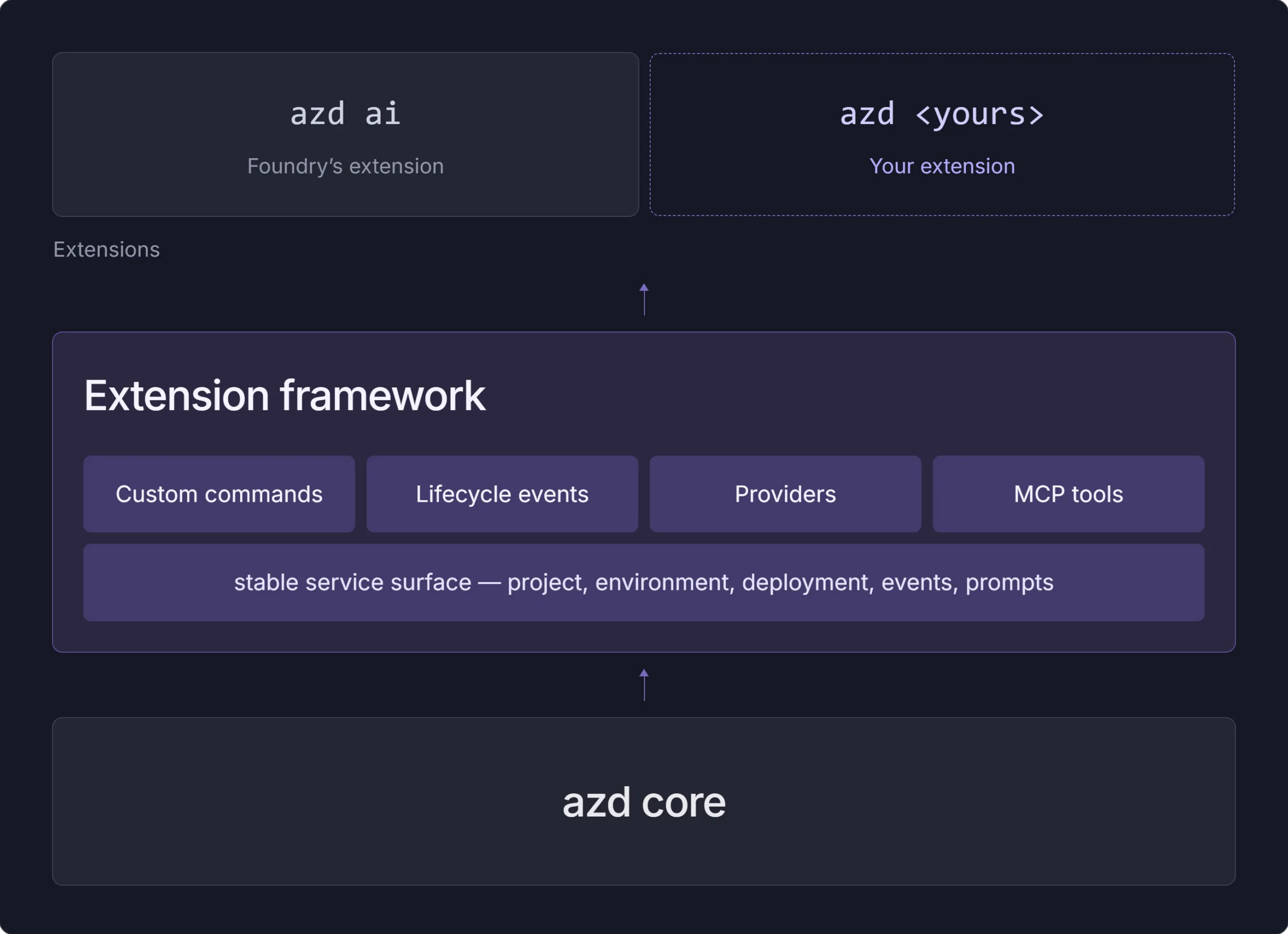
The idea behind extensions is simple. azd provides a consistent application lifecycle from local development to Azure. Extensions let you add the commands and capabilities your workflow needs while keeping developers in the same flow they use to build and deploy on Azure.
What changed since beta
The beta release established the core model for adding commands and lifecycle behavior to azd. Since then, the framework has expanded into a complete path for building, distributing, and operating extensions.
For GA, we stabilized the extension interfaces, broadened lifecycle and provider integration, added project-level extension requirements and version constraints, and improved authoring and publishing workflows through the azd x developer extension. Extension authors can now distribute releases through official, private, development, or nightly sources, while capabilities such as validation providers and MCP tools support more advanced developer workflows.
The growing Microsoft Foundry extension suite demonstrates how these pieces work together in production. GA means teams can now build on a stable framework while individual extensions continue to release and version their capabilities independently.
Make your supported path easier to follow
An azd extension is a modular component that adds commands and capabilities to the CLI. An extension can introduce a command namespace, automate a multistep workflow, connect to an Azure or third-party service, or run logic during an azd lifecycle event.
For engineering platform teams, this creates a practical way to turn platform practices into a usable developer experience. They can turn infrastructure and operational requirements into guided steps that developers follow as they build and ship.
Teams building developer products and services can use the same framework for customer-facing workflows. Instead of asking customers to understand the underlying resource model, coordinate several tools, and translate documentation into a working deployment, a product team can package the supported workflow as azd commands.
Microsoft Foundry is a good example. Its extensions help developers create and deploy hosted agents, connect agents to tools and data, inspect their behavior, and manage fine-tuning jobs. The product team can guide customers through these workflows in the terminal while building on the project, environment, provisioning, and deployment experience azd already provides.
Consider how many developer workflows begin with good guidance but become harder to follow across several tools. A developer might need to find the right template, copy a script, follow a documentation page, request access in another system, and remember which checks to run before deployment. Each step makes sense on its own. Together, they create friction and make the supported path harder to follow.
An extension can bring those steps into a guided azd workflow. Your team can create commands that:
- Initialize projects with approved architecture, infrastructure, policy, and observability defaults
- Connect applications to internal service catalogs, identity systems, and support processes
- Run security, compliance, quality, and cost checks at the right lifecycle stage
- Add deployment support for an internal platform or a specialized Azure service
- Scaffold the recommended configuration for a product or service
- Guide customers through setup, deployment, updates, and troubleshooting
- Coordinate domain-specific workflows for data, IoT, Kubernetes, AI, or other platforms
Developers keep working in the CLI they already use to initialize, provision, deploy, monitor, and remove applications hosted on Azure or built with Azure services. Internal platform teams and product teams can maintain the workflow as a product, version it, and distribute it through an extension source.
The official extension source comes preconfigured with azd, so extensions can be installed, updated, and removed right away:
azd ext list
azd ext install <extension-id>
azd ext update <extension-id>
azd ext uninstall <extension-id>
That source also gives product teams a distribution path for customer-facing experiences. You can add development sources for preview extensions or create a private source for internal tools. The model should feel familiar if you have worked with npm, NuGet, or another package registry.
You can also distribute an extension without a source. When you want to hand someone a one-off build created with the azd x developer extension discussed later, azd x pack --bundle packages it into a portable .zip that installs from a file path or a link:
azd ext install ./contoso-platform_1.0.0.zip
azd ext install https://example.com/builds/contoso-platform_1.0.0.zip
A platform connected to the azd lifecycle
Custom commands are one part of the framework. Extensions can also work with azd project and environment context, prompt developers for input, respond to lifecycle events, and plug in their own framework, service target, provisioning, and validation providers.
This gives extension authors several useful building blocks:
- New commands and nested command namespaces
- Event handlers for workflows such as provision, package, and deploy
- Custom service targets that package, publish, and deploy specialized services
- Custom language and framework support for build, restore, and package steps
- Custom provisioning providers that replace Bicep or Terraform for a project
- Validation checks that run before provisioning and can warn on or stop a risky deployment
- MCP tools that make extension capabilities available to agents and developer tools
These capabilities connect an extension to the same lifecycle developers already use:
azd init
azd provision
azd deploy
azd monitor
azd down
For example, an internal platform extension could scaffold a compliant service, register it in a service catalog, validate required configuration before provisioning, and report deployment metadata after azd deploy. The developer gets one connected flow. The platform team gets a maintainable place to encode and improve that flow.
Projects can also declare the extensions they need. A requiredVersions.extensions section in azure.yaml lists them with a version constraint:
requiredVersions:
  extensions:
    azure.ai.agents: ">=1.0.0"
azd installs them during azd init and checks them again before commands like azd up run.
Build with Microsoft Foundry through azd
When we first introduced the extension framework, we described AI workflows as one area where extensions could help. Microsoft Foundry has since turned that early example into a suite of customer-facing workflows.
The Foundry extensions coordinate project setup, model deployment, connections, tools, agent deployment, and operations under the azd ai namespace. Together, they give developers a consistent path from a local AI project to a running workload in Azure:
azure.ai.projectsmanages the active Foundry project contextazure.ai.agentsscaffolds, deploys, runs, and invokes hosted agentsazure.ai.connectionsmanages connections between Foundry projects and external systemsazure.ai.toolboxesmanages versioned collections of tools for agentsazure.ai.skillsmanages reusable behavioral guidanceazure.ai.routinesmanages timers, schedules, and event-driven automationazure.ai.inspectorprovides a browser-based experience for testing and debugging locally running agents
Foundry also provides the azure.ai.finetune extension for initializing fine-tuning projects, submitting and managing jobs, and deploying fine-tuned models from the terminal.
Each extension owns a focused part of the experience, and they come together under one command structure. You can install the hosted-agent extension bundle through the microsoft.foundry meta-extension:
azd ext install microsoft.foundryYou can also install and update individual extensions when you want a smaller set of capabilities:
azd ext install azure.ai.agents azure.ai.routines azure.ai.finetune
azd ext upgrade azure.ai.connections
For repeatable CI environments, install a specific extension version:
azd ext install azure.ai.agents --version 1.0.0-beta.9This modular model lets the Foundry experience grow while keeping each capability independently versioned. Developers can install the full suite or choose the tools that match their workflow.
Once installed, the extensions work with the familiar azd lifecycle. You can initialize a hosted agent project, provision its Azure resources, deploy the agent, and remove the resources when you finish:
azd ai agent init
azd up
azd down
The project can define its services, infrastructure, model deployments, and agent configuration in azure.yaml and Bicep. That configuration stays with the application in source control and can move across development, test, and production environments.
The Foundry suite gives developers immediate value from the extension framework. Install the extensions, then use the pieces you need to build and operate your AI workflow through azd.
Some Foundry capabilities remain in preview and will continue to evolve. Check the Microsoft Foundry extension documentation for the current extension list, requirements, and feature status.
What is included in the GA release
The GA milestone applies to the azd extension framework: the parts of azd that let teams build, distribute, install, and run extensions as part of the CLI experience.
Here is what that includes technically:
| Area | What is included |
|---|---|
| Extension management | Commands to discover, inspect, install, update, and uninstall one or more extensions, including dependency resolution and version constraints |
| Extension sources | The preconfigured official source, plus URL- and file-based sources for private, local, development, and nightly registries |
| Commands and metadata | Top-level and nested command namespaces, integrated help, command metadata, configuration schemas, and IntelliSense support |
| azd context and services | Access to project, environment, account, user configuration, prompts, deployment, containers, AI models, and other azd context |
| Lifecycle integration | Project and service event handlers that run extension logic around steps such as provisioning, packaging, and deployment |
| Extensible application support | Providers for custom language frameworks, service targets, provisioning workflows, and validation |
| Agent and developer-tool integration | MCP server capabilities and services that make extension tools available to agents and supported developer experiences |
| Authoring and distribution | The azd x developer extension, scaffolding workflow, registry schema, versioning model, and publishing guidance |
GA does not automatically make every extension and every capability inside an extension generally available. Extension owners can release and version their features independently. Development and nightly sources remain intended for preview and experimental builds, and preview features in the Foundry extensions keep their existing preview status.
This boundary lets the framework stay stable while product teams continue to develop and release their own experiences on the schedule that works for them.
Build an extension for your engineering platform
The framework also gives you an on-ramp for building your own experience.
The source code for azd extensions is available in the Azure Developer CLI repository, and the Awesome azd extension gallery provides a browsable catalog.
Start with the demo extension source if you want to see how an extension works with azd context, prompts, lifecycle events, service targets, and MCP tools:
azd ext install microsoft.azd.demo
azd demo
When you are ready to create an extension, install the developer extension and scaffold a project:
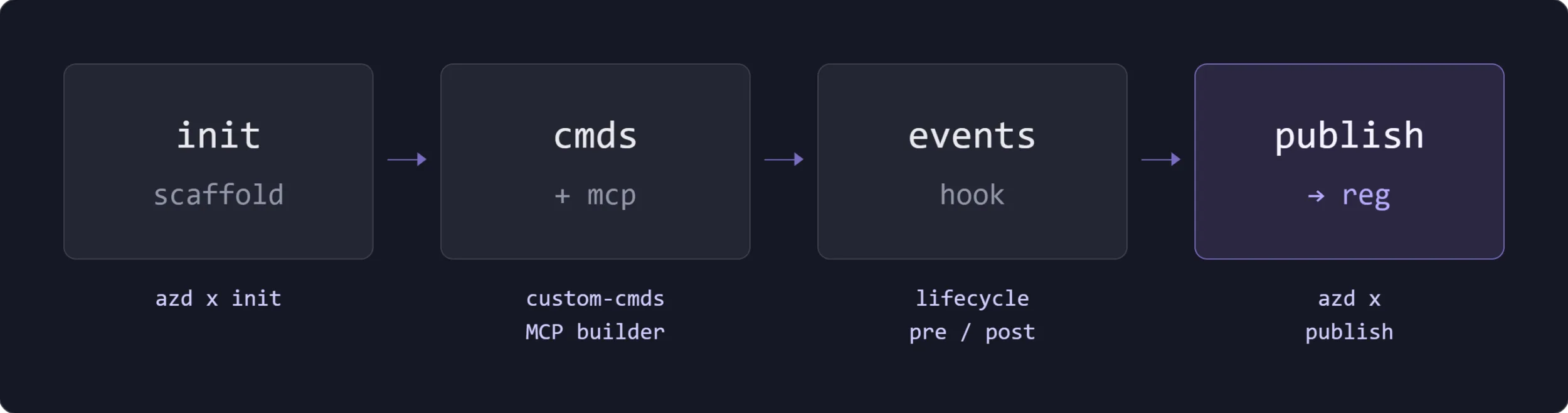
azd ext install microsoft.azd.extensions
azd x init
The scaffolding flow helps you choose a namespace for your commands and creates the starting structure for the extension. From there, you can build the workflow your developers need.
Think about the practices your platform or product team wants to make easy and repeatable. A good extension candidate often appears where developers have to coordinate several tools or remember organization-specific steps. It might be a supported path for a new service, a deployment workflow for an internal platform, or a guided setup for security and observability.
You can distribute internal extensions through a private source and keep them available only to your organization. Extensions intended for broader use can follow the current contribution and publishing guidance for the azd extension registry.
What will you build?
The first version of the extension framework gave us a place to explore what developers might add to azd. The GA platform gives teams a foundation for shipping those ideas.
If you build AI applications and agents, install the Microsoft Foundry extensions and explore the capabilities available through azd ai.
If you build an engineering platform, look at the scripts, documentation, and manual handoffs that make up your supported paths today. Those workflows could become a connected CLI experience that works with the azd application lifecycle.
Try the demo extension, scaffold your own with azd x init, and share your feedback with the Azure Developer CLI project on GitHub.
We are excited to see the Foundry extension ecosystem grow, and we are even more excited to see the extensions you build to make developers’ work easier and more productive.



0 comments
Be the first to start the discussion.