

Developers love the Aspire dashboard for viewing real-time telemetry and state of their apps. It’s easy to use and automatically collects telemetry from Aspire apps. We want to build on that experience with faster startup and fewer runtime dependencies. Enter .NET Native AOT.
In Aspire 13.6, the dashboard is published using .NET Native AOT. AOT removes JIT compilation overhead whenever the dashboard restarts and removes the dashboard executable’s dependency on a separately installed .NET runtime. It also gives us a way to adopt the latest .NET features without supporting multiple installed .NET versions.
Getting there took changes across the dashboard, Blazor, Fluent UI, and Dapper. This post explains the benefits of AOT, then looks at some of the engineering work behind them.
What .NET Native AOT changes
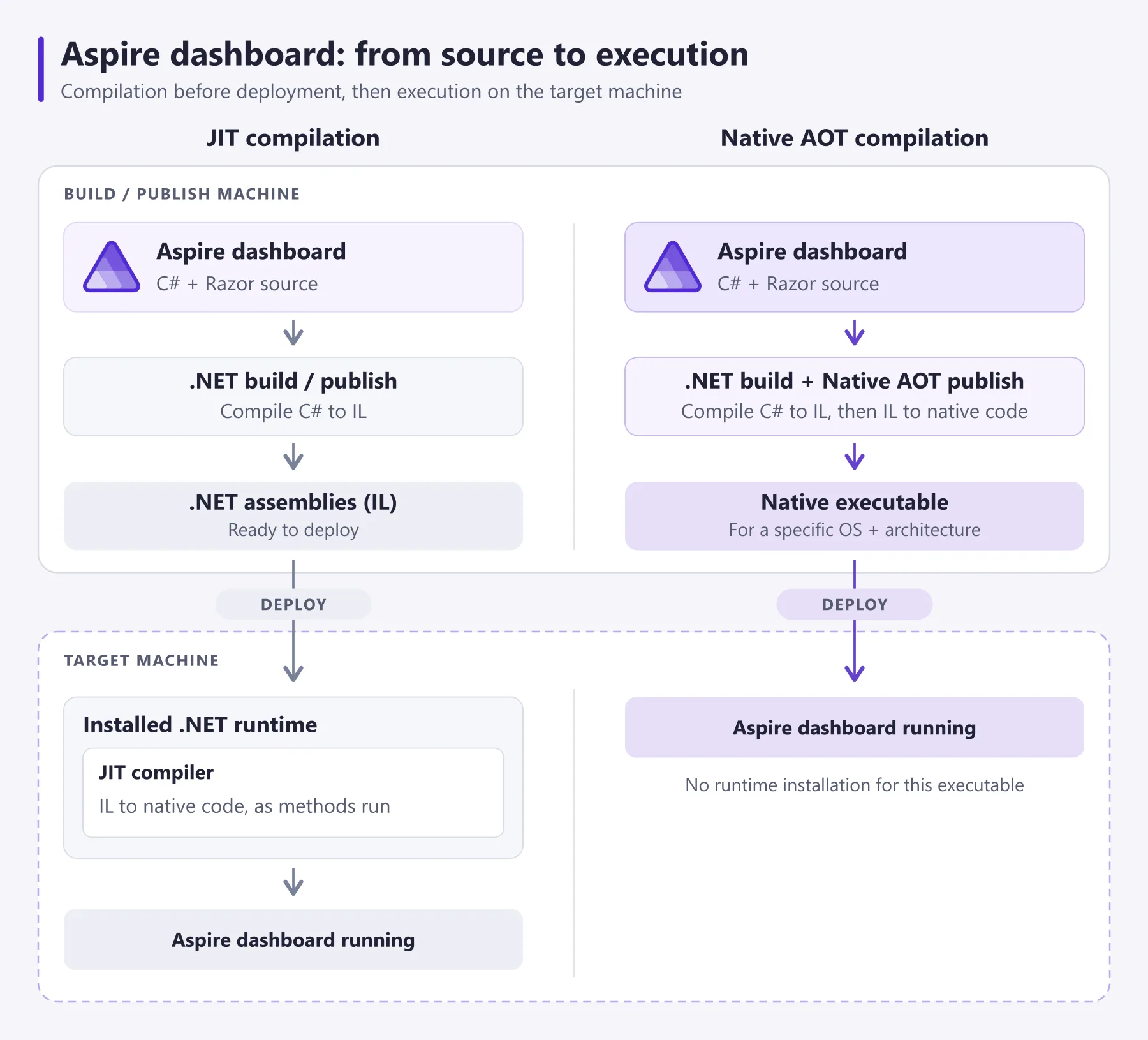
The Aspire dashboard is built with C#. Normally, .NET compiles your C# into intermediate language, or IL. When the application runs, the just-in-time compiler (JIT) compiles methods into native machine code as they’re needed.
Native AOT moves that compilation to publish time. The result is a native executable for a particular operating system and architecture. There is no JIT compiler running inside the application and there’s no requirement for the .NET runtime to be installed.
Benefits
Faster start and responsive UI
JIT compilation is useful for long-running applications, but its cost is repeated whenever a process starts again. The dashboard is a particularly interesting case because developers restart it along with their AppHost.
With Native AOT, the dashboard’s code is already compiled when the process starts. That also removes first-use JIT work when you open a page or exercise a feature for the first time after a restart.
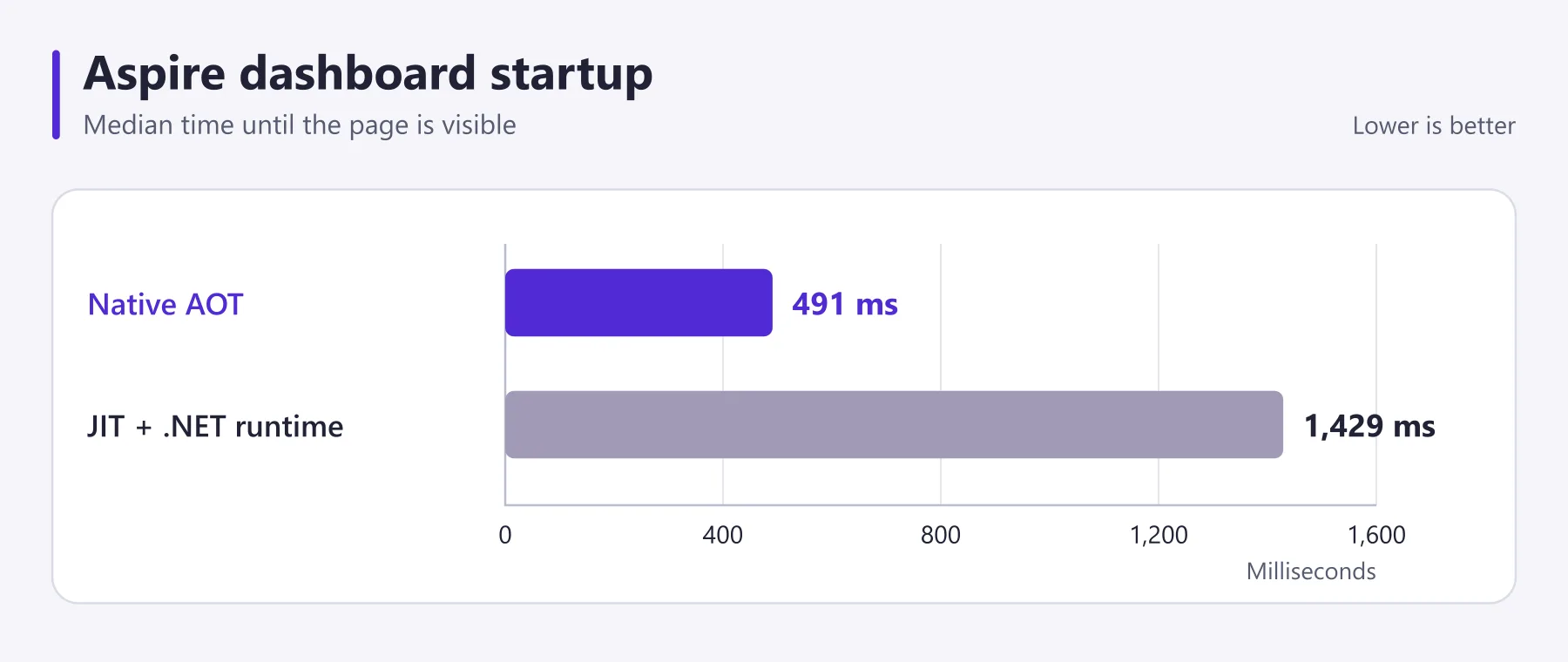
The result is a 66% reduction in median dashboard page-visible startup time and a more responsive UI.
.NET installation not required
The standalone Aspire dashboard is useful even when you aren’t running an AppHost. You can send it OpenTelemetry data from applications written in other languages, or use it to inspect telemetry while investigating a problem.
With the Aspire 13.6 CLI, aspire dashboard run launches the packaged native dashboard executable. The executable itself doesn’t need a separately installed .NET runtime. The CLI currently still ensures one is available for other parts of Aspire, but AOT gives us the option to remove that dependency for dashboard-only use.
Native AOT also reduces the combined size of the dashboard and its required runtime:
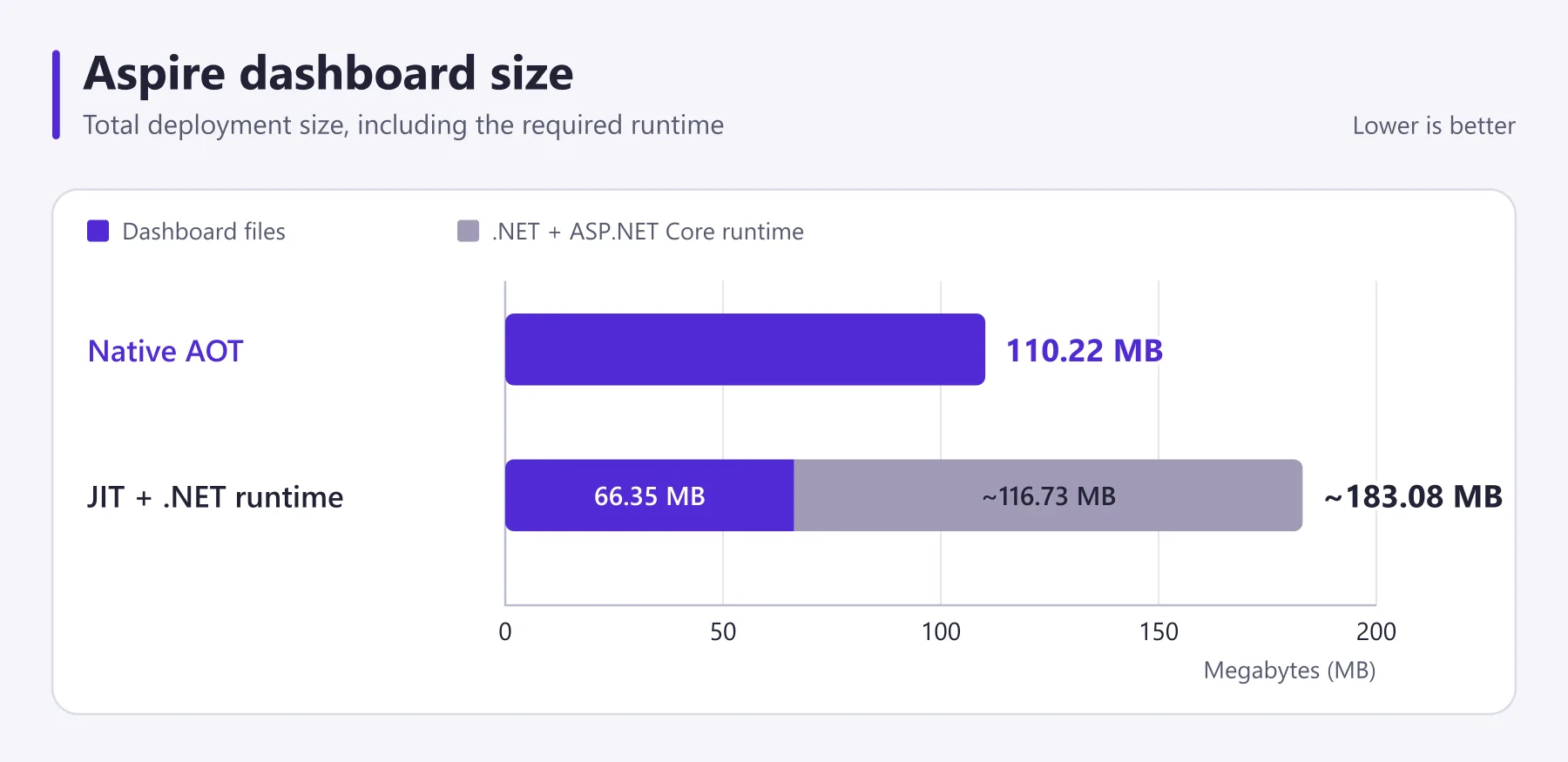
The same change opens up an improvement for the dashboard container. A native executable can use a base image containing its operating-system dependencies without carrying the full .NET runtime image. That enables a slimmer container base.
Using newer .NET features and fixes
Previously, we built the dashboard for .NET 8, the oldest .NET version under support. It could then run on a newer installed runtime through roll-forward.
That arrangement was a source of bugs for the Aspire dashboard. Blazor Web Apps are designed to run on the runtime they’re compiled for. That’s fine for an app running on a server, but the dashboard runs on developer machines. For example, JavaScript assets embedded in the dashboard are for .NET 8, but the installed .NET runtime is .NET 10, causing incompatibilities.
The native dashboard solves this problem. The dashboard targets .NET 11 and ships its framework code and assets together. We know browser assets and server bits match, regardless of the .NET runtimes installed on your machine.
.NET Native AOT also means we can use newer .NET APIs and fixes without waiting for our oldest supported runtime to reach end of support. The structured logs grid is a concrete example: it uses Blazor’s virtualized control to display large amounts of telemetry while keeping the page responsive. Targeting .NET 11 lets us use newer virtualization fixes immediately, even when you’re using the dashboard with applications targeting older .NET versions.
Can We Do This?
The dashboard is a substantial ASP.NET Core application. It has a Blazor Web App frontend built with Fluent UI, gRPC and HTTP/JSON OTLP endpoints for receiving telemetry, and SQLite persistence accessed through Dapper. It supports browser tokens, cookies, OpenID Connect, and certificate authentication. Minimal APIs expose telemetry to the CLI and coding agents.
All of those paths need to work when published as native code. AOT requires the compiler to determine ahead of time which code is needed, and trimming removes code and metadata it considers unused. Runtime code generation and reflection that discovers types dynamically need particular attention.
Much of the dashboard’s backend already had an AOT-compatible path, including its minimal APIs, gRPC endpoints, and SignalR connections. Blazor was the bigger question. Blazor Web Apps didn’t offer supported Native AOT publishing, and the Aspire team discussed replacing the frontend with React while keeping a .NET AOT backend.
The Blazor team offered another route. Blazor devs and agents were able to quickly implement the changes required to unblock running the Aspire dashboard with Native AOT. The changes landed in .NET 11 RC1, letting us keep the existing UI and saving a lot of developer/agent cost.
Experimental Blazor support
The Blazor work used by the dashboard in .NET 11 is experimental and does not make Native AOT a generally supported publishing option for Blazor Web Apps. If this capability is important to you, please share feedback on the Blazor Native AOT issue.Improvements across the stack
Making the dashboard AOT-compatible required changes in both the application and its dependencies. Five PRs capture the main pieces:
- Blazor support for the Native AOT dashboard added experimental hooks for generated JSON metadata in Blazor circuits. It also added a way to evaluate form field expressions without runtime code generation, while retaining the existing path for JIT applications.
- Native AOT compatibility in Fluent UI replaced runtime generic reflection in grid formatting and field validation, and added source-generated JSON metadata for themes and keyboard interop. The work also covered icon and emoji assemblies, although reflection-based asset discovery APIs still retain their trimming warnings.
- Upgrading the dashboard to Fluent UI v5 migrated the UI to the newer component model. This PR doesn’t itself contain AOT fixes, but the upgrade is required to consume the AOT improvements in v5 of the UI library.
- DynamicParameters support in Dapper.AOT enabled generated query code to delegate parameter binding and output handling to the parameter bag, rather than needing to know its members at build time. This matters for the dashboard because it uses dynamic SQL queries to keep execution fast and efficient in the native AOT build.
- Publishing the dashboard with Native AOT moved the dashboard to .NET 11 and enabled native publishing. It wired up generated JSON metadata, adopted Dapper.AOT, and updated packaging and startup so the CLI can launch the native executable with its static assets.
Common AOT issues and how we fixed them
Across these PRs, we observed some common problems with AOT support. Most fixes involved telling the compiler what needed to survive publishing, moving work to build time, or providing an alternative to runtime code generation.
Keeping dynamically accessed types and members
Trimming removes code and metadata that the application doesn’t appear to use. That’s a problem when a member is accessed through reflection rather than a direct call: the trimmer might remove something the application still needs.
Trimming annotations such as DynamicallyAccessedMembers and DynamicDependency describe those otherwise-hidden dependencies. For example, the dashboard passes component types to Blazor for dynamic rendering. The dashboard AOT PR annotated that component metadata to preserve the members required for activation and parameter binding:
[DynamicallyAccessedMembers(DynamicallyAccessedMemberTypes.All)]
public required Type Type { get; init; }
This attribute applies to the type represented by the property’s value, not just the property itself. The preservation requirement also needs to flow through the code supplying that type so the compiler can identify what to keep. Suppressing a trimming or AOT warning alone doesn’t preserve members or make unsupported code work.
Giving JSON serialization generated metadata
JSON serialization often discovers properties and constructs serialization logic at runtime. With AOT, we use System.Text.Json source generation to produce the required metadata at build time instead.
Types are declared on a serializer context using [JsonSerializable]. That context also acts as a resolver: given a type, it provides the serializer with the generated metadata. The important second step is configuring the serializer options to actually use it.
For example, the dashboard’s HTTP JSON configuration registers the dashboard and OTLP contexts:
builder.Services.ConfigureHttpJsonOptions(options =>
{
    options.SerializerOptions.TypeInfoResolverChain.Insert(
        0, DashboardJsonSerializerContext.Default);
    options.SerializerOptions.TypeInfoResolverChain.Insert(
        1, OtlpJsonSerializerContext.Default);
});
The dashboard also configures resolvers for Blazor JavaScript interop and browser storage, including the context added by the Fluent UI AOT work.
Replacing runtime generic construction
High-performance libraries often construct specialized generic types or methods at runtime, then cache delegates to avoid repeated reflection on a hot path. A JIT can generate the required code on demand. Native AOT can’t do that if the required generic instantiation wasn’t generated at publish time.
One workaround is a reflection-based fallback that operates on runtime type metadata without constructing new generic code. For example, JavaScript interop needs to convert a boxed ValueTask<T> returned by a .NET method into a Task. The conversion in DotNetDispatcher has separate paths for JIT and AOT:
private static Task GetTaskByType(Type type, object obj)
{
    var converterDelegate = _cachedConvertToTaskByType.GetOrAdd(
        type, (valueTaskType, taskConverterMethodInfo) =>
        {
            if (RuntimeFeature.IsDynamicCodeSupported)
            {
                return taskConverterMethodInfo
                    .MakeGenericMethod(valueTaskType.GenericTypeArguments[0])
                    .CreateDelegate<Func<object, Task>>();
            }

            var asTaskMethod = valueTaskType.GetMethod(
                nameof(ValueTask<object>.AsTask))!;
            return result => (Task)asTaskMethod.Invoke(result, null)!;
        }, _taskConverterMethodInfo);

    return converterDelegate.Invoke(obj);
}
When dynamic code is supported, this creates a delegate to a specialized generic converter. Under AOT, it instead looks up AsTask and calls it through reflection. The source also uses DynamicDependency to preserve that member. Both paths cache the converter, but the AOT path avoids constructing a generic converter method whose native code might not exist.
A long-term investment
Getting the dashboard running with Native AOT took a lot of work across the application and its dependencies. As the first-ever Blazor Web App to run with Native AOT, the Aspire dashboard is blazing a trail, tackling gaps in framework support and contributing fixes upstream.
We’d originally planned this work for the upcoming Aspire 17 release, but the pieces lined up in time for Aspire 13.6, putting us ahead of schedule.
We see AOT as a long-term investment in the Aspire dashboard. Beyond faster startup, it gives us a consistent runtime to build against and a path to simpler distribution. We can bring new .NET features and fixes to the dashboard sooner, without asking developers to change the runtimes used by their apps.
Try it in Aspire 13.6
Upgrade your Aspire CLI and AppHost packages to 13.6 to use the native dashboard in the normal startup flow. Older AppHosts retain the managed dashboard path. For standalone use, run aspire dashboard run and send it telemetry from your application.
You can follow the implementation in microsoft/aspire#19565 and the 13.6 changelog. Try a restart, open your telemetry, and let us know how it feels. If you hit a problem, please report it on GitHub.


I appreciate highly the fact that you not only announced the version of Aspire but also dived deeper into the AOT aspects. The fact that it allows shipping the new version of .NET has not crossed my mind before 🙂