


And the developers running Claude Code and GitHub Copilot CLI didn’t notice…
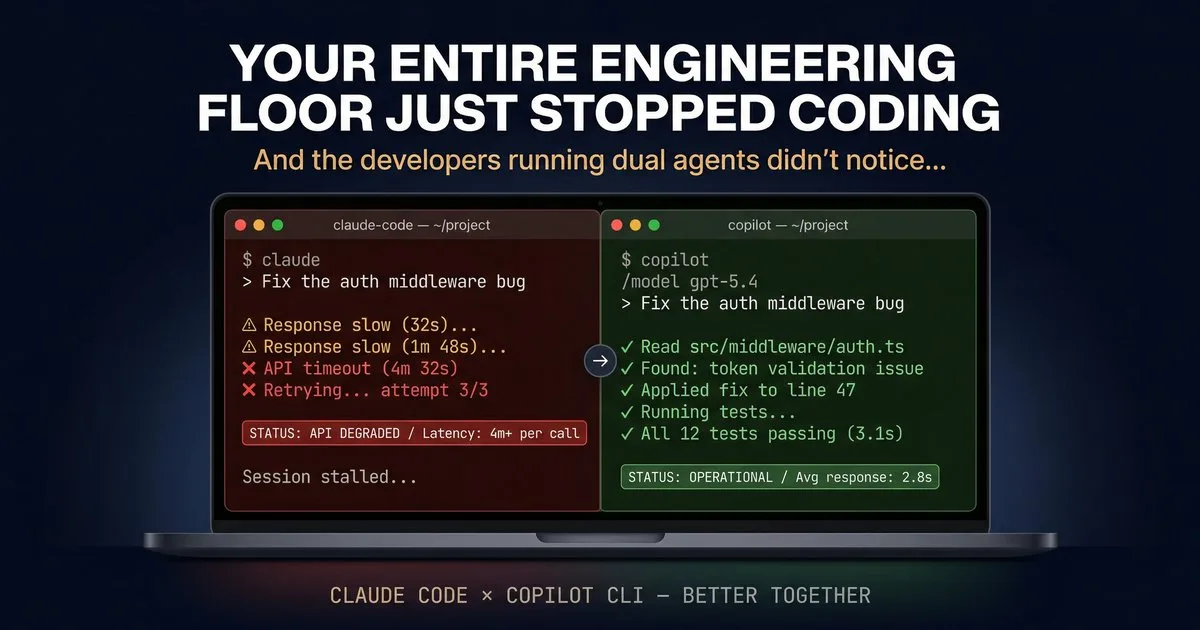
Status Page Says ‘Operational.’ Your Subagents Say Otherwise.
If you’re running autonomous agents in any serious capacity, you’ve experienced this: model provider outages aren’t edge cases — they’re part of the operating environment. Anthropic has had outages. OpenAI has had outages. Google has had outages. Every major model provider has had the kind of degraded performance that doesn’t trigger a status page alert but absolutely kills an agentic coding session. The traditional answer is “wait it out.” But if you’re a solutions architect prepping for a client demo tomorrow, or an engineer mid-sprint on a Friday afternoon, waiting isn’t an option. Here’s what a dual-tool setup gives you:
- Claude Code connects to Anthropic’s API directly — which fans out across AWS and GCP inference endpoints with varying GPU stacks, and when one backend hiccups, you see elevated API errors and poor user experience.
- Copilot CLI connects through GitHub’s infrastructure — with access to Claude, GPT-5.4, Gemini 3 Pro, Opus 4.6 and more via
/model - Different providers, different infrastructure, different blast radius
When one path is degraded, the other is almost certainly fine. And because both tools read the same project configuration, switching takes seconds — not a session rebuild.
They’re Not Competitors — They’re Specialists
The real “better together” story isn’t just about redundancy. It’s about complementary strengths. Each tool has capabilities the other doesn’t, and together they cover more ground than either one alone.
Claude Code Excels At
- Deep autonomous coding sessions — multi-hour sprints where the agent plans, builds, tests, and iterates without hand-holding
- Subagent orchestration — spawn specialized agents (Explore, Plan, custom) with isolated context windows so your main session stays clean
- Custom hooks and guardrails — full programmatic pre/post tool-use control with JS or Python handlers. I run a four-tier decision engine (deterministic rules → sequence tracking → AI classifier → human-in-the-loop escalation) that would be hard to replicate elsewhere
- Flexible model routing — point at Anthropic directly, Azure AI Foundry, or route through GitHub Copilot’s API as a proxy
Copilot CLI Excels At
- You’re not locked to one model provider — this is the big one. Copilot CLI gives you access to Anthropic’s Claude (Opus 4.6, Sonnet 4.6, Haiku 4.5), OpenAI’s GPT-5 (plus GPT-5 mini and GPT-4.1 at no premium request cost), and Google’s Gemini 3 Pro — all through a single
/modelcommand. No separate API keys, no separate billing, no separate infrastructure. One subscription, every frontier model. - Native GitHub integration — the built-in GitHub MCP server gives you issues, PRs, code search, labels, and Copilot Spaces without any configuration
- Interactive plan mode —
Shift+Tabinto a structured planning flow where Copilot asks clarifying questions via theask_usertool before writing any code - /review for pre-commit code review — get AI feedback on your staged changes without leaving the terminal
- Plugin ecosystem — install community plugins directly from GitHub repos with
/plugin install owner/repo - Seamless Codespaces integration — Copilot CLI is included in the default Codespaces image and available as a Dev Container Feature
What You Share (More Than You’d Expect)
Here’s the part that surprised me: the configuration overlap between these two tools is substantial. You’re not maintaining two separate setups. You’re maintaining one setup with a thin parallel layer.
| Feature | Status | What This Means |
|---|---|---|
| CLAUDE.md instructions | ✅ Native | Copilot CLI reads your CLAUDE.md at repo root. Zero config. |
| AGENTS.md | 🔗 Symlink | Symlink AGENTS.md → CLAUDE.md. One source of truth. |
| Skills (.claude/skills/) | ✅ Native | Both tools auto-load skills. Best cross-tool interop. |
| MCP servers | ↔️ Parallel config | Same server process. Config in .claude/mcp.json + devcontainer.json. |
| Subagents | ↔️ Parallel definitions | Different file formats. Share the prompt body, vary the YAML frontmatter. |
| Hooks (pre/post tool-use) | ↔️ Parallel plumbing | Same classifier binary called by both. Different registration formats. |
| Memory | ➖ Separate | Independent systems. No conflicts. |
| Session state | ➖ Separate | ~/.claude/ vs ~/.copilot/. Fully isolated, zero interference. |
The big insight: instruction files, skills, and MCP servers are the shared foundation. Subagents and hooks need parallel definitions, but the core logic is shared. Memory and sessions are fully independent — which is actually what you want.
The Five-Minute Setup
Getting both tools running in the same repo is straightforward. Here’s what I did.
Step 1: Symlink Your Instructions
CLAUDE.md is the source of truth. Copilot CLI reads it natively. Add a symlink for broader tool compatibility:
ln -s CLAUDE.md AGENTS.mdClaude-specific syntax (like @import directives or subagent @-mentions) is silently ignored by Copilot CLI. No conflicts.
Step 2: Skills Just Work
If you have a .claude/skills/ directory, Copilot CLI already reads it. Same SKILL.md files, same auto-loading behavior, same skill descriptions triggering on task match. This is the strongest interop point between the two tools — GitHub clearly built it for this.
Step 3: Mirror Your Agents
Claude Code subagents live in .claude/agents/sentinel.md. Copilot custom agents live in .github/agents/sentinel.agent.md. The YAML frontmatter differs slightly, but the system prompt body — the actual instructions — can be identical. I wrote a simple sync script that extracts the prompt body from Claude Code agent files and generates the Copilot CLI equivalents:
#!/bin/bash
# sync-agents.sh — keep agent definitions in sync
for agent in .claude/agents/*.md; do
  name=$(basename "$agent" .md)
  body=$(sed '1,/^---$/d' "$agent" | sed '1,/^---$/d')
  desc=$(grep 'description:' "$agent" | head -1 | sed 's/description: //')
  cat > ".github/agents/${name}.agent.md" << EOF
---
name: ${name}
description: ${desc}
---
${body}
EOF
done
Add it to a pre-commit hook or CI step, and your agents stay synchronized automatically.
Step 4: Dual MCP Config
Both tools connect to the same MCP server process — you just register it in two places. Claude Code uses .claude/mcp.json with "type": "stdio". Copilot CLI uses .devcontainer/devcontainer.json with "type": "local" (which maps from stdio automatically). Same binary, same capabilities, different config files.
Step 5: Shared Hook Logic
If you run safety hooks (I run a PostToolUse classifier chain with ModernBERT), extract the decision logic into a standalone CLI tool. Both Claude Code’s hook system and Copilot CLI’s hook system can call the same binary via stdin/stdout. The plumbing differs; the brain is shared.
What I Learned
1. Model provider outages are a “when,” not an “if”
I was coding an experimental project over the weekend with a friend — he was deep in Claude Code, subagents running… Then responses started dragging. 30 seconds. Then 4+ minutes per tool call. Not erroring — just slow enough to be useless. The worst kind of outage, agentic brown-out.
I said, “Open Copilot CLI in another tab.” He typed copilot — it read the same CLAUDE.md, loaded the same skills, picked up the repo context. /model gpt-5.4. First response: 3 seconds.
That’s the whole argument. Not that one tool is better. But that the one time you need the second one, you really need it — and the switch is almost seamless.
Every major provider has had significant degradation in the past six months. If your agentic workflow depends on a single API endpoint, you have a single point of failure. Running two tools with access to different model providers is the simplest form of resilience.
2. Copilot CLI gives you model-provider freedom
Here’s the beautiful part: Copilot CLI isn’t a single-model tool — it’s a model marketplace. You get Claude Opus 4.6, Claude Sonnet 4.6, GPT-5, GPT-5 mini, GPT-4.1 (at no premium request cost), and Gemini 3 Pro — all accessible via /model. When I run Claude Code through github-copilot/claude-sonnet-4.6, I’m hitting the same Claude model through GitHub’s infrastructure. Same weights, same capabilities, different path. And when Claude is degraded, I switch to GPT-5 in two keystrokes. No API key swapping, no config changes. That’s the kind of resilience that matters at 4pm on a Friday before a Monday demo.
3. Skills are the killer interop feature
Of everything I tested, the .claude/skills/ directory having native cross-tool support was the most impactful. A well-written SKILL.md that teaches an agent a specific workflow (SEC filing analysis, test generation, deployment scripting) works identically in both tools without any modification.
4. You don’t have to choose — and you shouldn’t
The agentic coding landscape is moving fast. New capabilities ship weekly in both tools. Locking into a single tool means you miss half the innovations. Running both means you always have access to the latest capabilities from both ecosystems — Claude Code’s Agent Teams and Copilot CLI’s /fleet, Claude Code’s custom hooks and Copilot CLI’s plugin system.
The Repository Structure
For reference, here’s what a dual-tool repo looks like:
your-repo/
├── CLAUDE.md                          # [shared] Source of truth
├── AGENTS.md -> CLAUDE.md             # [shared] Symlink
│
├── .claude/
│   ├── mcp.json                       # [Claude Code] MCP config
│   ├── settings.json                  # [Claude Code] Hooks + settings
│   ├── agents/                        # [Claude Code] Subagents
│   │   ├── sentinel.md
│   │   └── code-reviewer.md
│   └── skills/                        # [shared] Both tools read
│       ├── sec-analysis/SKILL.md
│       └── deployment/SKILL.md
│
├── .github/
│   ├── copilot-instructions.md        # [Copilot] Extra instructions
│   └── agents/                        # [Copilot] Custom agents
│       ├── sentinel.agent.md
│       └── code-reviewer.agent.md
│
├── .devcontainer/
│   └── devcontainer.json              # [Copilot] MCP config
│
├── mcp-servers/                       # [shared] Server source
│   └── guardrail/
│       ├── index.js
│       └── classifier.js
│
└── scripts/
    └── sync-agents.sh                 # [shared] Agent sync
The Bigger Picture: Multi-Agent Orchestration on Azure – GitHub Copilot CLI
The key insight: GitHub Copilot CLI is the Azure infrastructure expert. It ships with native Azure MCP tools — Cosmos DB, App Service, AKS, Key Vault, Bicep schemas, deployment planning — built in, not bolted on. When you’re architecting landing zones, writing IaC, or troubleshooting Azure resources, Copilot CLI has first-party knowledge that no other coding agent matches. And it gives you the same Anthropic models available in Claude Code — Claude Opus 4.6, Sonnet 4.6, — alongside GPT-5 and Gemini 3 Pro, all through one subscription.
- Rapidly Prototype with Copilot CLI — deep Azure integration, native MCP tooling, first-party infrastructure expertise
- Validate with Claude Code — use as a second opinion for prompt engineering, and edge case testing
Copilot CLI’s multi-model access is particularly valuable here. When you’re building an orchestration pipeline for a fintech client, you don’t want to discover that your prompts only work well on one model family. Running /fleet across all three major providers during development catches those issues early — before they become production incidents.
What’s Next
- Shared memory layer — an MCP server using Azure AI Search Memory layer that both tools connect to for persistent project knowledge, bridging Claude Code’s MEMORY.md and Copilot’s built-in memory
The agentic coding space is converging. CLAUDE.md and AGENTS.md read each other. Skills directories are cross-compatible. MCP servers are universal. Copilot CLI gives you every frontier model through a single subscription. And the patterns you build locally with both tools translate directly to production multi-agent deployments on Azure AI Foundry. The tools are meeting in the middle — and developers who ride both waves will move faster than those who pick a side.
References
| Resource | Link |
|---|---|
| GitHub Copilot CLI — Getting started | docs.github.com/…/copilot-cli |
| GitHub Copilot CLI — Custom agents | docs.github.com/…/create-custom-agents-for-cli |
| GitHub Copilot CLI — Custom instructions | docs.github.com/…/add-custom-instructions |
| Copilot CLI GA announcement | github.blog/changelog/2026-02-25-copilot-cli-ga |
| GitHub Copilot CLI — Available models | docs.github.com/…/change-the-ai-model |
| Azure AI Foundry — Platform overview | learn.microsoft.com/…/ai-foundry |
| Microsoft Agent Framework (MAF) | devblogs.microsoft.com/agent-framework |
| AGENTS.md specification (Linux Foundation) | github.com/agentsmd/agents.md |
| Model Context Protocol (MCP) | modelcontextprotocol.io |
| Claude Code — Subagents documentation | code.claude.com/docs/en/sub-agents |


da78p9
Important read on engineering productivity! When tools fail, work stops. We test the gear engineers rely on – our Razer Blade 15 review: https://petsonlypets.com/razer-blade-15-the-game-changing-laptop-for-creators-review/ and Acer Predator Triton 500 review: https://petsonlypets.com/acer-predator-triton-500-se-review-game-changing-laptop-for/ are popular dev picks. More at PetsOnlyPets.com
This blog entry smells like AI, stop doing that. If you write for humans, do that. Do t write for a AI bot.
You describe your AI as if they are gods, they are not. They are specialists of basic tasks, beyond that they fail missarbly.
But again, if I read this bluf, it smells like written by AI, stuffed with Al sorts of info formatss, links and info. It’s to much to vrij…