

Grounding an assistant in runbooks is straightforward. The harder part begins when the model proposes an action that requires authorization.
An operations assistant needs stronger controls as soon as it can act. Answering “which runbook covers this alert” is a search problem. Opening an incident from that same conversation is a control-plane problem, and that is where a helpful prototype quietly turns into something you would not want on call.
I built a deliberately narrow reference app to sit on that boundary and see what breaks. It runs on Azure Container Apps, retrieves Markdown runbooks through Azure AI Search, calls Azure OpenAI, and reads the user identity from Container Apps authentication. The assistant can call a deterministic read tool right away. When it wants to open an incident, it does not. It records a pending action and returns a preview. A separate endpoint executes that action only after the same signed-in person confirms it.
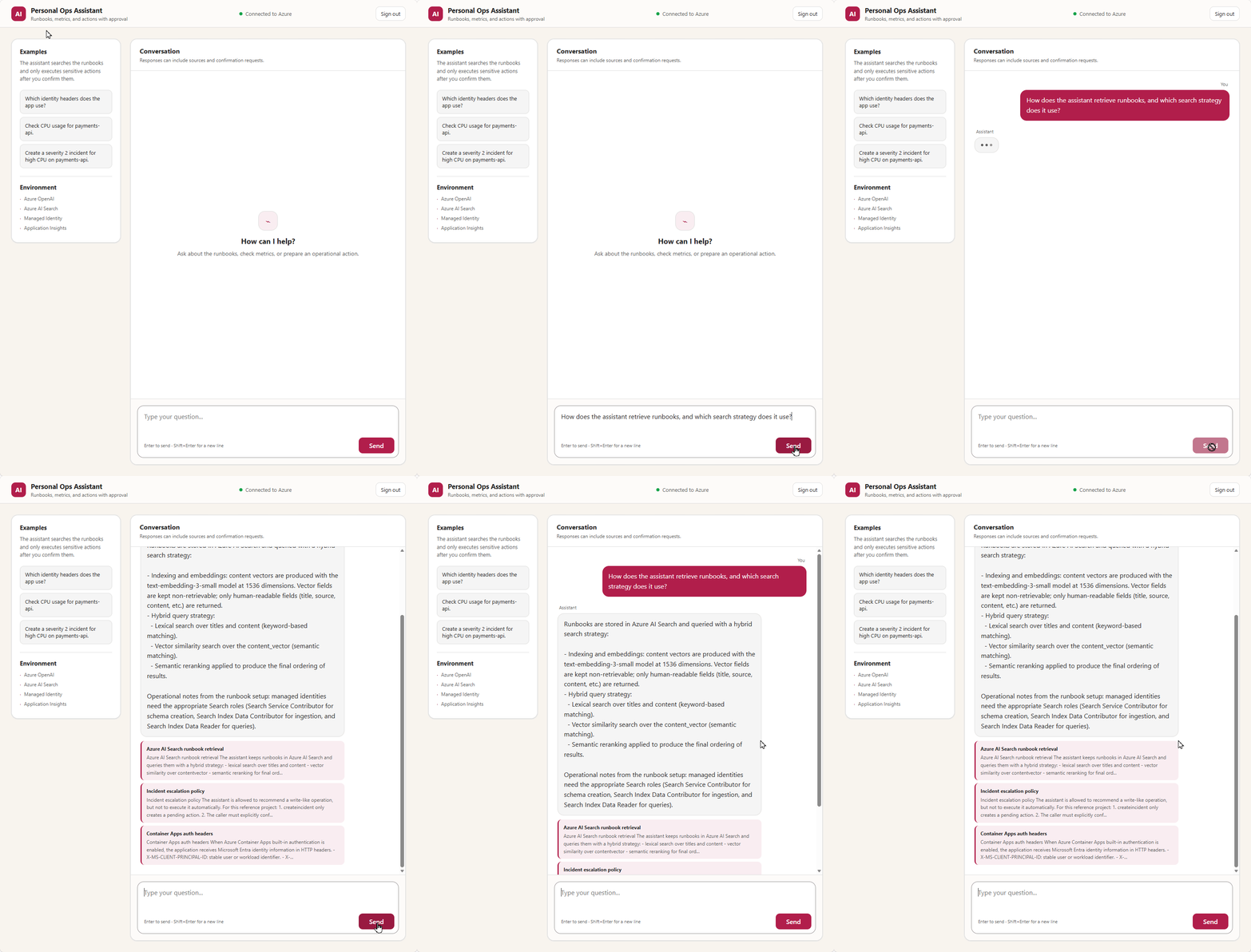
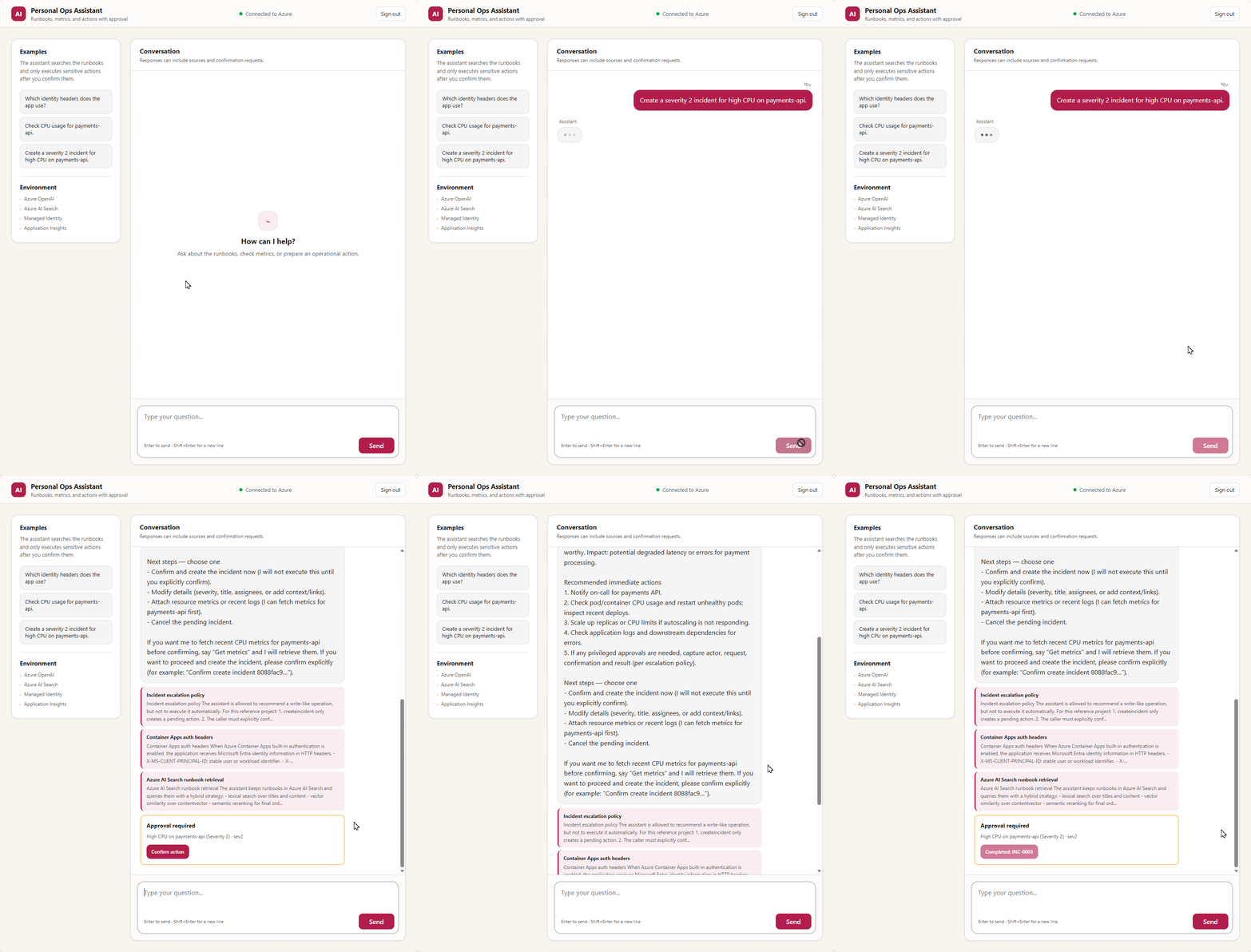
I validated the full loop in a browser: Microsoft sign-in returned to the chat UI, retrieval produced three citations, the metrics tool answered, and an incident appeared only after the confirmation click. The incident system itself is mocked on purpose. The point was to exercise the controls around a mutation, not to file real tickets while debugging them.
This piece is about the decisions, not the deployment sequence. The full walkthrough lives in the step-by-step tutorial, and the runnable code, Bicep, and exact App Registration commands are in the personal assistant lab.
The shape of it
The app has a deliberately small architecture:
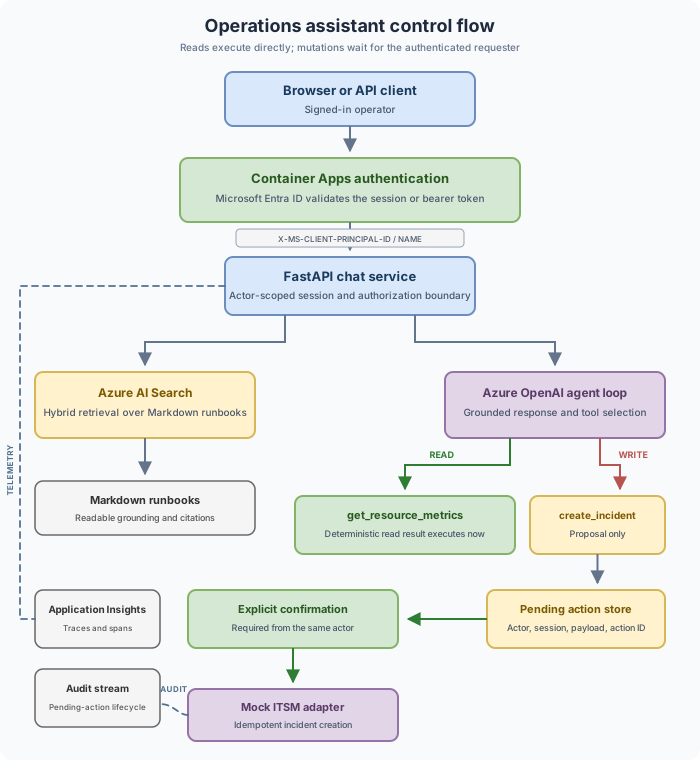
Bicep provisions Container Apps, Azure Container Registry, Azure OpenAI, Azure AI Search, Log Analytics, and Application Insights. Azure Developer CLI builds the image remotely in ACR, so I never needed Docker on my workstation for the Azure path.
Conversation history and pending actions live in memory, and the Container App is fixed at one replica. I chose this constraint explicitly: both stores must become shared and durable before the app can scale beyond one process. Both stores have to become shared and durable before this scales past one process, and I will come back to why that ordering matters.
Retrieve evidence before calling the model
At startup the lab can create an Azure AI Search index and ingest the sample runbooks. Each document stores its title, source, content, and a 1,536-dimensional embedding from text-embedding-3-small. The vector field is searchable but neither retrievable nor stored, because the model needs the readable fields for grounding and citations, not the raw floats.
Queries combine lexical and vector retrieval, then apply semantic ranking:
payload = {
    "search": query,
    "queryType": "semantic",
    "semanticConfiguration": "runbook-semantic",
    "select": "id,title,source,content",
    "top": 3,
    "vectorQueries": [
        {
            "kind": "vector",
            "vector": query_vector,
            "fields": "content_vector",
            "k": 50,
            "weight": 2,
        }
    ],
}
top=3 caps what lands in the prompt. k=50 gives ranking a wider candidate set to work from. Azure AI Search fuses the lexical and vector lists with Reciprocal Rank Fusion before semantic reranking; the hybrid search docs and vector index docs cover the query behavior and schema. The agent gets those documents as context and returns citations from the same result. Citation labels come directly from the Search results.
The HTTP 207 ingestion trap
Batch ingestion can report partial success. Azure AI Search returns HTTP 207 when a request holds a mix of successful and failed document operations. A plain raise_for_status() does not detect that partial failure and tells you nothing about whether every runbook actually landed.
So the adapter reads the body, collects the keys that succeeded, records each failure, and compares against the full set of expected IDs:
indexed_ids = {
    str(result.get("key"))
    for result in results
    if result.get("status") is True and result.get("key")
}
failures = [
    result for result in results
    if result.get("status") is not True
]
missing_ids = sorted(expected_document_ids - indexed_ids)

if failures or missing_ids:
    raise RuntimeError("Azure AI Search document ingestion was incomplete.")
There is a test where one document in a 207 batch succeeds and another fails. Treating that as a clean bootstrap would leave retrieval quietly dependent on whichever files happened to make it in.
BOOTSTRAP_RAG_ON_STARTUP=true keeps the first deploy convenient, but it also hands the Container App identity write roles on Search. In production I would move index creation and ingestion into a job or pipeline with Search Service Contributor and Search Index Data Contributor, and leave the runtime with only Search Index Data Reader. The Azure AI Search RBAC guidance lists the roles.
Separate reads from writes
The metrics tool is read only. In the sample it derives repeatable CPU, memory, and error-rate values from a hash of the resource name, which keeps local tests stable and lets an Azure Monitor adapter drop in later without touching the agent loop. Tool arguments still cross an untrusted boundary, so Pydantic rejects extra fields, holds the metrics window to 5 through 60 minutes, bounds string lengths, and restricts severity to sev0 through sev4.
Incident creation runs a different route. A model tool call does not reach the incident adapter. It records the proposed title, summary, severity, session, and requester under a fresh action ID and returns a preview:
record = pending_action_service.create_incident_request(
    session_id=session_id,
    actor=actor,
    title=validated.title,
    summary=validated.summary,
    severity=validated.severity,
)
Confirmation requires {"confirm": true}. The service then checks that the action exists, is still pending, and belongs to the authenticated actor before it calls the mock adapter. A model proposal is not user authorization. A prompt like “investigate the CPU alert and do what is needed” can push a model toward an incident tool. The proposal may be reasonable, but the backend still needs explicit authorization before changing an external system.
Approval invariants
The approval boundary relies on a few invariants that should remain true regardless of the storage or ITSM implementation:
- The backend executes the server-side payload stored with the pending action, not a payload resubmitted by the browser.
- The authenticated actor confirming the action must match the actor who requested it.
- Only an action in the
pendingstate can be claimed for execution. - The action ID remains the idempotency key across retries and downstream calls.
These controls are necessary but not sufficient for every production operation. Pending actions also need an expiration and cancellation policy. Browser-based confirmation should include CSRF protection, and high-risk mutations may require step-up authentication, separation of duties, or approval from a second operator.
Bind authorization to authenticated identity
Container Apps has built-in authentication for Microsoft Entra ID. With auth required, the platform validates the session or bearer token before the request reaches FastAPI and passes identity headers such as X-MS-CLIENT-PRINCIPAL-ID and X-MS-CLIENT-PRINCIPAL-NAME.
The app treats the principal ID as the stable actor identifier, falling back to it for the audit name when an app-only token has no user name. Missing identity is tolerated only in local development; in Azure mode a request with no principal ID gets a 401. The actor ID then shows up in two places that are easy to overlook:
memory_session_id = f"{actor.actor_id}:{session_id}"That keeps two users who pick the same session_id from reading each other’s history. The pending action stores requested_by_id, and confirmation compares it against the current actor, because knowing an action ID does not authorize its execution.
The whole trust model depends on Container Apps actually requiring authentication. Publishing the API anonymously and reading optional headers in app code would look similar and protect nothing. /healthz is the one deliberate exception so platform probes can run without a user session. Microsoft documents the setup under Container Apps authentication with Microsoft Entra ID.
Use managed identity for Azure credentials
No Azure OpenAI or Search keys live in the runtime. Both resources have local auth disabled. In development DefaultAzureCredential can ride the developer’s Azure CLI session; in Azure the code selects ManagedIdentityCredential:
def build_token_credential(config):
    if config.is_development:
        return DefaultAzureCredential()

    return ManagedIdentityCredential(
        client_id=config.managed_identity_client_id
    )
The system-assigned Container App identity gets Cognitive Services OpenAI User plus the Search roles the bootstrap needs. A separate user-assigned identity holds AcrPull for the image, and the registry keeps its admin user disabled. This removes long-lived Azure service keys from the code and environment variables, and it makes least privilege legible in Bicep: once ingestion moves out of the runtime, the Search write roles leave with it. Reference material sits in managed identities in Container Apps and Azure OpenAI authentication with managed identity.
Easy Auth still needs an App Registration credential for the browser provider. The template stores it as a Container App secret, but Azure Developer CLI also writes the value to the local .azure/<environment>/.env file in the clear. The documented flow clears that local copy after provisioning and expects rotation before expiry.
Handle idempotency and concurrency in the backend
Confirmation gets retried. Users may confirm twice, clients may time out, and responses may be lost after the operation completes. The sample handles concurrent confirmation inside one process with a lock that atomically flips an action from pending to executing, and the incident adapter caches results by action_id used as the idempotency key, so replaying a completed confirmation returns the same incident.
Those controls are sufficient only while the application runs in one process. They do not turn an in-memory store into a distributed or durable one. A real implementation needs an external store with an atomic claim or compare-and-set, a unique idempotency constraint, and a recovery policy for actions stuck in executing after a crash, and the eventual ITSM call should receive that same stable key when its API accepts one.
I would move state to shared storage before increasing maxReplicas. With two replicas, /chat could write a pending action in one process while /confirm hits another that has never seen it. State has to move to shared durable storage before scaling out. Azure Managed Redis is a plausible target for short-lived shared state, and the code already exposes store protocols, but I am not claiming that integration is finished.
Separate operational telemetry from audit records
The app wires up Azure Monitor OpenTelemetry when APPLICATIONINSIGHTS_CONNECTION_STRING is set, with custom spans around chat.request, rag.search, and tool.execute. Attributes capture the backend, result count, tool name, and whether a pending action came out of the turn. The user message is intentionally not among them, because copying prompts into general telemetry only widens the set of places operational detail can surface.
Audit records serve a different purpose. It records pending_action_created, pending_action_confirmed, and pending_action_result with the actor and action ID. Titles and severities help an investigation but can carry resource names, so their retention and access should reflect that. Traces describe system behavior. Audit records identify who requested and confirmed a mutation. In production those often belong in different destinations with different retention and access policies. The Application Insights OpenTelemetry docs cover the SDK setup.
What this implementation leaves out
One replica, in-memory history, in-memory pending actions, deterministic mock metrics, and a mock ITSM adapter. No long-term memory, no document-level ACLs, no private endpoints, no retrieval evaluations, no rate limiting. The sample also does not implement pending-action expiration, cancellation, CSRF protection, step-up authentication, payload signing, or risk-based approval policies. Those controls should be selected according to the impact of each tool rather than applied uniformly to every operation.
I kept this scope narrow so I could validate the main control boundaries without debugging several distributed systems at once. It let me validate retrieval, model tool selection, authenticated approval, deployment, and telemetry without chasing several distributed systems at the same time. Before production, I would first externalize state and ingestion. Next, I would add expiration and recovery for pending actions and define approval policies by risk. Only then would I connect Azure Monitor and a real ITSM system.
If you want to run it, the fake mode needs Python 3.12 and no Azure subscription, and the Azure path is written up end to end. The companion README’s deploy section has the ordered steps, and the full tutorial walks through provisioning, the App Registration, and the browser validation in the same order I ran them.


0 comments
Be the first to start the discussion.