


When people talk about building AI agents, they usually focus on models, tools, and prompts. In practice, one of the most important architectural decisions is much simpler: where does the conversation history live?
Imagine a user asks your agent a complex question, clicks “try again,” explores two different answers in parallel, and then comes back tomorrow expecting the agent to remember everything. Whether that experience is possible depends on the answer to this question.
Your choice affects cost, privacy, portability, and the kinds of user experiences you can build. It also determines whether your application treats a conversation as a simple thread, a branchable tree, or just a list of messages you resend on every call.
This article explores the fundamental patterns for chat history storage, how different AI services implement them, and how Microsoft Agent Framework abstracts these differences to give you flexibility without complexity.
Why Chat History Storage Matters
Every time a user interacts with an AI agent, the model needs context from previous messages to provide coherent, contextual responses. Without this history, each interaction would be isolated. The agent couldn’t remember what was discussed moments ago.
The storage strategy you choose affects:
- User experience: Can users resume conversations? Branch into different directions? Undo and try again?
- Compliance: Where does conversation data live? Who controls it?
- Architecture: How tightly coupled is your application to a specific provider?
The Two Fundamental Patterns
At the highest level, there are two approaches to managing chat history:
Service-Managed Storage
The AI service stores conversation state on its servers. Agent Framework holds a reference (like a conversation_id or thread_id) in the AgentSession, and the service automatically includes relevant history when processing requests.
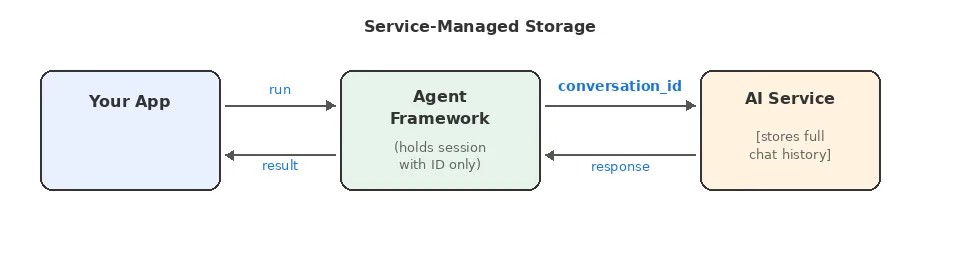
Benefits:
- Simpler client implementation
- Service handles context window management and compaction automatically
- Built-in persistence across sessions
- Lower per-request payload size (just a reference ID, not full history)
Tradeoffs:
- Data lives on provider’s servers
- Less control over what context is included
- No control over compaction strategy – you can’t customize what gets summarized, truncated, or dropped
- Provider lock-in for conversation state
Client-Managed Storage
Agent Framework maintains the full conversation history locally (in the AgentSession or associated history providers) and sends relevant messages with each request. The service is stateless. It processes the request and forgets.
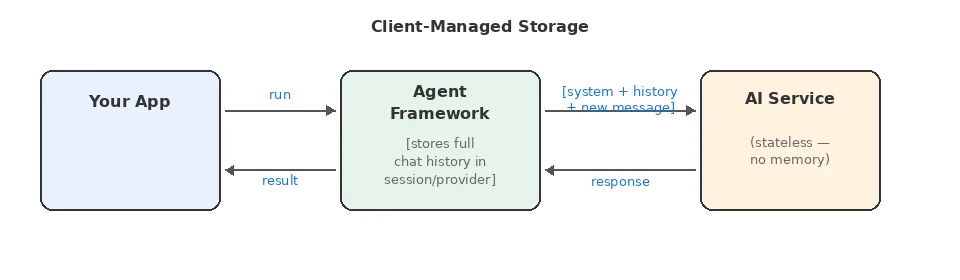
Benefits:
- Full control over data location and privacy
- Easy to switch providers (no state migration)
- Explicit control over what context is sent
- Full control over compaction strategies – truncation, summarization, sliding window, tool-call collapse
- Can implement custom context strategies
Tradeoffs:
- Larger request payloads
- Client must handle context window limits
- Must implement and maintain compaction strategies as conversations grow
- More complex client-side logic
Service-Managed Storage Models
Not all service-managed storage is equal. There are two distinct models that affect what you can build:
Linear (Single-Threaded) Conversations
This is the traditional chat model: messages form an ordered sequence. Each new message appends to the thread, and you can’t branch or fork the conversation.
Examples:
- Microsoft Foundry Prompt Agents (conversations)
- OpenAI Responses with Conversations API (conversations)
- [DEPRECATED] OpenAI Assistants API (threads)
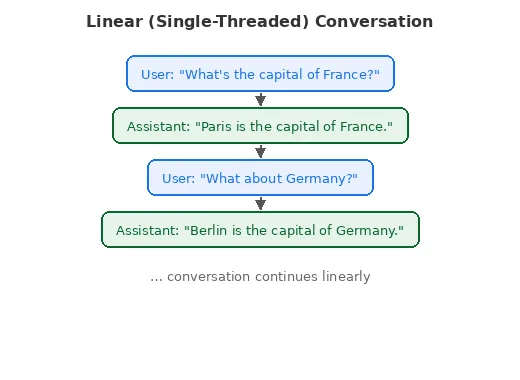
Good for:
- Chatbots and support agents
- Simple Q&A flows
- Scenarios requiring strict audit trails
Limitations:
- Can’t “go back” and try a different response
- No parallel exploration of different conversation paths
Forking-Capable Conversations
Modern Responses APIs introduce a more flexible model: each response has a unique ID, and new requests can reference any previous response as the conversation continuation point.
Examples:
- Microsoft Foundry Responses endpoint
- Azure OpenAI Responses API
- OpenAI Responses API
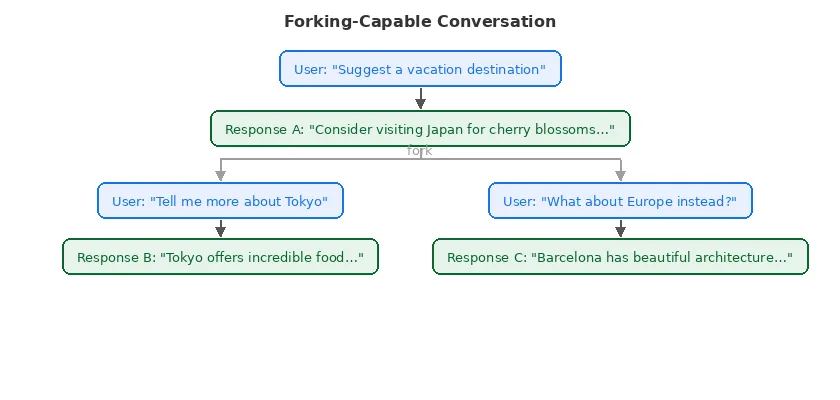
Good for:
- Exploration and brainstorming applications
- A/B testing different response strategies
- “Undo” and “try again” functionality
- Building tree-structured conversation UIs
- Agentic workflows where multiple paths may be explored
Client-Managed Storage Patterns
When the AI service doesn’t store conversation state, your application takes full responsibility. This is the pattern used by many providers.
Providers using this model:
- Azure OpenAI Chat Completions
- OpenAI Chat Completions
- Anthropic Claude
- Ollama
- Most open-source model APIs
Implementation Considerations
Context Window Management: You can’t send unlimited history. As conversations grow, you’ll need strategies like:
- Truncating older messages
- Summarizing earlier parts of the conversation
- Selective inclusion based on relevance
Persistence: In-memory history works for demos and development, but production applications almost always need a durable store – a database, Redis, blob storage, or similar. This adds infrastructure and operational complexity that service-managed storage avoids entirely.
Privacy Control: The upside: conversation data never leaves your control unless you explicitly send it. This can be crucial for sensitive applications.
Compaction: The Hidden Complexity
When the service manages history, it also manages compaction – keeping the conversation context within the model’s token limits. You don’t have to think about it, but you also can’t control it.
With client-managed history, compaction becomes your responsibility. As conversations grow, you need explicit strategies to prevent context window overflows and control costs. Common approaches include:
- Truncation – Drop the oldest messages beyond a threshold
- Sliding window – Keep only the most recent N turns
- Summarization – Replace older messages with an LLM-generated summary
- Tool-call collapse – Replace verbose tool call/result pairs with compact summaries
Agent Framework provides built-in compaction strategies for all of these patterns, so you don’t have to build them from scratch. But you do need to choose, configure, and maintain the right strategy for your use case – a tradeoff that doesn’t exist with service-managed storage.
How Agent Framework Handles the Differences
Microsoft Agent Framework provides a unified programming model that works regardless of which storage pattern the underlying service uses. This abstraction lives in two key components:
AgentSession: The Unified Conversation Container
Every conversation in Agent Framework is represented by an AgentSession. This object:
- Contains any service-specific identifiers (thread IDs, response IDs)
- Holds local state (for client-managed history scenarios). This may include:
- The actual chat history
- Storage identifiers for a custom database chat history store
- Provides serialization for persistence across application restarts
// C#
// Create a session - works the same regardless of provider
AgentSession session = await agent.CreateSessionAsync();

// Use the session across multiple turns
var first = await agent.RunAsync("My name is Alice.", session);
var second = await agent.RunAsync("What is my name?", session);

// The session handles the details:
// - If service-managed: tracks the conversation_id internally
// - If client-managed: accumulates history locally
# Python
# Create a session - works the same regardless of provider
session = agent.create_session()

# Use the session across multiple turns
first = await agent.run("My name is Alice.", session=session)
second = await agent.run("What is my name?", session=session)
ChatHistoryProvider: Pluggable Storage Backends
When you need client-managed storage, history providers allow you to control where history lives and how it’s retrieved:
// C#
// Built-in in-memory provider (simplest and default option)
AIAgent agent = chatClient.AsAIAgent(new ChatClientAgentOptions
{
    ChatOptions = new() { Instructions = "You are a helpful assistant." },
    ChatHistoryProvider = new InMemoryChatHistoryProvider()
});

// Custom database-backed provider (you implement)
AIAgent agent = chatClient.AsAIAgent(new ChatClientAgentOptions
{
    ChatOptions = new() { Instructions = "You are a helpful assistant." },
    ChatHistoryProvider = new DatabaseChatHistoryProvider(dbConnection)
});
# Python
from agent_framework import InMemoryHistoryProvider
from agent_framework.openai import OpenAIChatCompletionClient

# Built-in in-memory provider (simplest and default option)
agent = OpenAIChatCompletionClient().as_agent(
    name="Assistant",
    instructions="You are a helpful assistant.",
    context_providers=[InMemoryHistoryProvider("memory", load_messages=True)],
)

# Custom database-backed provider (you implement)
agent = OpenAIChatCompletionClient().as_agent(
  name="Assistant",
  instructions="You are a helpful assistant.",
  context_providers=[DatabaseHistoryProvider(db_client)],
)
Key design principle: Your application code doesn’t change when switching between service-managed and client-managed storage. The abstraction handles the details.
Transparent Mode Switching
Consider this scenario: you start with OpenAI Chat Completions (client-managed) and later want to try the Responses API (service-managed with forking). Your agent invocation code stays the same:
// C#
// Works with Chat Completions (client-managed)
var response = await agent.RunAsync("Hello!", session);

// Also works with Responses API (service-managed)
var response = await agent.RunAsync("Hello!", session);
# Python
# Works with Chat Completions (client-managed)
response = await agent.run("Hello!", session=session)

# Also works with Responses API (service-managed)
response = await agent.run("Hello!", session=session)
The session and provider handle the underlying differences. This decoupling is valuable for:
- Experimenting with different providers
- Migrating between services
- Building provider-agnostic applications
Provider Comparison
Most AI services have a fixed storage model – the service either stores history or it doesn’t. The Responses API is the notable exception: it’s configurable.
Fixed-Mode Providers
These providers operate in a single storage mode:
| Provider | Storage Location | Storage Model | Compaction |
| OpenAI Chat Completion | Client | N/A | Developer |
| Azure OpenAI Chat Completion | Client | N/A | Developer |
| Foundry Agent Service | Service | Linear (threads) | Service |
| Anthropic Claude | Client | N/A | Developer |
| Ollama | Client | N/A | Developer |
| GitHub Copilot SDK | Service | N/A | Service |
| [DEPRECATED] OpenAI Assistants | Service | Linear (threads) | Service |
Configurable: The Responses API
The Responses API (available from Microsoft Foundry, OpenAI, and Azure OpenAI) is a special case. It supports multiple storage modes controlled by configuration – primarily the store parameter:
| Mode | Configuration | Storage Location | Storage Model | Compaction |
| Forking (default) | store=true | Service | Forking via response IDs | Service |
| Client-managed | store=false | Client | N/A | Developer |
| Linear conversations | Conversations API | Service | Linear | Service |
This makes the Responses API uniquely flexible:
- store=true (default) – The service stores each response and its history. New requests can reference any prior response ID to continue from that point, enabling branching and forking. The service handles compaction.
- store=false – The service is stateless. Agent Framework manages the full conversation history client-side using history providers – just like Chat Completions.
- Conversations API – Built on top of Responses, this provides a linear thread model similar to Assistants. The service manages an ordered conversation and handles compaction. Pass a conversation id as input to responses instead of a previous response id, to enable this model.
Legend:
- Storage Location: Where the canonical conversation state lives – “Service” (on the provider’s servers) or “Client” (in Agent Framework’s session/history providers).
- Storage Model: For service-stored history, the shape – linear (thread) or forking (response IDs).
- Compaction: Who keeps context within token limits. “Service” = automatic. “Developer” = you configure compaction strategies in Agent Framework.
Configuring Responses API Modes
Here’s how each mode looks in practice:
Mode 1: Forking with service storage (default)
This is the simplest setup – just create an agent from the Responses client. The service stores everything and supports forking via response IDs.
// C# - Responses API with store=true (default)
// The service stores each response and its history.
// Each response ID can be used as a fork point.
AIAgent agent = new OpenAIClient("<your_api_key>")
    .GetResponseClient("gpt-5.4-mini")
    .AsAIAgent(
    instructions: "You are a helpful assistant.",
    name: "ForkingAgent");

AgentSession session = await agent.CreateSessionAsync();
var response1 = await agent.RunAsync("What are three good vacation spots?", session);

// The session tracks the response ID internally.
// A new session forked from response1 could explore a different branch.
# Python - Responses API with store=true (default)
# The service stores each response and its history.
# Each response ID can be used as a fork point.
from agent_framework import Agent
from agent_framework.openai import OpenAIChatClient

agent = Agent(
    client=OpenAIChatClient(),
    name="ForkingAgent",
    instructions="You are a helpful assistant.",
)

session = agent.create_session()
response1 = await agent.run("What are three good vacation spots?", session=session)

# The session tracks the response ID internally.
# A new session forked from response1 could explore a different branch.
Mode 2: Client-managed with store=false
Here you use the same Responses client but disable service-side storage. Agent Framework manages history client-side, giving you full control over persistence and compaction.
// C# - Responses API with store=false
// The service is stateless - Agent Framework manages history.
AIAgent agent = new OpenAIClient("<your_api_key>")
    .GetResponseClient("gpt-5.4-mini")
    .AsIChatClientWithStoredOutputDisabled()
    .AsAIAgent(new ChatClientAgentOptions
    {
        ChatOptions = new() { Instructions = "You are a helpful assistant." },
        ChatHistoryProvider = new InMemoryChatHistoryProvider()
    });

AgentSession session = await agent.CreateSessionAsync();
var response = await agent.RunAsync("Hello!", session);
// History lives in the InMemoryChatHistoryProvider,
// not on the service. You control compaction.
# Python - Responses API with store=false
# The service is stateless - Agent Framework manages history.
from agent_framework import Agent, InMemoryHistoryProvider
from agent_framework.openai import OpenAIChatClient
agent = Agent(
client=OpenAIChatClient(),
name="StatelessAgent",
instructions="You are a helpful assistant.",
default_options={"store": False},
context_providers=[InMemoryHistoryProvider("memory", load_messages=True)],
)
session = agent.create_session()
response = await agent.run("Hello!", session=session)
# History lives in the InMemoryHistoryProvider,
# not on the service. You control compaction.Mode 3: Linear conversations
The Conversations API builds on Responses to provide a linear thread model. You create a server-side conversation first, and then bootstrap your session with it. This gives you service-managed storage with a simple, ordered history – similar to the deprecated Assistants API.
In C#, the FoundryAgent class provides a CreateConversationSessionAsync() convenience method that creates the server-side conversation and links it to a session in a single call:
// C# — Responses API with Conversations (via Foundry)
// CreateConversationSessionAsync() creates a server-side conversation
// that persists on the Foundry service and is visible in the Foundry Project UI.
AIProjectClient aiProjectClient = new(new Uri(endpoint), new DefaultAzureCredential());

FoundryAgent agent = aiProjectClient
    .AsAIAgent("gpt-5.4-mini", instructions: "You are a helpful assistant.", name: "ConversationAgent");

// One call creates the conversation and binds it to the session.
ChatClientAgentSession session = await agent.CreateConversationSessionAsync();

Console.WriteLine(await agent.RunAsync("What is the capital of France?", session));
Console.WriteLine(await agent.RunAsync("What about Germany?", session));
// Both responses are part of the same linear conversation thread
// managed by the service.
# Python — Responses API with Conversations (via Foundry)
# Use get_session with a conversation id from the conversation service to link to
# a server-side conversation.
from agent_framework.foundry import FoundryChatClient
from azure.identity import AzureCliCredential
from agent_framework import Agent
foundry_client = FoundryChatClient(credential=AzureCliCredential())
agent = Agent(
client=foundry_client,
instructions="You are a helpful assistant."
)
# Create a session with a conversation id from the conversations service
conversation_result = await foundry_client.client.conversations.create()
session = agent.get_session(service_session_id=conversation_result.id)
response1 = await agent.run("What is the capital of France?", session=session)
response2 = await agent.run("What about Germany?", session=session)
# Both responses are part of the same linear conversation thread
# managed by the service.Decision Tree
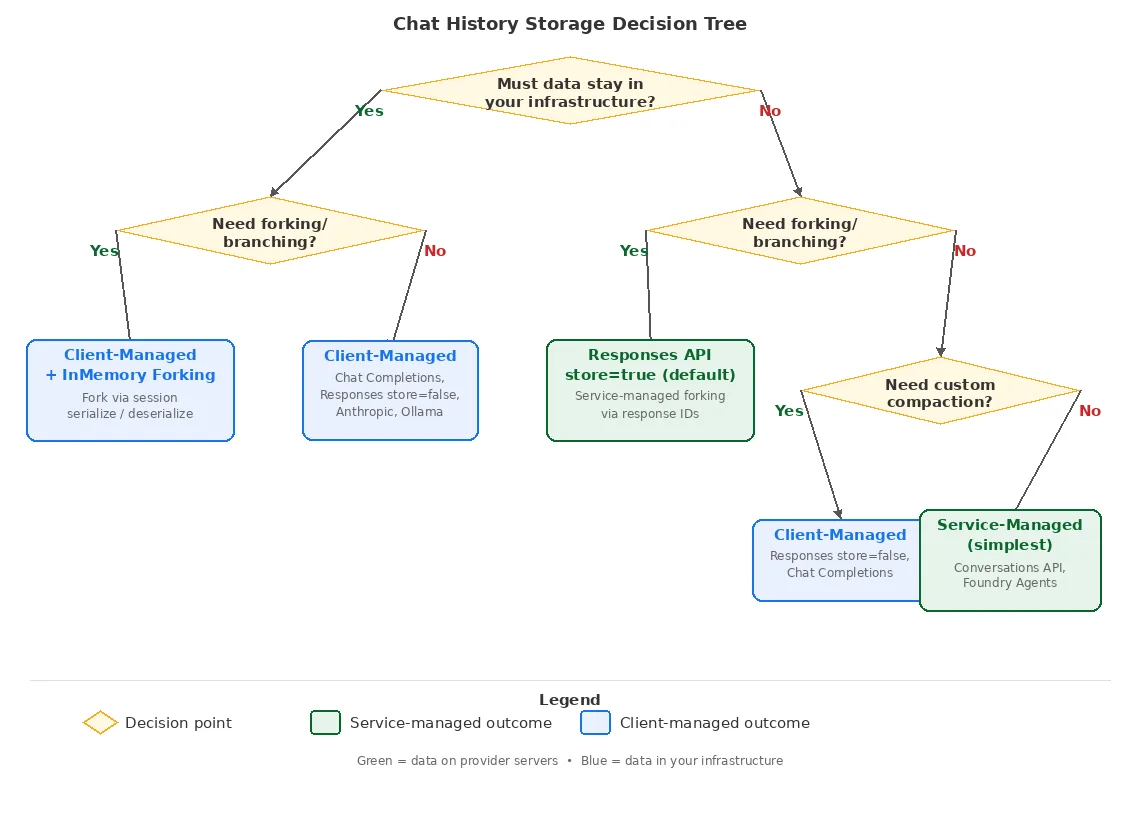
This decision tree demonstrates some of the main options available when choosing a chat history storage mechanism.
Conclusion
Chat history storage might seem like an implementation detail, but it fundamentally shapes what your AI application can do. Understanding the tradeoffs between service-managed and client-managed patterns—and between linear and forking models—helps you make architectural decisions that align with your requirements.
Microsoft Agent Framework’s session and provider abstractions give you the flexibility to start with one approach and evolve without rewriting your application logic. Whether you’re building a simple chatbot or a complex agentic system with branching conversations, the framework adapts to your chosen storage strategy.
The key takeaway: choose based on your actual requirements (privacy, control, capabilities), not just what’s easiest to start with. The right storage pattern will make your application more capable and maintainable in the long run.
For more details on implementing these patterns with Microsoft Agent Framework, see:
- The Conversations & Memory documentation
- Individual provider guides


0 comments