


Part 4 of Build your own claw and agent harness with Microsoft Agent Framework.
Over the last three parts our personal finance assistant grew from a single tool into a genuinely capable agent: it plans, reads your portfolio, asks before it trades, remembers what matters, loads skills on demand, reorganizes files with a shell, computes with CodeAct, and fans research out to background agents. It works on your machine. But “works on my machine” isn’t the same as ready to run for other people.
This final part closes that gap along four axes:
- Observability – see what the claw is doing with OpenTelemetry traces, token usage, and tool calls.
- Governance – screen prompts and responses through Microsoft Purview, so data access is discoverable, classified, and auditable for a regulated finance context.
- Deployment – host the claw as a Foundry Hosted Agent.
- Evals – measure quality with local finance checks and hosted Foundry evals, then use the results to tune prompts, tools, and skills.
To get there we make one structural change. Up to now each step was a single program. A production agent is usually run more than one way – interactively while you develop, hosted in the cloud for real use, and inside an eval harness in CI. So we split the claw into a shared agent factory plus three thin hosts that consume it: a console, a hosted service, and an evals runner. The agent is defined once; only the host around it changes.
Define once: the shared agent
Everything that makes the claw ours – instructions, file access, the valuation and risk skills, memory, approvals, the shell, CodeAct, and the background research agent – now lives in one factory. Each host just calls it.
In .NET the factory returns the built agent plus the resources the host should dispose:
await using ClawAgentBuild build = await ClawAgentFactory.CreateAsync(new ClawAgentFactoryOptions
{
    Log = Console.WriteLine,
});

// build.Agent is the same claw from Part 3 - skills, shell, CodeAct, background agents, approvals.
In Python it’s an async factory that returns an async context manager, so the shell and any MCP skills sessions are torn down cleanly:
agent = await build_claw_agent(credential=AzureCliCredential())
async with agent:
    # … run the agent …
With one definition feeding every host, observability, governance, deployment, and evals all apply to the same agent – not three subtly different copies.
See what it’s doing: observability
An agent that reads files, runs code, and calls tools is a small distributed system. When something goes wrong – a skill misfires, a tool loops, a response costs 10x what you expected – you need to see it. The harness already emits OpenTelemetry spans, metrics, and logs for model calls, tool invocations, and token usage; you just wire up an exporter.
The agent carries a single OpenTelemetry source name so hosts can subscribe to exactly its signals.
In .NET that’s one option on the harness:
AIAgent agent = chatClient.AsHarnessAgent(new HarnessAgentOptions
{
    OpenTelemetrySourceName = ClawAgentFactory.OpenTelemetrySourceName,
    // … file access, skills, shell, CodeAct, background agents …
});
When OTEL_EXPORTER_OTLP_ENDPOINT is set, the console host stands up trace and metric providers pointed at that source and sends their telemetry to the configured OTLP collector:
var otlpEndpoint = Environment.GetEnvironmentVariable("OTEL_EXPORTER_OTLP_ENDPOINT");
var telemetryEnabled = !string.IsNullOrWhiteSpace(otlpEndpoint);

using var tracerProvider = telemetryEnabled
    ? Sdk.CreateTracerProviderBuilder()
        .AddSource(ClawAgentFactory.OpenTelemetrySourceName)
        .AddOtlpExporter(options => options.Endpoint = new Uri(otlpEndpoint!))
        .Build()
    : null;
In Python, instrumentation is on by default – a single call wires the providers from environment variables (OTLP endpoint, console exporters, sensitive-data capture):
from agent_framework.observability import configure_otel_providers, get_tracer

configure_otel_providers()
with get_tracer().start_as_current_span("Claw Console Session"):
    agent = await build_claw_agent(credential=AzureCliCredential())
    async with agent:
        # … run the agent; spans, metrics, and logs flow to your collector …
What the harness does for you vs. what you wire by hand: the harness produces the telemetry – spans for each tool call and model turn, token-usage metrics, structured logs. You choose where it goes: an OTLP collector, the console, or Azure Monitor / Application Insights. Locally you wire the exporters yourself; when hosted on Foundry you wire nothing at all – the hosting runtime registers the exporter pipeline and Foundry injects
APPLICATIONINSIGHTS_CONNECTION_STRINGfor you (see the deployment section below).
Keep it governed: Purview
A finance assistant touches sensitive material. In a regulated setting you need prompts and responses screened against organizational policy – credit-card numbers, confidential holdings, disallowed content – with an audit trail. Microsoft Purview does exactly that, and the integration is a thin wrapper around the chat client, so it composes with everything else the claw does.
We make it opt-in: when PURVIEW_CLIENT_APP_ID is set the factory adds Purview; otherwise it runs unchanged. In .NET it’s a builder step on the chat client:
if (!string.IsNullOrWhiteSpace(purviewClientAppId))
{
    chatClient = chatClient
        .AsBuilder()
        .WithPurview(browserCredential, new PurviewSettings("Claw"))
        .Build();
}
In Python it’s chat middleware handed to the FoundryChatClient:
from agent_framework.microsoft import PurviewChatPolicyMiddleware, PurviewSettings

middleware = []
if client_app_id := os.environ.get("PURVIEW_CLIENT_APP_ID"):
    credential = InteractiveBrowserCredential(client_id=client_app_id)
    middleware = [PurviewChatPolicyMiddleware(credential, PurviewSettings(app_name="Claw"))]

client = FoundryChatClient(credential=..., middleware=middleware)
Now every prompt is checked before it reaches the model and every response before it reaches the user; blocked content is replaced with a policy message, and the interaction is logged for audit. Purview needs a Microsoft 365 E5 tenant with the right Graph permissions – see the AgentWithPurview and purview_agent samples for the full setup.
Ship it: deploy as a Foundry Hosted Agent
Creating the agent host application
Because the agent is defined once, hosting it is mostly wiring, not rewriting. The hosted host takes the same build.Agent and exposes it over the Responses protocol so Foundry can run it. In .NET the entire host is a thin ASP.NET app:
using Azure.Core;
using Azure.Identity;
using ClawAgent;
using Microsoft.Agents.AI.Foundry.Hosting;

// A specific credential is preferable in production (e.g. ManagedIdentityCredential); the chained
// credential below tries a dev token first (for local Docker debugging), then DefaultAzureCredential.
TokenCredential credential = new ChainedTokenCredential(
    new DevTemporaryTokenCredential(),
    new DefaultAzureCredential());

await using ClawAgentBuild build = await ClawAgentFactory.CreateAsync(new ClawAgentFactoryOptions
{
    ProjectEndpoint = Environment.GetEnvironmentVariable("FOUNDRY_PROJECT_ENDPOINT"),
    DeploymentName = Environment.GetEnvironmentVariable("FOUNDRY_MODEL"),
    Credential = credential,

    // Disable filesystem and shell access on the hosted container (see the risk note below).
    EnableFileAccess = false,
    EnableShell = false,
});

var builder = WebApplication.CreateBuilder(args);

// Registers the Responses API host for the agent AND auto-applies OpenTelemetry.
builder.Services.AddFoundryResponses(build.Agent);

var app = builder.Build();

// The endpoint that live Foundry calls.
app.MapFoundryResponses();

app.Run();
In Python it’s the responses host server:
from agent_framework_foundry_hosting import ResponsesHostServer

agent = await build_claw_agent(
    credential=DefaultAzureCredential(),
    enable_file_access=False,   # off on the hosted container
    enable_shell=False,         # off on the hosted container
)
await ResponsesHostServer(agent).run_async()
Core telemetry collection and export are automatically configured when hosted. There are no exporters to configure in either language. In .NET, AddFoundryResponses automatically wraps the agent with OpenTelemetryAgent, and the Foundry hosting runtime registers the OTLP exporter pipeline. In Python, Agent Framework is natively instrumented (on by default) and the hosting runtime collects and exports its spans — so the hosted host makes no configure_otel_providers() call at all (unlike the local console). When your agent runs on Foundry, it injects APPLICATIONINSIGHTS_CONNECTION_STRING automatically, so traces, metrics, and logs land in Application Insights with zero configuration. To capture prompt and response content in those traces (off by default), set OTEL_INSTRUMENTATION_GENAI_CAPTURE_MESSAGE_CONTENT=true in .NET or ENABLE_SENSITIVE_DATA=true in Python.
Turn off risky features
For the hosted agent, we turn off file access and shell. This is the one place we deliberately diverge from the console. In a shared, hosted environment, giving the model arbitrary read/write access to the container filesystem, or letting it run shell commands, is a serious security risk – data exfiltration, tampering, and persistence – even behind a deny-list. So the hosted build sets EnableFileAccess = false and EnableShell = false. Background agents stay on. If you do enable file access or shell on a hosted container, treat it as a production security decision and scope it tightly.
If you genuinely need file access when hosted, don’t reach for the container disk – supply an external AgentFileStore instead, for example one backed by Azure Blob Storage. In .NET:
await using ClawAgentBuild build = await ClawAgentFactory.CreateAsync(new ClawAgentFactoryOptions
{
    // ...
    EnableFileAccess = true,
    FileStore = new MyBlobAgentFileStore(blobContainerClient),
});
In Python it’s the file_access_store argument:
agent = await build_claw_agent(
    credential=DefaultAzureCredential(),
    enable_file_access=True,
    file_access_store=MyBlobAgentFileStore(blob_container_client),
)
async with agent:
    # … run the agent …
The claw reads and writes through the store’s abstraction, so files live in blob storage (governed, durable, shared) rather than on ephemeral container disk.
Enabling CodeAct in the container
This is the second deliberate divergence. Locally, CodeAct runs on Hyperlight, which isolates guest code in a VM-backed micro-sandbox. For the hosted build, we pass a CodeActProvider backed by LocalCodeAct, which runs the generated Python in a child process and leans on the hosted container itself as the sandbox — the same approach as the canonical Hosted-LocalCodeAct sample (the container image installs python3 for it). In .NET:
await using ClawAgentBuild build = await ClawAgentFactory.CreateAsync(new ClawAgentFactoryOptions
{
    // ...
    CodeActProvider = new LocalCodeActProvider(
        Environment.GetEnvironmentVariable("LOCAL_CODEACT_PYTHON") ?? "python3"),
});
LocalCodeAct is not itself a sandbox — it executes model-generated Python, so only run it inside an externally sandboxed environment such as a hosted-agent container. To drop CodeAct entirely instead, set EnableCodeAct = false.
Build and deploy
Both hosts ship an agent.manifest.yaml and an agent.yaml, but the two files have different jobs. The manifest is the template passed to azd ai agent init: it carries the agent’s name, metadata, protocol, and configurable parameters. The agent definition describes what Foundry runs – the Responses protocol, CPU and memory, and any environment variables the container needs. See the actual .NET manifest, .NET agent definition, Python manifest, and Python agent definition.
The deployment path then differs by language. Python uses Foundry’s default code (ZIP) deployment: azd uploads the self-contained sample folder, installs requirements.txt, and starts hosted.py. Pass that entry point when you initialize the project:
cd python/samples/02-agents/harness/build_your_own_claw/claw_step04_production_ready
azd ai agent init -m agent.manifest.yaml --entry-point hosted.py
azd up      # or `azd deploy` on subsequent pushes
The .NET sample deploys as a container image because it builds against the Agent Framework repo source (ProjectReference) and uses repo-level Central Package Management. A ZIP deployment uploads only the project folder, so a server-side restore cannot resolve those out-of-folder references or Directory.Packages.props. Publish locally first, then let azd build and push the image:
# From ClawAgent.Hosted:
dotnet publish -c Release -f net10.0 -r linux-x64 --self-contained false -o out

# First time only:
azd ai agent init -m agent.manifest.yaml --deploy-mode container
azd up      # or `azd deploy` after republishing on subsequent pushes
The .NET Dockerfile copies the pre-published out/ into a python3-enabled aspnet:10.0 image. For the complete prerequisites and identity assignments, follow the .NET deployment guide or the Python deployment guide.
Prove it’s good: evals
Before and after you deploy, you want to evaluate whether the claw is actually good. You may also want to ensure that no regressions follow any changes, or test different prompts to find the most optimal version. The evals host builds the agent and runs it against a small set of finance queries with two layers of checks.
Local checks are plain functions – fast, free, and runnable in CI. In .NET:
LocalEvaluator localEvaluator = new(
    FunctionEvaluator.Create("numeric_valuation", item =>
        !item.Query.Contains("Value MSFT", StringComparison.OrdinalIgnoreCase)
        || Regex.IsMatch(item.Response, @"\d")));

AgentEvaluationResults results = await build.Agent.EvaluateAsync(queries, localEvaluator);
Console.WriteLine($"Passed: {results.Passed}/{results.Total}");
In Python the same idea with the @evaluator decorator:
@evaluator(name="numeric_valuation_answer")
def numeric_valuation_answer(query: str, response: str) -> bool:
    return "msft" not in query.lower() or any(c.isdigit() for c in response)

local = LocalEvaluator(numeric_valuation_answer)
results = await evaluate_agent(agent=agent, queries=queries, evaluators=local)
print(f"{results[0].passed}/{results[0].total}")
Hosted Foundry evals add model-graded quality scores (relevance, coherence) and a shareable report – gated on FOUNDRY_PROJECT_ENDPOINT so the local checks always run:
// .NET
FoundryEvals foundryEvals = new(projectClient, deploymentName, FoundryEvals.Relevance, FoundryEvals.Coherence);
AgentEvaluationResults quality = await build.Agent.EvaluateAsync(queries, foundryEvals);
# Python
from agent_framework.foundry import FoundryChatClient, FoundryEvals
foundry = FoundryEvals(
client=FoundryChatClient(credential=credential),
evaluators=[FoundryEvals.RELEVANCE, FoundryEvals.COHERENCE],
)
quality = await evaluate_agent(agent=agent, queries=queries, evaluators=foundry)Run these on every change and the score tells you whether a new instruction, tool, or skill helped or hurt – the tuning loop that keeps a deployed agent honest.
Run it
.NET – run the console, the evals, or the hosted service:
cd dotnet
dotnet run --project samples/02-agents/Harness/BuildYourOwnClaw/Claw_Step04_ProductionReady/ClawAgent.Console
dotnet run --project samples/02-agents/Harness/BuildYourOwnClaw/Claw_Step04_ProductionReady/ClawAgent.Evals
dotnet run --project samples/02-agents/Harness/BuildYourOwnClaw/Claw_Step04_ProductionReady/ClawAgent.Hosted
Python
uv run python/samples/02-agents/harness/build_your_own_claw/claw_step04_production_ready/console.py
uv run python/samples/02-agents/harness/build_your_own_claw/claw_step04_production_ready/evals.py
uv run python/samples/02-agents/harness/build_your_own_claw/claw_step04_production_ready/hosted.py
The console behaves exactly like Part 3’s claw – now with telemetry flowing to your collector.
- To watch traces locally, point
OTEL_EXPORTER_OTLP_ENDPOINTat a collector (or setENABLE_CONSOLE_EXPORTERS=truein Python). - To turn on governance, set
PURVIEW_CLIENT_APP_ID. - To send telemetry to Application Insights when hosted, set
APPLICATIONINSIGHTS_CONNECTION_STRING.
Hosted
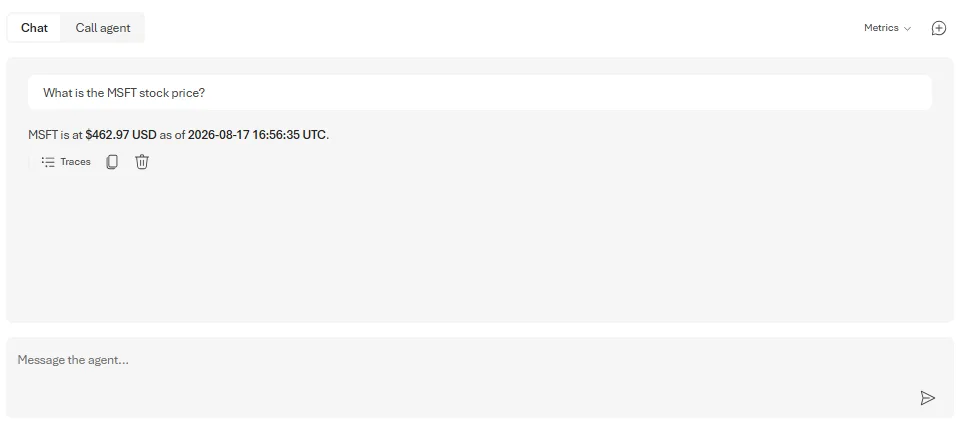
You can also call the deployed agent from the Foundry Agent playground.
The runnable samples
- .NET:
dotnet/samples/02-agents/Harness/BuildYourOwnClaw/Claw_Step04_ProductionReady - Python:
python/samples/02-agents/harness/build_your_own_claw/claw_step04_production_ready
Use these building blocks in your own agent
As always, each capability is available on its own – none of it is locked inside the harness:
| Feature | .NET | Python |
|---|---|---|
| Observability | Decorate any AIAgent with agent.AsBuilder().UseOpenTelemetry(sourceName).Build(); a chat-backed agent can also instrument its IChatClient in clientFactory. See the complete sample and UseOpenTelemetry source. |
Configure exporters with from agent_framework.observability import configure_otel_providers. See the observability source. |
| Governance | WithPurview is a ChatClientBuilder extension: chatClient.AsBuilder().WithPurview(credential, settings).Build(). See the WithPurview source and sample. |
Add PurviewChatPolicyMiddleware to a chat client. See the middleware source and sample. |
| Hosting | Register an AIAgent with builder.Services.AddFoundryResponses(agent), then map the endpoint with app.MapFoundryResponses(). Both are ASP.NET extensions in the hosting source. |
Wrap an agent with ResponsesHostServer(agent) and run it with run_async(). See the responses host source. |
| Evals | Use LocalEvaluator / FunctionEvaluator for local checks and FoundryEvals for hosted quality evaluation. |
Use LocalEvaluator, evaluate_agent, and @evaluator from the core evaluation module, or FoundryEvals. |
The pattern that ties them together is the shared agent factory: define the agent once, then wrap it in whatever host you need. Observability can decorate the agent and its underlying chat client; governance is chat-client middleware; hosting and evals operate on the finished agent.
What’s next
That’s the series. Across four parts we started from a single tool and finished with a governed, observable, deployable, continuously-evaluated finance assistant – a claw – built entirely from Microsoft Agent Framework building blocks, each of which you can lift into your own agent. The harness gave us planning, file access, approvals, memory, skills, a shell, CodeAct, and background agents; this part made the whole thing production-ready without changing what the agent is.
Take the claw, swap in your own domain – support, ops, research, whatever you build – and you have a running start on an agent you can actually ship.
📚 The series
Part of Build your own claw and agent harness with Microsoft Agent Framework:
- Overview – Build your own claw and agent harness
- Part 1 – Meet your agent harness and claw
- Part 2 – Working with your data, safely
- Part 3 – Scaling its capabilities
- Part 4 – Making your claw production-ready (you are here)


0 comments