

The best LLM in Visual Studio is the one you choose. This month’s update puts that idea front and center: pick the model that fits how you work, then use it everywhere GitHub Copilot already helps you today, from fixing vulnerable packages to reviewing pull requests. And once you’re in the editor, you’ll find sharper debugging tools too, whichever model is doing the thinking alongside you.
Grab the Visual Studio 2026 Stable Channel update and let us know what’s working and where we should invest next.
Updates to Bring Your Own Model
The best AI in Visual Studio is the AI you can bring with you. With Bring Your Own Model (BYOM), more developers can use AI in Visual Studio with the models their teams prefer, whether through GitHub Copilot or their own model deployments. From individual developers experimenting with new models to organizations standardizing on approved deployments, BYOM lets you use AI your way, whether or not you’re signed in to GitHub.
BYOM is available in preview and enabled by default across the Community, Professional, and Enterprise SKUs. Connect to a Microsoft Foundry deployment or another supported provider, including custom endpoints for OpenAI and Ollama, then work in Agent Mode with the new Agent (Preview).
This is an early preview, and we want your feedback. Not every model supports every Agent Mode capability yet. When a feature isn’t supported, Visual Studio marks it clearly instead of failing silently. Try it and tell us what’s working and where we should invest next in the Developer Community forum or fill out this short survey.
To get started: open Chat, open the model picker and choose Add a model or Manage Models, connect to your provider, then start working in Agent Mode. Supported providers are Microsoft Foundry, OpenAI, Anthropic, and Ollama, with custom endpoint support for OpenAI and Ollama.
This release has breaking changes for the BYOM capability: BYOM now works with the new Agent (Preview), which is built on the GitHub Copilot SDK-powered harness. The earlier BYOM experience in the previous Ask and Agent modes is no longer supported; install the latest Visual Studio release and use the new Agent (Preview) to try it. Previously added Ollama models will need to be re-added after this update due to a few backend updates for that provider.
Fix NuGet Vulnerabilities from the Error List
Whichever model you’ve chosen, it can now help you close security gaps the moment they surface. NuGet Audit warnings in the Visual Studio Error List give you a direct way to fix vulnerable packages with GitHub Copilot instead of tracking them down manually.
After a restore reports an NU1901, NU1902, NU1903, or NU1904 warning, select the sparkle action in the Fixer column. This opens GitHub Copilot Chat in agent mode and asks Copilot to fix the vulnerable NuGet packages using the NuGet MCP server.
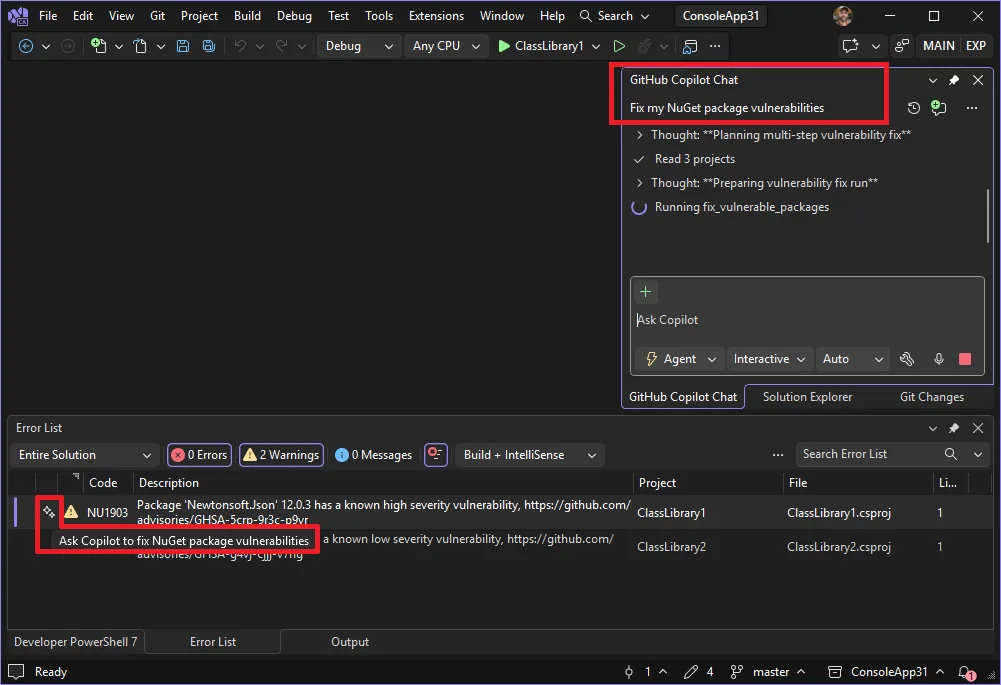
To use the fix: restore a solution that contains a package with a known vulnerability, open View > Error List and find the NuGet Audit warning, select the sparkle action in the Fixer column, then review and apply the changes Copilot proposes. You’ll need to be signed in to GitHub Copilot, and automated fixes also require the NuGet MCP server, which is built into Visual Studio and can be enabled from the Copilot Chat tools menu.
Explore Pull Requests with the Git Agent
Reviewing a pull request usually means piecing together the discussion thread, the changed files, and what actually matters before you can dig in. The Git agent can now do that legwork for you, powered by whichever model you’ve connected.
Open GitHub Copilot Chat, select the Git agent, and ask it about your pull request, attaching the pull request as context from the Git Repository window. The response includes navigable links that open the corresponding comments and files directly in the pull request view in the IDE, so you can jump straight to what matters instead of scrolling to find it. Ask follow-up questions any time you want the agent to go deeper.
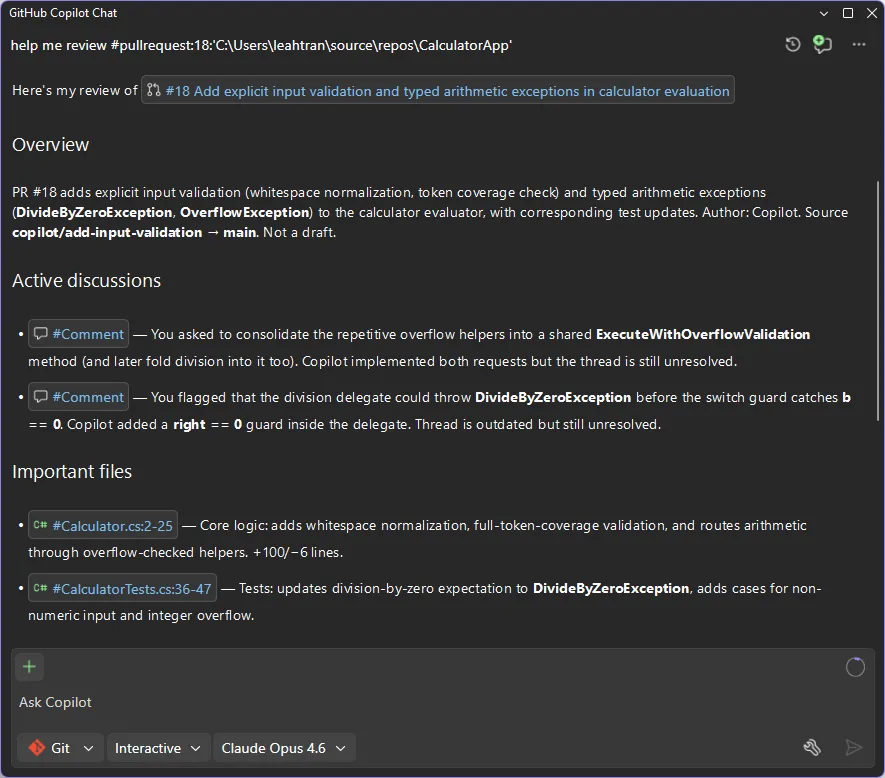
Connect your Git provider’s MCP servers so Copilot can pull in more context about your pull requests. GitHub and Azure DevOps are both supported.
See Which Operand Decides Your if Condition
Ever paused on a compound if statement and had to work out which part of it actually made the call? Visual Studio now highlights the deciding expression in C# if statements that use && or ||.
While debugging, pause on an if statement. Alongside the existing inline → true or → false hint, Visual Studio uses red and green highlighting to show which operand determined the result. When an && condition evaluates to false, the highlighting identifies the operand that failed or caused evaluation to short-circuit. When an || condition evaluates to true, it identifies the operand that satisfied the condition. It’s a small detail that saves you from mentally evaluating each piece of a complex branch on your own.


You can right-click a highlighted expression to disable branch highlighting from the editor context menu, and the highlight colors are available under Tools > Options > Environment > Fonts and Colors if you want to tune them to your theme.
Attach to Process Now Supports Podman Containers
Container discovery now recognizes Podman alongside Docker. Start a container, then go to Debug > Attach to Process. Set Connection type to Podman, then select Find. Your Podman containers appear automatically, with the same attach experience you already use for Docker.
You can debug both .NET and C++ containers with no extra configuration.
From our entire team, thank you for choosing Visual Studio! For the latest updates, resources, and news, check out the Visual Studio Hub and stay in touch.
Happy coding! The Visual Studio team


0 comments