


When I first found Visual Studio Dev Essentials, it felt like discovering a hidden door in the developer toolkit world. I’d heard about free tools and cloud credits, but I wasn’t sure if it would really matter in day-to-day coding life. The short answer: it absolutely does.
What struck me most was how the program was built with real developers in mind, and the fact that it’s completely free makes it accessible to anyone with a Microsoft account.
Why Dev Essentials Matters
Dev Essentials is not a trial version or a limited sneak-peek. It’s a free developer membership that brings together the tools, cloud services, downloads, and training you need to build apps for any platform. That means macOS, Linux, Windows, web, mobile, backend services, and even cloud workloads.
That breadth is what makes it valuable. You’re not signing up for one isolated tool or service. You’re unlocking a suite of practical development benefits you can use right now.
Who It’s For
This is exactly the program I wish I’d known about earlier in my career:
- Visual Studio Community developers get access to a wider set of tools, training, and cloud credits through Dev Essentials.
- VS Code users can augment their lightweight editor with cloud and training resources that make exploring new stacks easier.
- Students and hobbyists can experiment freely, learn at their own pace, and build real projects without budget constraints.
That doesn’t mean paid subscriptions aren’t valuable. If you use Visual Studio Professional or Enterprise, your subscription already includes Dev Essentials benefits plus more extensive tools and services for team development, enterprise workflows, and advanced features. But Dev Essentials itself is not a limited version of a paid subscription. It stands on its own as a free program for developers of all kinds.
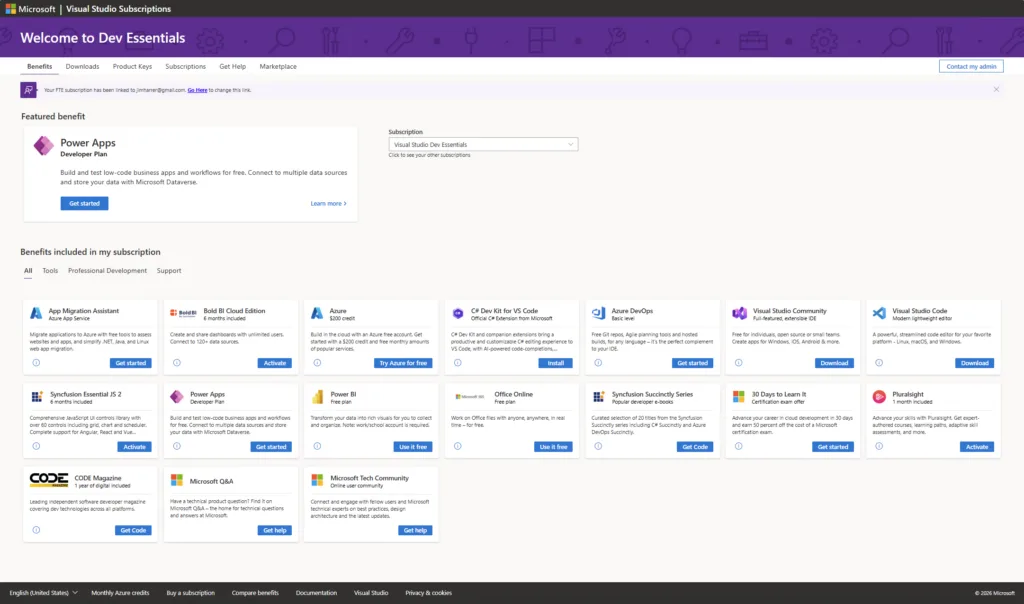
What You Get with Dev Essentials
Once you join, these are the kinds of benefits you’ll find in your dashboard:
Developer Tools
- Visual Studio Community — a powerful IDE for individuals, open source, and small teams.
- Visual Studio Code — lightweight, cross-platform editor that adapts to your workflow.
Cloud Services
- Azure Free Account with $200 in credit for the first month and a 12-month set of free services you can experiment with.
- Azure DevOps for planning, CI/CD, and collaboration without added cost.
- Power Apps Community Plan to build and test low-code business apps.
Software & Downloads
- SQL Server Developer Edition, Power BI, Office Online apps, and other downloadable offerings you can use as part of your development toolkit.
Learning & Training
- Access to Pluralsight and other curated learning content that helps you upskill and stay current without added cost.
My Experience
For me, Dev Essentials changed how I approached areas I was curious about but hadn’t prioritized because of time or cost. Cloud services that used to feel intimidating became something to play with and experiment on without worrying about budget. Training paths that I always meant to explore were suddenly easy to access.
It’s like having a sandbox for your skills and tools — a place where you can build, break, and learn without consequences.
How to Get Started
If you haven’t already, visit the Dev Essentials page, sign in with your Microsoft account, and activate the benefits you want.
Once you’re in, you’ll see all your tools, cloud credits, software downloads, and training resources in one place. Start with what you’re curious about — whether that’s a new language, a cloud service, or a developer workflow improvement.
Dev Essentials isn’t just a list of freebies. It’s a practical, developer-focused toolkit that meets you where you are and helps you build what’s next.


Dear Mr. Harrer,
I am honored to write to you. I am an ordinary student from China, studying at Hunan First Normal University, majoring in Intelligent Manufacturing Engineering.
Currently, we are learning Visual Studio to prepare for our future careers and enhance our competitiveness. By chance, I came across your blog post and noticed there were not many comments. This surprised me, because I believe as a manager, you should receive lots of professional feedback on this platform.
The software provides a free platform for coding and developing applications for students, developers, and professionals alike. How fantastic and valuable it is!After learning this...
It’s a great set of tools for developers. The community edition of Visual Studio can do a lot.
Jim, my team at work is eager to use Visual Studio 2026, especially with our upcoming update to .Net 10. How can we ensure that nothing proprietary is being sent to the cloud? I have seen Enterprise users asking this question since release, and I am not seeing any clear answers. This is obviously extremely important to Enterprise users. We can’t use it if we can’t ensure proprietary information is staying local. Thanks.
Wake up Visual Studio dev team, the way vscode is far ahead receiving new features almost each day, I wonder at the end of the year who will still be using VS, at this point why keep two IDEs?
this comment has been deleted.
VSCode has had 9 updates this year. Visual Studio 2026 has had 8.
They are very different products. VSCode is basically just a light weight shell where most of the functionality comes from extensions. Visual Studio is their flagship IDE with features appropriate for professional developers and enterprise applications. If you don’t understand something, you are better off learning more about it than assuming everyone involved is “asleep.”
There are a number of devs who’ve been using Visual Studio since VS 6.0 and then VS .NET, which was first released in 2002. We love that environment and are grateful that Microsoft has seen that – and seen us!
Some of us developers prefer Visual Studio over VS Code.