


If you use editor productivity extensions for Visual Studio 2026, there’s good news—they can now load faster! Extension developers with existing MEF-based editor productivity extensions should read this blog to learn about recent changes and how they might be affected.
We introduced VisualStudio.Extensibility to simplify the creation of Visual Studio extensions for developers. Previously, handling threads in VSSDK-based extensions was often difficult, requiring knowledge of thread affinity and even the ins and outs of COM just to avoid freezing Visual Studio. The new extensibility model abstracts these technical details away seamlessly.
Despite this advancement, we recognize most Visual Studio extensions still use VSSDK, so we’re striving to make targeted improvements there as well – especially regarding performance. For Visual Studio 2026, we’ve added the ability to load MEF-based editor extensions on a background thread, which significantly speeds up startup times for users. A major highlight of Visual Studio 2026 is its improved performance, and the proposed change we’re making to MEF is just one of many enhancements planned to make it even faster. We hope you’ll be pleased with the results.
What changed?
Visual Studio editor components use the Managed Extensibility Framework (MEF), which requires that objects be constructed in a free-threaded manner. Despite official MEF guidelines, we’ve often loaded components on the UI thread, resulting in many extensions relying on this behavior and limiting our ability to enhance startup performance.
With Visual Studio 2026, we’re shifting to a free-threaded model, loading MEF components on background threads. This means extensions with UI thread dependencies might fail to load. We’ve been rigorously testing this approach in recent Visual Studio 2022 updates, and we are aware that some extensions that expect to load on the UI thread will fail to load with this optimization. To support extension developers through this transition, we’ve provided a setting and an analyzer that allows you to experiment with background loading and detect if your extension could be impacted by this change before we push it out more broadly. This initiative reflects our commitment to reducing disruptive changes and help extenders adapt when updates are necessary for the overall improvement of the product.
Does it impact my extension?
To help extension developers better detect if this change impacts you, we created an analyzer to identify potential issues. We hope that this will give you the opportunity to bring your extension in compliance with MEF rules, so that your extension can also get a startup performance boost like the rest of Visual Studio 2026.
The example below shows the analyzer running and reporting access to the Microsoft.VisualStudio.Shell.ThreadHelper and DTE2.StatusBar require UI thread.
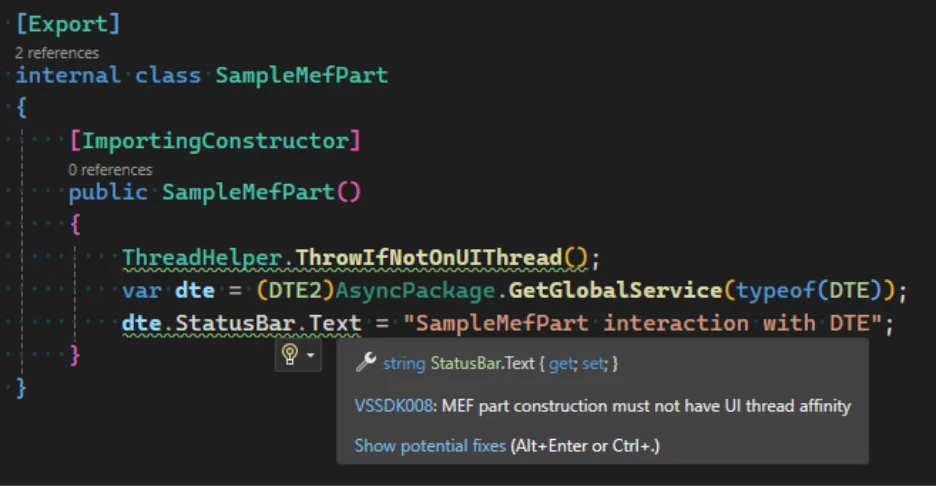
To use the analyzer, add a reference to the latest version of the Microsoft.VisualStudio.SDK.Analyzers package:
<PackageReference Include="Microsoft.VisualStudio.SDK.Analyzers" Version="17.7.98" PrivateAssets="all" />
To validate your extension can adapt to this change, enable the Preview Feature flag “Initialize editor parts asynchronously during solution load”.

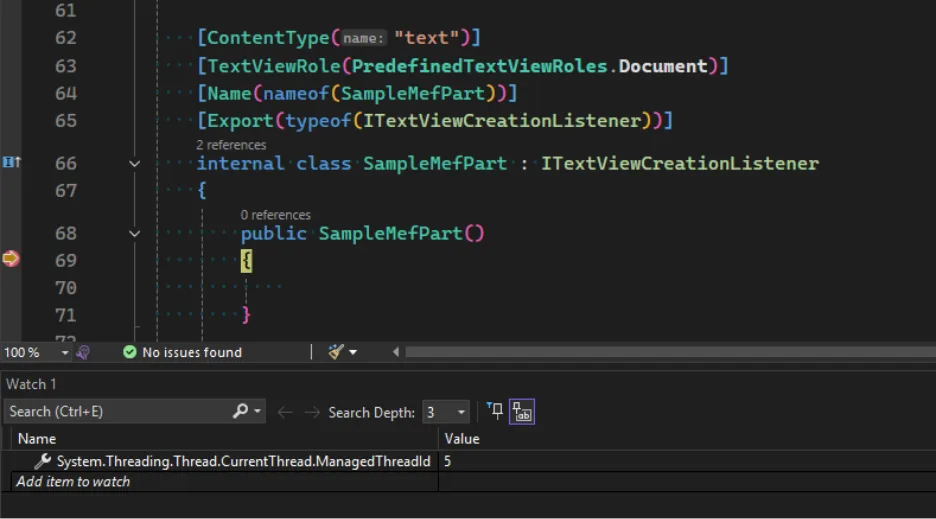
When debugging, you may set a breakpoint in MEF part constructors and evaluate System.Threading.Thread.CurrentThread.ManagedThreadId. If it’s different than 1, then your code executes on the background thread.
Call to action
Loading MEF parts on a background thread is essential for improving Visual Studio’s performance, and we have gradually enabled this change in Visual Studio 2026. We recognize that code changes can be inconvenient, so we’ve made it straightforward to spot and resolve any issues. To see examples of removing UI thread affinity, please see our documentation or a sample PR on how we made this change ourselves.
We want to hear from you!
Thank you for sharing your issues and suggestions with us, and we hope you’ll keep providing feedback about what you like and what we can improve in Visual Studio. For those new and experienced to extending Visual Studio, we invite you to visit our documentation to learn more, or watch the video series on Visual Studio Toolbox where Visual Studio engineers take you through how to build extensions using our samples on GitHub. Feel free to share feedback with us via Developer Community: report any bugs or issues via report a problem and share your suggestions for new features or improvements to existing ones. If you want a closer engagement with other partners in the ecosystem, please visit our GitHub repo to report issues as well.
Stay connected with the Visual Studio team by following us on YouTube, Twitter, LinkedIn, Twitch and on Microsoft Learn.


Visual Studio 2026 significantly reduced theme customization by removing many color tokens. Please reintroduce these tokens so extension authors can restore the beloved Blue theme, as requested in Bring Blue theme back for Visual Studio 2026 and Once more, we ask for the Blue Theme back in VS 2026.
We’re very aware of the wish to bring back those tokens. If it was easy we would have done so already. We’re looking into options…
Which version? These blog posts get more and more confusing with regular feature releases, live-updates outside of feature releases, and blog posts not disclosing when it’s talking about Insider preview versions. They’re all “Visual Studio 2026”. But that’s not helpful. “they can now load faster” doesn’t tell me when “now” is now for me.
Preloading extensions on background thread began in version 18.0, and is now enabled for 50% of developers. Starting 18.4 we will bring it to 100%. Also, this experience is limited to reopening a solution, e.g. from the “Get started” window or “File > Recent Projects and Solutions”. Thank you for your feedback on how much details you expect to see in the blog posts!
Developing extensions for Visual Studio has been a nightmare, I spent whole weekend trying to fix the editor stealing keystrokes sent to my custom window.
I reported it here: https://developercommunity.visualstudio.com/t/Custom-WPF-Window-ignore-specific-keystr/11037258
And seems this already had been reported in 2024, and I doubt it will get any attention again.
Hi Lilo, I ran into the exact same behavior today with an overlay dialog similar to the one in your bug report. It appears to be a WPF behavior and the way I got around it was to open my WPF control using
ShowDialog()instead ofShow(). Otherwise I had to look at registering both keyboard and input focus etc. which seemed to only work sporadically.But ShowDialog() blocks the thread, “Otherwise, I had to look at registering both keyboard and input focus” I also tried this, I even tried hooking the Window inputs but they still get send to the background window, “which seemed to only work sporadically”, so is this a “bug”?