


Bookmarks in Visual Studio have always been a simple, reliable feature. Many developers use them regularly, and over the years we’ve heard consistent feedback from those users. Bookmarks were useful, but there were a few core gaps that kept them from being as effective and relevant as they could be.
Navigation was one of the biggest pain points. You could move between bookmarks, but there was no easy way to jump directly to a specific bookmark using the keyboard. That made bookmarks harder to rely on once you had more than a few. Another common request was sharing. Bookmarks worked well for personal, local navigation, but there was no good way to share them with teammates or reuse them across repos, branches, or pull requests.
That feedback is what led to Bookmark Studio, a new experimental Visual Studio extension that builds on the existing bookmark experience by filling in those missing pieces, without changing how bookmarks fundamentally work.
Faster, more intentional navigation
One of the core additions in Bookmark Studio is slot‑based navigation.
Bookmarks can be assigned to slots 1 through 9 and jumped to directly using simple keyboard shortcuts like Alt+Shift+1 through Alt+Shift+9. This makes bookmarks feel more deliberate and easier to rely on when you want fast access to a handful of important locations.
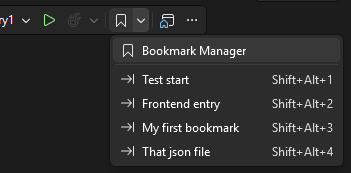
New bookmarks are automatically assigned the next available slot when possible, so fast navigation often works without any extra setup. Bookmark Studio also integrates with Visual Studio’s existing bookmark commands, which means your current shortcuts and muscle memory continue to work as expected.
A single place to work with bookmarks
Bookmark Studio also adds a dedicated Bookmark Manager tool window.
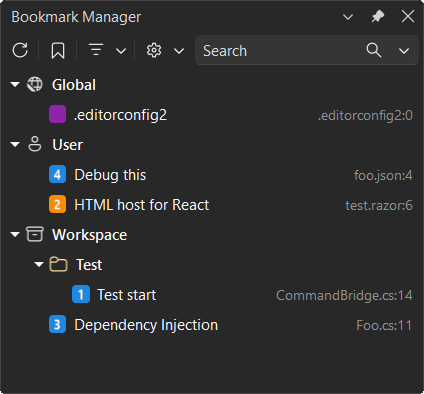
The manager shows all bookmarks in one place and makes it easy to browse, search, and navigate between them. You can filter by name, file, location, color, or slot, and jump directly to a bookmark with a double‑click or keyboard navigation. It’s designed to make bookmarks easier to revisit, especially when switching context or coming back to code later.
Optional structure, when you need it
Another piece of feedback we heard was the need for just a bit more organization.
With Bookmark Studio, bookmarks can have labels, colors, and folders. None of this is required, and you can keep using bookmarks exactly as you do today. But when you’re debugging, refactoring, reviewing code, or exploring unfamiliar areas of a codebase, that extra context can make bookmarks more useful and easier to reason about.
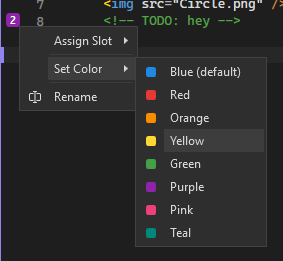
All bookmark metadata is stored per solution, so it stays with your work across sessions.
Bookmarks you can share and reuse
Bookmarks are often most valuable when they capture intent, not just location.
Bookmark Studio makes it easy to export bookmarks as plain text, Markdown, or CSV. That means you can include bookmarks in pull requests, share investigation paths with teammates, or move useful bookmark sets between repos. Instead of being a purely personal tool, bookmarks can become a lightweight way to communicate context and decisions.
Bookmarks that stay put as code changes
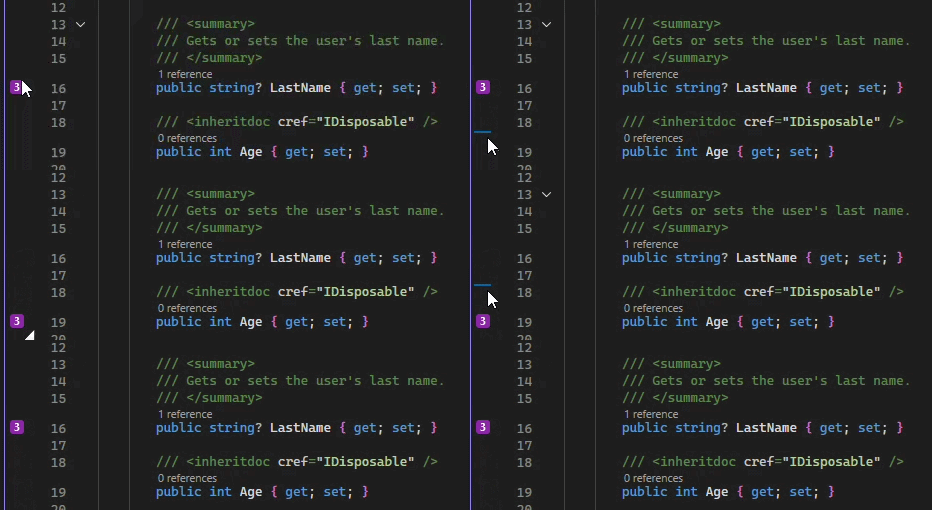
Bookmark Studio tracks bookmarks as text moves during editing, so they stay attached to the relevant code instead of drifting to the wrong line. This makes bookmarks more dependable during active development, especially when files are changing frequently.
A focused improvement, not a reinvention
Bookmark Studio doesn’t try to replace tasks, TODO comments, or issue tracking. It doesn’t introduce a new workflow you have to learn. Instead, it fills in the gaps that many bookmark users have pointed out over time, making bookmarks easier to navigate, easier to share, and more useful as part of everyday development.
If you already use bookmarks in Visual Studio, Bookmark Studio should feel familiar within minutes. And if you’ve ever wished bookmarks could do just a little more, this extension is worth a look.
You can download Bookmark Studio today from the Visual Studio Marketplace. As always, feedback and pull requests are welcome on the GitHub repo.



Sounds good, and congrats !
I use bookmarks in my development, but one of the major drawbacks is that when you create a new branch of a project, you lose these bookmarks, and there’s no import or export option (which is useful if you want to have them on another machine).
Does this tool handle that?
“Bookmarks worked well for personal, local navigation, but there was no good way to share them with teammates or reuse them across repos, branches, or pull requests.
That feedback is what led to Bookmark Studio”
This looks awesome – reminds me of vim marks. Any plans to incorporate into mainline VS eventually?
In addition to being useful, this looks like a good reference extension to refer to while I’m learning extension development. Mads, do you know if it’s yet possible to have a native search bar control in a VisualStudio.Extensibility tool window, or is VSSDK’s `ToolWindowPane.SearchEnabled` still the only way?
It is still only possible using
ToolWindowPane.SearchEnabledThis is a great example of how UX improvements can make a feature so much better. I haven’t been using Bookmarks that much to be honest, but I think we this improvement it will become one of my favs. 👍