


Here on the Visual Studio team, our top priority is making your coding experience smoother and more enjoyable. And that begins with truly listening to your feedback. We understand that sometimes sharing your thoughts can feel like tossing bug reports and suggestions into a black hole. It doesn’t feel good, and we get it.
But here’s the good news: over the past year, we’ve resolved more bugs reported by users and delivered more requested features than at any other time in Visual Studio’s history. We believe in being open about what happens to your feedback, so in this post, we’ll pull back the curtain and show you exactly how your input is processed and how it directly influences our work.
So, grab your favorite warm drink, settle in, and join us for a behind-the-scenes look at how your feedback truly shapes the future of Visual Studio.
Every bug report or feature request you submit on developercommunity.visualstudio.com becomes a ticket in our system. We mirror that ticket in our internal Azure DevOps setup and assign it to the right team.
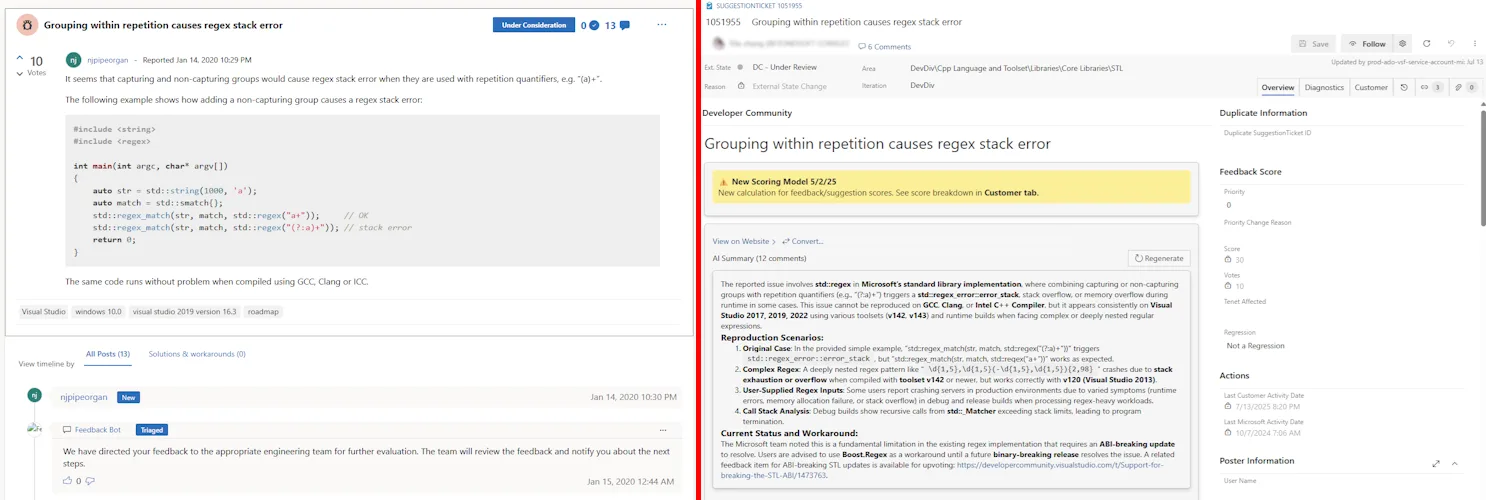
We treat your feedback with the same priority as our internal tasks, triaging and prioritizing it to align with our goals and direction. In other words, who created the issue doesn’t matter. If the issue is important and impactful, we consider it.
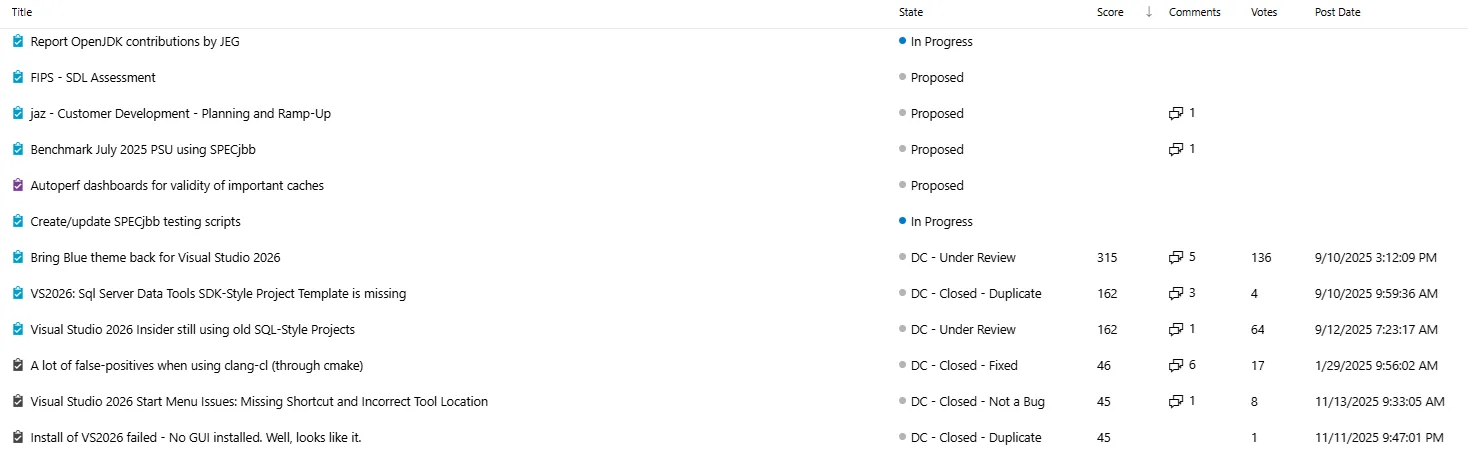 Figure 2: Internal and external tickets are triaged together in the same view in Azure DevOps
So, what makes a feedback ticket important and impactful? Your engagement on the Developer Community directly influences what we work on next. We assign an internal Score to every ticket based on community traction, impact, and severity. Each vote increases the ticket’s Score and highlights issues or ideas the community cares about. It’s important that you upvote existing tickets and add more context rather than submitting a new ticket for the same issue. Comments add context and boost the Score, helping us understand the issue or feature request’s importance. Comment on existing tickets to add more context to the issue or feature request. It all helps.
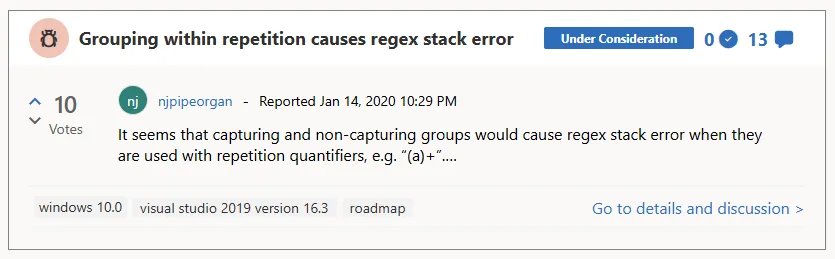
As a ticket’s Score rises, it can automatically escalate in priority – low, medium, or high. Medium and high-priority bugs come with Service Level Agreements (SLAs). High-priority tickets are targeted for investigation within a week, while medium-priority tickets have a longer but defined timeline.
Priority isn’t just about votes and comments, though. Our teams weigh the Score against factors like technical complexity and alignment with goals, such as performance, reliability, and accessibility. A high Score doesn’t guarantee top priority, but it’s a major factor.
This system ensures that feedback from our users shapes the IDE, and that we catch bugs as early as possible. Some bugs require immediate attention, especially regressions and issues affecting key tenets like performance or accessibility.
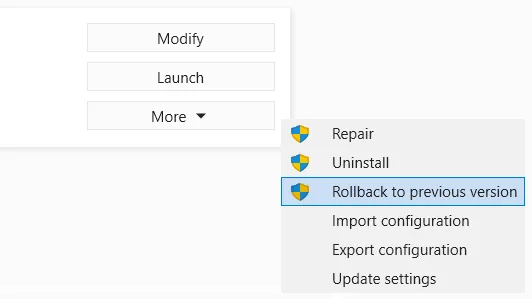
Regressions – cases where something that used to work breaks – are typically high priority because they disrupt your workflow. If you ever need to rollback to a prior release due to a regression or critical issue, it’s crucial to let us know. After you complete the rollback, Visual Studio asks you to submit feedback describing what led you to revert and the specific problem you encountered.
Your input is invaluable for helping us identify, prioritize, and resolve regressions quickly so we can prevent similar disruptions in future updates. Bugs affecting core tenets like performance or accessibility also get quick attention. A slowdown in the IDE or an accessibility issue that limits usability? We prioritize those to keep Visual Studio smooth and inclusive.
To help us address your feedback as quickly and effectively as possible, here are some tips for writing a ticket that stands out and speeds up resolution.
- Use descriptive title: Use a title that is easy for others to find so they can vote, comment, and add more information.
- Include clear reproduction steps: Describe exactly what you did leading up to the issue. List each step in order so we can follow your process and reliably see the problem on our end.
- Add screenshots: Visuals make it easier to understand what’s happening. If possible, attach screenshots that highlight the issue or error message.
- Use the recording function: Consider using the built-in recording feature to capture your workflow and the issue in real time. This gives us a direct view of the problem as it occurs.
- Share a minimal reproducible project: If you can, create a simple project that demonstrates the issue. Zip up the project files and include them with your ticket submission. This helps us isolate the bug and find a solution faster.
Sometimes, we still can’t figure out what’s going on. The team can’t reproduce the issue, or the error logs just don’t give us enough to go on. When that happens, we usually reach out to you and the rest of the community for more details. We’re not trying to be a hassle; we really do want to fix the problem, but we just need a little more info to get there. Anyone can add more info to any ticket, and we encourage you to jump in if you can help.
Speaking of feedback, love that Visual Studio fixed the build status after I reported the misleading output and many of you upvoted it. The next text is much better. Your feedback matters!
– “.Morten” Nielsen, MVP and Visual Studio user
What happens if you want to open a bug on the bug reporting system itself? This is one of the feedback team’s most frequently asked questions. The answer is that you report it the exact same way as any other Visual Studio bug. Go to Help > Send Feedback > Report a Problem… and fill in the ticket.
In conclusion…
The bug is there whether you tell us or not. But when you take the time to let us know about it, you’re really doing all of us – our team and other users – a huge favor. We know reporting bugs isn’t much fun, but we do our best to make it a good experience.
It may not always seem like it, but things are getting better. We’re fixing more bugs and adding more features now than ever before in our nearly 30 years of history. And that’s all because of you. Thank you for all your feedback over the years. It’s made a bigger difference than you can possibly imagine.
Keep sharing your thoughts on developercommunity.visualstudio.com and in the comments below.



Hi Mads,
there is one feedback which seems could be solved very easily, but it is closed as lower priority:
https://developercommunity.visualstudio.com/t/clipboard-history-bug/1065722
It will be true game changer because current behavior is not natural and not intuitive.
In general: it is frustrating that so many small but useful improvements are closed as lower priority…
Our work is U.S. Government and that opens a whole different can of worms. I can’t (at least without a huge amount of effort) dump data or code when VS breaks. It is extremely frustrating. I can’t submit support tickets, and I can’t call anybody on the phone. All I can do is go round-n-round with the AI agent.
There appears to be a blind spot in the feedback system where an issue that’s been miscategorized and erroneously closed just stays that way indefinitely. Here is an issue that was incorrectly flagged as a duplicate. Repeated and detailed comments asking for it to be corrected have gone unanswered.
https://developercommunity.visualstudio.com/t/VS-2026-Scrollbars-are-too-narrow-and-no/10984893#TPIN-N10990546-N10992283
Speaking of issues that have been around for a very, very long time. Here is an example.
https://developercommunity.visualstudio.com/t/Allow-building-running-and-debugging-a/351628
It is now 2025 with 2026 literally a week away. Why are we still dealing with long path issues? Yes, the status is "Under Review" but what exactly does that mean? Will this ever be resolved?
I had to shred path lengths all over our repo and since it is git, it wasn't easy. It was literally a restructuring. I hope the VS team can put this at least near the top of the priority list. It has...
Hi Mads, I posted a feature request a couple of months ago, but it’s languished since then with no reply. (Am I being too impatient?)
Can you assist? Thanks!
https://developercommunity.visualstudio.com/t/10988992
Thanks for opening the issue. I’ve reached out to the WCF team to get an update
Getting through the bug triage is pretty much impossible. Only the most trivial bugs get through.
I’m not even sure the attached memory dumps get attached. It seemed as nobody gives them any attention.
With over 5000 fixed in the past 12 months, this is simply not true. That doesn’t mean it doesn’t appear that way or feel like it if your bugs are left unfixed repeatedly. That’s highly unfortunate.
The attached logs and dumps are crucial for fixing the issues. It’s not all bugs where the information is useful, but for a lot of them they are.
Can you share an update on the status of these 2 items:
https://dev.azure.com/msazure/One/_workitems/edit/31770464
https://dev.azure.com/msazure/One/_workitems/edit/31770380
These 2 are coming from https://github.com/microsoft/service-fabric/issues/1541
This is regarding the Service Fabric Tools extension, that still needs to be released for Visual Studio 2026. Users that use Service Fabric are currently unable to use Visual Studio 2026, which is leading to some fustration in the Service Fabric community (as you can see in the Github Issue)
The Service Fabric team doesn't reply to this Github issue unfortunately, but since you mentioned that the tickets are being monitored, i'm (and i'm sure many others are) wondering what the status of...
It looks like Oleg replied just an hour ago saying “We expect to have clarity on the timeline by end of Jan 2026.“
Yes. Great that we heard from the Service Fabric Team!
Does user feedback really mean anything to you guys?
If it actually did, you would reconsider your descision about the blue theme.
Reading this thread should be enough to understand how much this means to a lot of us:
https://developercommunity.visualstudio.com/t/Bring-Blue-theme-back-for-Visual-Studio/10963534
Yes, I answered the Blue Theme question to Hitesh’s comment below. Short answer: it’s complicated.
Is there an API to expose all colors used in VS?
If there is one, maybe I can make an extension to let users change their color theme with several mouse clicks.
It would be really nice if this got some attention: https://developercommunity.visualstudio.com/t/Peek-Implementation/644274
For most projects I work on, and I believe this is true for many people, the Peek Definition feature is now useless because we use interfaces all over the place. Its value was exactly in the quick way to see a small piece of code, without having to go to another file and lose mental context.
As one of the comments outlined, the "Go to implementation" feature is already there, and so is the Peek Window. I know sometimes things are not so straightforward as they seem, but maybe this is...
That’s a good one. This might be one that is relatively straightforward. I’ve passed it along to the team for consideration just in case.
In the process of making things better you are messing up most productive things working before and than asking users to vote/submit suggestion/feedback/report bugs! This is a serious issue you need to look into. There are many examples to this claim and let me share couple of them here...
BLUE THEME:
Many VS users are use to with original BLUE THEME which was first introduced in VS 2010. Now imagine the same blue theme not available in VS 2026 by default. And this is the first big change user notice when they start VS and now you are expecting someone to...
I hear you. The blue theme is a tough one and believe me when I tell you that it's one we want to address. But it's one of those situations where something that seems simple is the exact opposite.
The New Project Dialog (NPD as we call it internally) is a strange case. The new design did solve some issue the old one had, but introduced new ones that people were unhappy about. There were plans and ideas to address the issues, but a series of events lead to it not happening. That doesn't mean we won't revisit this...
I’m guessing there’s no longer a dedicated color token for the area below the top toolbars, that includes the full window width (even behind Solution Explorer) and all the way to the status bar? In my opinion that 1 color alone would help a lot with contrast and focus issues, and with the feeling of things being too bright with all of the light themes. In VS 2022 blue theme, it’s the dark purple/blue color. It’s just 1 additional token.
Please see the picture I posted today to the Bring Blue theme back ticket.
> We actually have some early concepts we showed the MVPs recently to get their feedback
Is that the one behind feature flag VS.NewProjectDialogTreeView? Because that one exists for years without any progress..
(it’s slightly better than the current one but not as good as it could be)
@hitesh davey: You can enable that one with the Feature Flags extension from Paul Harrington.
Hi Mads, you know, a good UI/theme can make work efficient and enjoyable, and the Blue Theme is exactly that kind of theme. To be honest, I don’t even feel like opening VS every day now—the new VS theme is really straining on the eyes. Please reconsider this feedback. I don’t expect an exact replica to be restored, but could you at least provide something similar, or could you please add more color tokens so that users can customize it ourselves?
The new project dialog sucks!
It has sucked for quite a lot of years. Users has provided suggestions about blending the two design into one. You guys had joint the discussion for a while. Now it is completely dropped, with no reason.
Mads, you say “The blue theme is a tough one and believe me when I tell you that it’s one we want to address.”
If that is the case, why is the issue marked as Closed – Out Of Scope? Shouldn’t you re-open it?