

Since announcing that Visual Studio 2019 v16.1 will block any extension from synchronously autoloading, we’ve seen a tremendous effort of both 1st and 3rd-party extensions to implement async background load. It’s been truly amazing to see the community of extension authors stepping up to the task. Many even did it long before we announced Visual Studio 2019.
The result is faster startup and solution load times for Visual Studio, as well as fewer UI delays cause by blocking operations on the main thread. So, a big THANK YOU to all extension authors for all the hard work to make this happen.
Control the behavior
By default, Visual Studio 2019 v16.1 blocks any synchronously autoloaded package from any extension and shows a notification to alert the user about it.

What’s new is that the individual user can now control how they would like the extension to load. The reason for this change is two-fold.
First, most extensions now support async background loading, which improves startup and solution load performance across the board. Second, there exist a class of extensions developed and used internally in companies around the world that for various reasons cannot support async background load. It’s usually because they no longer have the source code or the person who originally built the extension is no longer working at the company.
To stop blocking synchronously autoloaded extensions, you can either click the Allow synchronous autoload on the yellow notification bar or check a new checkbox in the options dialog.
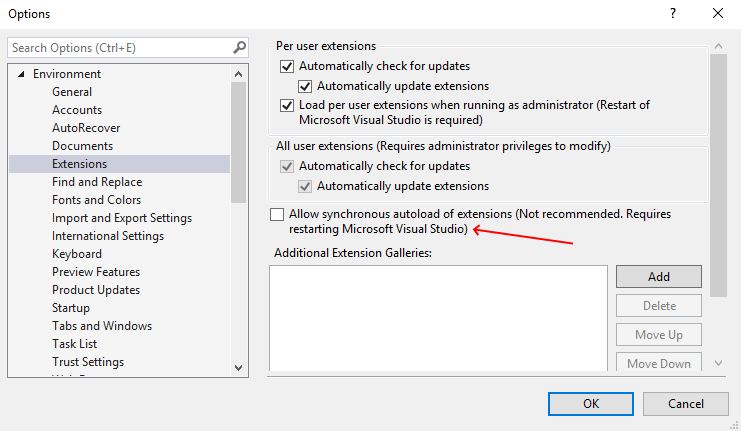
It’s important to stress that we really don’t recommend to anyone that they allow synchronous autoload, but we recognize the need to be able to unblock users and teams to do their job. Even when we know it leads to degraded performance of Visual Studio.
Group policy
To set this option for all team members, the IT admin can now set a registry key through Group Policy. When the Group Policy is set, it takes precedence over the individual user’s ability to change the option themselves, and the checkbox is greyed out and disabled.
Marketplace updates
Extension authors must still use AsyncPackage and enable background load. An update to the Marketplace shows errors when uploading any extension supporting Visual Studio 2019 that uses synchronous autoload. This update is in place since no extension can make assumptions about the users allowing synchronously autoloaded extensions.
Simply put
Here’s a bullet list to sum it up:
- Marketplace requires autoload to be async and in the background
- Users and IT admins can opt out of the blocking behavior (not recommended)
- Autoloading extension should always happen asynchronously in the background
Again, thank you so much for your efforts to make Visual Studio perform better to the benefit of all users. We appreciate the hard work and understand that on many cases it took a considerable amount of work to make this happen. You have our sincerest respect and admiration.


Hi. ModelingPackage (from the DSL-Tools in the Modeling SDK) derives from Package and it hasn't changed for years now...
We use it extensively to customize the IDE for our multiple development teams. We have in fact created our own modeling framework to assist in the development of our business apps (ERP). So, it is very important for us that these DSLs load when Visual Studio loads.
The option is all well but those warnings are simply very annoying.
My questions is (are):
- Will ModelingPackage get an update to support AsyncPackage?
- When are you really planning to discontinue the...
You’ll have to manually change the generated code to use AsyncPackage from the Modelling SDK. We have no plans to discontinue the Modelling SDK
I find this change extremely annoying, and whilst Microsoft may wish to make an informational comment on synchronous extension performance, I don't think they should ever officially deprecate these kinds of extensions. As many have commented, there are lots of useful extensions out there that load this way. The one that was key for me was the custom document well in the Productivity Power Tools, which has not been ported over to loading asynchronously, meaning I either have to put up with the default (inferor in several ways) tab well, or hack the VSIX for the old document well to...
The blog post shows how to allow synchronous extensions to load. The defaults changed, but you’re still in control.
Hi,
I created an extension as in the exemple provided (basically I did a fork of AsyncPackageMigration ), but in Visual Studio 2019, at least, I still get that Async Package Migration was not loaded because it uses deprecated syncronous autoload APIs.
Can someone please provide some help on this, because it seems that the exemple does not work.
Thank you
Hi,
I’ll reply here to my own question, may be it will be useful for someone else: when you do the switch from Package to AsyncPackage, remember to update the version number of the extension too, because otherwise, in my case at least, Visual Studio still “remembers” that that extension was loaded Synchronous and it kept showing that the extension is deprecated.
Cheers,
Liviu
Please continue to support the ability to opt-in to enable synchronously loaded extensions. The developers in my group use an extension we authored that does many things to tailor the build environment, but, most importantly, hooks the OnBuildBegin build event to update header files and resources that are dependencies for the build. Builds may fail or use stale data without this, so it's mandatory that this extension be loaded before a build begins. We experimented with switching the extension to support asynchronous loading, but it's fairly easy for someone to kick off a build before the extension loads. We don't...
The ability to enable synchronously loaded extensions is necessary for our use case, but I also want to point out that we continue to develop and enhance our extension. If possible, we'd like to be able to build our extension in Visual Studio 2019 (and beyond). As it stands, we need to retain Visual Studio 2017 in order to recompile our Package-derived extension because Visual Studio 2019 only supports AsyncPackage. Also, from our perspective Visual Studio 2019 first has to fail to load our development environment, the developer enables synchronously loaded extensions (via prompt or in the Tools | Options...