


In the explosive era of Agentic AI, we’re not just seeking more powerful models—we’re searching for a development experience that lets developers actually get some sleep. When building Agents locally, we’ve traditionally faced three major challenges:
- Black-Box Execution: What is my Agent thinking? Why is it stuck? (Debugging is hard)
- Interaction Silos: I’ve built my Agent—how do I quickly demo a beautiful UI to stakeholders? (Productization is hard)
- Performance Blind Spots: How many tokens are being consumed? Where’s the latency? (Optimization is hard)
Today, I’ll walk you through a classic case from Microsoft Agent Framework Samples—GHModel.AI—to reveal the “Golden Triangle” development stack that perfectly solves these pain points: DevUI, AG-UI, and OpenTelemetry.
Let’s explore how this powerful combination empowers the entire local development lifecycle.
Phase 1: Creation — Standing on the Shoulders of GitHub Models
In the GHModel.AI case, we first address the “brain” problem.
Traditional local development is often constrained by computing resources or expensive API keys. This case cleverly leverages GitHub Models. As an evangelist, I must strongly recommend this combination:
- Zero-Barrier Access: Call GPT-4o, Llama 3, and other cutting-edge models directly with your GitHub account—no complex Azure configuration or credit card binding required.
- Standardized SDK: Through Agent Framework’s abstraction layer, we can switch model backends with just a few lines of code.
In this case’s code structure, you’ll find Agent definitions become exceptionally clear. No more spaghetti-style Python/C# scripts—just structured “declarations.”
Quick Start Code
Python:
# Python - Create Agents with GitModels

from agent_framework.openai import OpenAIChatClient

chat_client = OpenAIChatClient(
    base_url=os.environ.get("GITHUB_ENDPOINT"),    # 🌐 GitHub Models API endpoint
    api_key=os.environ.get("GITHUB_TOKEN"),        # 🔑 Authentication token
    model_id=os.environ.get("GITHUB_MODEL_ID")     # 🎯 Selected AI model
)


# Create Concierge Agent

CONCIERGE_AGENT_NAMES = "Concierge"
CONCIERGE_AGENT_INSTRUCTIONS = """
            You are an are hotel concierge who has opinions about providing the most local and authentic experiences for travelers.
            The goal is to determine if the front desk travel agent has recommended the best non-touristy experience for a traveler.
            If so, state that it is approved.
            If not, provide insight on how to refine the recommendation without using a specific example. """


concierge_agent = chat_client.create_agent(
    instructions=CONCIERGE_AGENT_INSTRUCTIONS,
    name=CONCIERGE_AGENT_NAMES,
)

# Create FrontDesk Agent

FRONTEND_AGENT_NAMES = "FrontDesk"
FRONTEND_AGENT_INSTRUCTIONS = """
            You are a Front Desk Travel Agent with ten years of experience and are known for brevity as you deal with many customers.
            The goal is to provide the best activities and locations for a traveler to visit.
            Only provide a single recommendation per response.
            You're laser focused on the goal at hand.
            Don't waste time with chit chat.
            Consider suggestions when refining an idea.
            """


frontend_agent = chat_client.create_agent(
    instructions=FRONTEND_AGENT_INSTRUCTIONS,
    name=FRONTEND_AGENT_NAMES,
)

# Create Workflow

frontend_executor = AgentExecutor(frontend_agent, id="frontend_agent")
concierge_executor = AgentExecutor(concierge_agent, id="concierge_agent")

workflow = (
WorkflowBuilder()
.set_start_executor(frontend_executor)
.add_edge(frontend_executor, concierge_executor)
.build()
)
.NET:
// .NET - Creat Agents with GitHub Models

var openAIOptions = new OpenAIClientOptions()
{
    Endpoint = new Uri(github_endpoint)
};

var openAIClient = new OpenAIClient(new ApiKeyCredential(github_token), openAIOptions);

var chatClient = openAIClient.GetChatClient(github_model_id).AsIChatClient();

const string ReviewerAgentName = "Concierge";
const string ReviewerAgentInstructions = @"
    You are an are hotel concierge who has opinions about providing the most local and authentic experiences for travelers.
    The goal is to determine if the front desk travel agent has recommended the best non-touristy experience for a traveler.
    If so, state that it is approved.
    If not, provide insight on how to refine the recommendation without using a specific example. ";

const string FrontDeskAgentName = "FrontDesk";
const string FrontDeskAgentInstructions = @"""
    You are a Front Desk Travel Agent with ten years of experience and are known for brevity as you deal with many customers.
    The goal is to provide the best activities and locations for a traveler to visit.
    Only provide a single recommendation per response.
    You're laser focused on the goal at hand.
    Don't waste time with chit chat.
    Consider suggestions when refining an idea.
    """;

var reviewerAgentBuilder = new AIAgentBuilder(chatClient.CreateAIAgent(
    name: ReviewerAgentName,
    instructions: ReviewerAgentInstructions));

var frontDeskAgentBuilder = new AIAgentBuilder(chatClient.CreateAIAgent(
    name: FrontDeskAgentName,
    instructions: FrontDeskAgentInstructions));

AIAgent reviewerAgent = reviewerAgentBuilder.Build(serviceProvider);
AIAgent frontDeskAgent = frontDeskAgentBuilder.Build(serviceProvider);

// Create Workflow
var workflow = new WorkflowBuilder(frontDeskAgent)
.AddEdge(frontDeskAgent, reviewerAgent)
.Build();
Phase 2: Testing & Debugging — DevUI
This is the highlight of this article. Previously, we debugged Agents using the print() method and endless console logs. Now, we have DevUI.
What is DevUI? It’s an “inner-loop” tool designed specifically for developers within Agent Framework. When GHModel.AI runs, DevUI provides a visual console:
-
Chain of Thought Visualization: You no longer need to guess why the Agent chose Tool A over Tool B. In DevUI, you can see each Reasoning, Action, and Observation step like a flowchart. This isn’t just debugging—it’s an “X-ray” of Agent behavior.
-
Real-Time State Monitoring: What’s stored in the Agent’s Memory? Is the context overflowing? DevUI lets you view Conversation State in real-time, quickly pinpointing the root cause of “hallucinations.”
Python:
cd GHModel.Python.AI/GHModel.Python.AI.Workflow.DevUI
pip install agent-framework agent-framework-devui python-dotenv
python main.py
# Browser opens automatically at http://localhost:8090
.NET:
cd GHModel.dotNET.AI/GHModel.dotNET.AI.Workflow.DevUI
dotnet run
# DevUI: https://localhost:50516/devui
# OpenAI API: https://localhost:50516/v1/responses
 DevUI dramatically shortens the "write-run-fix" feedback loop. For complex Multi-Agent collaboration scenarios, it's your command center.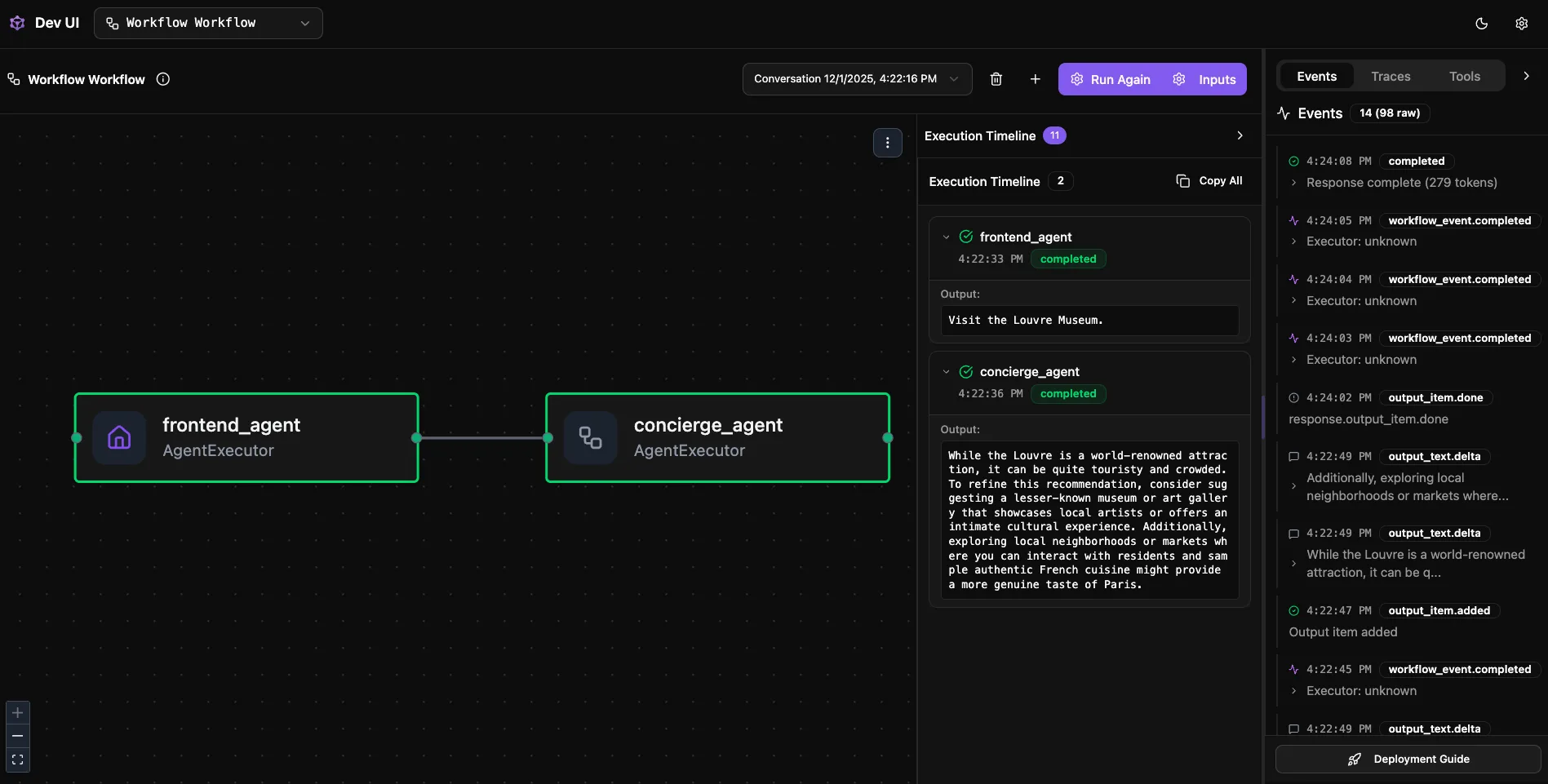
Phase 3: Delivery & Interaction — AG-UI
Debugging is done, and your boss says: “Can you send me a link so I can try it too?” At this moment, don’t hand-write a React frontend! What you need is AG-UI.
What does AG-UI solve? It’s a standardized Agent-User interaction protocol. In the GHModel.AI case, by integrating AG-UI:
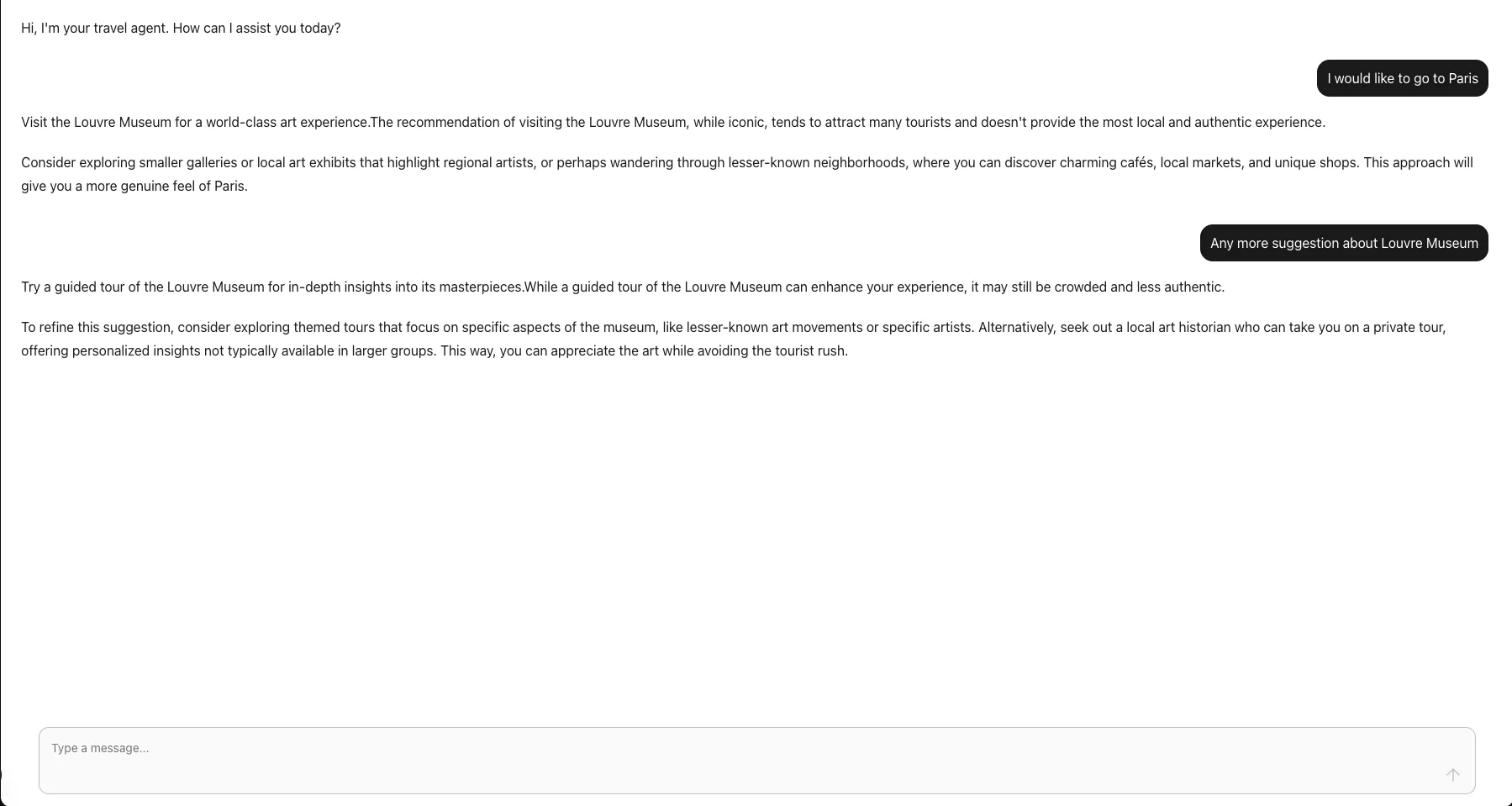
- Out-of-the-Box Frontend: Agent Framework can directly expose interfaces compliant with the AG-UI protocol. Any frontend supporting AG-UI (like components provided by CopilotKit) can connect directly to your local Agent.
- Streaming Responses & Generative UI: It supports not only text streaming but also server-side UI component pushing. This means your Agent can dynamically render charts, tables, or cards on the user interface based on content—no frontend hardcoding required.
AG-UI Supported Features
- ✅ Streaming responses (SSE)
- ✅ Backend tool rendering
- ✅ Human-in-the-Loop approvals
- ✅ Shared state synchronization
- ✅ Seamless CopilotKit integration
Implementation Examples
Python Server:
# Server — Register AG-UI endpoint
from agent_framework_ag_ui import add_agent_framework_fastapi_endpoint
from workflow import workflow

app = FastAPI()
agent = workflow.as_agent(name="Travel Agent")
add_agent_framework_fastapi_endpoint(app, agent, "/")
.NET Server:
// Program.cs — ASP.NET Core AG-UI endpoint registration
using Microsoft.Agents.AI.Hosting.AGUI.AspNetCore;

var builder = WebApplication.CreateBuilder(args);
builder.Services.AddAGUI();

var app = builder.Build();
AIAgent workflowAgent = ChatClientAgentFactory.CreateTravelAgenticChat();
app.MapAGUI("/", workflowAgent);
await app.RunAsync();
The transition from DevUI to AG-UI is a seamless switch from “developer perspective” to “user perspective.” We can use CopilotKit to create UI
Phase 4: Performance Tracking — OpenTelemetry
Before the Agent goes live, besides functioning correctly, we must answer: “Is it fast? Is it expensive?”
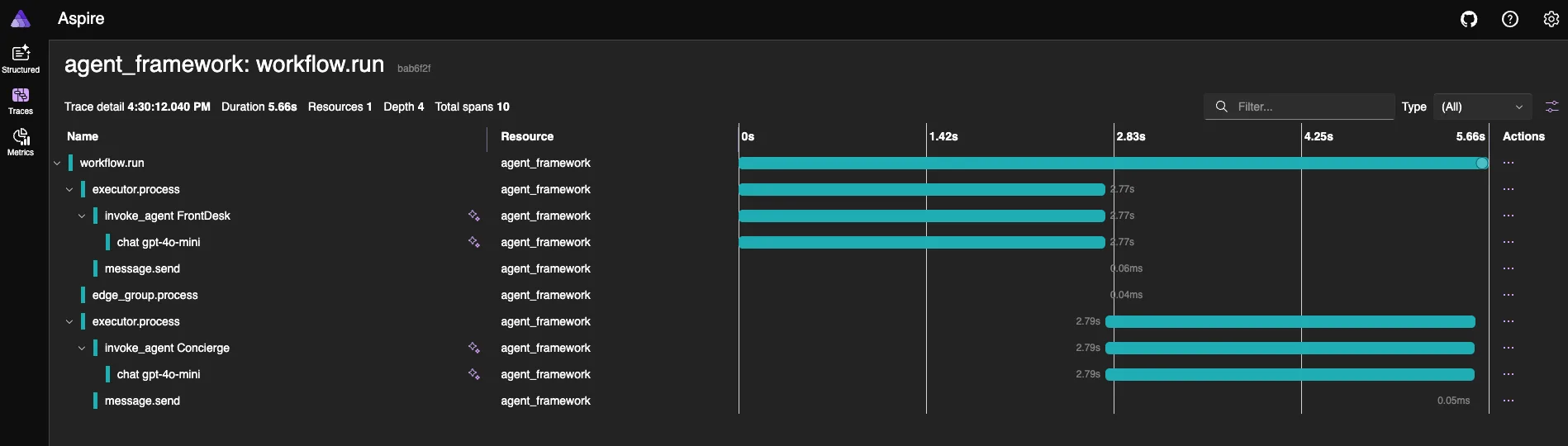
This is where OpenTelemetry (OTel) enters. In Agent Framework, OpenTelemetry support is baked-in. In GHModel.AI code, typically just one line of configuration (like AddOpenTelemetry or setup_observability):
-
Distributed Tracing: When a request comes in, passes through routing, Guardrails, calls GitHub Models, and returns results—OTel generates a complete Flame Graph. You can precisely see:
- How long does network I/O take?
- How long does LLM Token generation take?
- How long does local logic processing take?
-
Cost Transparency: Combined with OTel Metrics, we can monitor Token consumption rates. This is crucial for cost estimation when migrating from GitHub Models (free/prototype stage) to Azure OpenAI (paid/production stage).
🔧 Quick Setup
Python:
# Enable telemetry in one line
from agent_framework.observability import setup_observability
from agent_framework import setup_logging

setup_observability()
setup_logging()
.NET:
// OpenTelemetry configuration
var tracerProvider = Sdk.CreateTracerProviderBuilder()
    .AddSource("*Microsoft.Agents.AI")
    .AddOtlpExporter(options => options.Endpoint = new Uri("http://localhost:4317"))
    .Build();
Environment Variables:
ENABLE_OTEL=true
ENABLE_SENSITIVE_DATA=true               # Enable sensitive data logging in dev
OTLP_ENDPOINT=http://localhost:4317       # Aspire Dashboard / OTLP Collector
APPLICATIONINSIGHTS_CONNECTION_STRING=... # Azure Application Insights (optional)
📈 Visualization Options
| Platform | Use Case | Quick Start |
|---|---|---|
| Aspire Dashboard | Local development | docker run --rm -d -p 18888:18888 -p 4317:18889 mcr.microsoft.com/dotnet/aspire-dashboard:latest |
| Application Insights | Production monitoring | Set APPLICATIONINSIGHTS_CONNECTION_STRING |
| Grafana Dashboards | Advanced visualization | Agent Overview, Workflow Overview |
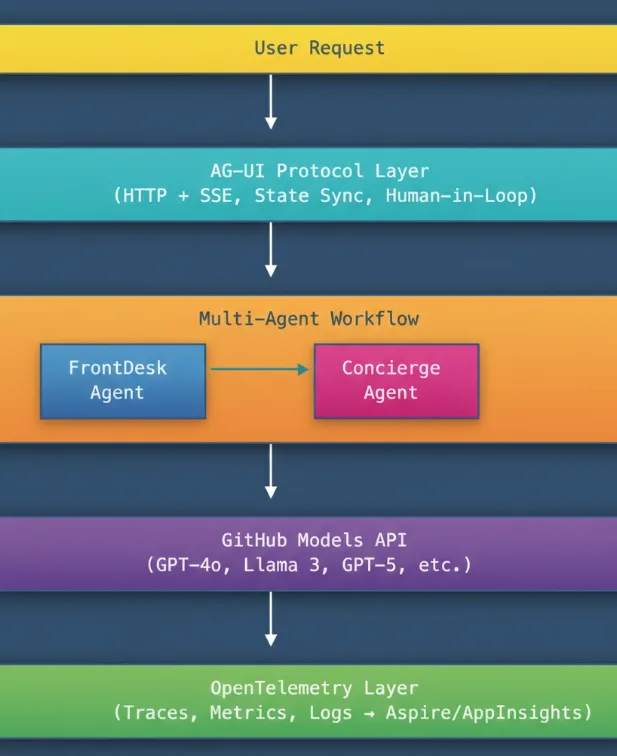
Architecture Overview
Summary: Build Your “Efficiency Closed Loop”
Returning to the GHModel.AI case, it’s not just a code sample—it demonstrates best practice architecture for modern Agent development:
| Layer | Tool | Purpose |
|---|---|---|
| Model Layer | GitHub Models | Rapidly validate ideas with free, cutting-edge models |
| Debug Layer | DevUI | Gain “God Mode View,” iterate logic quickly |
| Presentation Layer | AG-UI | Standardize output, generate user interfaces in seconds |
| Observability Layer | OpenTelemetry | Data-driven optimization, no more guesswork |
Final Thoughts
I encourage every Agent developer to dive deep into the code in Agent-Framework-Samples. Stop debugging AI with Notepad—arm yourself with these modern weapons and go build next-generation intelligent applications!
The combination of GitHub Models for rapid prototyping, DevUI for visual debugging, AG-UI for seamless user interaction, and OpenTelemetry for production-grade observability represents a paradigm shift in how we build agentic applications.
Your Agent development journey starts here. The future is agentic. Let’s build it together!
Resources
- Microsoft Agent Framework Microsoft Agent Framework GitHub Repo
- Microsoft Agent Framework Samples Microsoft Agent Framework Samples
- Microsoft Agent Framework DevUI Samples DevUI Getting Started
- Microsoft Agent Framework Observability Guide Observability Samples


Great article. Nice and short description how to create and test an agent. Thx for sharing!
Question: AG-UI stands for “Agent Generic UI” you wrote.
In the AG-UI specs (https://docs.ag-ui.com/introduction) they say “Agent–User Interaction (Protocol)”.
Just curious what the correct version is.
thanks , I have updated the content