


Introduction: A New Paradigm for AI Application Development
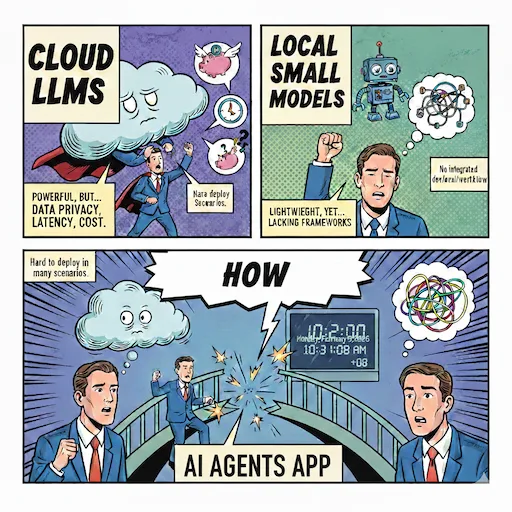
In enterprise AI application development, we often face this dilemma: while cloud-based large language models are powerful, issues such as data privacy, network latency, and cost control make many scenarios difficult to implement. Traditional local small models, although lightweight, lack complete development, evaluation, and orchestration frameworks.
The combination of Microsoft Foundry Local and Agent Framework (MAF) provides an elegant solution to this dilemma. This article will guide you from zero to one in building a complete Deep Research agent workflow, covering the entire pipeline from model safety evaluation, workflow orchestration, interactive debugging to performance optimization.
Why Choose Foundry Local?
Foundry Local is not just a local model runtime, but an extension of Microsoft’s AI ecosystem to the edge:
- Privacy First: All data and inference processes are completed locally, meeting strict compliance requirements
- Zero Latency: No network round trips required, suitable for real-time interactive scenarios
- Cost Control: Avoid cloud API call fees, suitable for high-frequency calling scenarios
- Rapid Iteration: Local development and debugging, shortening feedback cycles
Combined with the Microsoft Agent Framework, you can build complex agent applications just like using Azure OpenAI.
Example Code:
agent = FoundryLocalClient(model_id="qwen2.5-1.5b-instruct-generic-cpu:4").as_agent(
    name="LocalAgent",
    instructions="""You are an assistant.

Your responsibilities:
- Answering questions and providing professional advice
- Helping users understand concepts
- Offering users different suggestions
""",
)
How to Evaluate an Agent?
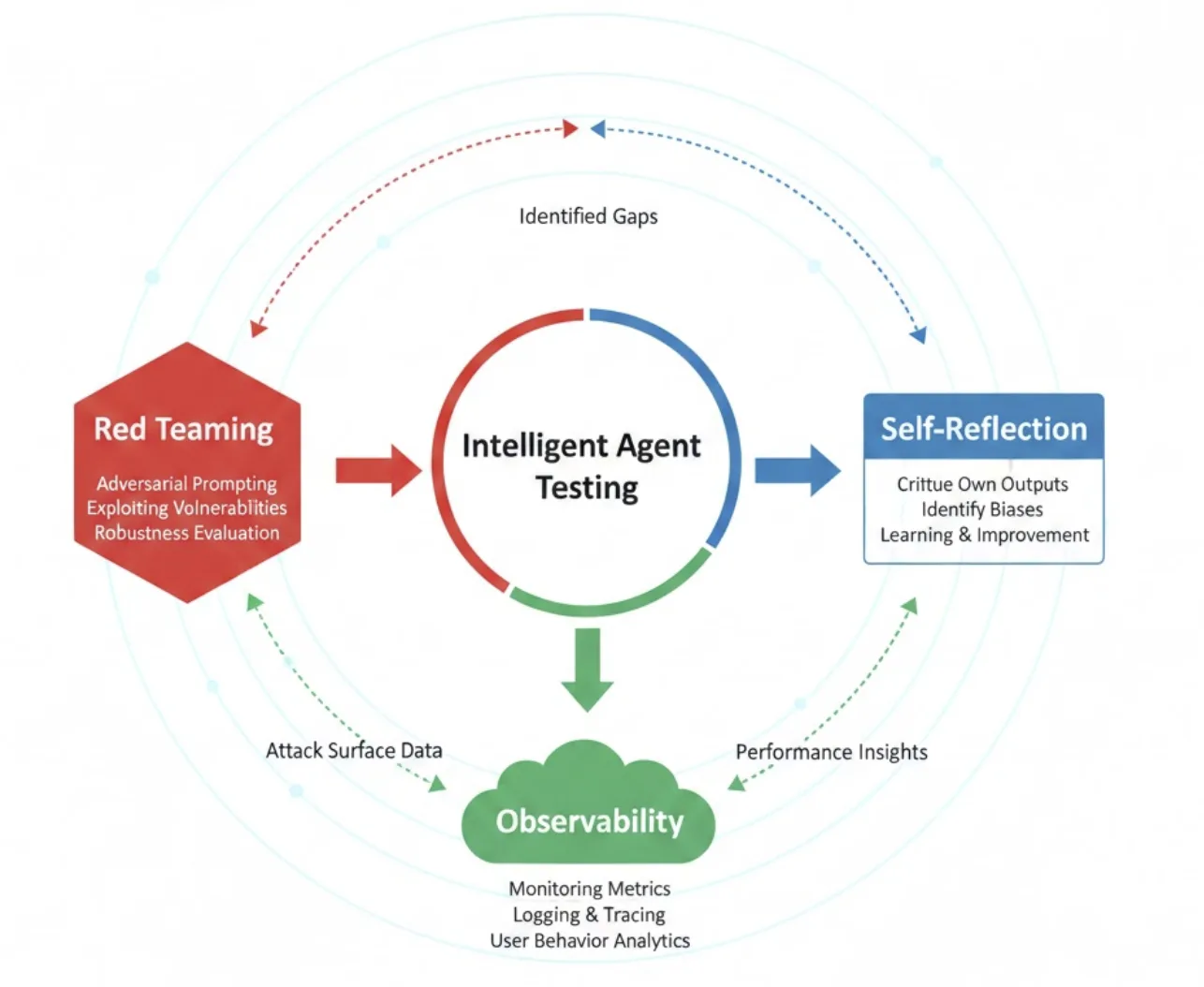
Based on the Agent Framework evaluation samples, here are three complementary evaluation methods, with corresponding implementations and configurations in this repository:
-
Red Teaming (Security and Robustness)
- Purpose: Use systematic adversarial prompts to cover high-risk content and test the agent’s security boundaries.
- Method: Execute multiple attack strategies against the target agent, covering risk categories such as violence, hate/unfairness, sexual content, and self-harm.
-
Self-Reflection (Quality Verification)
- Purpose: Let the agent perform secondary review of its own output, checking factual consistency, coverage, citation completeness, and answer structure.
- Method: Add a “reflection round” after task output, where the agent provides self-assessment and improvement suggestions based on fixed dimensions, producing a revised version.
- This content is temporarily omitted in the example
-
Observability (Performance Metrics)
- Purpose: Measure end-to-end latency, stage-wise time consumption, and tool invocation overhead using metrics and distributed tracing.
- Method: Enable OpenTelemetry to report workflow execution processes and tool invocations.
Complete Development Process: From Security to Production
Step 1: Red Team Evaluation – Securing the Safety Baseline
Before putting any model into production, security evaluation is an essential step. MAF provides out-of-the-box Red Teaming capabilities, combined with Microsoft Foundry to complete Red Team evaluation:
# 01.foundrylocal_maf_evaluation.py
from azure.ai.evaluation.red_team import AttackStrategy, RedTeam, RiskCategory
from azure.identity import AzureCliCredential
from agent_framework_foundry_local import FoundryLocalClient

credential = AzureCliCredential()
agent = FoundryLocalClient(model_id="qwen2.5-1.5b-instruct-generic-cpu:4").as_agent(
    name="LocalAgent",
    instructions="""You are an assistant.

Your responsibilities:
- Answering questions and providing professional advice
- Helping users understand concepts
- Offering users different suggestions
""",
)

def agent_callback(query: str) -> str:
    async def _run():
        return await agent.run(query)
    response = asyncio.get_event_loop().run_until_complete(_run())
    return response.text

red_team = RedTeam(
    azure_ai_project=os.environ["AZURE_AI_PROJECT_ENDPOINT"],
    credential=credential,
    risk_categories=[
        RiskCategory.Violence,
        RiskCategory.HateUnfairness,
        RiskCategory.Sexual,
        RiskCategory.SelfHarm,
    ],
    num_objectives=2,
)

results = await red_team.scan(
    target=agent_callback,
    scan_name="Qwen2.5-1.5B-Agent",
    attack_strategies=[
        AttackStrategy.EASY,
        AttackStrategy.MODERATE,
        AttackStrategy.CharacterSpace,
        AttackStrategy.ROT13,
        AttackStrategy.UnicodeConfusable,
        AttackStrategy.CharSwap,
        AttackStrategy.Morse,
        AttackStrategy.Leetspeak,
        AttackStrategy.Url,
        AttackStrategy.Binary,
        AttackStrategy.Compose([AttackStrategy.Base64, AttackStrategy.ROT13]),
    ],
    output_path="Qwen2.5-1.5B-Redteam-Results.json",
)
Evaluation Dimensions:
- Risk Categories: Violence, hate/unfairness, sexual content, self-harm
- Attack Strategies: Encoding obfuscation, character substitution, prompt injection, etc.
- Output Analysis: Generate detailed risk scorecards and response samples
Evaluation results are saved as JSON for traceability and continuous monitoring. This step ensures the model’s robustness when facing malicious inputs.
This is a screenshot after running 01.foundrylocal_maf_evaluation.py. You can improve results by adjusting the prompt.

Step 2: Deep Research Workflow Design – Multi-Round Iterative Intelligence
The core of Deep Research is the “research-judge-research again” iterative loop. MAF Workflows makes this complex logic clear and maintainable:
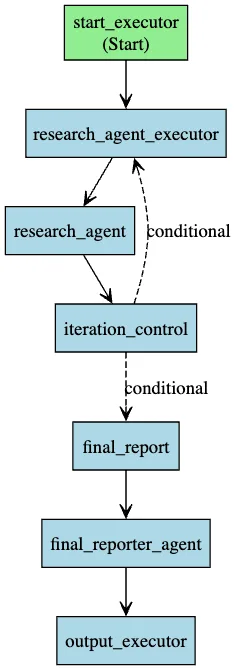
Key Components:
-
Research Agent
- Equipped with
search_webtool for real-time external information retrieval - Generates summaries and identifies knowledge gaps in each round
- Accumulates context to avoid redundant searches
- Equipped with
-
Iteration Controller
- Evaluates current information completeness
- Decision-making: Continue deeper vs Generate report
- Prevents infinite loops (sets maximum rounds)
-
Final Reporter
- Integrates findings from all iterations
- Generates structured reports with citations
Code Implementation (simplified):
from agent_framework import WorkflowBuilder
from agent_framework_foundry_local import FoundryLocalClient

workflow_builder = WorkflowBuilder(
    name="Deep Research Workflow",
    description="Multi-agent deep research workflow with iterative web search"
)

workflow_builder.register_executor(lambda: StartExecutor(state=state), name="start_executor")
workflow_builder.register_executor(lambda: ResearchAgentExecutor(), name="research_executor")
workflow_builder.register_executor(lambda: iteration_control, name="iteration_control")
workflow_builder.register_executor(lambda: FinalReportExecutor(), name="final_report")
workflow_builder.register_executor(lambda: OutputExecutor(), name="output_executor")

workflow_builder.register_agent(
    lambda: FoundryLocalClient(model_id="qwen2.5-1.5b-instruct-generic-cpu:4").as_agent(
        name="research_agent",
        instructions="...",
        tools=search_web,
        default_options={"temperature": 0.7, "max_tokens": 4096},
    ),
    name="research_agent",
)

workflow_builder.add_edge("start_executor", "research_executor")
workflow_builder.add_edge("research_executor", "research_agent")
workflow_builder.add_edge("research_agent", "iteration_control")
workflow_builder.add_edge(
    "iteration_control",
    "research_executor",
    condition=lambda decision: decision.signal == ResearchSignal.CONTINUE,
)
workflow_builder.add_edge(
    "iteration_control",
    "final_report",
    condition=lambda decision: decision.signal == ResearchSignal.COMPLETE,
)
workflow_builder.add_edge("final_report", "final_reporter_agent")
workflow_builder.add_edge("final_reporter_agent", "output_executor")
The beauty of this design lies in:
- Modularity: Each executor has a single responsibility, easy to test and replace
- Observability: Inputs and outputs of each node can be tracked
- Extensibility: Easy to add new tools or decision logic
Step 3: DevUI Interactive Debugging – Making Workflows Visible
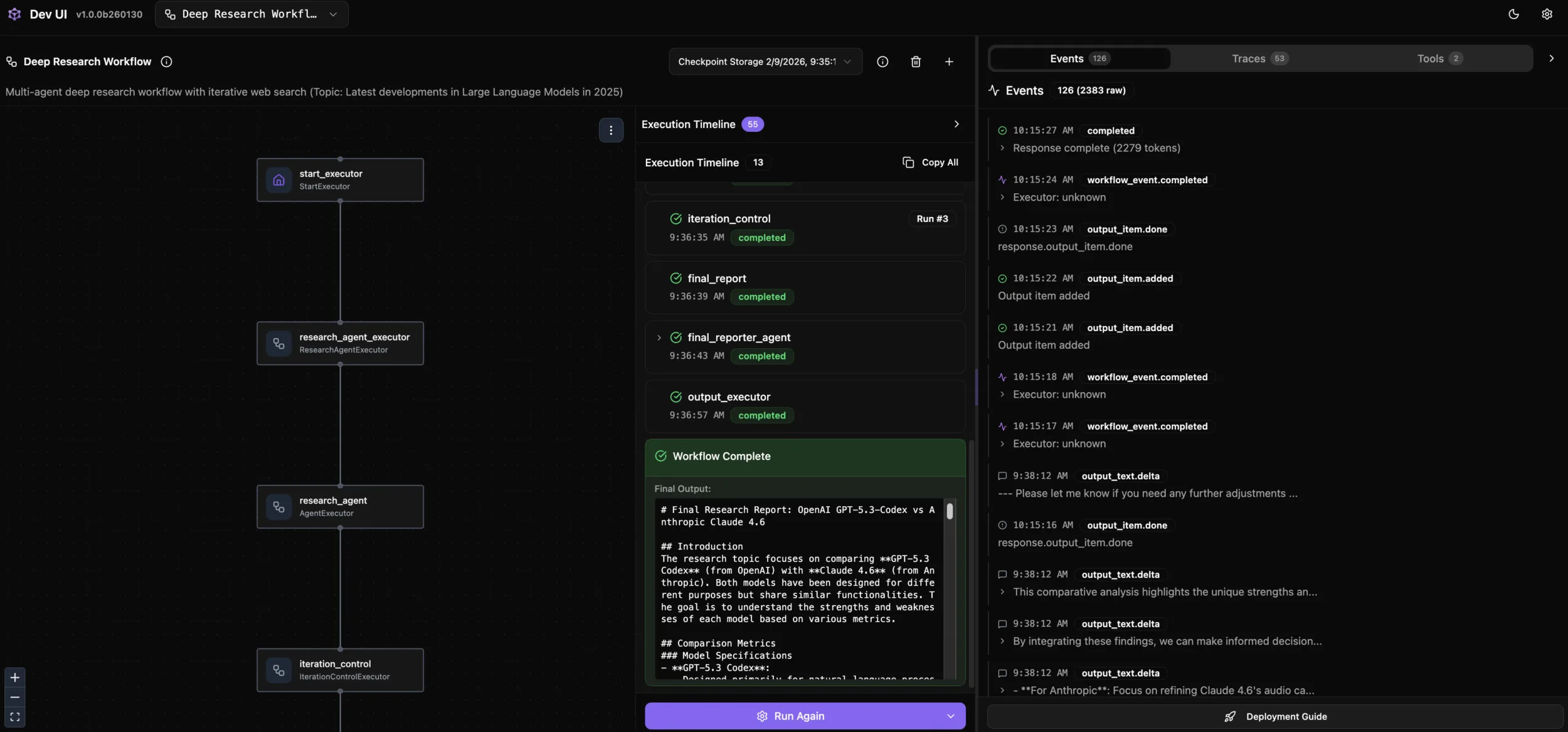
Traditional agent debugging is often a “black box” experience. MAF DevUI visualizes the entire execution process:
python 02.foundrylocal_maf_workflow_deep_research_devui.py
# DevUI starts at http://localhost:8093
DevUI Provides:
- Workflow Topology Diagram: Intuitively see node and edge relationships
- Step-by-Step Execution: View input, output, and status of each node
- Real-time Injection: Dynamically modify input parameters to test different scenarios
- Log Aggregation: Unified view of all agent logs and tool invocations
Debugging Scenario Example:
- Input: “GPT-5.3-Codex vs Anthropic Claud 4.6”
- Observe: Evolution of search keywords across 3 rounds by the research agent
- Verify: Whether the iteration controller’s decision basis is reasonable
- Check: Whether the final report covers all sub-topics
This interactive experience significantly shortens the time from discovering problems to solving them.
Step 4: Performance Evaluation and Optimization – .NET Aspire Integration
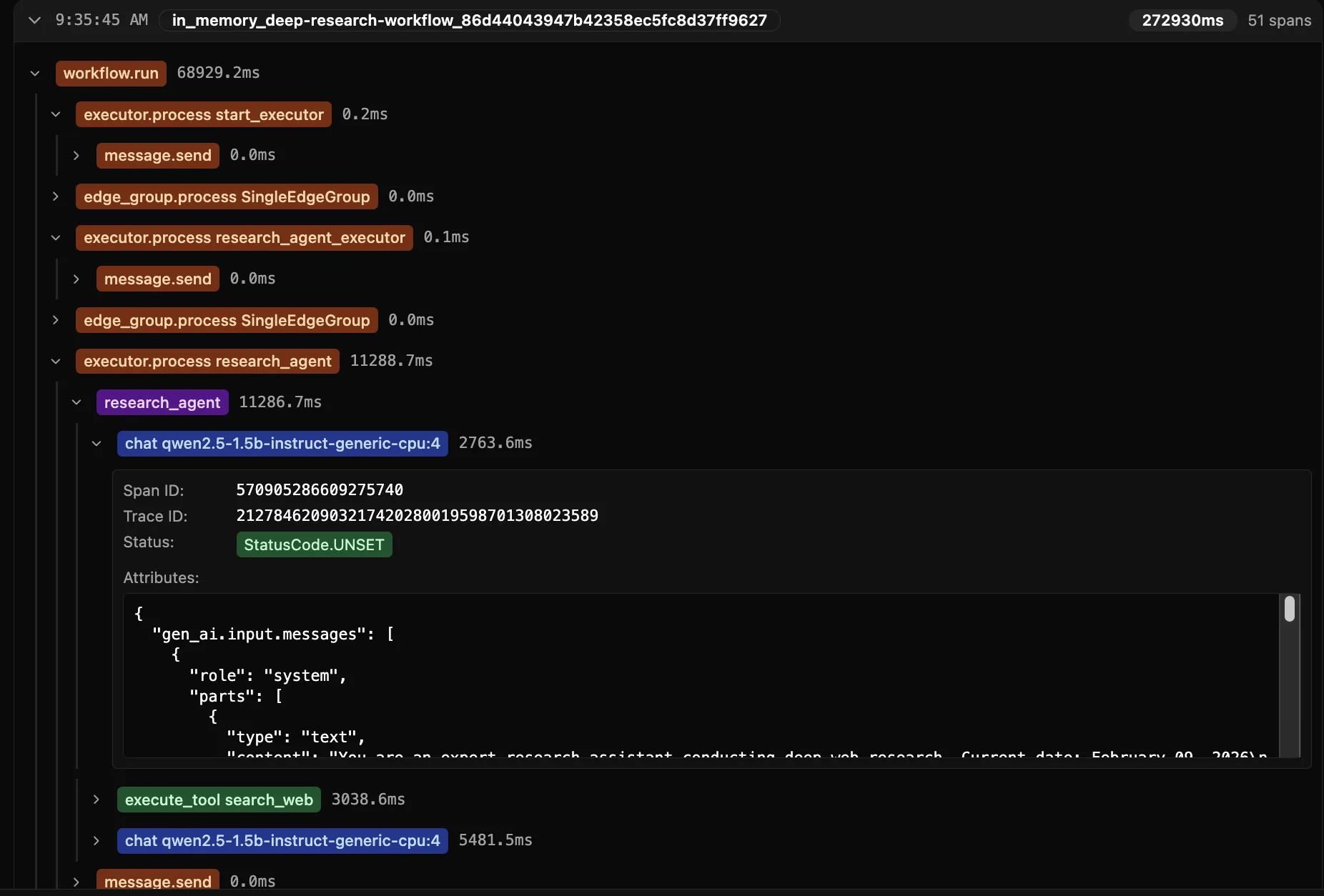
In production environments, performance is a dimension that cannot be ignored. MAF’s integration with .NET Aspire provides enterprise-grade observability:
Enable Telemetry:
# Configure OpenTelemetry
export OTLP_ENDPOINT="http://localhost:4317"

# Workflow automatically reports
- Latency: Time consumption of each executor
- Throughput: Concurrent request processing capacity
- Tool Usage: search_web call frequency and time consumption
Key Metrics:
- End-to-End Latency: Time from user input to final report
- Model Inference Time: Response speed of local model
- Tool Invocation Overhead: Impact of external APIs (such as search)
- Memory Usage: Context accumulation across multiple iterations
Optimization Strategies:
- Use smaller models (such as Qwen2.5-1.5B) to balance speed and quality
- Cache common search results to reduce API calls
- Limit iteration depth to avoid excessive research
- Streaming output to improve user experience
Through distributed tracing, you can precisely locate bottlenecks and make data-driven optimization decisions.
Practical Guide: Quick Start
GitHub Repo : https://github.com/microsoft/Agent-Framework-Samples/blob/main/09.Cases/FoundryLocalPipeline/
Environment Setup
# 1. Set environment variables
export FOUNDRYLOCAL_ENDPOINT="http://localhost:8000"
export FOUNDRYLOCAL_MODEL_DEPLOYMENT_NAME="qwen2.5-1.5b-instruct-generic-cpu:4"
export SERPAPI_API_KEY="your_serpapi_key"
export AZURE_AI_PROJECT_ENDPOINT="your_azure_endpoint"
export OTLP_ENDPOINT="http://localhost:4317"

# 2. Azure authentication (for evaluation)
az login

# 3. Install dependencies (example)
pip install azure-ai-evaluation azure-ai-evaluation[redteam] agent-framework agent-framework-foundry-local
Three-Step Launch
Step 1: Security Evaluation
python 01.foundrylocal_maf_evaluation.py
# View results: Qwen2.5-1.5B-Redteam-Results.json
Step 2: DevUI Mode (Recommended)
python 02.foundrylocal_maf_workflow_deep_research_devui.py
# Open in browser: http://localhost:8093
# Enter research topic, observe iteration process
Step 3: CLI Mode (Production)
python 02.foundrylocal_maf_workflow_deep_research_devui.py --cli
# Directly output final report
Architectural Insights: Evolution from Model to Agent
This case demonstrates three levels of modern AI application development:
- Model Layer (Foundation): Foundry Local provides reliable inference capabilities
- Agent Layer: ChatAgent + Tools encapsulate business logic
- Orchestration Layer: MAF Workflows handle complex processes
Traditional development often stops at model invocation, while MAF allows you to stand at a higher level of abstraction:
- No more manual loops and state management
- Automatic handling of tool invocations and result parsing
- Built-in observability and error handling
This “framework-first” approach is key to moving enterprise AI from POC to production.
Use Cases and Extension Directions
Current Solution Suitable For:
- Research tasks requiring multi-round information synthesis
- Enterprise scenarios sensitive to data privacy
- Cost optimization needs for high-frequency calls
- Offline or weak network environments
Extension Directions:
- Multi-Agent Collaboration: Add expert agents (such as data analysts, code generators)
- Knowledge Base Integration: Combine with vector databases to retrieve private documents
- Human-in-the-Loop: Add manual review at critical decision points
- Multimodal Support: Process rich media inputs such as images, PDFs
Conclusion: The Infinite Possibilities of Localized AI
The combination of Microsoft Foundry Local + Agent Framework proves that local small models can also build production-grade intelligent applications. Through this Deep Research case, we see:
- Security and Control: Red Team evaluation ensures model behavior meets expectations
- Efficient Orchestration: Workflows make complex logic clear and maintainable
- Rapid Iteration: DevUI provides instant feedback, shortening development cycles
- Performance Transparency: Aspire integration makes optimization evidence-based
More importantly, this solution is open and composable. You can:
- Integrate custom tools (database queries, internal APIs)
- Deploy to edge devices or private clouds
The future of AI applications lies not only in the cloud, but in the flexible architecture of cloud-edge collaboration. Foundry Local provides enterprises with a practical path, enabling every developer to build agent systems that are both powerful and controllable.
Related Resources:


0 comments
Be the first to start the discussion.