


App developers require performance, stability, and cross-platform consistency such as fast startups, smooth UI, and seamless code sharing across Windows, Android, and iOS as these factors directly impact user experience, development efficiency, and business outcomes. High performance and stability ensure apps run reliably and respond quickly, leading to satisfied users and fewer support issues. Cross-platform consistency allows developers to reuse code and deliver similar experiences across multiple devices, reducing development time, maintenance costs, and enabling faster updates and innovations.
We’re excited to release React Native Windows 0.81.0, aligned with React Native 0.81.5, includes major architectural enhancements, improved performance, enhanced developer tooling experience with Hermes Debugger, reliability, and significant progress toward feature parity between Fabric and Paper renderers.
🧵Fabric Architecture Enabled by Default
Starting with React Native Windows version 0.80 and now 0.81, the New Architecture is enabled by default. It is strongly recommended to move to the new architecture as soon as possible to take advantage of improved performance, long-term support, and modern capabilities as paper architecture will not be supported from React Native for Windows v0.82. Meta is officially deprecating and removing the old architecture starting React Native 0.82. Therefore React Native for Windows old architecture (Paper) will be deprecated starting react native windows@0.82, then the code base will be deleted along with support for the Old Architecture.
🔗Learn more: New vs. Old Architecture · React Native for Windows. Upgrading to latest version of RNW v0.81 is made more simpler with a streamlined process documented here.
New Architecture (Fabric Renderer)
React Native’s New Architecture brings many framework improvements including the advanced Fabric rendering system. It greatly improves the speed and responsiveness of React Native apps over the previous Legacy or Old Architecture and its Paper renderer. The New Architecture was enabled by default for the iOS and Android platforms in react-native@0.76.0.
In the RNW new architecture (Fabric) the JavaScript engine (on the JS thread) communicates with native components via generated interfaces such as JSI, TurboModules, and the Fabric renderer. The Yoga layout engine runs on a shadow thread to calculate layout measurements. Native Components, built using Windows UI Composition are managed and rendered using the Fabric Renderer which maps React components to corresponding native components (e.g., mapping <Switch> to SwitchComponentView). This setup efficiently maps React components to native Windows UI elements, ensuring responsive and accurate UI updates. Hosting native elements within will align with ContentIsland APIs, to allow hosting WinUI, WebView and XAML.
Meta’s React Native Old Vs New Architecture
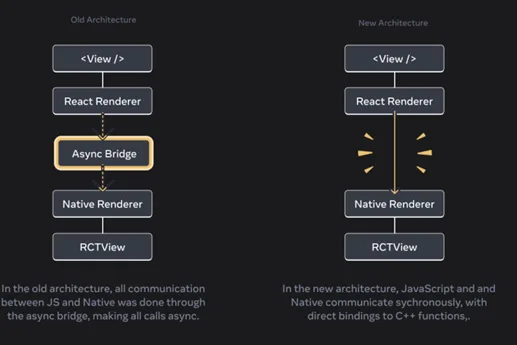
React Native for Windows also supports the New Architecture for the Windows platform. It was first available as an opt-in preview in react-native-windows@0.76.0 and will now be default for new app projects starting react-native-windows@0.80.0. For more information on the differences between the architectures on Windows, see New vs. Old Architecture Differences.
🔥 What’s New in RNW v0.81?
This release enhances the developer tooling experience with Hermes Debugger for better debugging capabilities, resolves modal crash issues, and adds refined event handlers for ScrollView and TextInput. Additionally, ScrollView now supports snap alignment and interval properties, enabling smoother and more precise scrolling behaviour.
Note: *Upgrade to Node.js 22.14.0 or higher is required from RNW v0.81 onwards
🧵Hermes Debugger Support
React Native DevTools (the modern Chrome DevTools-based debugger) is now supported in React Native Windows v0.81!
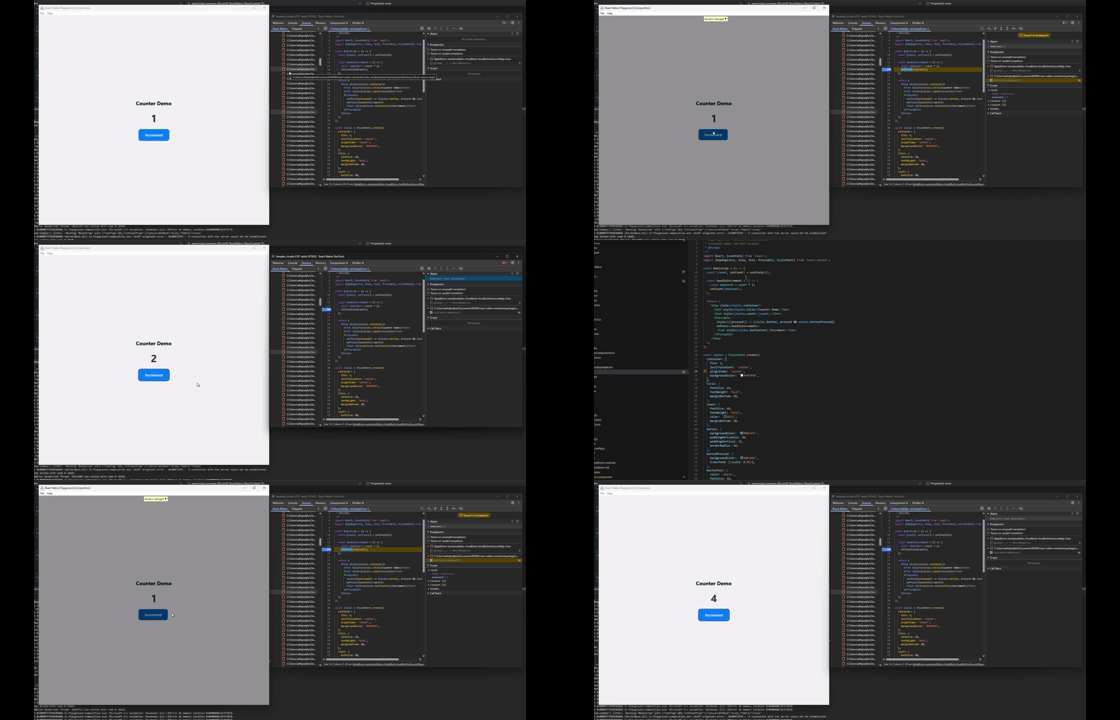
What you can do now:
- Debug JavaScript – Set breakpoints, step through code, inspect variables
- Use the Console – View logs, evaluate JS, inspect objects
- Profile performance – CPU profiler, memory snapshots, React render timing
- Inspect React components – Browse component tree, view/edit props & state, highlight elements on device
Press “J” in Metro to launch DevTools instantly (just like Android/iOS!)
📖 For complete documentation of capabilities: React Native DevTools · React Native
Why this matters: Windows developers now get the same debugging experience as Android and iOS. No more second-class tooling – it’s full platform parity. Hermes debugger provides efficient, and integrated debugging capabilities for React Native apps. The Hermes debugger allows developers to debug the code as it runs on the real JavaScript engine on the device, which leads to more accurate diagnoses of issues.
More details:
- Works with Hermes engine on both Fabric and Paper apps
- Backward compatible – hermes.dll supports both legacy and modern debuggers
- The debugger is based on stable React Native 0.76+ DevTools architecture
- Next Steps: Support for Network and Performance tab in Meta RN is enabled from 0.83 onwards and is planned to be available in RNW v0.83
🔧Maintainability Improvements in RNW v0.81
React Native Windows 0.81.0 introduces essential reliability fixes, including deadlock resolution, improved developer tooling, and security enhancements.
- The update also delivers major improvements to accessibility in the Fabric architecture, event handling for ScrollView and TextInput, and overall stability, addressing crashes and modal property issues
⚙️ Component Enhancements
Recent enhancements to React Native Windows v0.81 bring a host of new capabilities and improvements to key components, aimed at delivering a smoother, more intuitive, and accessible user experience.
ScrollView
Capabilities such as snapToStart, snapToEnd, snapToOffsets, and momentum scroll properties are added to enable more precise and smooth scrolling experiences and stability improvements addressing crashes and modal property issues.
TextInput
Enhanced capabilities include keyboardDismissMode, onPressOut, scrollEnabled, OnScroll, maxFontSizeMultiplier, autoFocus, onContentSizeChange, and selectionColor, giving developers finer control over input behaviour and appearance.
Text
Improvements in ellipsize modes deliver better text handling and clip alignment, ensuring content is displayed more effectively.
Accessibility
Accessibility is significantly improved for the Fabric architecture, with new features such as:
- Accessibility heading levels
- Support for annotation property updates
- Fixes for focus issues in Text and TextInput components
- New props for reply counts in annotations
- Improved focus handling for Text and TextInput with screen readers
📊Feature Parity Progress
The vast majority of core components, APIs, and functionality in React Native (i.e. from the react-native package) are already available in React Native for Windows in the New Architecture. However there are some gaps and we’re not at 100% feature parity with the old architecture (Paper based).
If you encounter missing properties, please open an issue. You can also leave comments on existing issues to help us prioritize what to tackle first!
Significant progress has been made toward achieving near-complete feature parity between the new Fabric renderer and the legacy Paper architecture:
- Fabric now covers 95% of core component props and 98% of extended props (excluding RefreshControl)
- Most major components (View, ActivityIndicator, Image, Switch) are ≥98% parity with Paper with (1034/1051) properties now enabled in Fabric
Flyout / Popup Behavior Update
In the New Architecture RNW, the Flyout and Popup components have been updated to align with the Modal API for better cross-platform consistency. Modal is now supported in the New architecture on Windows and developers are encouraged to migrate to it where possible.
For more details on missing modules in new architecture (Fabric) please refer to: Missing Properties · React Native for Windows
Third-Party Modules and Community Libraries
When migrating to the New Architecture (Fabric), it’s important to verify that all third-party or community modules used in your project are compatible with the new architecture. Modules developed for the old Paper bridge may not function correctly without Fabric support.
Before using any external module:
- Check the module’s documentation or GitHub repository for Fabric or TurboModule support
- Prefer modules that explicitly state compatibility with React Native 0.80 or higher
- If the module is not updated, consider alternative libraries or maintain your own fork until Fabric support is added
🏁Gallery App Updates
As part of our ongoing commitment to modernising and enhancing the React Native ecosystem, we are pleased to highlight significant updates to the Gallery applications.
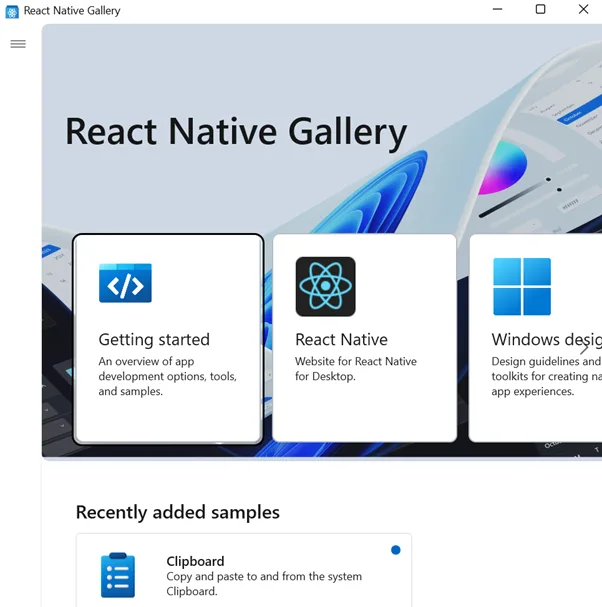
- React Native Gallery (Legacy): Uses Paper renderer
- React Native Gallery: Uses Fabric renderer
This approach ensures that developers can compare the legacy and new architectures side-by-side, making it easier to understand the benefits of migrating to Fabric. We strongly encourage teams to begin transitioning their projects to the Fabric renderer. This move not only unlocks new capabilities but also prepares applications for continued support and innovation as the Paper architecture will begin to phase out.
🧱React Native for Windows Deprecation of Paper Architecture
Nearly all future investments to React Native (and React Native for Windows) will be toward the new architecture, and we highly recommend that all projects migrate to New architecture using Fabric renderer as soon as possible. React Native (and therefore React Native for Windows) old architecture (Paper) will be deprecated starting React Native Windows@0.82, then the code base will be deleted along with support for the Old Architecture.
Here is the migration guide: Migration Guide · React Native for Windows to simplify using a sample app from paper to Fabric so developers can easily migrate.
AI Image Classifier using React Native for Windows Sample App: Migrating from Paper to Fabric and Upgrading to React Native for Windows 0.81
AI Image Classifier using React Native Windows is a sophisticated AI-powered image classification app that showcases machine learning integration on Windows ARM64 devices using React Native for Windows 0.79 (Paper architecture) which is eventually migrated to React Native for Windows 0.81’s Fabric architecture.
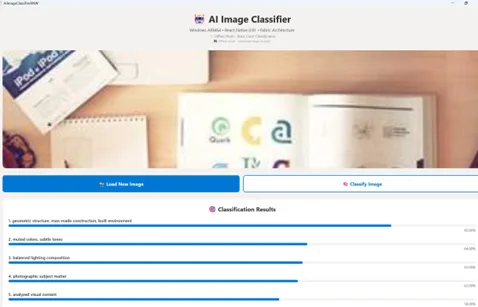
The app features advanced offline algorithms with sophisticated color/pattern analysis. The application demonstrates professional Windows development practices with:
- Optimized touch handling
- Smart image loading with retry logic
- Real-time predictions displayed through interactive progress bars
- Comprehensive error recovery systems
Featuring a modern Fluent Design interface with TypeScript safety and custom DOM polyfills, this app serves as a demonstration of how modern AI capabilities can be seamlessly integrated into React Native Windows applications while maintaining native performance and user experience standards.
Check out the step by step instructions to upgrade or migrate your React Native for Windows apps to latest versions using new architecture (Fabric).
Closing
Migrating from Paper to Fabric in React Native Windows modernizes your project, improves performance, and prepares your app for future React Native releases.
Reference Links
You can learn more about React Native or WinAppSDK at the links below:
- React Native Windows Documentation
- React Native Windows GitHub
- Fabric Architecture Overview
- Learn more about Windows App SDK
- Learn more about React Native
- Learn more about Windows development
If you’re interested in getting started with React Native for Windows, check out our website at aka.ms/reactnative.
If you would like to provide feedback regarding your experience with React Native for Windows, please submit your comments here. Your input is highly valued!!
You can also follow us on X @ReactNativeMSFT to keep up to date on news, feature roadmaps, and more.


Super cool! I’m writing RN for many years and hope/wait to see Surface Phone / Windows phone mode lands, then we can port our RN app for it!
lol when was the last time you wrote about your own windows tech like i don’t know winui 3
i hope valve win