


The SharePoint team is excited to (finally) bring Site Collection creation to Graph! Starting in Microsoft Graph beta you can now create new site collections!
But that’s not all! Creating site collections through older APIs required that your application have Sites.FullControl.All – which is a tenant-wide high-privilege scope that grants access to essentially everything. Because that just isn’t a good model for a site provisioning model we’re also introducing a new scope, Sites.Create.All allowing for a low-permission site provisioning flow. Read on to learn how?
Create A Site
Creating a site follows the normal pattern of issuing a POST request to the /sites endpoint. An example body is show below:
{
  "name": "Communication Site Test",
  "webUrl": "https://contoso.sharepoint.com/sites/commsite1",
  "locale": "en-US",
  "shareByEmailEnabled": false,
  "description": "Test Site Description",
  "template": "sitepagepublishing",
  "ownerIdentityToResolve": {
    "email": "ryan@contoso.com"
  }
}
A few notes, be sure to check out the docs for all the details:
- webUrl is the absolute url within your tenant where you want the site created
- template supports three options
- sts – team site
- sitepagepublishing – publishing/communication site
- ownerIdentityToResolve is required when calling in application-only mode
Use Sites.Create.All to Improve Security
To create a more secure provisioning experience we are also introducing the Sites.Create.All scope. Designed to be used with Sites.Selected, this scope allows your application, in both delegated and application-only flows to create new site collections but not read any existing site collections to which it does not have explicit permissions.
Once the site collection is created, the Sites.Create.All scope provides no additional access or control – instead the calling application is auto-granted Sites.Selected + FullControl of the new site collection. At this point the application permissions can be managed like any other, including full removal from the site.
Once created the site can be managed and further setup by the creating application through the Sites.Selected permissions. Lists and Libraries can be created, other applications added to the site, and other provisioning actions can be completed.
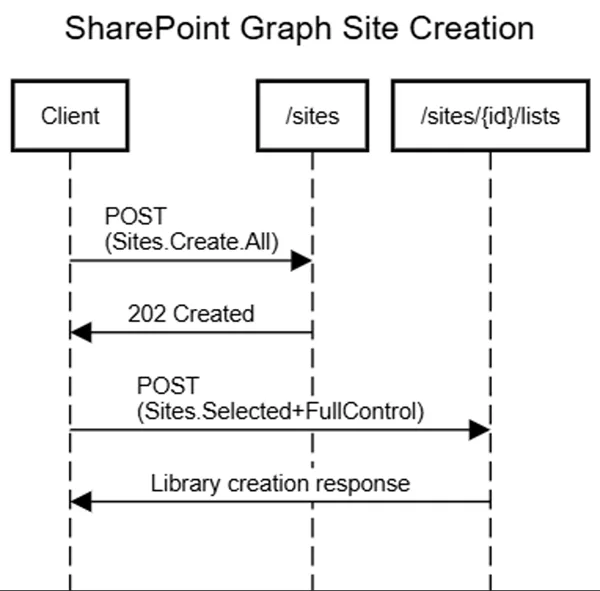
The creating application maintains access, allowing for centralized idempotent provisioning designs. It would also be possible to have multiple provisioning applications for different audiences like HR or Finance where the central app would manage only those sites with custom business logic and controls.
To see this in action, give your application Sites.Create.All and Sites.Selected scopes, and call the API as described above.
Migrating to Sites.Create.All
For your applications that create site collections today, you can swap Sites.FullControl.All for Sites.Create.All and Sites.Selected. Moving forward for any new sites your provisioning code should remain mostly unchanged.
For existing sites provisioned before this update, you need to run a script to add the application permissions to the already created sites. This can be done using calls to /permissions for each site.
Call To Action
These are two long required features, and we’re excited to bring them to you! Now is a great time to review your provisioning applications to see if migrating to this lower-permission model is a good fit. Review the Sites.Selected model, and for ISVs and vendors creating provisioning solutions – we hope this reduces the friction where Sites.FullControl.All was previously required. Let us know your input and feedback on the comments.


Will this be added to the SharePoint permission model as well? (Graph is still a bit too limited)
Updated:
Adding both SharePoint Site.Selected permission, Graph Site.Selected permission and Graph Sites.Create.All allows you to create sites, and you will get both Sites.Selected permissions, so you can use the app for CSOM, Rest etc.
The article mentions: template supports three options, but only lists 2. The last option is group, but I cannot get it to work, I only get unhelpful General exception errors.
Oooo, nice😀. Was a bit worried when it disappeared from the roadmap 6 months ago
This is a valuable enhancement that helps organisations adopt a least-privileged permission model. However, from an ISV perspective, its adoption may be limited because it still requires admin consent for the Sites.Create.All scope. It’s not entirely clear why this permission needs to be gated in this way.
For ISVs, the admin consent requirement can be a significant barrier, as it prevents users from easily “trying out” an application—even when it only stores data in their own SharePoint environment—without administrator involvement. Ideally, these improvements would allow applications to create a low-risk, sandboxed SharePoint environment for testing and onboarding, without exposing other parts...