


We’re back after the summer break, and August picks up right where June left off. We’ve shipped Beta 3 of SharePoint Framework 1.24, the Copilot Components public preview – the capability we announced in June as SharePoint Copilot Apps – is open to everyone, and we’re now working toward general availability in October 2026. More on that name change in a moment.
There’s more. We’re opening a new preview program where our engineering and product teams work directly with you to build agents that use Copilot Components on top of your own business processes – so if you have a scenario in mind, we want to hear about it. And after a long wait, React 18 support is confirmed for SPFx 1.24.
As always, this is a community-driven journey. The feedback you shared over the summer – in GitHub issues, in community calls, and directly with the team – is what shaped this release and the roadmap ahead.
SharePoint Framework 1.24 Beta 3 is now available
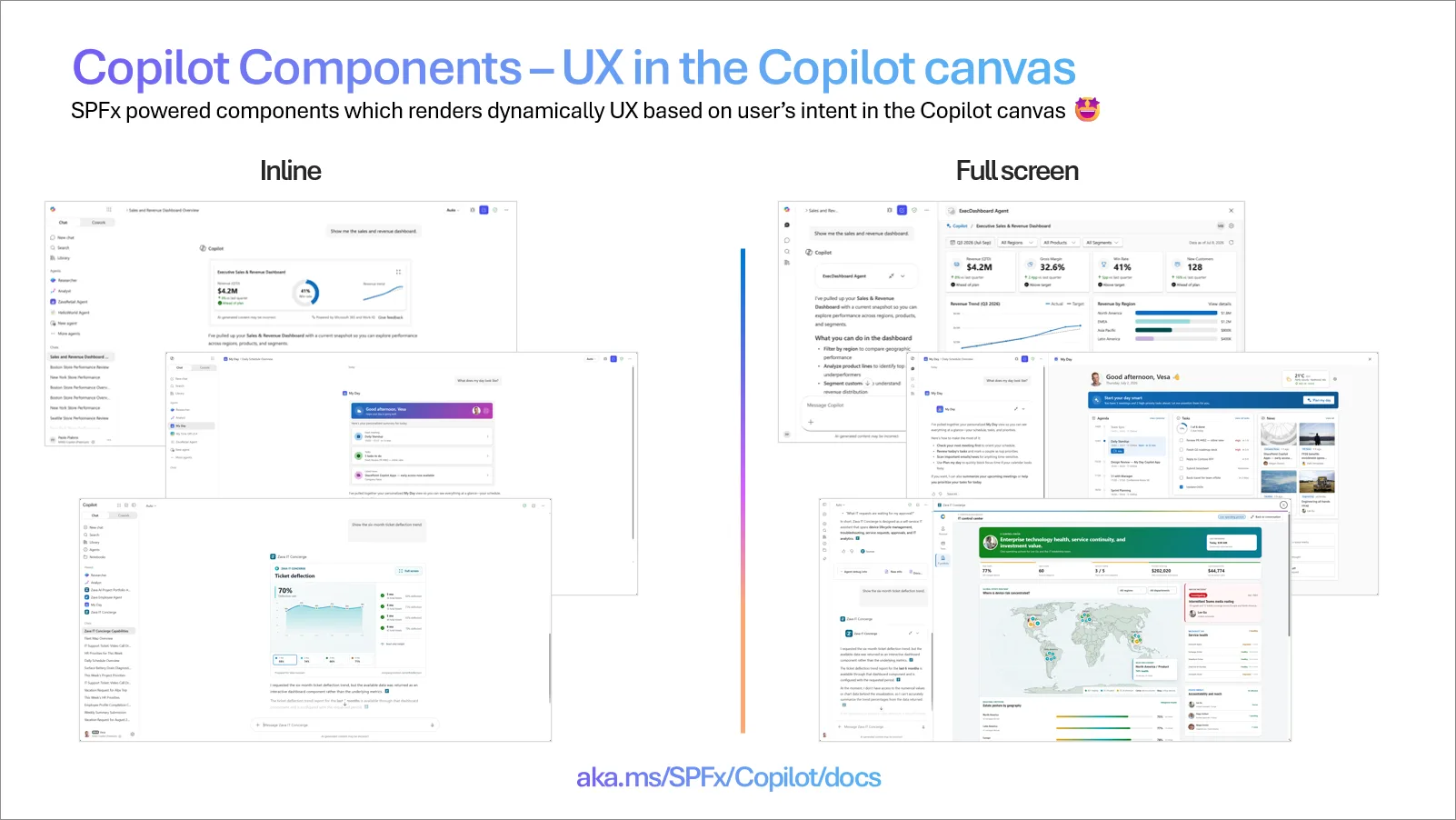
Copilot Components let you build rich, interactive user experiences that render directly on the Copilot canvas, using the SPFx skills, tooling, and investments you already have. Instead of a text-only answer, your agent can bring a real UI – cards, forms, actions, and business data – into the conversation.
Components can render inline in the Copilot conversation for quick, in-context interactions, or expand to a full-screen experience when the scenario needs more room.
A note on naming
If you followed the June announcement, you’ll know this capability as SharePoint Copilot Apps. That was the working name for public preview, and the most likely name going forward is Copilot Components – which is what you’ll see us using in this post, in the templates, and in the samples. We’re still working on locking the naming down ahead of general availability, so treat it as not yet final. Nothing about the capability itself changes with the name, and we’ll confirm the final one before GA.SPFx 1.24 Beta 3 is now available, and it moves the Copilot Components public preview forward. We’re shipping preview updates in regular, smaller increments rather than saving everything for one large drop – you get new capabilities and fixes as soon as they’re ready, and we get your feedback while there’s still time to act on it before general availability.
Built on industry standards, hosted in your own tenant
Three things worth knowing about how Copilot Components are built:
- Industry standards, not a proprietary model. You build them with React and standard JavaScript libraries, connected through MCP Apps. If your team knows React, they can build these today.
- They run in your own tenant. A component deploys to your Microsoft 365 tenant on the SPFx hosting model you already run and govern – inside your existing tenant boundary, with no new infrastructure to operate and no new place for your data to live.
- They move between tenants. A component is a standard SPFx solution package, so you can build once and deploy to your own tenant or to many customers’ tenants – the same cross-tenant story you know from SPFx, now on the Copilot canvas.
The preview is open to everyone – please try it
We want to be specific about what’s available today, because we’d like as many of you as possible to try this and tell us what you think:
- The preview is enabled worldwide, for all customers. It’s on in every tenant – there’s no special tenant, ring, sign-up, or allow-list needed to try it.
- No Copilot license is required, and there are no consumption-based costs during the preview.
- You can test the experience with the scenario samples we provide, so you don’t have to build something from scratch to see how it works. The samples include the solutions, the demo data, and setup instructions.
- We’ll confirm the licensing and cost model for general availability soon. We know this matters for your planning, and we’ll share the details as soon as they’re final.
Here’s a walkthrough of how to set up the samples and try the experience in your own tenant:
You can find sample solutions from aka.ms/SPFx/Copilot/GitHub – See the video for an example solution which has a downloadable package for easy testing.
Once you’ve tried it, we want to hear from you – what worked, what didn’t, what was confusing, and what you’d build with it. Feedback during preview is what shapes the general availability release. File issues on GitHub, raise them in a community call, or leave a comment on this post.
Our target is to make Copilot Components generally available in October 2026.
You can find the full details of this release in the release notes:
- See SharePoint Framework 1.24 Beta 3 release notes for specific updates on this preview
See it in action – the business value story
If you only have a few minutes, start here. This walkthrough shows Copilot Components in practice in an end-to-end business scenario – what the user sees, what it replaces, and why it matters.
The scenario in the video is built on the same samples linked above, so you can reproduce it in your own tenant and adapt it to your business.
Join the new Copilot Components preview program
First, to be clear about what this is and isn’t: you don’t need to join anything to use Copilot Components. The feature is already available in every customer and partner tenant today, with no Microsoft 365 Copilot license and no consumption-based costs. Download the samples and start building – that path is open to everyone, right now.
This program is something different. We’re looking for a limited set of customers and partners for a closer, hands-on engagement: going beyond the samples to build agents that use Copilot Components against their own business processes, working directly with our engineering and product teams.
Because it’s hands-on work on our side, we can only take on a small number of participants. If you’re selected, we’ll work with you to:
- Identify the business process and scenario where Copilot Components add the most value
- Help you design and build the agent and its components
- Give you a direct line to the engineering team for questions and issues
- Feed your input straight into the roadmap ahead of general availability
Sign up here: https://aka.ms/spfx/copilot/preview/signup/
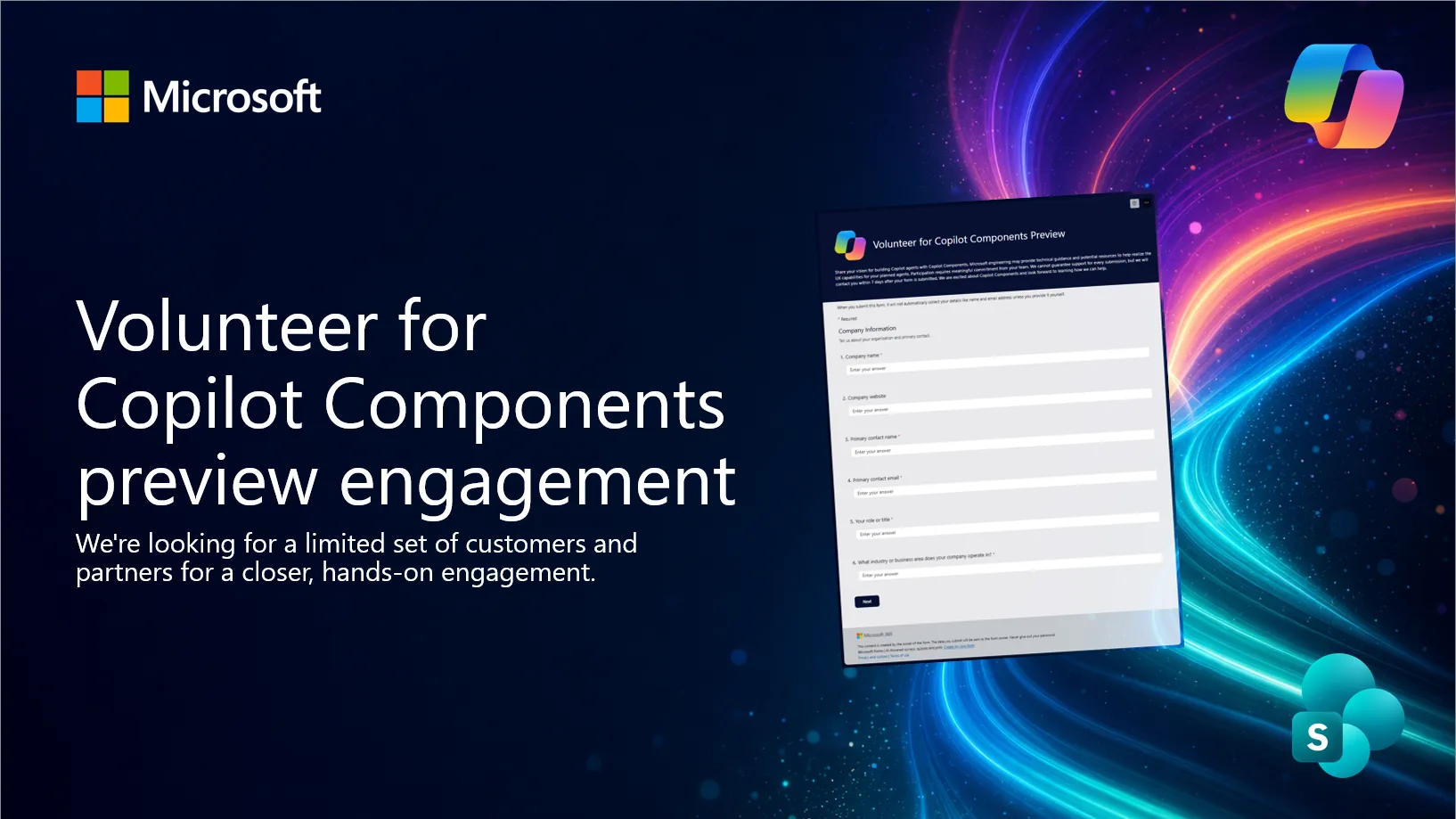
Whether you’re a customer with a process you’d like to modernize or a partner building for your clients, tell us about your scenario – that’s what we’ll be looking at as we review sign-ups. We’ll reach out to the customers and partners we’re able to take on as the preview progresses.
And if we can’t fit you into this round, you’re not blocked on anything: the feature is in your tenant today, the samples are public, and your feedback through GitHub and the community calls reaches the same team.
React 18 support is coming in SPFx 1.24
This one has been at the top of your list for a long time, and we know it’s overdue: React 18 support is landing in SharePoint Framework 1.24.
It’s the single most requested item we’ve tracked across GitHub, community calls, and every feedback survey we’ve run. Getting there meant bringing the out-of-the-box web parts up to React 18 first, and that work is now far enough along for us to commit to 1.24. Thank you for your patience, and for keeping the pressure on – it’s the reason this is happening now.
You don’t have to wait for general availability to try it. The Copilot Component React templates have already been updated to React 18, so you can start building against them today with SPFx 1.24 Beta 3.
Please test them and tell us what you find (through our issue list). We’re especially interested in:
- Anything that behaves differently under React 18’s stricter rendering behavior
- Build, bundling, or type-definition issues you hit when upgrading an existing solution
- Third-party component libraries that don’t yet play well with React 18
Roadmap
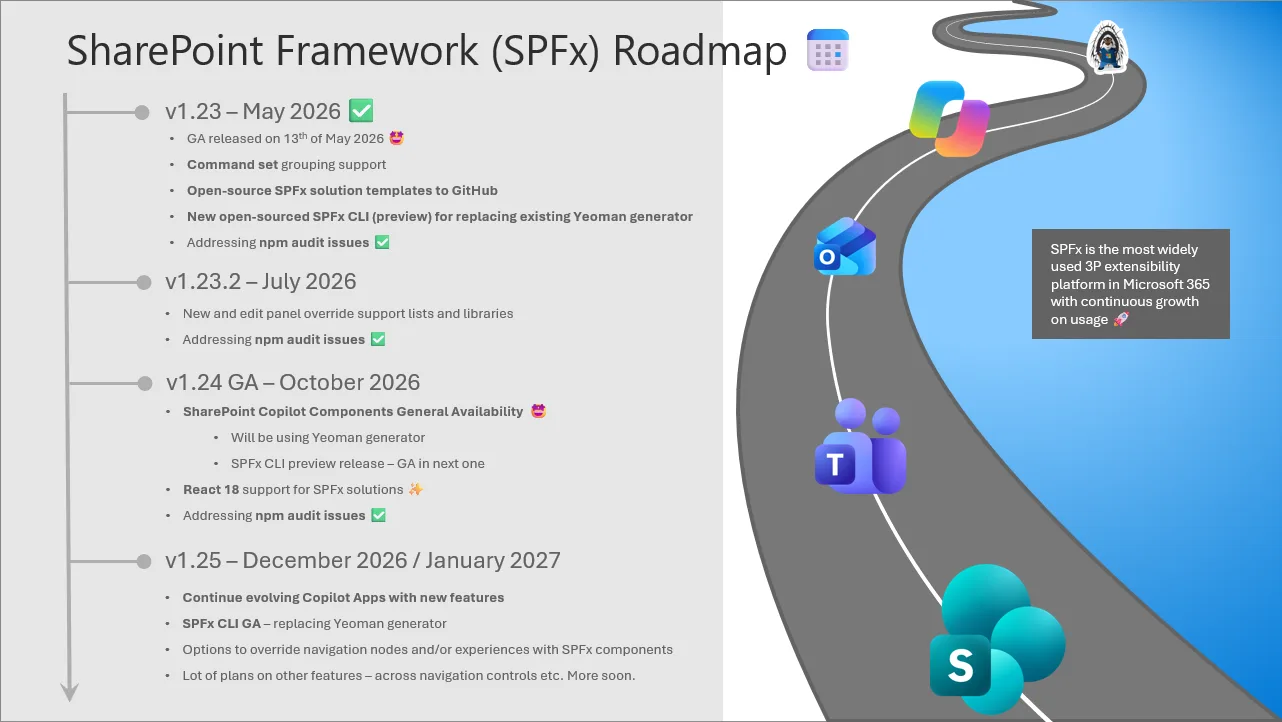
We continue to evolve towards a more predictable, quarterly-oriented release cycle, and we’ll keep the public roadmap updated as schedules and features firm up. Here is the current set of investments planned for upcoming SPFx releases:
Version 1.23.2 – June 2026 (shipped)
- Issue fixing and platform quality improvements
- Readiness for new and edit panel override support for lists and libraries
- Addressing any new npm audit vulnerability issues
Version 1.24 Beta 3 – August 2026 (shipped)
- Copilot Components public preview update
- React 18 support for SPFx solutions
- Addressing findings from previous beta specifically on Copilot Components
- Addressing any new npm audit vulnerability issues
Version 1.24 General Availability – October 2026
- Copilot Components general availability
- React 18 support for SPFx solutions
- Addressing any new npm audit vulnerability issues
Version 1.25 – December 2026 / January 2027
- Further evolving the Copilot Components model
- SPFx CLI general availability (GA) – includes updated open-source templates – replacing Yeoman generator from this version forward
- Navigation customizers – options to override navigation nodes and/or experiences with SPFx components – more details in work in progress
- Other potential areas and topics based on customer and partner feedback
- Addressing any new npm audit vulnerability issues
Roadmap items represent our current plans and may change as development progresses and customer feedback is incorporated. We will be updating you on the situation with the monthly updates.
Top of mind
These are the features that are top of mind and which we want to address as soon as possible.
- Licensing and cost model for Copilot Components at general availability. We’ll confirm the details as soon as they’re final.
- Upgrade guidance for React 18. As solutions move to 1.24, we’ll publish guidance covering the common upgrade paths and known third-party library considerations.
We encourage you to keep sharing feedback to support our planning for the upcoming upcoming quarters. We already have an extensive list of ideas and enhancements in mind, and we’re always interested in your input.
What’s next?
We continue expanding the SharePoint platform to unlock more innovation across Microsoft 365:
- SharePoint Framework (SPFx) for building rich, AI-powered, and business-integrated solutions with custom user interfaces directly in Microsoft 365, now including Copilot Components.
- SharePoint Embedded to bring SharePoint content into your own apps hosted outside of Microsoft 365 with your own user interface.
- Agents and AI to create intelligent, adaptive experiences that access your content and business information efficiently and expose them easily to your end users.
We encourage you to explore these capabilities and see how they can help you build the next generation of solutions for your organization and customers.
If you’re planning to build experiences for Copilot, Microsoft 365 & Power Platform, we strongly recommend joining our community calls and the broader Copilot, Microsoft 365 and Power Platform Community activities, covering Microsoft 365 Copilot, Power Platform, SharePoint, Microsoft Teams, Copilot Studio, Microsoft Graph, Microsoft Viva, and more. You can find call details and community assets at https://aka.ms/community/home.
You might also be interested in our SharePoint partner showcase series, where we highlight solutions built with SharePoint. Each episode includes a video and a blog post with additional details. If you’re building something with SharePoint and would like to be featured, let us know through the sign-up form and we’ll contact you to schedule a recording.
Follow us on LinkedIn or X to stay up to date on Copilot, Microsoft 365 & Power Platform announcements.
Got feedback or input on this blog post – leave a comment and we will get back to you.
We’ll be back with the next roadmap update at the end of September, as we get closer to the 1.24 general availability release. 👋
Happy coding!


Hello Vesa!
I have one question regarding Copilot Apps. Are you guys planning to bring support for custom engine agents, so we would be able benefit “build once-approach” with UIs for more complex scenarios.
Thanks in advance,
J-P
We’ll start now with the Declarative Agents, but are looking further evolve the experience. This is all based on MCP Apps model, so technically it should be also available with the custom engine agents inside of customer tenant, but we have not really worked on this model for now and do not have a specific timelines for next steps at this point.
Hi Vesa!
Congratulations on yet another big release. The React 18 bump sounds very promising and like a big step forward.
I know upgrade guidance is coming, but one question already comes to mind: would we need to deploy a new .sppkg to our customers to start running our solution on v18, or is it something we can control otherwise? I guess the deeper question is: will this require an update to the manifest? For us this is a big one because of the way we deploy our software: we have control over the JavaScript outside the package, but not...
React 18 update is gradual and not automatic replacement. We are currently also running a mix of React 17 and 18 in the SPO with the Microsoft provided web parts. This does increase the page payload, but eventually target is to be able to drop the React 17 dependency.
Technically you control the React 18 usage in your web parts with the dependencies. You can even have a mix of web parts as long as you do not mix and match for example library components between the React versions.