


You’ve built an AI agent. Now it needs users, context, and a way to participate in real work. Teams gives you all three—and we’re making it dramatically easier to bring agents to Teams. At Microsoft Build 2026, we’re announcing new investments to help your agents become teammates in everyday work, from new interaction patterns to streamlined tooling.
As a developer, you can build an agent in Teams for your own organization or publish it to the agent store for users everywhere. Partners like Linear, Cursor, and more listed below, are already showing what’s possible when agents live directly inside the flow of work—participating in conversations, completing tasks, and moving work from discussion to action.
Try the simulated demo of Linear in Teams
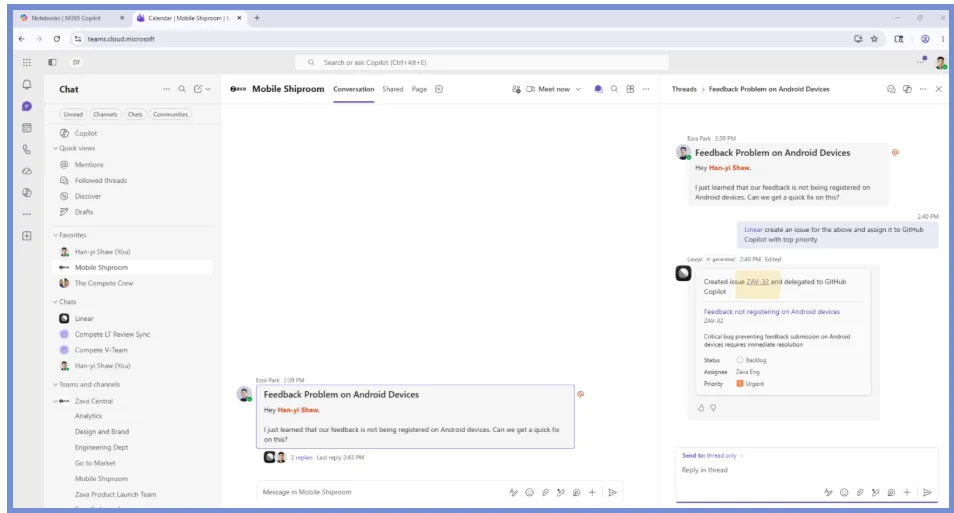
Linear agent in Teams demo
Build and deploy agents faster
Building an agent today can mean juggling registration, credentials, manifest creation, and deployment across multiple tools, slowing developers down before they even get to the interesting work. With the Microsoft Teams SDK, you can build intelligent agents powered by Work IQ that work across chats, channels, and meetings using a single, consistent platform. This enables your collaborative agents to have consistent, context-aware interactions across conversations, so they can seamlessly support work wherever it happens. The Teams SDK accelerates the path from idea to working prototype and is now generally available in Python, JavaScript, and C#. Tomorrow at Build, we are hosting a session called Build agents where work happens: chats, channels, and meetings in Microsoft Teams, where you can see the power of the Teams SDK in real time.
The Teams developer CLI helps automate setup tasks like app registration and configuration, reducing context switching and repetitive work. Expanded language support gives developers more flexibility in how they build. Be sure to check out our session today at Build From Zero to Teammate in 25 Minutes: Build a Teams Agent Live where the new CLI will be debuted.
As we streamline the developer experience, we’re also broadening where those experiences are available—now including sovereign cloud environments. Microsoft 365 Agents Toolkit and Developer Portal now support sovereign high-cloud environments, including GCC High and DoD, enabling developers targeting these tenants to run the same agent creation and update flows with built-in cloud-aware handling without the need for manual workarounds. This implementation updates authentication endpoints, token scopes, and cloud-specific service routing so provisioning and runtime behaviors align with sovereign requirements. It also introduces Teams Graph client flows used by API key, OAuth, and Entra SSO registration paths in these cloud contexts. For developers, this means a faster path to building and validating solutions in sovereign environments
Turn conversations into action with collaborative agents
The real opportunity with agents in Microsoft Teams isn’t just automation—the most impactful agents are active participants in how work gets done.
Teams provides the collaborative platform to enable interactions that make agents feel like teammates. Agents can now have 1:1 interactions with individuals in a group setting through targeted messages. For example, an agent can message an individual user in a Teams channel if they need access to a tool to complete a task without cluttering an ongoing conversation with a request that does not apply to the group.
Agents can also be invoked quickly through simple slash commands and participate in conversations with lightweight signals like emoji reactions and feedback. These patterns make interactions more natural and drive deeper engagement over time.
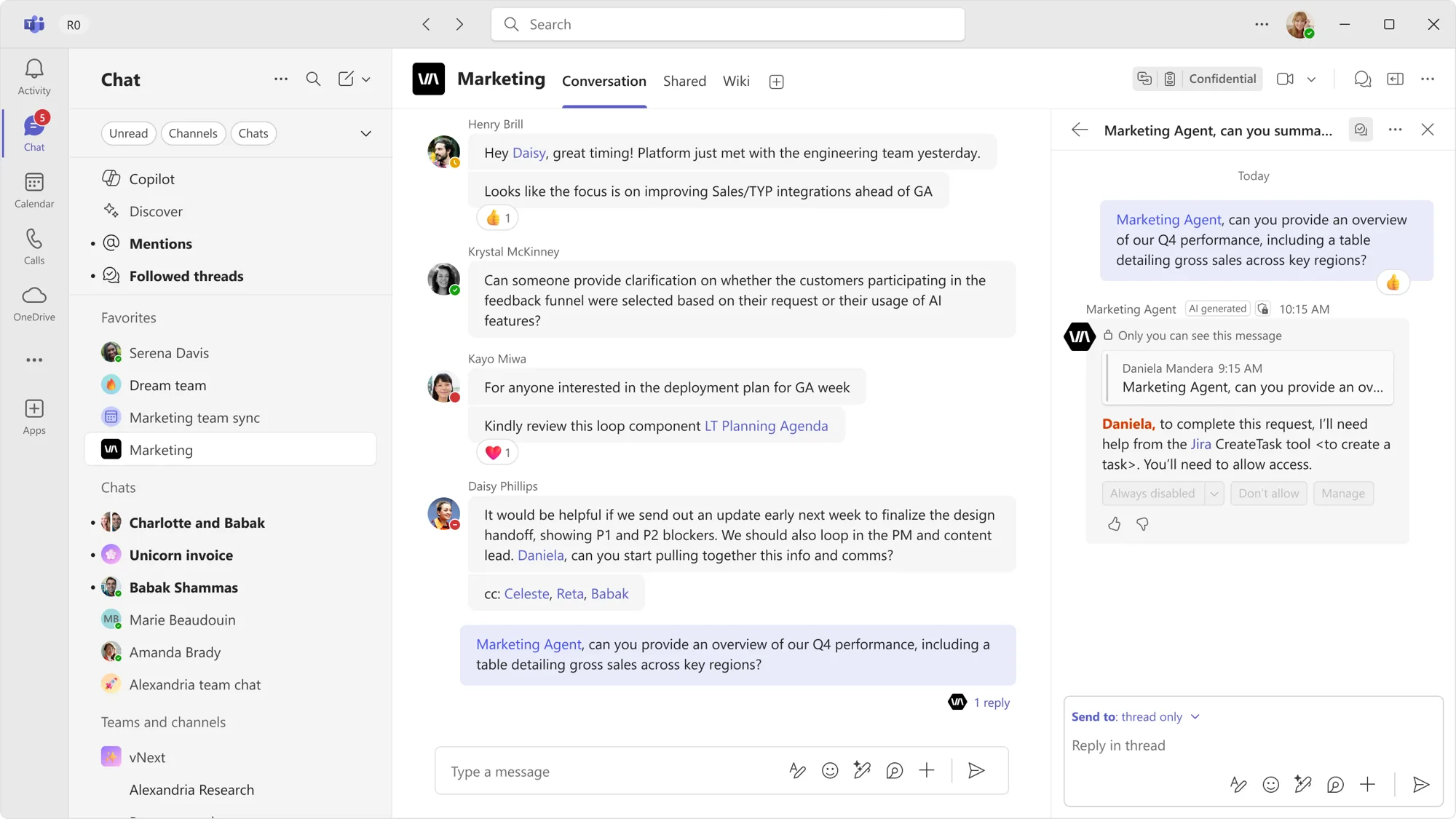
Targeted messages
Teams also supports more complex, long-running workflows. With agent sessions — context-aware interactions that allow agents to maintain continuity and track progress over time — and threaded conversations in channels, agents can track work, contribute to ongoing discussions, and help teams move projects forward. Human-in-the-loop capabilities, such as quoted replies, further enable agents to participate in real processes like approvals, clarifications, and iterative decision-making.
We’re already seeing partners like GitHub, Atlassian, Cursor, and Linear bringing human-agent collaboration to a new paradigm, directly in Teams, with a seamless @ mention from your Teams channels, group chats, and meetings. The Lovable agent will be available in the Microsoft Marketplace and Teams Store later this month.
- GitHub Copilot operates as an on-demand coding collaborator within Teams chats and channels, turning conversation context into pull requests, bug fixes, and code iterations.
- Atlassian’s Rovo agent brings Jira and Confluence context into the flow of Teams chats and channel conversations, enabling users to update issues and draft content.
- The Cursor agent enhances collaborative engineering execution by enabling your team to fix bugs, investigate code, and ship features, without leaving your Teams discussions.
- The Linear agent brings product development workflows into Microsoft Teams, turning conversations into action by capturing issues, updating projects, and helping teams stay aligned.
- The Lovable agent is coming in June and will enable users to describe what they want to build directly in a Teams chat and ship a working web app, closing the loop from conversation to creation.
These scenarios highlight what’s possible when agents are embedded directly into collaborative workflows.
Reach users where they already work
Shipping an agent is only part of the challenge – getting it into users’ hands and driving real usage is where many developers struggle. Building on Teams can help address this pain point by bringing agents into the flow of work.
When your agent lives inside Teams, it becomes part of everyday workflows instead of something users need to discover and adopt separately. It can participate in conversations across chats, channels, and meetings, helping it function as a seamless virtual teammate rather than a tool users need to seek out.
That reach now extends further than ever. Your agent is no longer confined to standard channels. With app support now available in shared channels and private channels, you can plug into how real collaboration happens across organizational boundaries and on sensitive projects. Shared channels enable seamless collaboration with both internal and external partners beyond your immediate team, while private channels create a space for more confidential decisions, approvals, and project work.
Ship your agent today
Teams gives you unified tooling, rich collaborative context, and built-in distribution—everything you need to move from prototype to production and from usage to meaningful value. Here’s how to start:
- Build your first agent with the Teams SDK that works across standard, private, and shared channels.
- Join us at Microsoft Build:
- Check out partner agents like Linear, GitHub, Cursor, and Atlassian Rovo in the agent marketplace.
Happy coding!


0 comments