


Business applications hold some of the most valuable data in an organization—customer’s financial records, sales pipeline, support cases, inventory orders—but that data has traditionally been locked behind app-specific experiences. Users switch between Dynamics 365, Power Apps, Outlook, and Teams to piece together the full picture. What if Copilot could understand your business data the way your best people do?
Microsoft 365 Copilot in business apps
Microsoft 365 Copilot is now embedded as an in-app sidecar within Power Apps, Dynamics 365 Sales, and Dynamics 365 Customer Service—removing the need to switch between apps to find context or complete steps.
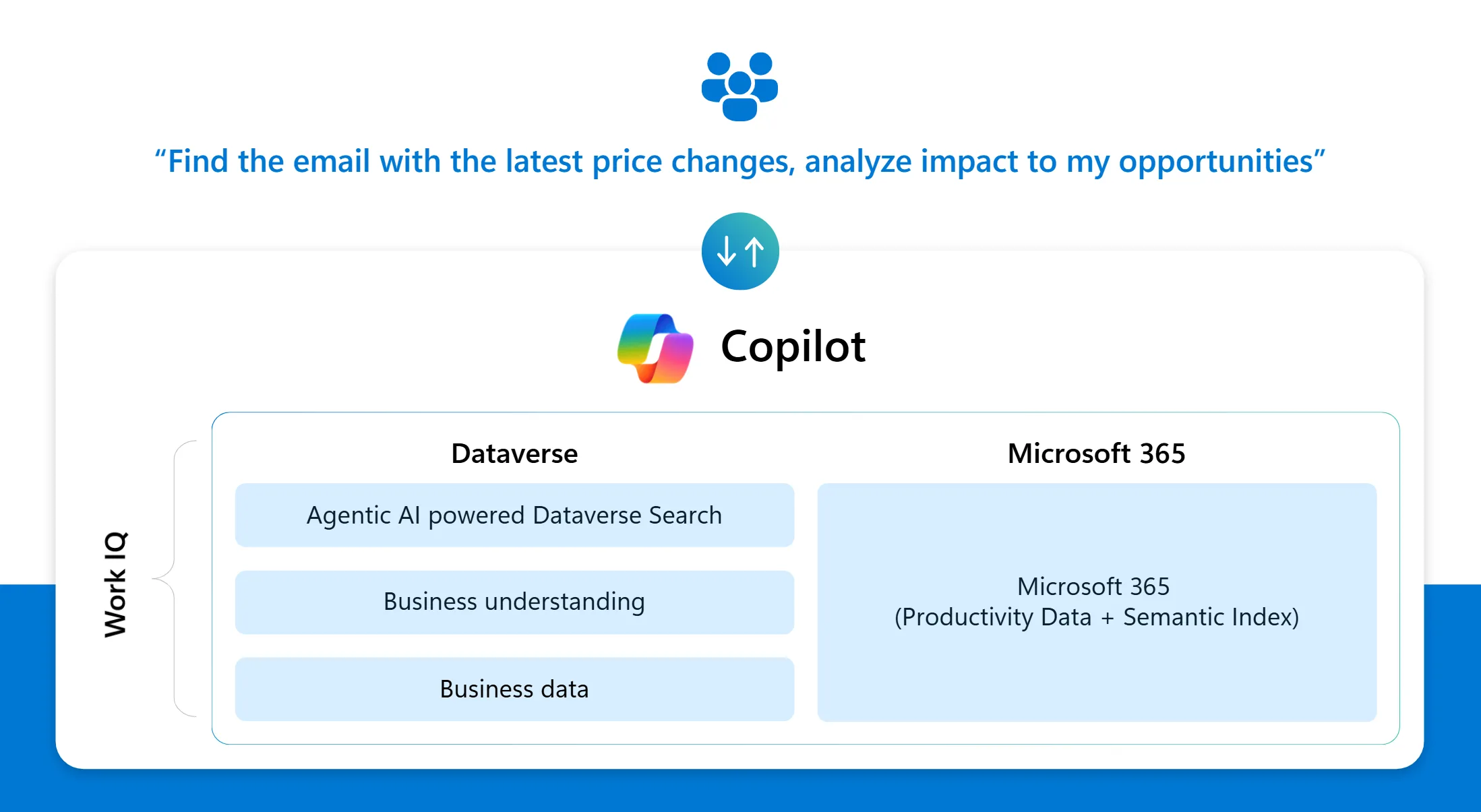
Work IQ is the reasoning layer, reconciling enterprise data and work signals from across your apps. Under the hood, Work IQ powers the combination of critical sources of business data and insights: Microsoft 365 apps, Dynamics 365 apps, and Power Platform.
- Microsoft 365 data. Emails, meetings, and documents from Microsoft 365 apps to deliver grounded, contextual answers.
- Dynamics 365 and Power Platform data. Relevant business records (accounts, opportunities, leads, activities, and your custom entities) from Dataverse.
What’s New: Intelligent semantic layer for business understanding
By leveraging recent breakthroughs in Dataverse Agentic AI powered Dataverse Search, Microsoft 365 Copilot within “in app” experiences (Power Apps, Dynamics 365 Sales, Dynamics 365 Service) delivers answers using an adaptive reasoning process based on schema and keywords (similar to how business logic retrieves records today).
With this update, we are announcing that Dataverse Search is enriched with an intelligent semantic layer that understands the business data schema and adds true business data understanding for agents to operate.
What’s New: Capture hidden procedural knowledge as business understanding
Business understanding also enables organizations to capture procedural knowledge from existing business workflows as context to further inform Copilot. For example, as the sales lead, I need to draft a sales proposal to a customer. Before I start drafting an email, I need to:
- Research: Understand customer contact’s role on LinkedIn, review CRM records for recent conversations, and use messaging based on the latest sales play, and share any marketing promotions.
- Reviews: Because this is a key account with existing contracts in place, I check with leadership to get their buy in.
- Optimize Readability: Shorten the message so that it is mobile optimized.
Business understanding captures this hidden procedural knowledge and dynamically loads these instructions to answer relevant sales questions so that Copilot can perform domain specific tasks at the level of any expert (in this case the sales lead).
Seeing it in action
Previously, in Microsoft 365 Copilot, asking “Help me understand which products are affected by pricing changes and identify my corresponding opportunities that are impacted by this change” would not return a list of records because Copilot didn’t have your Dataverse context. With business understanding, the same question produces a precise list based on grounded data —no report building, no app switching, no guesswork.
How was this accomplished? With business understanding, Work IQ can now connect the dots, understand your business data, and know how to use it effectively. Without leaving Dynamics 365 Sales, Copilot understood that “ZavaCore Fiber – Nano Grade” and “ZavaCore Fiber – System Grade” were the affected products based on signals from Outlook messages. It then compared with the CRM records to find opportunities aligned to those impacted products:
- “ZavaCore Fiber – NanoGrade” and “ZavaCore Fiber – System Grade” are product records in Dataverse and tagged in related opportunities.
- When users ask questions about finding an opportunity, Copilot knows to only analyze “open opportunities.”
Activating business understanding with Dataverse MCP
Agents are only as smart as the data they can reach. Whether you’re building an agent in Copilot Studio, GitHub Copilot, or Azure AI Foundry, the quality of your agent’s responses depends entirely on its ability to find, understand, and reason over your business data. That’s where the Dataverse MCP server comes in.
The Dataverse Model Context Protocol (MCP) server gives agents a structured, secure way to interact with your business data — inserting or updating records, reading from tables, searching knowledge, and executing prompts — all from within the agent’s context. Instead of building custom connectors, developers can point any MCP-compatible agent to Dataverse MCP and get instant access to rich, governed business data.
Starting in late March, we’re enhancing the Dataverse MCP with new tools specifically designed to build business understanding for agents. Try them out on the Dataverse MCP preview endpoint: aka.ms/dataversemcppreview.
Dataverse MCP is available today across:
- Microsoft Copilot Studio
- Azure AI Foundry
- GitHub Copilot
- Any MCP-compatible platform or agent runtime
Work IQ with business understanding means:
- Dataverse Search now understands your data, not just your schema.
- Organizations can capture procedural knowledge from business workflows.
- Agent developers can use Dataverse MCP to access new tools that enable business understanding.
The result: business-aware answers grounded in real records and real work — without leaving your workflow. This is the platform that moves Copilot from organizational context to true business understanding.


0 comments
Be the first to start the discussion.