


The new Work IQ Retrieve tool grounds agents in the context of work, helping them reason over the right information and deliver more relevant, trustworthy responses. With one retrieval layer across work sources, developers can give agents richer organizational context without building separate search systems.
Retrieve: grounded answers across work sources
The new MCP tool named retrieve searches a user’s workplace data—including email, files, meetings, Teams messages and people, as well as connected enterprise sources. As with any other tool offered by Work IQ, each user will be able to retrieve information only from work sources they are authorized to access. Security and access control always come first when consuming organizational intelligence with Work IQ.
This new MCP tool evolves the Copilot Retrieval API to reshape retrieval for agentic consumption: optimized for agents and designed to scale as they ground decisions in work context.
The tool returns two main components: raw per-source retrieval hits and a model-friendly grounding markdown with inline citations. Each hit carries structured metadata (URL, sensitivity label). Ground your answer on the markdown field.
This is more than a ranked list of documents. The response contains both a readable grounding representation and structured hit records. The markdown is the model-facing context to use when composing an answer; its inline citation IDs correspond to the individual hits, whose fields can include id, resourceId, webUrl, entityUrl, entityType, contentProtection, resourceMetadata and sensitivityLabel. Preserve citations when summarizing, and use hit metadata when the application needs to link back to a source or apply source-aware handling.
Retrieval and delegation are separate operations. Use retrieve to collect relevant context for the current agent; use ask or do_action when the task should be delegated to another agent, optionally selecting a target agent ID. This keeps the retrieval query focused on finding evidence rather than implicitly routing work.
More about the tool parameters
The tool supports a strategy setting that reflects what you know about the data location. The default copilot strategy is the broad choice: it searches indexed Microsoft 365 content and can also search federated connectors, external data sources and MCP tools. Use grounding when the request can be answered from the Microsoft 365 index alone. It searches indexed SharePoint, OneDrive, Teams and Outlook content. Values other than copilot and grounding are rejected.
For applications that need narrower source selection, you can also rely on the capabilities parameter. It accepts an optional allow-list using the Declarative Agent capability shape. It can restrict retrieval to capability families such as Email, TeamsMessages, or OneDriveAndSharePoint, with capability-specific scope fields where applicable. With this parameter you can also target a specific SharePoint site, OneDrive location, SharePoint Embedded container, a shared mailbox or specific mail folders, or a single Federated connector. Omitting the list, or passing an empty list, leaves all sources available to the selected agent in scope.
| Parameter | What it controls |
|---|---|
query |
Required. A natural-language description of what to find; empty or whitespace-only input is invalid. |
includeDeveloperCard |
Optional orchestration diagnostics from the backend, including agent metadata, tool invocation details and a retrieval summary. Defaults to false. |
agentId |
Targets a custom Copilot agent (bizchat-as-gpt-scenario); the ID is included in the request. |
strategy |
copilot (default) searches indexed Microsoft 365 content plus federated connectors, external sources and MCP tools. Use it when the location is unknown or may be outside the index. grounding limits retrieval to indexed SharePoint, OneDrive, Teams and Outlook content. Other values are rejected. |
capabilities |
An optional Declarative Agent capability allow-list, including any capability-specific scopes: People, Meetings, OneDriveAndSharePoint, Email, TeamsMessages, Dataverse and GraphConnectors. Omit it or pass an empty list to search all sources available to the selected agent. It cannot be combined with a non-default agentId; Dataverse and GraphConnectors cannot be combined with grounding. |
Try it in the Interactive Demo
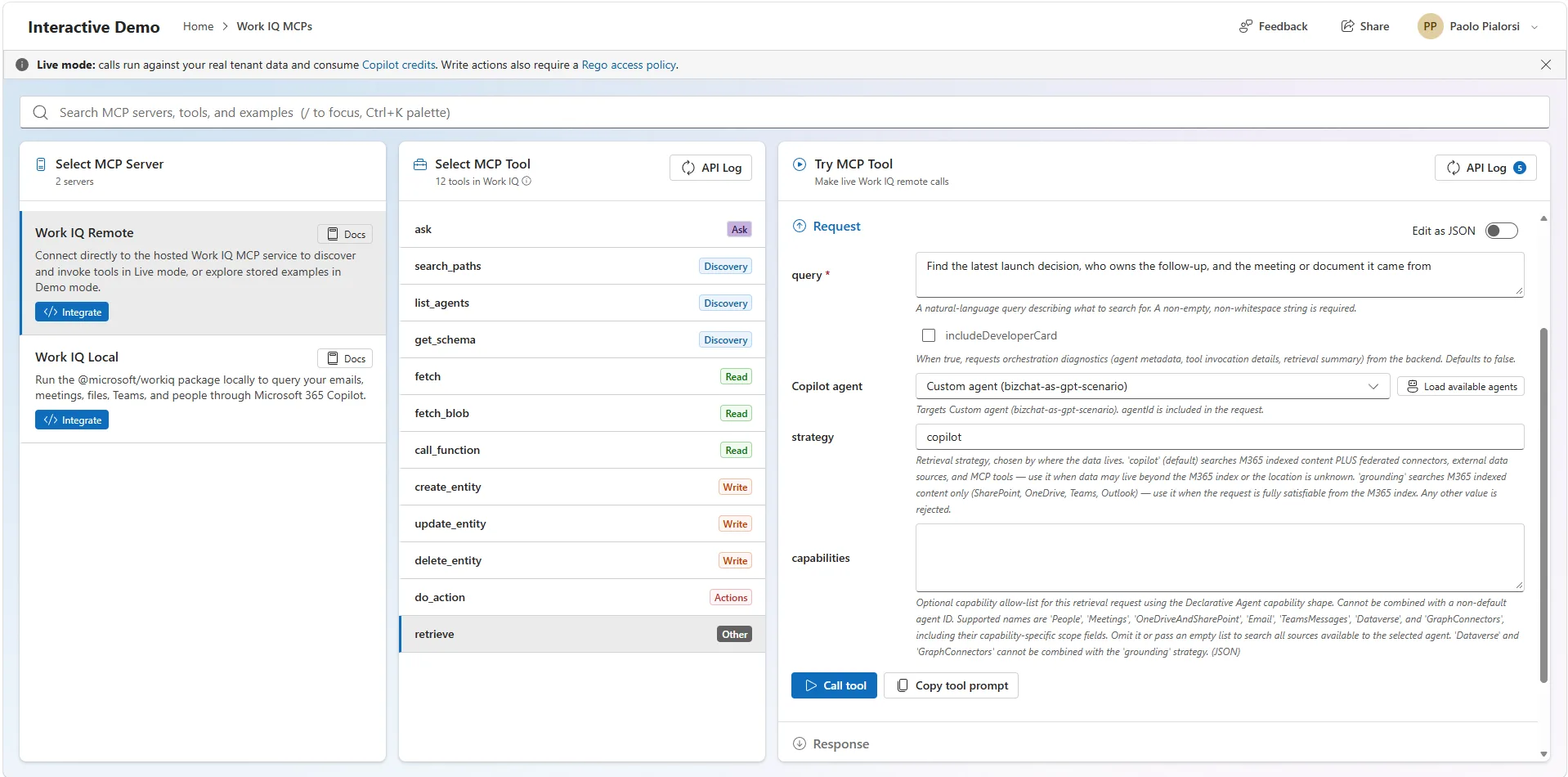
Open the Interactive Demo and explore the Work IQ MCP tools. A query that spans different work artifacts makes the distinction between broad and index-only retrieval concrete. For example, this conceptual request uses the broad default strategy and leaves the source set to the selected agent:
{
  "query": "Find the latest launch decision, who owns the follow-up, and the meeting or document it came from",
  "strategy": "copilot",
  "includeDeveloperCard": false
}
To constrain a query to the Microsoft 365 index, set "strategy": "grounding". To narrow further, supply capabilities as a JSON array of capability objects—for example, an Email capability with its supported scope fields. Do not combine a capability list with a non-default agentId, or include Dataverse or GraphConnectors with the grounding strategy. Use includeDeveloperCard: true while debugging orchestration to request backend diagnostics; leave it false for the normal retrieval path.
In the response, ground the answer on markdown, then resolve the inline citation IDs against retrievalHits. The payload is namespaced as application/vnd.ms-workiq.retrieval. The following abbreviated example illustrates its shape; real responses can contain many more hits and richer resource-specific metadata:
{
  "application/vnd.ms-workiq.retrieval": {
    "markdown": "## Files\n- **Launch decision** [^h1]\n\n## Meetings\n- **Follow-up owner** [^h2]",
    "retrievalHits": [
      {
        "id": "h1",
        "webUrl": "https://example.com/sites/project/decision",
        "entityType": "Files",
        "sensitivityLabel": {}
      },
      {
        "id": "h2",
        "webUrl": "https://example.com/meetings/project/recap",
        "entityType": "Meetings",
        "sensitivityLabel": {}
      }
    ],
    "resultCount": 2,
    "stoppedReason": "completed"
  }
}
Build your intelligent agents with Work IQ
Try the pattern in the Interactive Demo: use retrieve when an agent needs cited context across work sources. Experiment with deliberate strategy and source choices, inspect the returned grounding and metadata, and see how source-aware retrieval can shape your own agent architecture.
For more insights about Work IQ, join us at Microsoft Ignite in San Francisco, November 17–20, 2026. Watch the Microsoft Ignite site for event details and roadmap updates, and bring your questions about the future of Work IQ.
Useful links
Here you can find some useful links:


0 comments
Be the first to start the discussion.