


XAML Studio Open Sourced
It’s been over 8 years since what became XAML Studio was started. And from nearly the beginning, it was always envisioned as an open-source project… So, it’s with great pleasure that I’m happy to announce that day has finally come!
XAML Studio is now an open-source project! 🎉 A big thanks to the .NET Foundation for helping to make this journey happen and allowing us to become a new seed project within their organization.
If you want to learn more about the history of XAML Studio as a project, you can actually read all about that on our GitHub discussion post about the project here.
At a Glance 🔍
- Background on XAML Studio 📝
- New Features ✨
- Open Source Journey 🚶➡️
- Feedback & Contributing 🙋
- Next Steps 🔮
Background 📝
XAML Studio is a developer tool for WinUI developers using XAML. It lets you rapidly prototype ideas before integrating them into your app within Visual Studio. It provides a variety of tools and helpers that are useful, specifically for XAML based development, such as:
- Live Edit and Interaction ✏️
- Binding Debugger 🐞
- Data Context Editor 🗒️
- Auto-save and restore Documents 💾
- IntelliSense ✨
- Documentation Toolbox 📚
- Alignment Guides 📏
- Namespace Helpers 🌎
Those features can be found in the current 1.1 version in the Microsoft Store.
New Features ✨
The last public release of XAML Studio was version 1.1. Since then, development has still continued, with what will now be version 2, as we have worked toward this open-source achievement. See the next steps section below for more details on upcoming plans.
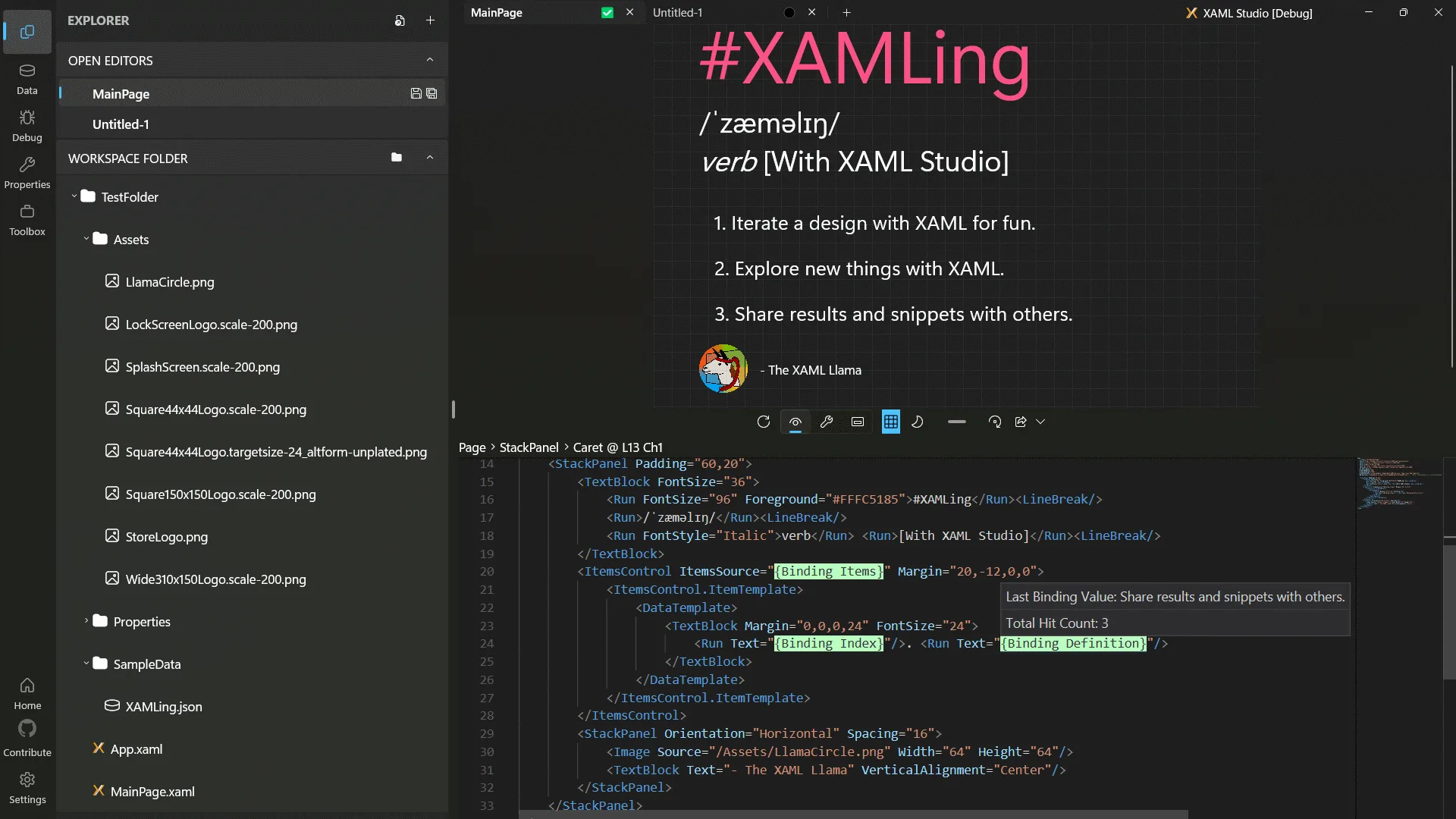
Above is a screenshot of the new v2 interface of XAML Studio. Version 2 is still in active development, but it can be built from source from the GitHub repository, today!
If you followed the #12DaysOfXAML hashtag on X (formerly known as Twitter), Bluesky, or Mastodon over the last couple of weeks, you’ll have learned all about over a dozen of the new features and improvements made to the tool.
You can learn all about them from the social links above or see our Feature Feedback discussion area on GitHub which digs into each feature, its status, and allows you to provide feedback on them.
Open Source Journey 🚶➡️
The great thing about being a XAML Llama 🦙 has already been getting to work on great open-source projects, like the Windows Community Toolkit (WCT). XAML Studio is a complex application which needed many controls which were not available, at the time, for WinUI. As part of the journey of building XAML Studio, many of these fundamentals were lifted along the way into other projects, mostly the WCT.
SwitchPresenter 🔢
For instance, the break-out SwitchPresenter control in WCT 7.0, which allowed developers to use a switch like statement in XAML came directly from the development of XAML Studio! It was built to allow easy interop with the WinUI NavigationView control to display the various activities within the XAML Studio UI. As seen in the screenshot above on the left driving the display of the Explorer panel, from the NavigationView selection.
Sizer Controls 📏
Similarly, the WCT 8.0 ContentSizer control, along with the whole “Sizer” suite, culminating in the complete revamp of GridSplitter was also driven by XAML Studio. This was driven by the need for letting the side bar panel collapse and retain its size when expanded again. This was hard to do with the traditional GridSplitter control without a lot of extra logic and manipulation of Grid columns. You can see these in the above screenshot, the ContentSizer is between the Explorer panel and the XAML document on the right, and a GridSplitter is used between the XAML preview and XAML editor.
The ContentSizer allowed us to manipulate a general XAML element in order to have that be contained within the parent layout. To collapse it, we turned off its Visibility and let the rest of the layout flow around it, but its width could be maintained that way. The PropertySizer was another early foray into figuring out how to create a manipulatable shelf alongside the NavigationView and maintaining its width between collapsed and visible states.
From there, with the continual usage of the sizer controls, we realized it was a great opportunity to centralize this logic and fix some long-standing issues and gaps with their behavior.
Vertical Segmented and SelectedContentControl 🎛️
The Windows developer community is great. It’s been amazing to see developers rally together to contribute to open source and build things that accelerate everyone forward.
Just as we were preparing for this moment, we realized we needed some other experiences to fill some gaps. Discussions in the Windows App Community Discord server led to Avid29 jumping in to open a WCT PR to add a Vertical Orientation to the Segmented control (as seen in the header image at the top of this blog), and with AndrewKeepCoding to the creation of the SelectedContentControl. 🦙❤️
The tabs may look connected to the document in XAML Studio v2, but they’re not. We needed to separate them in order to gain control of the layout of the TitleBar area, this let us place the XAML Studio application name there and be the drag handle for the app. This is a non-standard pattern, so please provide feedback on how it feels to use the app in the feature feedback forum.
Adorners 🎁
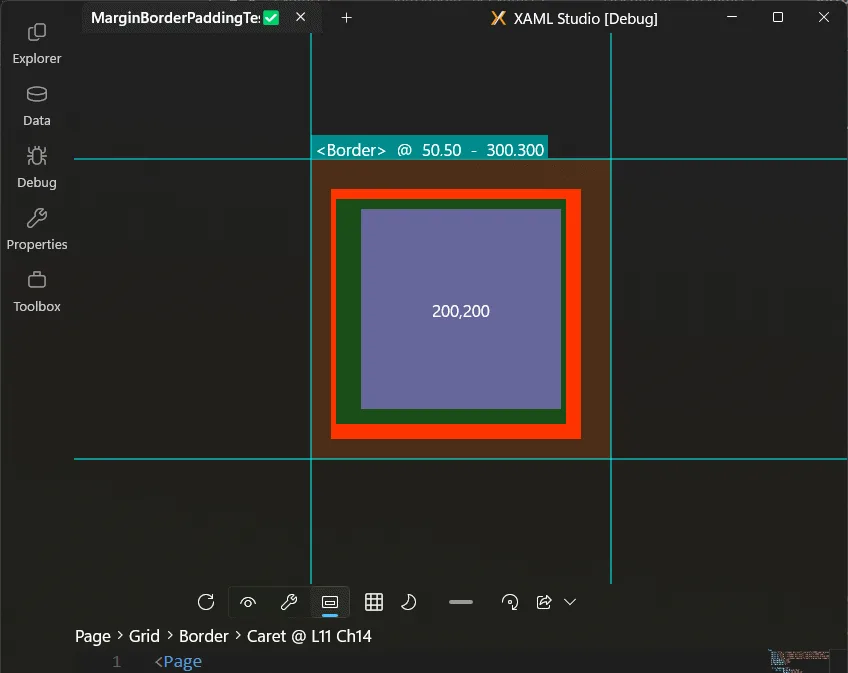
Last, but not least. WinUI XAML-based Adorners. These didn’t originally start explicitly for XAML Studio, they started as a hackathon project to figure out what was possible in this space. WPF Adorners have been a staple of complex editors and manipulation of UI for XAML, but have long since been missing from WinUI.
The project originally started in the Windows Community Toolkit Labs, where new controls are prototyped. There were some limitations with responding to layout, however, they were good enough to pull into XAML Studio for experimenting with advanced visualizations and editor tools, like the boundary highlighter above.
Through this work, some of the original challenges were solved, and as part of the journey to open sourcing XAML Studio, we updated and released an initial experimental version of the Adorners package through WCT Labs last month! You can try it out in your own WinUI applications with the CommunityToolkit.Labs.Uwp.Adorners or CommunityToolkit.Labs.WinUI.Adorners package on NuGet today!
Feedback & Contributing 🙋
Not sure how to get started contributing? Don’t worry! Did you know that just providing feedback on what we’re doing and trying our new features is contributing?!?
Jump into the Feature Feedback forum to learn about new v2 features to try and provide feedback on what works and what doesn’t work.
Join the discussion on Discord in the #xaml-studio channel of the Windows App Community Discord server.
You can also reach out on social media with the #XAMLStudio hashtag. Find me at @XAMLLlama, @xamlllama.bsky.social, or @XAMLLlama@hachyderm.io.
If you’re interested in contributing documentation or code, here are a few extra steps:
- Take a look at our repository and clone it. Be sure to checkout the
devbranch for v2. - Open the
XamlStudio.slnxsolution and try to build it following the steps in the readme. - Back on GitHub, find an unclaimed issue.
- Comment to chime in with what you’d like to do, and we can help you get started toward your first Pull Request (PR)!
Next Steps 🔮
Open sourcing is a feature! This was a lot of work to get to this point, but we’re super excited to continue this journey with the community of passionate WinUI developers out there. 🦙❤️
XAML Studio v2 has a lot of cool features, but many of them are still experimental and early in their development cycle. We hope to continue improving these experiences and stabilizing the code, especially with some still needed larger changes needed to fully support some of the new experiences as well as WinUI 3.
Once we’re ready, hopefully later this year, we’ll work to an official stable release of v2 that ships to the Microsoft Store. You can track the latest progress towards a v2 beta release on our Roadmap Issue here.
I look forward to seeing everyone on GitHub, thanks!
🙋♂️ Looking to learn more about WinUI? Check out this YouTube Playlist.


What about also open sourcing Blend for VS?
As much as Microsoft wants WinUI to take off, WPF has way more market and mindshare and us .NET desktop devs are far more likely to encounter and maintain a WPF app in the wild than a WinUI app.
Thank you Michael! This is FANTASTC news!!! I’m really excited to see XAML Studio open-sourced and to follow its future!!!🤩