


This month we’re shipping three updates that make Reinforcement Fine-Tuning (RFT) more accessible, more powerful, and easier to get right:
- Global Training for o4-mini — train from 13+ Azure regions at lower per-token rates.
- New model graders — GPT-4.1, GPT-4.1-mini, and GPT-4.1-nano are now available as model graders, giving you more flexibility and cost control when scoring model outputs.
- RFT best practices — a distilled guide to help you design graders, prepare data, and avoid common pitfalls.
Read on for the details.
Global Training for o4-mini
Global Training expands the reach of model customization with the affordable pricing of our other Global offerings. With this update, o4-mini joins the list of models you can train globally:
- Train from anywhere — launch fine-tuning jobs for o4-mini from 13 Azure regions today, expanding to all finetuning regions by end of April.
- Save on training costs — benefit from lower per-token training rates compared to Standard training.
- Same quality, broader reach — identical training infrastructure and model quality regardless of the region you start from.
Currently available regions: East US 2, North Central US, West US 3, Australia East, France Central, Germany West Central, Switzerland North, Norway East, Poland Central, Spain Central, Italy North, Switzerland West, and Sweden Central.
o4-mini is one of the most popular models for reasoning-intensive and agentic workloads. Adding Global Training support makes it significantly more cost-effective to customize at scale—especially for teams spread across multiple geographies.
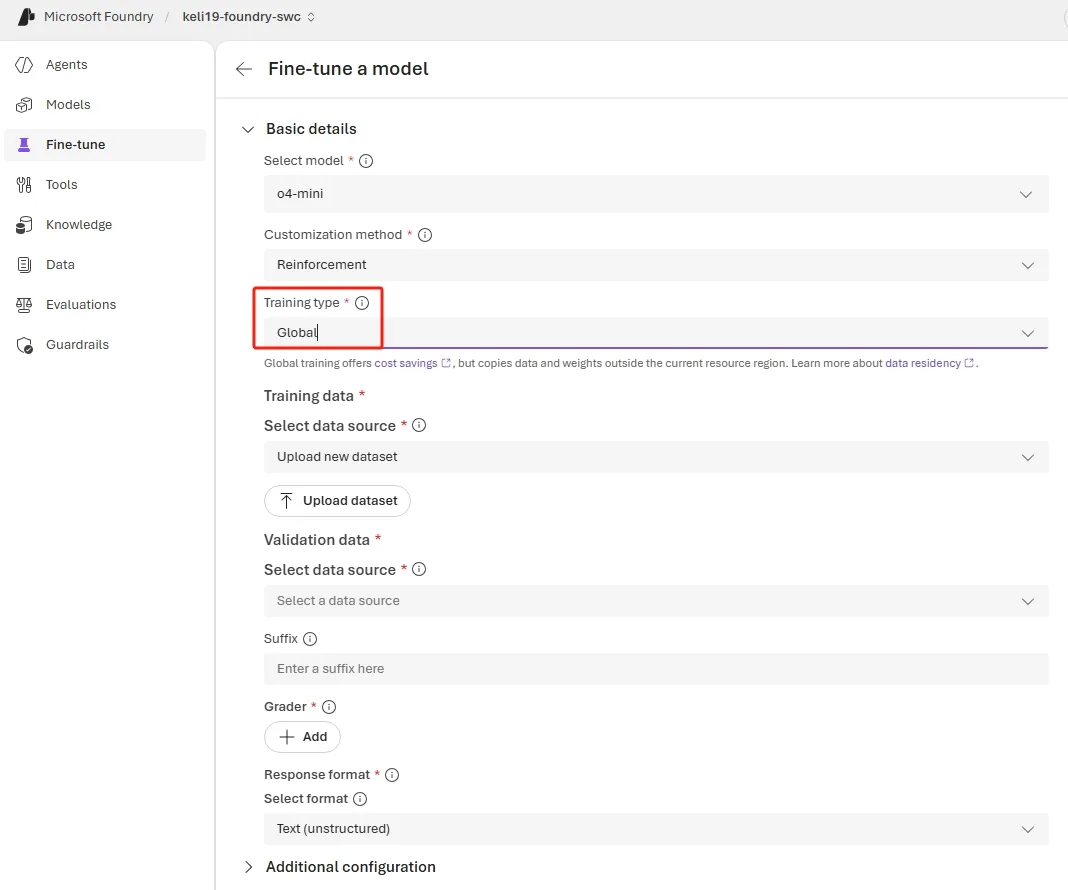
Create an o4-mini Global Training Job via REST API
curl -X POST "https://<your-resource>.openai.azure.com/openai/fine_tuning/jobs?api-version=2025-04-01-preview" \
  -H "Content-Type: application/json" \
  -H "api-key: $AZURE_OPENAI_API_KEY" \
  -d '{
    "model": "o4-mini",
    "training_file": "<your-training-file-id>",
    "method": {
      "type": "reinforcement",
      "reinforcement": {
        "grader": {
          "type": "string_check",
          "name": "answer-check",
          "input": "{{sample.output_text}}",
          "reference": "{{item.reference_answer}}",
          "operation": "eq"
        }
      }
    },
    "hyperparameters": {
      "n_epochs": 2,
      "compute_multiplier": 1.0
    },
    "trainingType": "globalstandard"
}'New Model Graders: GPT-4.1, GPT-4.1-mini, and GPT-4.1-nano
Graders are the engine of RFT—they define the reward signal your model optimizes against. Until now, model-based graders were limited to a smaller set of models. Starting this month, three additional models are available as graders:
- GPT-4.1
- GPT-4.1-mini
- GPT-4.1-nano
When to Use Model Graders
Deterministic graders (string-match, Python, endpoint-based) should remain your default—they are faster, cheaper, and more reproducible. Reach for model graders when:
- The task output is open-ended or subjective (e.g., summarization quality, tone adherence, multi-step reasoning coherence) and cannot be reduced to a simple string check.
- You need to score partial credit across multiple dimensions—such as factual accuracy, completeness, and safety—in a single grading pass.
- You are building an agentic workflow where tool-call correctness depends on semantic context that pattern matching cannot capture.
Choosing the Right Model Grader
- Start with GPT-4.1-nano for initial iterations—its low cost lets you run more experiments and faster feedback loops.
- Upgrade to GPT-4.1-mini once your grading rubric is stable and you need higher fidelity.
- Reserve GPT-4.1 for production grading or complex rubrics where every scoring decision counts.
Tip: You can mix grader types within a single RFT job. For example, use a string-match grader for the “correct answer” dimension and a GPT-4.1-mini model grader for evaluating the “reasoning quality” dimension.
Reinforcement Fine-Tuning Best Practices
Whether you are using the new model graders or deterministic ones, the following best practices will help you get the most out of RFT.
When to Use RFT
RFT improves reasoning accuracy and decision quality in tasks where outputs can be clearly evaluated and scored. It is especially effective when:
- Tool-calling accuracy matters — the model must select and invoke the right tools with correct parameters.
- Policy or rubric enforcement — outputs need to follow specific business rules that a grader can validate.
- Structured data extraction — correctness is unambiguous and can be scored deterministically.
Not a fit for style or tone. If you need formatting, voice, or stylistic adjustments, prefer prompt engineering, structured outputs, or supervised fine-tuning (SFT).
Step 1: Define the Objective
Start by clearly stating the task and what success looks like. Then design a grader that reflects real task quality as reliably as possible. The grader is the primary driver of RFT success—invest disproportionate effort here.
Step 2: Establish a Baseline
Before training, run a baseline evaluation on a small set of examples (10–100 samples) so you understand starting performance and can measure real improvement. Evaluate using a base model (for example, o4-mini) and experiment with system prompts to reach the best possible performance before fine-tuning.
Step 3: Design Effective Graders
The grader determines what the model optimizes for. Follow these principles:
- Use the simplest grader that works. If validating an exact-match answer (a number, a multiple-choice letter), use a string-match grader rather than a model-based or Python grader.
- Prefer deterministic checks. String validation, code/Python-based graders, and endpoint-based graders are more reliable than model-based grading.
- Aim for well-distributed rewards. Rewards that are too sparse or too uniform produce weak learning signals that limit model improvement.
- Validate on diverse, real-world inputs. Validate the grader on diverse, real world inputs rather than relying only on synthetic data.
Step 4: Start Small and Iterate
Begin with small datasets (10–100 samples), simple graders, and low epoch counts. A practical workflow:
- Start with o4-mini RFT to validate the end-to-end setup and grader behavior.
- Graduate to larger models once the reward signal and training loop look healthy.
- Change one variable at a time so gains or regressions can be clearly attributed.
Step 5: Tune Training Parameters
Expect epoch count and compute_multiplier to have the most impact on quality. Adjust one at a time and monitor the reward trend and variance throughout training.
RFT Data Format
RFT requires a different data format from SFT. The final message in each row must be a User or Developer role—not Assistant.
SFT format (answer in the assistant message):
{
  "messages": [
    { "role": "system", "content": "Reply to the user's question as accurately as possible." },
    { "role": "user", "content": "Question: What is the capital of France?" },
    { "role": "assistant", "content": "Paris" }
  ]
}
RFT format (answer moved to a top-level key for the grader):
{
  "messages": [
    { "role": "developer", "content": "Reply to the user's question as accurately as possible." },
    { "role": "user", "content": "Question: What is the capital of France?" }
  ],
  "reference_answer": "Paris"
}
The reference_answer (or any custom top-level key) can be referenced in the grader as item.reference_answer.
Common Pitfalls
Data and Grader Mismatch
Every key referenced in your grader (e.g., item.reference_answer) must exist in all data rows. If your grader references item.capital but your data uses reference_answer, the job will fail silently or score incorrectly.
Example of a mismatched grader:
{
  "type": "string_check",
  "name": "answer-check",
  "input": "{{sample.output_text}}",
  "reference": "{{item.capital}}",
  "operation": "eq"
}
If your data uses reference_answer instead of capital, update the grader reference to {{item.reference_answer}}.
Missing Response Format
To reference sample.output_json in your grader, you must provide a response format in the job definition. Without it, the model outputs free-form text and JSON grader references will fail.
{
  "type": "json_schema",
  "json_schema": {
    "name": "response",
    "strict": true,
    "schema": {
      "properties": {
        "capital": { "title": "Capital", "type": "string" },
        "population": { "title": "Population", "type": "string" }
      },
      "title": "CapitalData",
      "type": "object",
      "additionalProperties": false
    }
  }
}
Advanced: Agentic RFT Scenarios
Tool Design
Treat tools as part of the environment, not passive helpers. Build tools that reflect the full decision-making cycle your task requires—not just the final action. For example, an automatic escalation workflow shouldn’t only have a tool to trigger escalation; it also needs a tool to check recipient availability first. Without that step, the model never learns when escalation is appropriate.
Design for training-scale traffic: set timeouts and rate limits, add tracing (latency + error codes), and plan retry behavior so that slow calls don’t cascade into a retry storm.
MCP Server Integration
RFT supports tool use through function-calling, but MCP is the preferred approach for production agentic systems. Implement each tool once, then expose it two ways—via an MCP interface for MCP-native clients and via a function-calling-compatible interface for fine-tuning. This lets you seamlessly integrate with Agents, Evaluations, and Reinforcement Fine-Tuning on the Foundry platform.
Monitor for Reward Hacking
Don’t wait for final scores—inspect outputs and evaluation metrics throughout training using the Metrics tab on the fine-tuning job detail page in Foundry.
Signs of reward hacking:
- Eval scores improve while visible output quality degrades.
- The model produces responses that “match” the grader without performing the intended behavior (e.g., a semantically incorrect tool call that still passes pattern checks).
Mitigations:
- Use held-out evaluation sets with diverse, real-world inputs.
- Give partial credit across multiple dimensions (outcome, tool use, safety).
- Explicitly require critical intermediate steps (e.g., lookups before writes).
- Keep grading deterministic so improvements reflect policy changes, not grader noise.
What’s Next
- Read the full RFT Best Practices guide on GitHub.
- Explore the fine-tuning code samples for end-to-end workflows.
- Review the Reinforcement Fine-Tuning how-to in Microsoft Learn.
Conclusion
This month’s RFT updates work together: Global Training for o4-mini lowers your training costs across regions, new GPT-4.1 model graders give you richer reward signals for complex evaluation tasks, and the best practices guide helps you avoid common pitfalls from day one. Start small with a handful of scored examples and a simple grader, validate your setup, and scale from there.


0 comments