


Tooling doesn’t break at a small scale—it breaks when teams move to production. AI adoption accelerates, so does the number of tools available to them. Discovering, managing and securing the right tools has quickly become one of the biggest challenges in building production-grade agents. Today, we are announcing new capabilities in Toolboxes in Foundry:
- Skills (preview): Create, version, and manage reusable capabilities in a project-scoped catalog and expose them through Toolbox. Agents can discover and use these, making shared capabilities as easy to use as any tool.
- Work IQ (preview) and Fabric IQ (preview): Connect your agents directly to enterprise data and reasoning systems, so they can operate with real business context—without custom integrations.
- Browser Automation (preview): Bring Model Context Protocol (MCP)-native web automation to hosted agents using Playwright workspaces. It gives teams a faster path from idea to execution, with live visibility and control when workflows hit edge cases—so agents can reliably automate complex web tasks.
- Tool Search (preview): As your toolbox grows, sending every tool definition on every turn gets expensive. Tool Search retrieves only the most relevant tools at runtime, keeping the model’s context focused and efficient.
Most of the capabilities in this post are delivered through Toolboxes in Foundry—the layer where agents discover, access, and use tools at runtime. Routines (preview) is the exception: it’s part of Foundry Agent Service and handles agent run control, so you can define when an agent should execute and let Foundry reliably queue, run, and track those executions at scale.
Discover – Intent Based Tool discovery with Tool Search (preview)
At the core of scaling agents is tool discovery at scale. Tool search is designed to solve this challenge. In production, toolboxes grow fast. A toolbox with 5 tools can quickly become 50 or 200 as teams add edge cases, integrations, and partner APIs. Without tool search, every tool definition is sent to the model on every turn, creating three problems:
- Cost scales with tool count: Every definition adds input tokens. At 200 tools, you pay for thousands of schema tokens on every turn, whether the model uses them or not.
- Context gets crowded: Tool definitions take up context window space, leaving less room for the conversation, domain context, and reasoning.
- The model gets confused: With hundreds of tools in view, it may choose similar but wrong tools or miss the right one in the noise.
When tool search is enabled on a toolbox, the toolbox no longer floods the model’s context with every tool definition. Instead, it exposes just two meta-tools:
tool_search— describe what you need, get back the most relevant toolscall_tool— invoke any discovered tool by name
Everything else is hidden by default. Instead of browsing lists, the agent describes its intent, discovers the right tools, and executes. Toolbox builders also need control over how tools are surfaced, and tool search provides this. Some tools are critical on every turn, some have names that don’t match how people think about them, and some get called so often that a search round-trip is wasted overhead. Tool search gives you control to:
- Pin a specific tool to be always exposed and visible to models before
tool_search. - Provide additional context about a tool that matches how your team thinks about using this tool in your use case
- Auto-pin tools that you use most frequently and surface before
tool_searchwithout you taking explicit actions
Catalog – Provide Business Context with Work IQ, Fabric IQ and Browser Automation
To make agents useful to your user, you need more than tool discovery—you need access to real business data and ready-to-use integrations. Foundry brings these together in a single catalog with Work IQ, Fabric IQ and more.
Work IQ: bring Microsoft 365 into your agents (preview)
Work IQ gives agents access to your organization’s data and context—without exposing raw data. It builds a continuously updated understanding across Microsoft 365 and external systems, grounded in your existing permissions and policies. With Work IQ, agents can reason over real workplace context and handle complex, multi-step tasks at scale.
Fabric IQ: connect agents to business data (preview)
Fabric IQ connects agents to the operational and analytical state of your business. It provides a shared context layer grounded in real-time and historical data. Through ontology, Fabric data agents, and Power BI semantic models, Fabric IQ lets agents query business data using natural language—so they can answer questions like “Which customers placed orders above $10,000 last quarter?” and return results grounded in governed data.
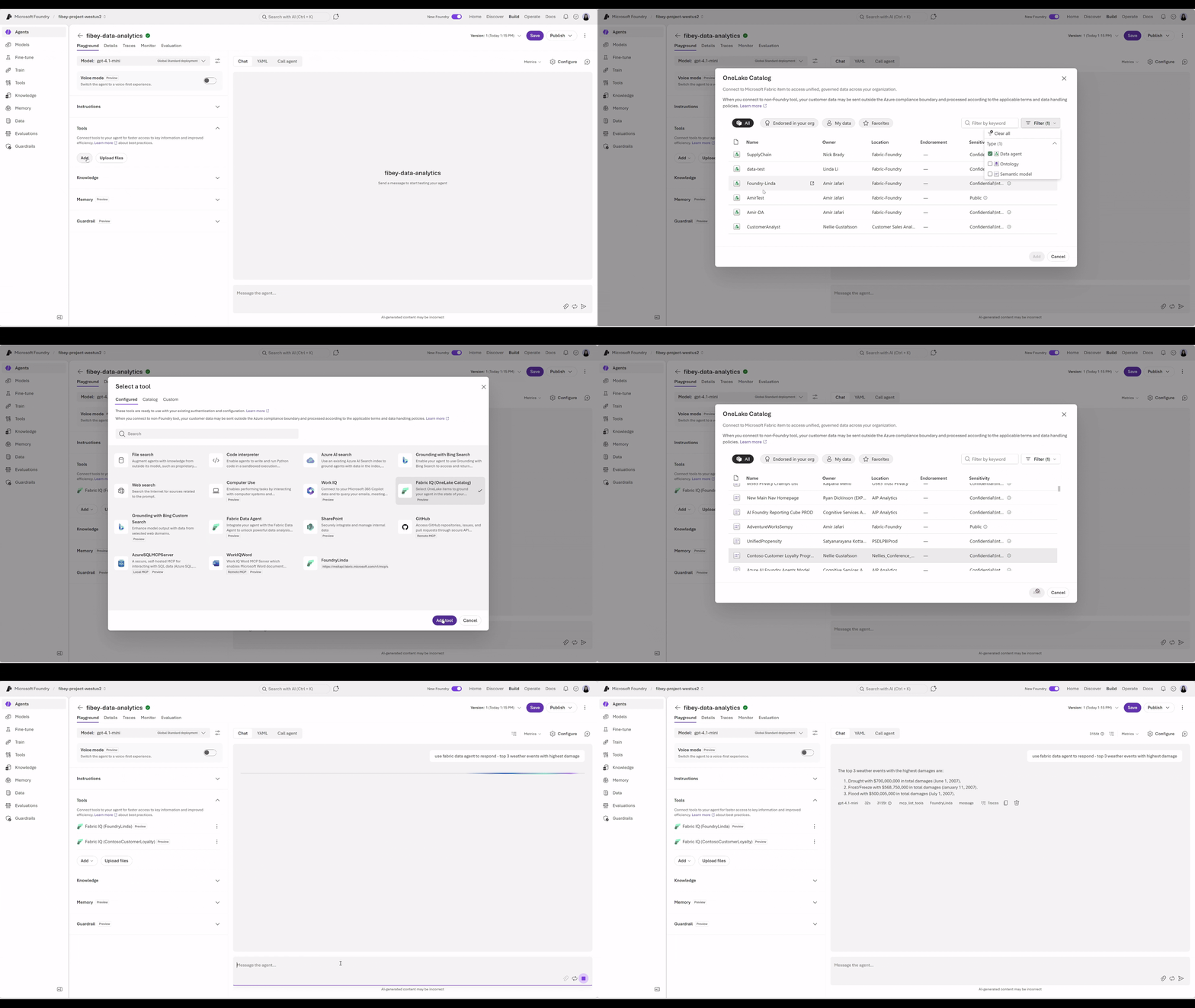
Browser automation (preview)
Browser automation brings MCP-native web automation to hosted agents using Playwright workspaces. It gives teams a faster path from idea to execution, with live visibility and control when workflows hit edge cases—so agents can reliably automate complex web tasks.
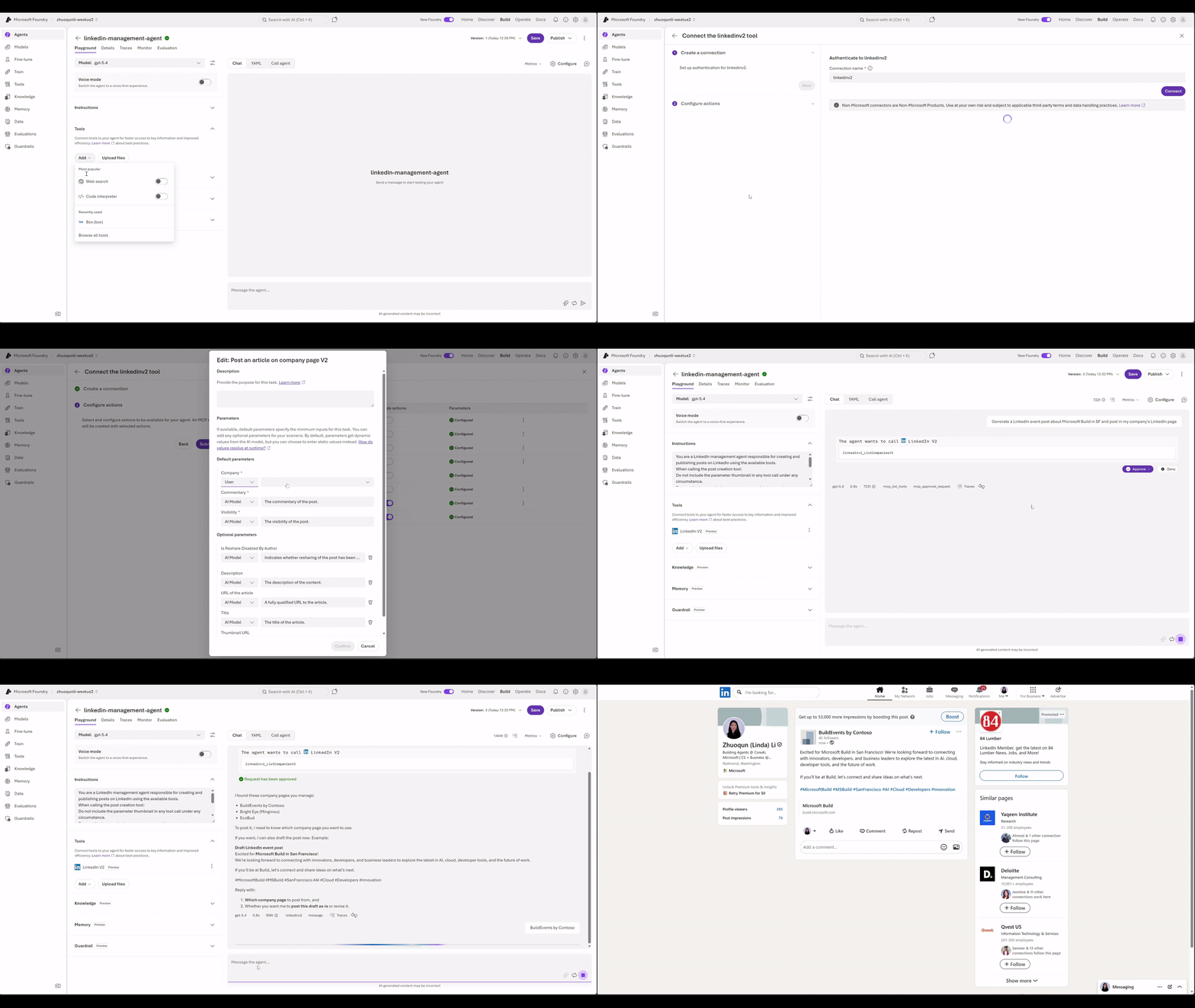
Managed MCP servers from Azure Connector Namespace (preview)
The Foundry Tools Catalog includes pre-built integrations to SaaS and line-of-business systems. When you add a connector, Foundry provisions a managed MCP server that your agent can use to take action—across systems like Jira, Confluence, LinkedIn, and Box—without custom integration work.
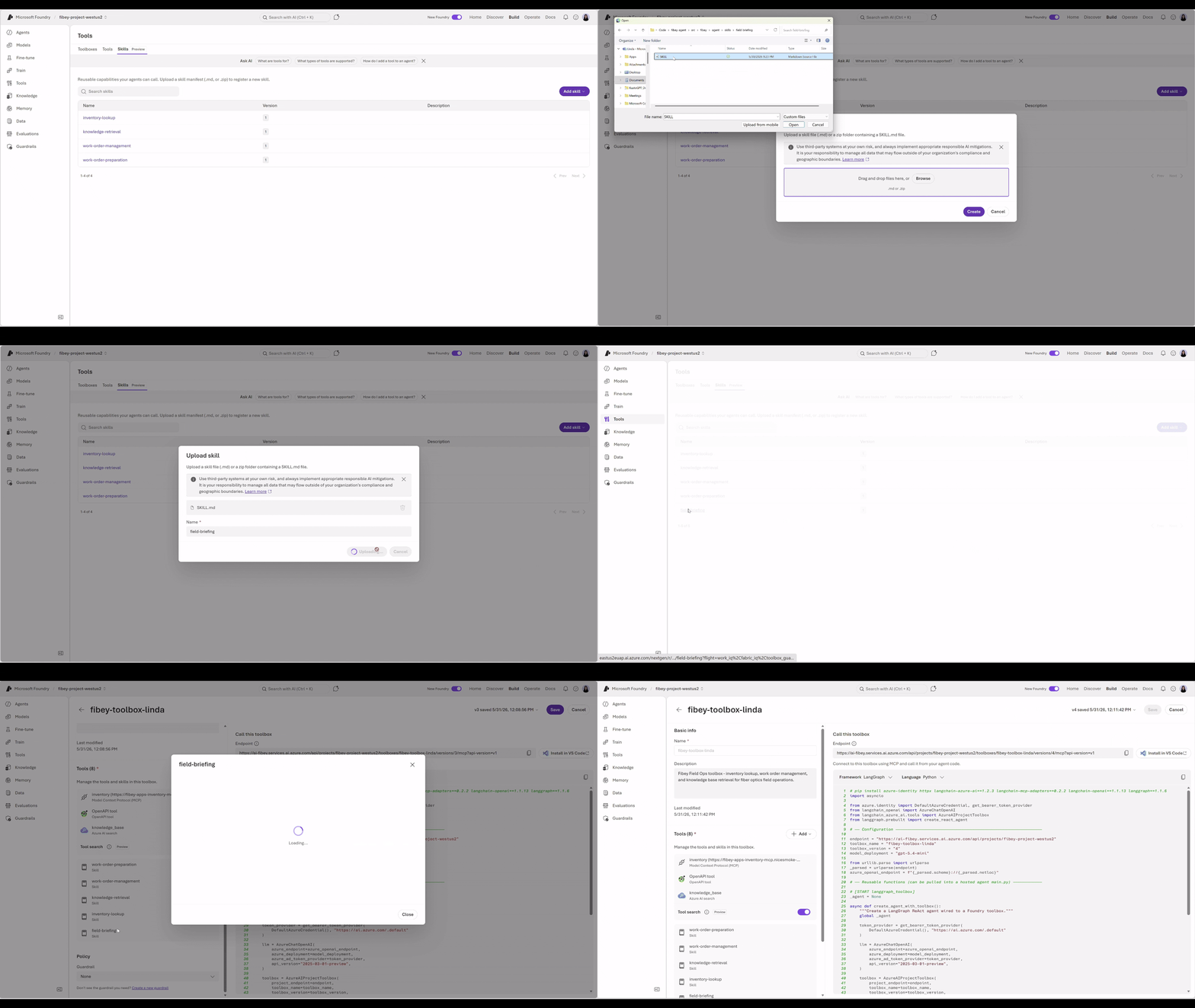
Skills (preview): build and manage reusable capabilities
Tools tell an agent what it can do. Skills tell it how to do it.
Today, skills are fragmented across repos, scripts, and runtime setup—making them hard to manage, version, and reuse. With Toolbox, skills become first-class experience. You can attach versioned, immutable skills directly to your toolbox, creating a managed, shareable catalog of reusable capabilities. Agents discover and load these skills through MCP resources at startup—no custom wiring required.
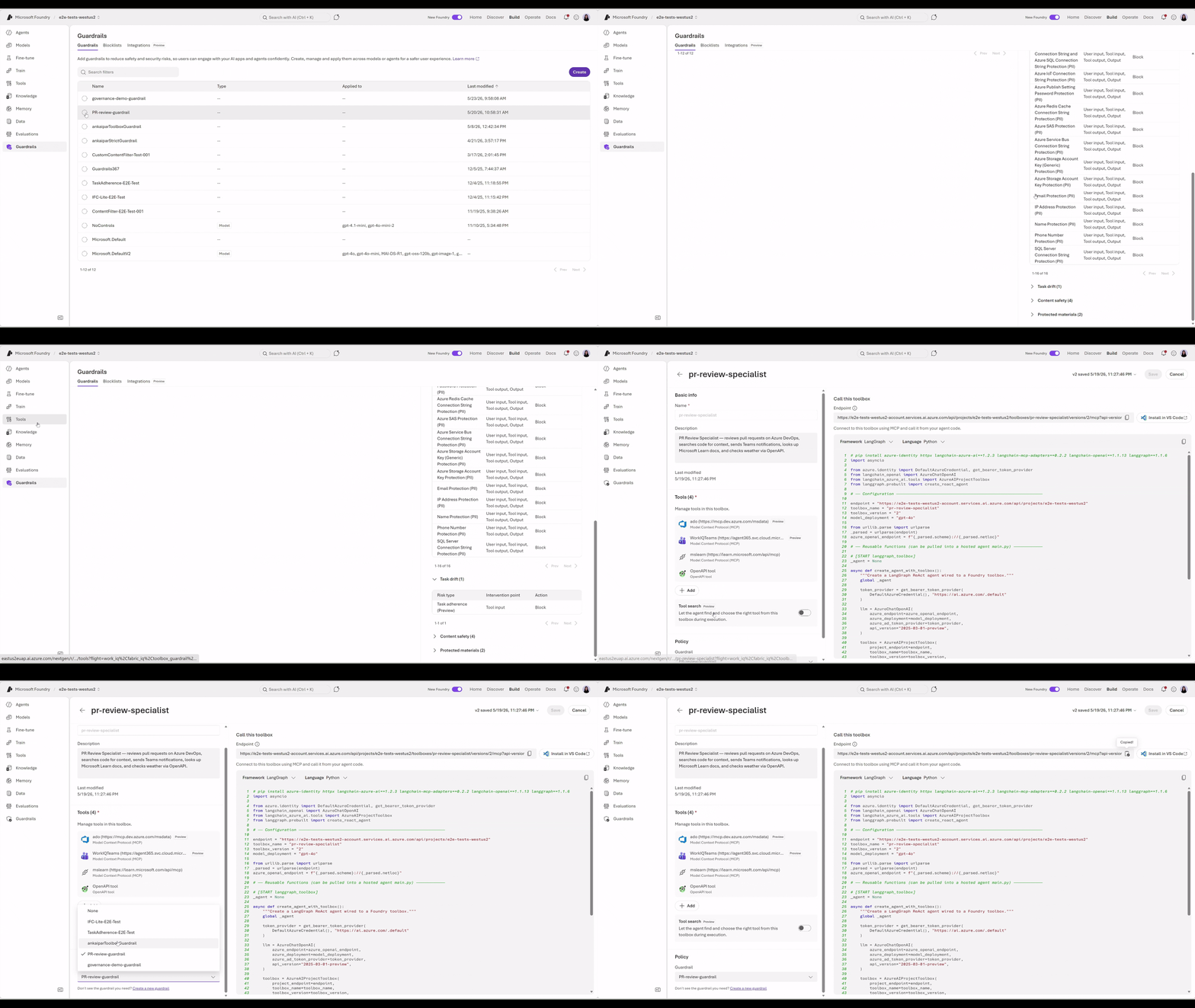
Govern – Control Tool Calls with Guardrail
As tool and toolbox usage scales, admins need clear governance over what agents can do. With Guardrails in Foundry Control Plane, you can enforce policies on both tool inputs and outputs—helping block tool calls that violate compliance requirements, expose sensitive data, trigger unsafe content, or drift from the intended task. Guardrails integrate directly with Toolbox, so tool calls stay governed consistently across your agent experiences.
Everything above expands what your agents can access through Toolbox.
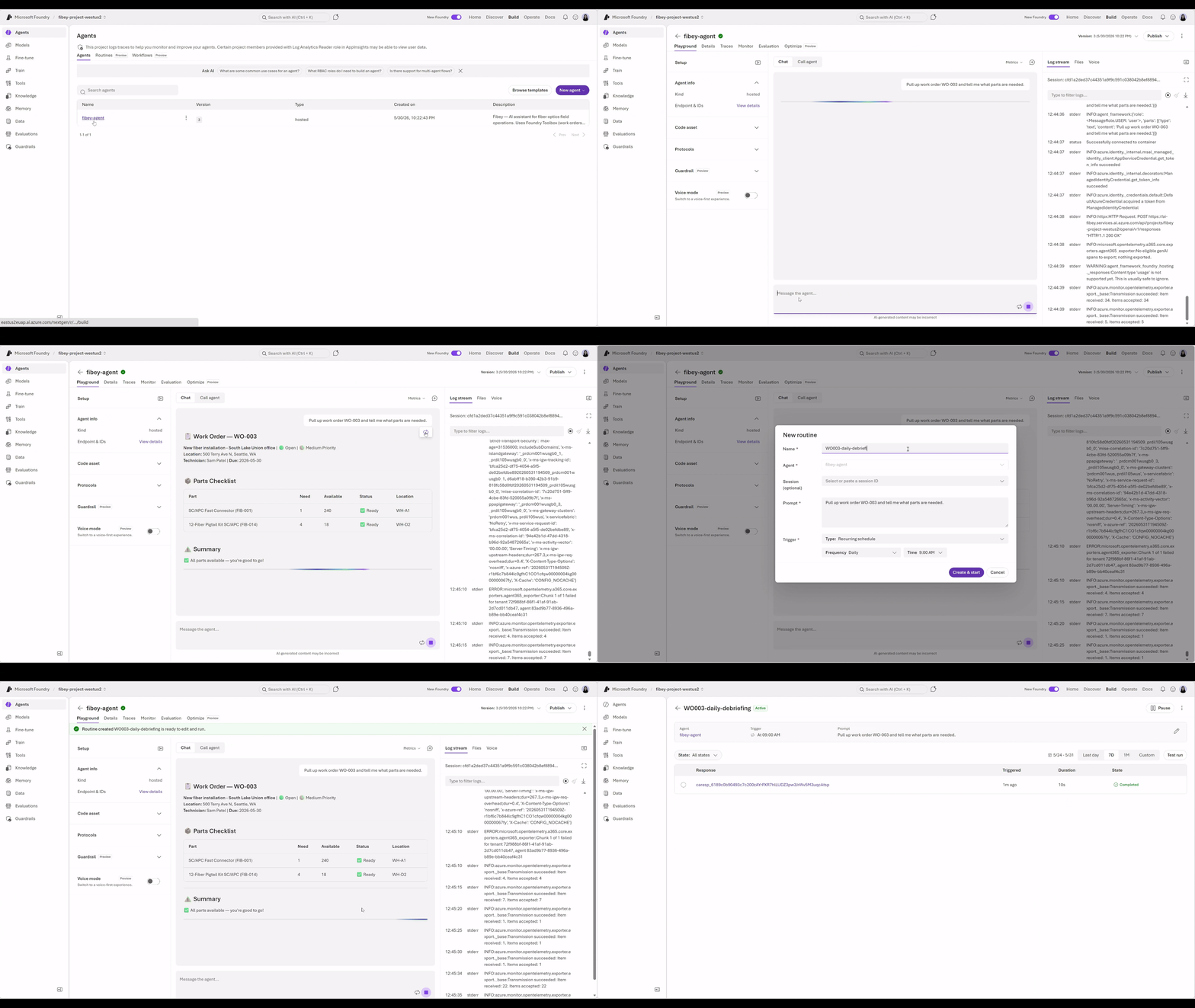
The next capability shifts gears to when and how agents actually run. Once an agent works in development, most teams hit the same operational wall: turning it from something you invoke by hand into something that runs on a schedule, reacts to an event, or kicks off when a new record, message, or file arrives. Today, that means stitching together schedulers, webhooks, Logic Apps or Azure Functions, queues, storage, and auth code—just to get the agent to start at the right time; this is where Routines simplify this process.
Routines in Foundry Agent Service (preview)
Routines in Foundry Agent Service collapse that operational layer into your project. You declare a trigger—a schedule or an event—and the agent action it should invoke, and Foundry handles invocation, permissions, connections, and run history alongside the agent itself. The trigger, the action, and the audit trail all live with the agent in the same Foundry project. Use routines for lightweight agent automation, such as daily summaries, one-time reminders, or periodic checks. If your scenario needs branching, multiple agents, human approval steps, or complex state, use a workflow instead.
Code Samples
from azure.identity import DefaultAzureCredential
from azure.ai.projects import AIProjectClient
from azure.ai.projects.models import MCPTool, WebSearchTool, ToolboxSearchPreviewTool,

# Create Foundry project client
endpoint = "https://<your-foundry-account>.services.ai.azure.com/api/projects/<your-project>"
project = AIProjectClient(
    endpoint=endpoint,
    credential=DefaultAzureCredential(),
)

# Create toolbox version with web search and MCP tools
toolbox_version = project.beta.toolboxes.create_toolbox_version(
    toolbox_name="my-toolbox",
    description="Toolbox with web search and an MCP server",
    tools=[
        WebSearchTool(),
        ToolboxSearchPreviewTool()
        MCPTool(
            server_label="myserver",
            server_url="https://your-mcp-server.example.com",
            require_approval="never",
            project_connection_id="my-key-auth-connection",
        ),
    ],
)
print(f"Created toolbox: {toolbox_version.name}, version: {toolbox_version.version}")
Get started today
The easiest way to explore is through the Microsoft Foundry portal. From there you can create a project, deploy a model, and build your agent. Follow the documentation and Microsoft Learn courses. Developers can get started in minutes by following the Quickstart, which walks through setting up, testing, and deploying a production-ready hosted agent end to end. Check the following documentation to get started:
- Tool Search in Toolbox
- Work IQ
- Fabric IQ
- Browser Automation
- Skills in Toolbox
- Managed MCP servers from Azure Connector Namespace
- Routines
- Creating Toolbox with Azure Developer CLI
If you’re attending Microsoft Build 2026, or watching on-demand content later, be sure to check out these sessions:
- BRK241 — From prototype to production: build and run agents at scale
- BRK242 — Turn your agents into action: Connect tools, APIs, and documents


0 comments
Be the first to start the discussion.